TL;DR: Reverse ASIN gives a snapshot of the keywords a competitor ranks for; to monitor competitor ranking changes, you need to turn that snapshot into a time series. Build a fixed competitor set, run reverse ASIN, create a high-signal keyword watchlist, baseline organic and sponsored positions, then track changes across 7, 30, and 90 days.
Key Takeaways
- Reverse ASIN is a discovery tool; competitor keyword monitoring is a time-series exercise. Use both to see what changes and whether it persists.
- Track three signals: keyword coverage, organic rank, and sponsored rank. Keep them separate in your data so you don't confuse paid with organic momentum.
- A meaningful ranking change crosses a visibility threshold (top 3, top 10, top 20, top 50) or persists for several days. Ignore one-day noise.
- Pair reverse ASIN with a dedicated Amazon keyword rank tracker to discover untracked opportunities and then continuously measure what matters.
Table of Contents
- Reverse ASIN Is a Snapshot, and Competitor Monitoring Turns It Into a Time Series
- The Core Workflow: Use Reverse ASIN to Discover, Then Track What Matters
- Build a Ranking Baseline Before You Interpret Any Movement
- How to Collect Long-Term Competitor Ranking Data Without Creating Data Noise
- Five Competitor Ranking Patterns That Are Worth Acting On
- Use a Competitor Cohort to Separate Strategy Changes From Market Changes
- Turn Competitor Ranking Changes Into Specific Seller Actions
- A 30-Day Reverse ASIN Competitor Monitoring Playbook
- Common Monitoring Mistakes That Create False Competitor Signals
- Reverse ASIN vs. Amazon Keyword Rank Tracker: Why Serious Competitor Monitoring Needs Both
- FAQ
- References
Note on marketplaces: This guide is specifically optimized for the US market. The examples and tool screenshots reflect Amazon.com search behavior, but the workflow applies to most Amazon marketplaces with minor adjustments.
Successful Amazon sellers don't just watch their own rankings; they watch the rankings of every competitor that matters. Yet many sellers only run reverse ASIN once, print the keyword list, and then do nothing with it. The result: you know the competitor's current keywords, but you have no idea whether they are gaining ground, losing ground, or about to launch a PPC attack on your best search terms. Monitoring competitor ranking changes turns that static document into a living data source. If you haven't already built a reverse ASIN workflow, start with our Reverse ASIN strategy guide, then use this article to make it time-aware and action-ready.
Reverse ASIN Is a Snapshot, and Competitor Monitoring Turns It Into a Time Series
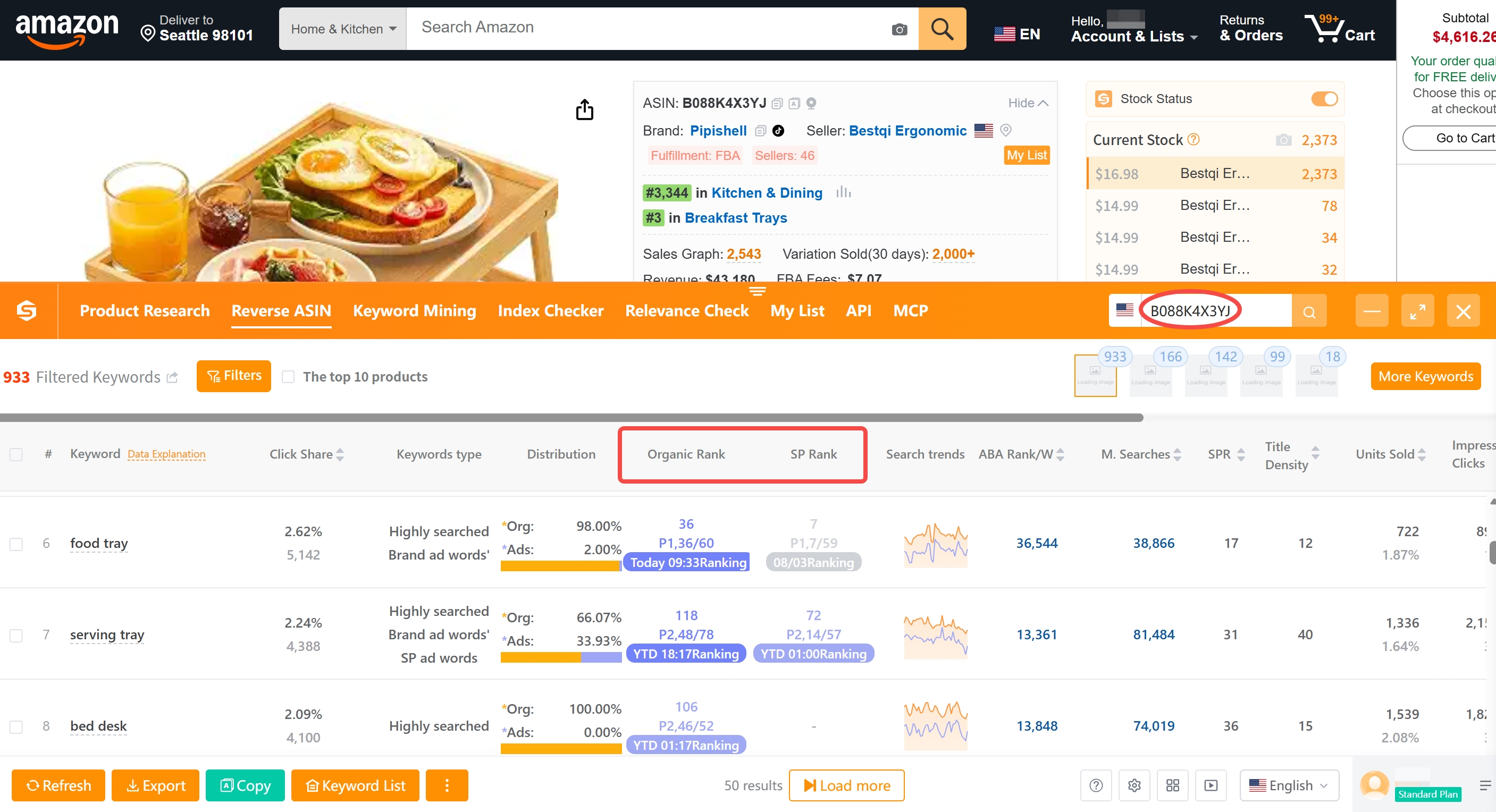
Reverse ASIN, also called reverse ASIN lookup, starts with a competitor's ASIN and ends with the list of keywords that ASIN currently ranks for. It is extraordinarily useful for discovering keyword gaps, analyzing listing relevance, and auditing a competitor's SEO strategy. But the word "currently" is the key limitation. Amazon's ranking algorithm recalculates relevance signals constantly; what ranks today may be gone tomorrow. A single report gives you a snapshot of one moment in time, not the trajectory of the competitor's performance.
What a One-Time Reverse ASIN Report Can and Cannot Tell You
A one-time report can instantly show you which keywords the competitor appears on, with organic rank, sponsored rank, exact/phrase/broad match distribution, and estimated search volume. It can reveal how well the listing is optimized for core search terms, which long-tail keywords it captures, and whether the competitor is paying for sponsored placements. It cannot tell you whether those rankings are stable, improving, or collapsing. It cannot tell you whether the competitor just launched a PPC campaign or recently relaunched the listing with new content. It cannot tell you whether a keyword's search volume is seasonal or flat. Without historical context, you might mistake a temporary BSR spike for a permanent SEO win, or ignore a slow rank decline that only shows up when you compare snapshots.
The Three Signals Worth Tracking Over Time
To turn a snapshot into a time series, focus on three signals that represent the most important ranking changes: keyword coverage, organic rank, and sponsored rank. Each signal answers a different competitive question and requires a different kind of monitoring.
Keyword Coverage Changes
Keyword coverage is the set of search queries for which the competitor's ASIN appears anywhere in the search results. When a competitor starts ranking for a new keyword cluster, it often signals a listing change, a new child variation, or a PPC push. When a keyword disappears from their portfolio, it may mean the listing was modified, the keyword lost relevance, or Amazon suppressed the product for that search. Tracking coverage changes is the fastest way to spot a competitor expanding into your territory.
Organic Ranking Changes
Organic rank is the product's natural, unpaid position for a given keyword. It is the core measure of SEO health. A steady organic climb toward the top 10 means the competitor is gaining relevance, conversion momentum, or review velocity. A sudden drop below the first page can be caused by listing suppression, stock issues, or a change in Amazon's ranking factors. Organic ranking changes matter most on keywords that generate meaningful search volume and conversions.
Sponsored Ranking Changes
Sponsored rank is where the product appears in the "Sponsored" slots of search results. Sponsored rank changes reveal PPC strategy and budget signals. If a competitor suddenly moves from page 3 sponsored to a top-of-search ad, they are likely increasing bids, adding keywords, or raising budgets around a new launch. Tracking sponsored rank separately from organic rank is essential because paid placements can mask organic weaknesses or accelerate organic gains.
What Actually Counts as a Meaningful Ranking Change?
Not every rank movement is worth your attention. Amazon results are noisy; daily rank swings of a few positions are normal. A meaningful change is one that affects customer visibility, click-through, or conversion economics. Use the following thresholds to avoid overreacting.
Entering or Leaving the Top 10
The top 10 on Amazon receives roughly 80-90% of clicks for many search terms, so a competitor crossing into or out of this band is a high-impact event. A competitor that breaks into the top 10 on one of your core keywords should trigger a listing and pricing audit within 24 hours. Losing the top 10 is an equally strong signal that their relevance or performance has deteriorated.
Moving Across the Top 20 or Top 50 Threshold
Page one on desktop typically shows the top 20-ish organic results after ads. Moving from page 2 into page 1 (or from beyond page 3 to page 2) fundamentally changes how many customers see the product. Top 20 and Top 50 are standard monitoring checkpoints because they influence both click-through probability and long-tail discovery. Set alerts for crossings, not for every single position change.
A New Keyword Appearing in the Competitor's Ranking Portfolio
When a competitor starts ranking for a keyword they never ranked for before, it can mean a listing rewrite, a new variation, a successful PPC campaign that organically lifted the keyword, or a new product launch under the same ASIN. If that keyword overlaps with your target list, it is a leading indicator of competitive invasion. Track the date it appears, the initial rank, and whether it persists.
A Change That Persists Instead of Reversing the Next Day
A rank change that lasts more than 3-5 days is almost always driven by a structural factor like listing quality, price, review velocity, or PPC budget rather than random flux. Persistent changes are the ones you should investigate and respond to. Temporary spikes may be caused by a flash sale, a featured deal, or a one-day PPC experiment, and should be watched but not acted on.
Callout: Define "meaningful" before you start monitoring. A good rule of thumb: ignore movements within the same result block (e.g., positions 8 and 9) unless they repeat for a full week. Only trigger action when rank crosses a major visibility boundary (top 3, top 10, top 20, top 50) or when a new keyword appears.
The Core Workflow: Use Reverse ASIN to Discover, Then Track What Matters
The most common mistake is running reverse ASIN on one competitor once. Instead, you need a repeatable workflow that starts with a structured reverse ASIN discovery pass and funnels only high-value keywords into ongoing monitoring. The four steps below let you go from a single snapshot to a sustainable competitive-monitoring routine without drowning in data.
Step 1: Build a Fixed Competitor Set
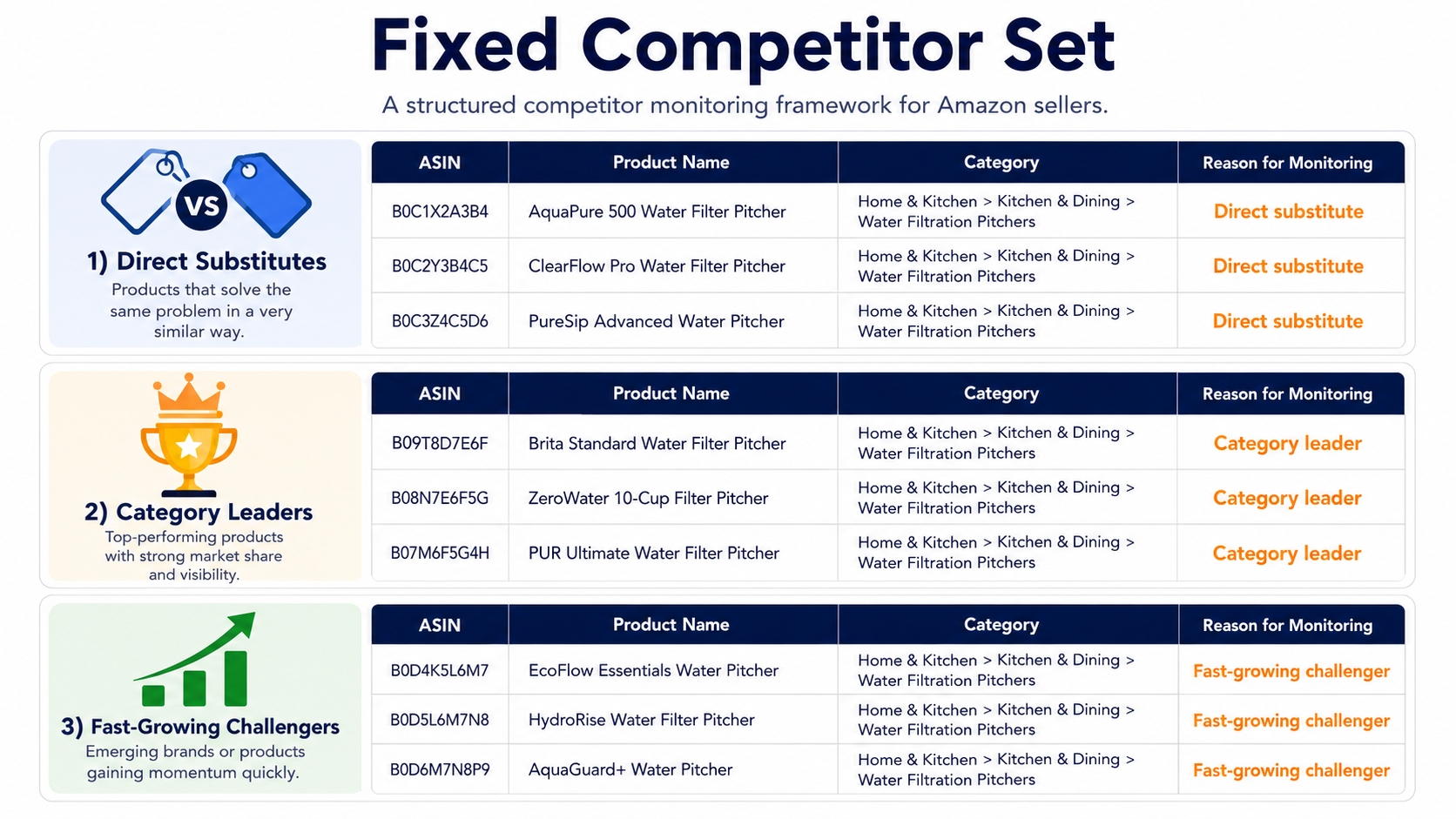
You can't monitor every ASIN in your category. You need a fixed, defensible set of competitors that you revisit with every scan. Start with 5-10 ASINs max; you can expand later. The goal is consistency. If you change the set frequently, you'll lose the ability to compare snapshots over time.
Direct Product Substitutes
These are products that are almost identical to yours: same core function, similar specifications, and a price point that overlaps with yours. A direct substitute is your biggest threat because Amazon often places your listing and theirs in direct comparison. If they gain ranking on a keyword you both target, you lose sales immediately. Direct substitutes should be the first ASINs in your reverse ASIN monitor.
Category Leaders
Category leaders are the best-selling products that dominate the search results for your main category terms. They may not be exact substitutes, but they shape customer expectations, set the price benchmark, and often sit at the top of the organic results for high-traffic keywords. Monitoring flat or declining category leaders can reveal that the market is shifting or that a new challenger is overtaking them.
Fast-Growing Challengers
A challenger is a newer or lower-ranked product that is growing review velocity, sales, or keyword coverage faster than the rest of the category. These are the competitors that will hurt you in six months if left unmonitored. Look for products that are climbing in BSR, adding new variations, or suddenly running aggressive PPC. Include one or two in your set to catch trends early.
Step 2: Run Reverse ASIN Across Multiple Competitors
With your competitor set defined, run reverse ASIN on each ASIN. You can use SellerSprite's Reverse ASIN tool or any other reverse ASIN lookup. For a detailed walkthrough of the mechanics, see our guide on how to perform reverse ASIN search. The goal is not to collect every keyword; it's to compare multiple competitors side by side and identify the keywords that matter strategically.
Separate Shared Keywords From Competitor-Specific Keywords
Shared keywords that multiple competitors rank for are the battlefield terms where customer decisions are won and lost. These deserve spot prioritization. Competitor-specific keywords, where only one competitor appears, may be the result of a unique listing angle or a PPC experiment. They can reveal untapped niches, but you should verify search volume and relevance before acting.
Identify High-Relevance Keywords Before High-Volume Keywords
A 50,000-volume keyword that is only loosely related to your product will hurt conversion rate if you chase it. High-relevance keywords match the product's main function, attributes, and customer intent. Sort your reverse ASIN results first by relevance, then by search volume. Prioritize keywords where the competitor's product is clearly relevant, because those are the keywords you can realistically target and win.
Separate Organic Visibility From Paid Visibility
Reverse ASIN tools typically show both organic and sponsored ranks. Never merge them. A competitor may rank #3 organic but #10 sponsored, which is a completely different competitive situation than being #3 sponsored and #12 organic. Keep separate columns from day one, because the monitoring workflow and the actions you take are different for each.
Step 3: Create Your Competitor Keyword Watchlist
You don't need to track every keyword the tool returns. A watchlist is a curated set of keywords that are strategically important for your product and that you will monitor continuously. Keep it focused: 50-100 keywords per competitor set is enough for most sellers, and fewer is better if you do it manually.
Core Revenue Keywords
These are the high-volume, high-relevance keywords that already drive sales for you or for competitors. They are the top 10-15 terms in your niche. Core revenue keywords deserve daily or weekly checks because a small rank change can have a large P&L impact.
Emerging Long-Tail Keywords
Long-tail keywords have lower search volume but often convert far better because they match more specific intent. If a competitor is growing on a long-tail term, they may be capturing a niche you haven't yet targeted. Watch for new long-tail keywords appearing in their reverse ASIN results over time.
Keywords Where Competitors Rank but You Do Not
These are your keyword gaps. Every competitor keyword that is relevant to your product but missing from your listing is a potential growth opportunity. Add these to your watchlist with a note that you don't yet rank; the monitoring goal is to see whether the competitor strengthens their position or loses it, both of which inform your next listing update.
Keywords Where Competitors Rely Heavily on Sponsored Placement
If a competitor's sponsored rank is much better than their organic rank, they are paying for visibility. This is a signal of a temporary or budget-dependent advantage. Monitor these keywords carefully: if the competitor reduces spend, they may disappear from the results, giving you an opening to capture the traffic organically.
Step 4: Move High-Value Keywords Into Ongoing Tracking
Once your watchlist is defined, move those keywords into a tool that records historical rank data. A dedicated Amazon keyword rank tracker can automatically capture organic and sponsored positions on a schedule. This is the step that turns reverse ASIN from a one-off discovery into a continuous monitoring system.
Checklist: Before moving a keyword to continuous tracking, ask: (1) Does it have meaningful search volume? (2) Is it relevant to my product? (3) Do I already track it? (4) Will I act on the data? If you answer no to any, leave it on the reverse ASIN discovery list and skip the tracker.
Build a Ranking Baseline Before You Interpret Any Movement
You can't know whether a competitor is improving if you don't know where they started. A baseline is a complete record of the starting organic and sponsored position for every ASIN-keyword pair you plan to monitor. Take time to create it carefully; every future comparison depends on it.
Record the Starting Position for Every ASIN–Keyword Pair
Use a spreadsheet or a rank tracking tool and log the initial organic rank and sponsored rank for each competitor ASIN paired with each watchlist keyword. If a competitor does not rank at all, record "Not ranked" or ">50". This gives you a complete matrix. Make sure you capture the date; a baseline is only valid for comparison if you know when it was recorded.
Keep Organic and Sponsored Rankings in Separate Columns
In your baseline table, create two columns for each keyword: Organic Rank and Sponsored Rank. Never combine them into a single "rank" field. Organic rank is influenced by listing relevance, sales velocity, and reviews. Sponsored rank is influenced by bid, budget, and ad relevance. Mixing them makes it impossible to tell whether a competitor's visibility is driven by SEO or by PPC dollars.
Capture Search Demand Alongside Rank
Rank is meaningless without search volume. A product moving from #5 to #3 on a keyword with 1,000 monthly searches is much less significant than moving on a keyword with 50,000 searches. Record estimated monthly search volume for every watchlist keyword in your baseline. As Amazon's search demand shifts seasonally, you will also need to refresh the volume data, not just the rank.
Use the Same ASIN Variation Consistently
A product with variations can have different child ASINs showing for the same keyword at different times. Pick one ASIN, usually the main child that appears for your target keywords, and monitor that same ASIN throughout. If you monitor the parent and the child interchangeably, you'll literally compare apples to oranges.
Why Mixing Parent and Child ASINs Creates False Signals
The parent ASIN in a variation family is a virtual product that usually doesn't appear in search results; only child ASINs show. If you track the parent and a child on separate days, you might see "Not ranked" and then "#8", which looks like a huge jump when it's actually a data inconsistency. Always verify the exact ASIN that appears for the keyword and stick with it.
Define Ranking Thresholds Before Monitoring Starts
Set clear thresholds for what you want to react to. These thresholds act as filters that separate normal fluctuation from actionable changes. The table below shows common thresholds and how to interpret them.
| Threshold | Why It Matters | Typical Action |
|---|---|---|
| Top 3 | Highest click share and often the default auto-suggest position | Immediate listing audit and price check |
| Top 10 | First page visibility that drives majority of clicks | Analyze competitor listing changes and PPC activity |
| Top 20 | Visible on page one, especially on mobile | Check review velocity and conversion factors |
| Top 50 | Page two; often threshold for long-tail search expansion | Decide whether to invest in this keyword |
Top 3
The top 3 results on Amazon get the overwhelming majority of clicks. A competitor entering the top 3 on a keyword you value is the most urgent signal in this list. It usually means they have either dramatically improved conversion or are using sponsored placements to push into that slot. Check both their organic and sponsored rank to understand the mechanism.
Top 10
Top 10 is the classic first-page threshold. If you and your competitor are both in the top 10, you are fighting for the same customer. A change that pushes one of you out of the top 10 is a direct competitive win or loss. Monitor this threshold weekly and record the exact date of any crossing.
Top 20
Top 20 is important because Amazon mobile apps often show fewer results per screen, and the visible page may effectively end near the top 20. Crossing into the top 20 from below puts a competitor into a much more visible area. It is a leading indicator that they may soon break into the top 10.
Top 50
Top 50 means the product is on page two. For long-tail keywords, page two can still generate clicks, but for high-volume terms it is far less valuable. Use top 50 as a filter to decide which keywords deserve your PPC budget and which should be treated as purely organic opportunities.
How to Collect Long-Term Competitor Ranking Data Without Creating Data Noise
Once your baseline is set, you start collecting data on a regular basis. But most sellers quickly drown in spreadsheets, screenshots, and scattered notes. The key is to design your data collection process so that you can spot meaningful changes without pulling your hair out.
Keep Historical Snapshots Instead of Overwriting the Latest Result
If you update "Current Rank" every day and delete yesterday's value, you lose the ability to analyze trends. Store every snapshot in a table or in a rank tracker that automatically appends history. A simple table with Date, ASIN, Keyword, Organic Rank, Sponsored Rank, and Search Volume is enough. The snapshot is your source of truth; never overwrite it.
Store the Minimum Useful Dataset
More data isn't always better. Store the minimum number of fields that let you answer whether the ranking change is permanent, caused by a competitor action, or caused by the market. The following fields are the minimum useful dataset.
| Field | Why Store It |
|---|---|
| Date | Orders the snapshots and lets you measure persistence |
| ASIN | Tells you exactly which product is being tracked |
| Keyword | Identifies the search term |
| Organic Rank | Shows natural SEO position |
| Sponsored Rank | Shows PPC position |
| Search Volume | Lets you weigh the rank change by demand |
| Price | Price changes often explain rank movements |
| Rating and Review Count | Social proof and conversion driver |
Date
Without a date, you can't create a time series. Record the exact date and, ideally, the time of day because Amazon rankings can change intraday. The date is the anchor that lets you compare snapshots and calculate persistence.
ASIN
The ASIN must be the exact child ASIN you saw in the search results. If you track the parent or a different child, the data is invalid. Add the product name and brand to the table so you can understand the record at a glance.
Keyword
Use the exact keyword or phrase you are tracking. Normalize plurals and case to avoid duplicates. A clear keyword list makes your table filterable and comparable.
Organic Rank
Record the natural position in the search results. If the product does not appear in the top 50, record "Not ranked" or a high number like 99. Keep it separate from sponsored rank.
Sponsored Rank
Record the position in the sponsored slots. If no sponsored ad appears, leave it blank or mark "No ad". This field reveals PPC aggressiveness.
Search Volume
Capture the estimated monthly search volume from your reverse ASIN tool or keyword research tool. Refresh this monthly, because volume changes with seasons and trends.
Price
Price is one of the most powerful ranking signals. Record the current deal price or regular price. A sudden price drop can push a competitor up the rankings temporarily. Without price data, you may wrongly attribute the move to SEO.
Rating and Review Count
Store the number of ratings and the average rating at the time of the snapshot. Review velocity is a key input to Amazon's algorithm. A sudden spike in reviews often coincides with a ranking improvement.
Compare Trends Across 7-Day, 30-Day, and 90-Day Windows
A single snapshot won't tell you whether a change is accelerating. Use three different time windows: 7 days to spot short-term action, 30 days to see a moderate trend, and 90 days to understand structural shifts. For example, a competitor may have lost 5 positions in the last 7 days but gained 15 positions in the last 90 days. That means the recent decline is only a pullback within a larger upward trend.
Use Rolling Trends Instead of Reacting to One-Day Rank Swings
Instead of looking at today's rank versus yesterday's rank, calculate the moving average over the last 7 days. A rolling average smooths out one-day anomalies caused by A/B testing, brief PPC fluctuation, or Amazon indexing quirks. If the 7-day moving average changes by more than your defined threshold, act.
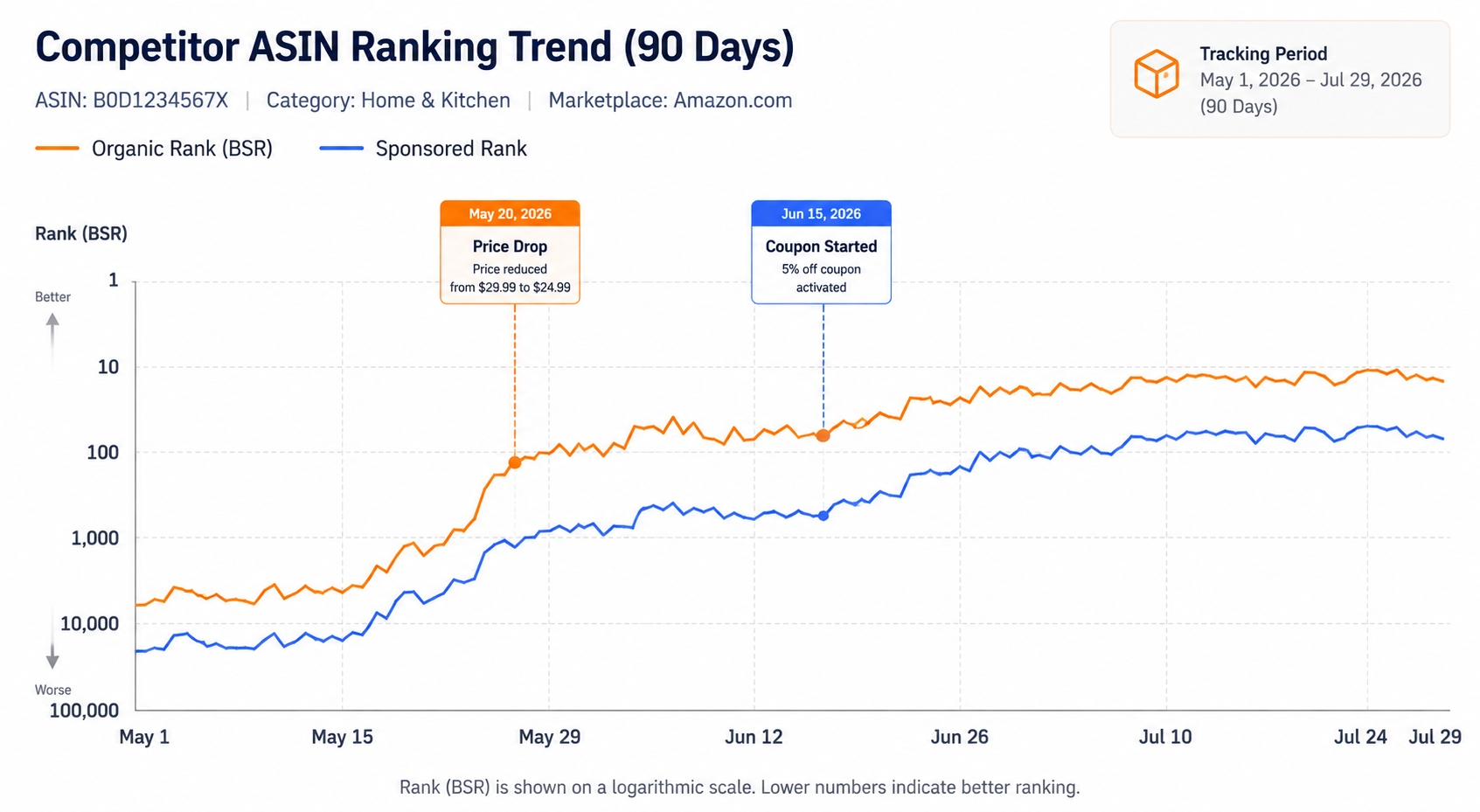
Annotate Events That May Explain Ranking Movement
If you see a ranking change, the first question should be "What happened at the same time?" Add notes to your dataset whenever you observe a known event. This is the fastest way to turn correlation into causation without jumping to conclusions.
Price Changes
Record the date and amount of any price change you see on the competitor's product page. Price drops often cause immediate rank jumps because conversion rate rises, which signals relevance to Amazon. A price increase can have the opposite effect.
Coupons and Promotions
A coupon is a green tag on the search results page that increases click-through. Promotions also create a conversion bump. Annotate when a competitor adds a coupon, because it can explain a temporary organic rank improvement that will disappear once the promotion ends.
Listing Updates
If you notice the competitor's title, bullets, images, or A+ content change, note it. Listing optimization directly affects relevance scores and can dramatically change keyword coverage. A competitor that rewrites their listing to target your keywords is a major threat.
Review Growth
Check the competitor's review count regularly and note when a batch of new reviews appears. Review velocity is a ranking input, and a sudden influx of reviews can lift a product for weeks. If the review growth is driven by a giveaway or a promo, it may be temporary.
PPC Pushes
If you see sponsored rank improve at the same time as organic rank, the competitor is likely running a coordinated PPC and SEO push. Annotate changes to sponsored ads because they often precede organic movements by days or weeks.
Five Competitor Ranking Patterns That Are Worth Acting On
Some ranking patterns are not just noise; they are strategic signals. Once you have enough historical data, you'll start seeing recurring patterns that tell you exactly what the competitor is doing. Here are five patterns worth acting on.
Pattern 1: A Competitor Enters the Top 10 Across an Entire Keyword Cluster
You see a competitor move into the top 10 on 5-10 related keywords at the same time. This is not random; it usually means they have launched a new variation, improved the listing, or started running a large PPC campaign across a keyword cluster.
What It May Signal
This pattern signals a coordinated push to dominate a product category or niche. If the cluster includes your core keywords, the competitor is targeting your customer base directly. If the cluster is new, they are expanding their product portfolio.
What to Check Before Reacting
Check whether the top-10 entries are organic, sponsored, or a mix. Look at their current price and coupons. A quick scan of their listing can show whether they rewrote the title to include those keywords. Give it 5 days; if the pattern holds, it's structural and worth a full competitive response.
Pattern 2: Sponsored Rank Improves Before Organic Rank
The competitor's sponsored position jumps from slide 3 to slide 1 on a keyword, while their organic rank remains flat or lags. This is a classic PPC-first strategy: spend aggressively to generate clicks and conversions, which eventually lifts organic rank.
Why This May Indicate an Aggressive PPC Push
If sponsored rank improves and stays higher for 3-5 days, the competitor has likely increased bids, expanded match types, or launched a new campaign. The purpose is usually to generate sales velocity that signals relevance to Amazon's algorithm.
How to Watch for Organic Follow-Through
Watch the organic rank over the next 7-14 days. If organic rank improves after the sponsored push, the strategy is working. If organic rank stays flat, the competitor is losing money on PPC without long-term benefit. Use this information to decide whether to defend the keyword now or wait until the competitor's budget fatigues.
Pattern 3: Organic Rank Falls While Sponsored Rank Holds
A competitor loses 10 organic positions but keeps their sponsored ad at the top of the page. This pattern is more common than you think, because sellers often use PPC to compensate for weakening organic relevance.
When Paid Visibility May Be Defending Weakening Organic Visibility
If organic rank drops while sponsored rank remains high, the competitor's listing is slowly losing relevance. They may be outsourcing their buy box, have a bad review trend, or simply have an outdated listing. The high sponsored position is a defensive move to keep sales flowing while they fix the organic issue.
Why You Should Not Automatically Copy the Competitor's Bidding Behavior
It can be tempting to increase your PPC bids because a competitor has a strong sponsored presence. But if their organic rank is falling, their PPC cost is likely rising. Copying them can burn your budget on a keyword that may soon be up for grabs organically. Instead, improve your listing and let your organic rank do the work.
Pattern 4: A Competitor Starts Ranking for a New Long-Tail Keyword Cluster
A competitor suddenly appears for a set of long-tail keywords they had no ranking for previously. This pattern often indicates a deliberate expansion into a new customer segment or product use case.
Product Positioning Signal
The long-tail keywords they enter reveal how the competitor sees their product. For example, a competitor moving into "organic dog shampoo for puppies" signals they are repositioning to target pet-owner pain points. You can use this to anticipate their marketing angle and differentiate your listing.
Emerging Customer Intent Signal
Long-tail keywords often reveal a growing search trend. If a competitor starts ranking for a cluster before you do, they may have found a new demand curve that you haven't tapped. Check search volume growth for those keywords; if it's rising, add them to your own SEO roadmap.
Listing Expansion Signal
A new keyword portfolio often means the competitor added new bullets, increased backend search terms, or launched a new variant. Keep an eye on their listing to see what content changed. That will give you a roadmap for the keywords they think are important.
Pattern 5: Several Competitors Move in the Same Direction at the Same Time
When you monitor a cohort of competitors, you'll occasionally see all of them drop or improve together. This is the most important pattern because it's usually a market-level change, not a single competitor's strategy.
Competitor-Specific Change vs. Market-Wide Change
If all competitors move down on a keyword, the algorithm may have updated, or search demand has shifted. If only one competitor moves, it's likely a listing or PPC change. Use the cohort comparison to classify the movement before you react.
Check Search Demand Before Blaming Your Listing
A simultaneous decline across competitors on a given keyword can be caused by a seasonality dip. If search volume is falling, rankings may hold but click-through drops. Before changing your listing, verify whether the keyword's demand is stable, growing, or shrinking.
Callout: Use these five patterns as a diagnostic checklist. When you see a change in your competitor rank tracking data, ask which pattern it fits. The pattern will tell you what to do next.
Use a Competitor Cohort to Separate Strategy Changes From Market Changes
A cohort is a group of competitor ASINs that you track together. Using a cohort gives you a reference point to understand whether a movement is unique to one competitor or common to the whole market. This is the analytical foundation of reliable competitor monitoring.
Compare One ASIN Against a Group, Not Against Yesterday
Instead of asking "Did this competitor improve?" ask "Did this competitor improve relative to the other five I track?" A product can lose rank even if it's a good product, because the entire category is changing. Comparing against a cohort filters out market-wide noise.
Look for Relative Rank Movement
Relative movement means the change in rank of one competitor compared to the average change of the cohort. If competitor A goes from #5 to #4 and the cohort average stays stable, that's a positive relative move. If all five competitors move from #5 to #4, it's likely an external factor like a category reset.
Identify Market Leaders, Followers, and Outliers
With cohort data, you can classify each competitor. The market leader is the ASIN that consistently ranks highest for most keywords. Followers move in sync with the leader. Outliers move counter to the trend. If an outlier starts moving with the market, their previous strategy may have failed; if a follower becomes an outlier, watch for a new tactic.
Ask Whether the Keyword Changed or the Competitor Changed
Every ranking change is a combination of the keyword's search demand and the competitor's relevance. Distinguish between these two forces.
Rising Search Volume With Stable Rankings
If search volume for a keyword is rising but competitors hold their rank, the opportunity is growing. Click-through and sales will increase without any ranking change. This is a signal to invest in that keyword, both organically and with PPC.
Stable Search Volume With One Competitor Rising
When search volume is flat but one competitor consistently climbs, it's almost certainly a listing or conversion issue unique to that competitor. Their new position may come at the expense of another product. Identify who lost rank and why.
Falling Search Volume Across the Entire Competitor Set
If all competitors drop on a keyword while search volume declines, the keyword is losing relevance. Don't panic about your own rank; instead, reassess whether the keyword deserves any marketing budget at all. It may be a seasonal term or a fast-fading trend.
Turn Competitor Ranking Changes Into Specific Seller Actions
Data is useful only if it leads to action. This section maps common competitor ranking scenarios to concrete steps you can take. The key is to act deliberately, not reactively.
When a Competitor Gains Rankings on Your Core Keywords
A competitor gaining on your core keywords is the highest-priority signal. Your response should be immediate but calculated.
Audit Listing Relevance First
Before increasing PPC spend, compare your listing to the competitor's. Check the title, main image, bullets, A+ content, and backend keywords. Are you using the exact keyword in the right places? Does your product better match customer intent? If the competitor's listing is more relevant, no amount of PPC will save you long-term.
Check Conversion Drivers Before Increasing PPC
Conversion rate is the strongest ranking feedback loop. If the competitor converts better, they will keep winning. Review your price, offers, reviews, and product photography. Sometimes a small price drop strategy or a coupon can reverse the trajectory without spending a dollar on PPC.
When a Competitor Wins a Keyword You Do Not Target
A new keyword appearing in a competitor's portfolio can be a goldmine. But don't chase every keyword they own.
Decide Whether It Is a Real Keyword Gap
A real gap exists when the keyword is relevant to your product, has meaningful search volume, and appears in the competitor's organic or sponsored results. If the keyword is only mildly related, adding it to your listing could hurt your relevance score. Use a relevance score or your own judgment.
Decide Whether the Keyword Belongs in SEO, PPC, or Neither
If the keyword has high conversion intent, optimize your listing for it organically. If it's a highly competitive term where you need quick visibility, test it with a PPC campaign. If the search volume is tiny or the CPC is too high, add it to a watchlist and move on.
When Competitors Increase Sponsored Visibility
A surge in sponsored ads across your category can quickly inflate your own advertising costs. The worst response is to match bids blindly.
Defend Only Keywords With Proven Business Value
Identify the keywords that have historically produced profitable sales for you. On those keywords, consider increasing bids to maintain share of voice. For the rest, let the competitor spend money unless you can see a positive return. Use your own ACOS and sales data to decide.
When a Competitor Loses Rankings
Rank losses can be temporary, so you need to verify before attacking the keyword.
Look for Opportunity Before Assuming Weakness
If a competitor falls from #3 to #15, check their listing for stock issues, price jumps, or a drop in review rating. If the cause is temporary, they may recover in days. If the cause is structural, you can increase your PPC spend on that keyword to capture the traffic they lost.
When the Entire Category Shifts
If every competitor's ranking changes together, the problem is probably not your listing.
Update the Keyword Strategy Instead of Chasing Individual ASINs
When the market shifts, re-evaluate your entire keyword list. Some keywords may have lost demand; new ones may have emerged. Run a fresh reverse ASIN scan on your competitor set to see the new landscape, then update your watchlist and baselines. A category-wide shift is the best time to rethink your SEO strategy.
A 30-Day Reverse ASIN Competitor Monitoring Playbook
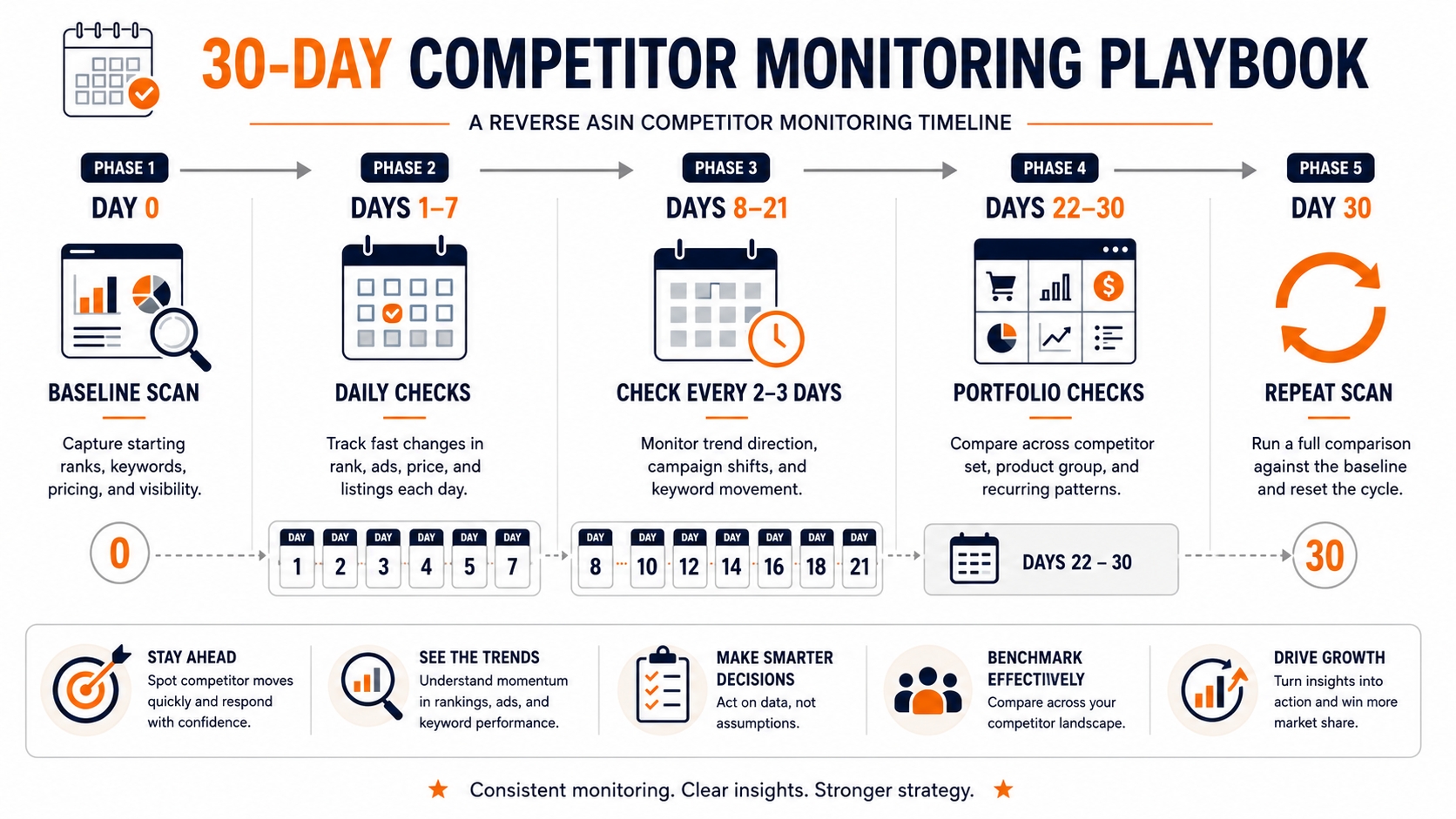
If you're starting from scratch, here is a concrete 30-day plan that uses reverse ASIN for discovery and rank tracking for monitoring. You'll end the month with a clean baseline and clear signals.
Day 0: Create the Baseline
Begin with the foundational steps so that every future snapshot has a reference.
Choose Competitors
Select 5-10 ASINs that cover direct substitutes, category leaders, and fast-growing challengers. Write down the ASINs and the reason each one is in your set. This prevents you from changing competitors casually later.
Run Reverse ASIN
Use a reverse ASIN tool to pull the current organic and sponsored keyword list for each competitor. Export everything into a raw data file. Don't filter yet; you need the full picture to identify gaps.
Build the Keyword Watchlist
From the combined keyword lists, select the core revenue keywords, emerging long-tail keywords, and keywords where competitors outrank you. Aim for 50-100 keywords. Create a table with ASIN, keyword, organic rank, sponsored rank, and search volume as the baseline.
Days 1–7: Watch for Short-Term Ranking Shocks
During the first week, check the watchlist daily. You're looking for sudden movements like a competitor jumping into the top 10 or a keyword disappearing. Record anomalies in a notes column. Don't change your own strategy yet; just collect data.
Days 8–21: Separate Persistent Changes From Noise
Continue tracking every 2-3 days. By day 14, you have a 2-week trend. Compare each competitor's rank on day 21 to day 0. A change that lasts for 14 days is likely structural. Flag any keyword that moved across a threshold (e.g., from 15 to 8).
Days 22–30: Look for Keyword-Portfolio Changes
Now look at the complete keyword portfolio of each competitor. Are there new keywords that didn't exist at day 0? Did any competitor lose a cluster of keywords? This is the portfolio-level view that reveals shifts in product positioning and PPC campaigns.
Day 30: Run Reverse ASIN Again and Refresh the Watchlist
After 30 days, run reverse ASIN again on the same competitor set. Compare the new list to your baseline. Remove keywords that no longer matter, add new ones that emerged, and update search volumes. This closes the loop and starts your next monitoring cycle.
Common Monitoring Mistakes That Create False Competitor Signals
Even with the best intentions, sellers make mistakes that invalidate their data. Here are the most common ones and how to avoid them.
Reacting to a Single Day of Rank Movement
Amazon rankings fluctuate daily due to small shifts in sales velocity, A/B testing, and indexing. A competitor that drops from #4 to #9 today may return to #4 tomorrow. If you react to single-day movements, you'll waste resources and create a panic culture. Use a 7-day moving average or a 3-day persistence rule.
Tracking Hundreds of Low-Relevance Keywords
More keywords does not mean better monitoring. Tracking 500 irrelevant keywords creates so much noise that you'll miss the 10 that matter. Focus on keywords that have clear business value: they drive sales, they are relevant to your product, or they represent a high-growth niche.
Mixing Organic and Sponsored Positions
If your spreadsheet has one column called "Rank", you are mixing two fundamentally different signals. Organic rank changes come from SEO drivers; sponsored rank changes come from PPC budget and bid. Mixing them will lead you to make wrong decisions about whether a competitor is gaining or losing real market share.
Changing the Competitor Set Every Week
A cohort is only useful if it's stable. If you swap competitors frequently, you lose the ability to compare rankings over time. Stick with the same ASIN set for at least 90 days. You can add new competitors, but don't remove them unless they stop selling or become irrelevant.
Comparing Different Child ASINs Without Realizing It
A variation family can have multiple child ASINs. If you record the parent ASIN one day and a child the next, your data is meaningless. Before adding an ASIN to your tracker, confirm that it's the specific ASIN that appears in the search results for your keywords.
Ignoring Search Volume and Seasonality
Rank changes don't tell the whole story. A keyword's search volume can fluctuate dramatically by season. If you ignore volume, you might see a competitor drop in rank during a seasonal decline and think they are losing power, when in reality the entire market is shrinking. Always compare season-over-season and year-over-year where possible.
Treating Correlation as Proof of What a Competitor Did
If a competitor's rank improves and their review count jumps, you may assume the reviews caused the rank change. But the reviews could have come from a giveaway program that also involved PPC or a price discount. Correlation is not causation. Annotate all possible causes before drawing conclusions.
Checklist: Before you act on a competitor ranking change, ask: (1) Did the change occur in organic or sponsored? (2) Does it persist for 3+ days? (3) Did search volume stay stable? (4) Is there an annotated event that explains it? If you can't answer all four, keep monitoring.
Reverse ASIN vs. Amazon Keyword Rank Tracker: Why Serious Competitor Monitoring Needs Both
Sellers often ask whether they need reverse ASIN or a keyword rank tracker. The answer is: you need both. They solve two different problems, and together they create a complete competitive-monitoring system.
Reverse ASIN Finds What You Did Not Know to Track
Reverse ASIN scans the entire keyword universe of a competitor ASIN. It uncovers keywords you may have never considered, reveals new long-tail clusters, and highlights sponsored keyword strategies. It's a discovery tool that expands your radar.
Rank Tracking Measures What You Already Know Matters
A rank tracker continuously records positions for specific keywords you have selected. It gives you the time series you need to spot meaningful changes, calculate moving averages, and see whether a change is temporary or structural. Rank tracking without reverse ASIN can blind you to new threats; reverse ASIN without rank tracking leaves you with no history.
Historical Data Shows Whether the Change Is Temporary or Structural
The most valuable output of a keyword rank tracker is history. When you combine historical rank data with reverse ASIN scans, you can see the trajectory of a keyword and a competitor over months. This is the only reliable way to distinguish a flash-in-the-pan PPC push from a long-term SEO threat.
The Ideal Workflow: Discover → Monitor → Diagnose → Rediscover
Use reverse ASIN to discover new keywords and competitors. Move the high-value keywords into a rank tracker to monitor them continuously. When you see a signal, use the historical data and annotations to diagnose the cause. Then, periodically (every 30-90 days), run reverse ASIN again to rediscover new keywords and refresh your watchlist. This closed loop is the foundation of proactive Amazon competitive intelligence.
FAQ
How often should I run Reverse ASIN on competitors?
Run a full reverse ASIN discovery pass every 30 days. In between, use your keyword rank tracker to monitor the watchlist every 1-3 days. Weekly reverse ASIN scans are overkill for most categories because keyword coverage changes more slowly than rank. However, if you're in a highly volatile market such as consumer electronics or seasonal products, run a partial reverse ASIN scan every 2 weeks on your top 2 competitors.
Can Reverse ASIN show historical Amazon keyword rankings?
No, a standard reverse ASIN report only shows the current keywords a competitor ranks for. It doesn't include the history of those rankings. To get historical data, you need an Amazon keyword rank tracker that stores daily snapshots. You can, however, build your own history by running reverse ASIN periodically and saving the results. The most effective approach is to use reverse ASIN for discovery and a rank tracker for history.
How many competitor ASINs should I monitor?
For most sellers, 5-10 competitor ASINs are enough. If you monitor more than 10, you increase data noise and time commitment. Choose a mix: 3-4 direct substitutes, 2-3 category leaders, and 1-2 fast-growing challengers. Quality beats quantity. Once a competitor becomes irrelevant or stops selling, replace them after a full monitoring cycle.
Should I track organic and sponsored rankings separately?
Yes, always. Organic rank is driven by listing relevance, sales velocity, and reviews; sponsored rank is driven by bid, budget, and ad quality. A competitor may have excellent sponsored rank but poor organic rank, which means they are paying for visibility. If you merge the two, you can't tell whether they have a sustainable SEO advantage or a temporary PPC advantage. Track them in separate columns and analyze them separately.
What is a significant Amazon keyword ranking change?
A significant change is one that crosses a major visibility threshold (top 3, top 10, top 20, top 50) or persists for more than 3-5 days. A movement from position 18 to 15 is less significant than a movement from 21 to 19, which changes whether the product appears on page one. Also, a new keyword appearing in the competitor's portfolio is significant even if the rank is low, because it signals a change in relevance or strategy.
How can I tell whether a ranking change is temporary?
Check the persistence: if the rank reverts to its original position within 3 days, it was likely temporary. Use a 7-day moving average to smooth out noise. Also check for known temporary causes like flash sales, one-day PPC pushes, coupon page features, or fluctuations in search volume. Annotate every event you see, and if the change remains consistent for 7-10 days, treat it as a structural change.
Next Steps
- Run a reverse ASIN scan on your top 5-10 competitors using SellerSprite's Keyword Reverse tool.
- Create your competitor keyword watchlist with the criteria from this guide, then set up ongoing rank tracking for those keywords.
- Build your baseline, define your thresholds, and schedule a 30-day reverse ASIN refresh as described in the playbook.
References
- Amazon Seller Central - Search Query Performance Dashboard View
- How Amazon Keyword Ranking Works View
By SellerSprite Success Team
The SellerSprite Success Team combines deep Amazon marketplace expertise with data science to help sellers grow profitably. With years of experience in e-commerce analytics, we focus on ethical, sustainable strategies that align with Amazon's evolving algorithms and policies. Our insights are trusted by thousands of sellers worldwide.
Last updated: 2026-08-13