TL;DR: Amazon gated categories block you from listing until you prove your inventory is authentic, traceable, and compliant. This guide lists the categories most often gated in 2026, shows how to check a specific ASIN before you buy inventory, and walks through the ungating application step by step.
Key Takeaways
- Gating is a permission layer, not a quality verdict. Category gating, brand gating, and ASIN-level restrictions are three separate gates with different evidence standards.
- Check eligibility in Seller Central's Add Products tool before you place a purchase order. "Apply to sell" is the only signal worth acting on.
- Ungating evidence usually means commercial supplier invoices plus matching product details, with safety certificates added for regulated categories. Retail receipts rarely qualify.
- Approval is scoped and reversible: it may cover a brand, a category, or a single ASIN, and it can be re-verified or revoked.
- 2026 adds compliance layers on top of ordinary ungating, including product safety testing and an updated commercial liability insurance requirement.
- Validate demand, competition, and total cost of entry with data before you pay for approval requirements.
Table of Contents
- Amazon Gated Categories List: Which Products May Require Approval in 2026?
- What Does "Gated" Actually Mean on Amazon?
- How to Check Whether a Product Is Gated Before Buying Inventory
- How to Get Ungated on Amazon: Step-by-Step Application Process
- Amazon Ungating Requirements: Which Documents Do You Actually Need?
- What Improves Your Chances of Getting Approved?
- Why Amazon Ungating Applications Get Rejected and What to Do Next
- What Changed in 2026? Safety Requirements Beyond Ordinary Ungating
- Is Getting Ungated Worth It? Evaluate the Market Before Applying
- What Happens After You Get Ungated?
- Conclusion
- FAQ
- Next Steps
- References
Note on marketplaces: This guide is specifically optimized for the US market. Category lists, document standards, and approval queues can differ in the UK, EU, and Japan marketplaces.
Amazon gated categories are the fastest way to turn a promising product into a dead end or into a durable moat, depending on how you prepare. Every year, sellers buy inventory for listings they were never eligible to sell, then discover the restriction after the shipment lands. The fix is procedural rather than mysterious: identify the gate before you commit capital, understand which type of approval you need, and submit evidence a reviewer can verify in a single pass.
This guide is the category-and-approval companion to our Amazon product research guide. It lists the categories most often gated in 2026, shows how to check restrictions on a specific ASIN, breaks down the documents behind a successful Amazon ungating application, and explains what to do when an application is rejected.
Amazon Gated Categories List: Which Products May Require Approval in 2026?
Amazon does not publish one permanent, global list of gated categories. Eligibility changes by marketplace, by seller account history, and by the specific brand or ASIN you want to list, which is why a category that was open last year can require approval this year. The groups below are the categories US sellers most often report as gated in 2026. Use them to plan research, then confirm the actual gate inside Seller Central before you commit to inventory.
Rule of thumb: a category list is a starting point, not a permission. The only authoritative answer for your account is the status shown in Seller Central's Add Products tool on the day you check it.
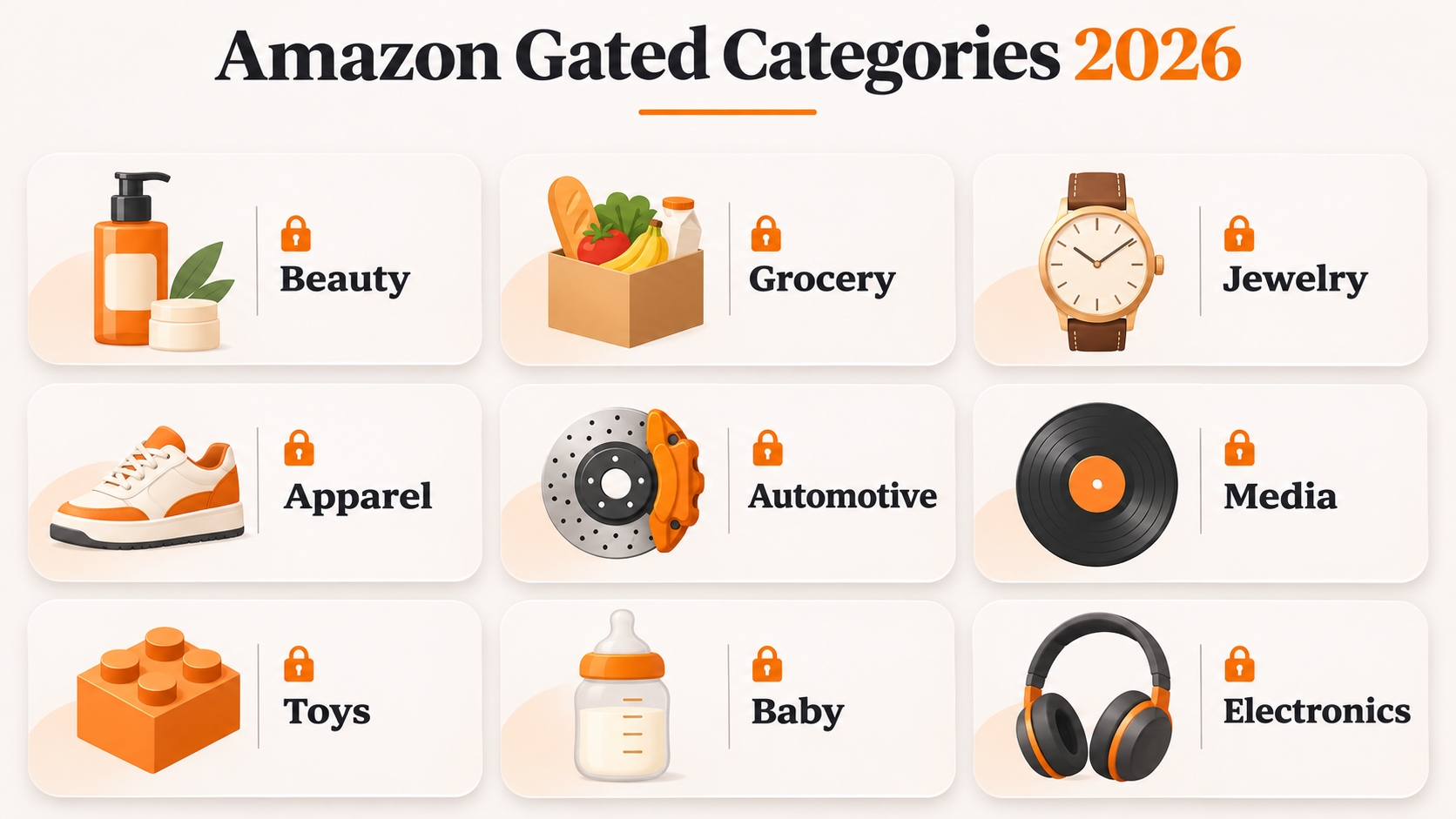
Beauty, Health, and Personal Care
This group covers skincare, cosmetics, supplements, medical devices, over-the-counter drugs, sexual wellness, and contact lenses. Gates here usually hinge on manufacturing evidence rather than brand permission: facility registration, good manufacturing practice documentation, ingredient and label details, and safety testing for anything applied to skin or ingested. Topicals and supplements tend to be reviewed most strictly, and sourcing from a distributor instead of the brand usually triggers additional chain-of-custody questions.
Grocery and Gourmet Food
Shelf-stable food, beverages, coffee, and specialty items require approval plus reliable date and lot-code handling. Amazon may ask for invoices that show lot codes, expiration dates, and remaining shelf life, so a supplier who cannot document production dates is a liability. Perishable and temperature-controlled items usually need a fulfillment setup that matches their handling requirements, and alcohol or items containing alcohol carry a separate compliance track entirely.
Jewelry, Watches, and Fashion Accessories
Jewelry is a classic gate and one of the few where Amazon may require a quality-assurance process in addition to invoices. Claims about precious metals, gemstones, or plating must be substantiated by your supplier, because inaccurate material claims are treated as both a listing accuracy problem and a consumer protection problem. Watches and sunglasses are gated largely for counterfeit risk, so brand authorization and verified sourcing carry more weight than volume.
Clothing, Shoes, Handbags, and Eyewear
Apparel is gated mainly at the brand level, but some subcategories, including designer handbags, licensed merchandise, and performance eyewear, face broader restrictions. Listings must include accurate fiber content, country of origin, and size information, and variation families must be built correctly to avoid suppression. If you plan to sell a well-known label, allow time for brand approval rather than assuming that category approval covers it.
Automotive, Powersports, and Industrial Products
Automotive parts require accurate fitment data, and safety-critical components such as brakes, tires, and emissions-related parts carry additional regulatory overlays. Powersports adds vehicle-safety expectations. Industrial and scientific categories may require certifications, safety data sheets, and hazardous-materials review. If your item contains batteries or liquids, remember that FBA hazmat review is a separate process from selling approval and can stall an otherwise approved listing.
Collectibles, Fine Art, Music, and Video Products
Coins, stamps, art, and trading cards raise questions about authenticity and provenance, and some subcategories require documentation showing how you acquired the inventory. Media products, including CDs, DVDs, vinyl records, and videos, are heavily gated by brands and rights holders, and the condition standards for used media are stricter than most sellers expect. Issues involving region coding, licensing, and copyright frequently arise after approval rather than before it, so review the relevant category policies as well as the application requirements.
What About Toys, Baby Products, Electronics, and Other Popular Categories?
Toys are seasonally gated for some accounts, particularly ahead of the fourth quarter, and baby products require children's product certificates and accredited lab testing. Consumer electronics bring warranty, compatibility, and certification questions, with batteries and chargers under extra scrutiny. Video games, software, cell phones, Amazon devices, and some subscription programs also carry restrictions. The table below summarizes what usually triggers each gate and the evidence reviewers tend to ask for.
| Category group | What usually triggers the gate | Evidence commonly requested |
|---|---|---|
| Beauty and personal care | Supplements, topicals, medical devices, health claims | Invoices, facility or GMP documents, ingredient and label details |
| Grocery and gourmet food | Expiration dates, lot codes, food handling | Invoices showing lot codes, shelf life confirmation |
| Jewelry and watches | Precious metal claims, gemstones, counterfeit risk | Invoices, quality assurance documentation, brand authorization |
| Automotive and powersports | Fitment accuracy, safety parts, batteries | Invoices, fitment data, safety or transport documents |
| Collectibles and media | Authenticity, provenance, licensing rights | Invoices, provenance records, rights holder authorization |
| Toys and baby | Child safety standards and testing | Invoices, children's product certificate, accredited lab reports |
What Does "Gated" Actually Mean on Amazon?
"Gated" simply means Amazon requires you to demonstrate that you can sell a product responsibly before your listing becomes active. It is a permission layer applied on top of your seller account, not a judgment about the product itself. Up to three different gates can apply to the same item at once, and each has its own application, evidence standard, and scope. Knowing which gate you are facing is what prevents you from sending the right documents to the wrong queue.
Category Gating vs. Brand Gating vs. ASIN-Level Restrictions
Category gating applies to an entire product node, brand gating applies to a specific brand within that node, and ASIN-level restrictions can be applied to individual listings that Amazon wants to verify. A category approval does not automatically clear a brand gate, and a brand approval does not guarantee every ASIN in that brand is open. When you are blocked, always identify the layer that caused it because the fix and the timeline are different for each.
Definition box: the three gates
- Category gate: the whole node needs approval. Evidence is usually invoices plus category-specific safety documents.
- Brand gate: one brand needs authorization, even in an open category. Evidence is invoices plus, often, a brand letter or Brand Registry enrollment.
- ASIN restriction: one listing needs verification. Evidence matches exactly what the limitation message requests.
Selling Approval Is Different From Product Compliance
Approval means Amazon permits you to list. Compliance means your product meets legal, safety, and labeling standards. You can hold a valid approval and still fail to meet Amazon's compliance requirements, which can lead to listing suppression or account suspension weeks after a successful launch. Treat ungating as the entry ticket and compliance as the operating discipline you maintain for as long as the listing is live.
Restricted, Prohibited, and FBA-Ineligible Products Are Not the Same
Restricted products can be sold once you obtain the necessary approval, while prohibited products cannot be sold under any circumstances. Recalled goods, unsafe items, and illegal products fall into the prohibited category, and no approval application can make them eligible for sale. FBA-ineligible products can be perfectly legal to sell but cannot be stored in Amazon fulfillment centers because of hazmat, temperature, or packaging rules. Confusing these three statuses is the fastest way to waste weeks on an application that never had a chance.
How to Check Whether a Product Is Gated Before Buying Inventory
A gating check takes about two minutes per product, which is far less time than liquidating inventory you cannot list. Complete these checks while you are still comparing suppliers, and save a screenshot of any limitation message. This documentation can serve as useful evidence if your selling eligibility changes later or if you need to contact Amazon Seller Support. The four steps below work for existing ASINs and for products you plan to create as new listings.
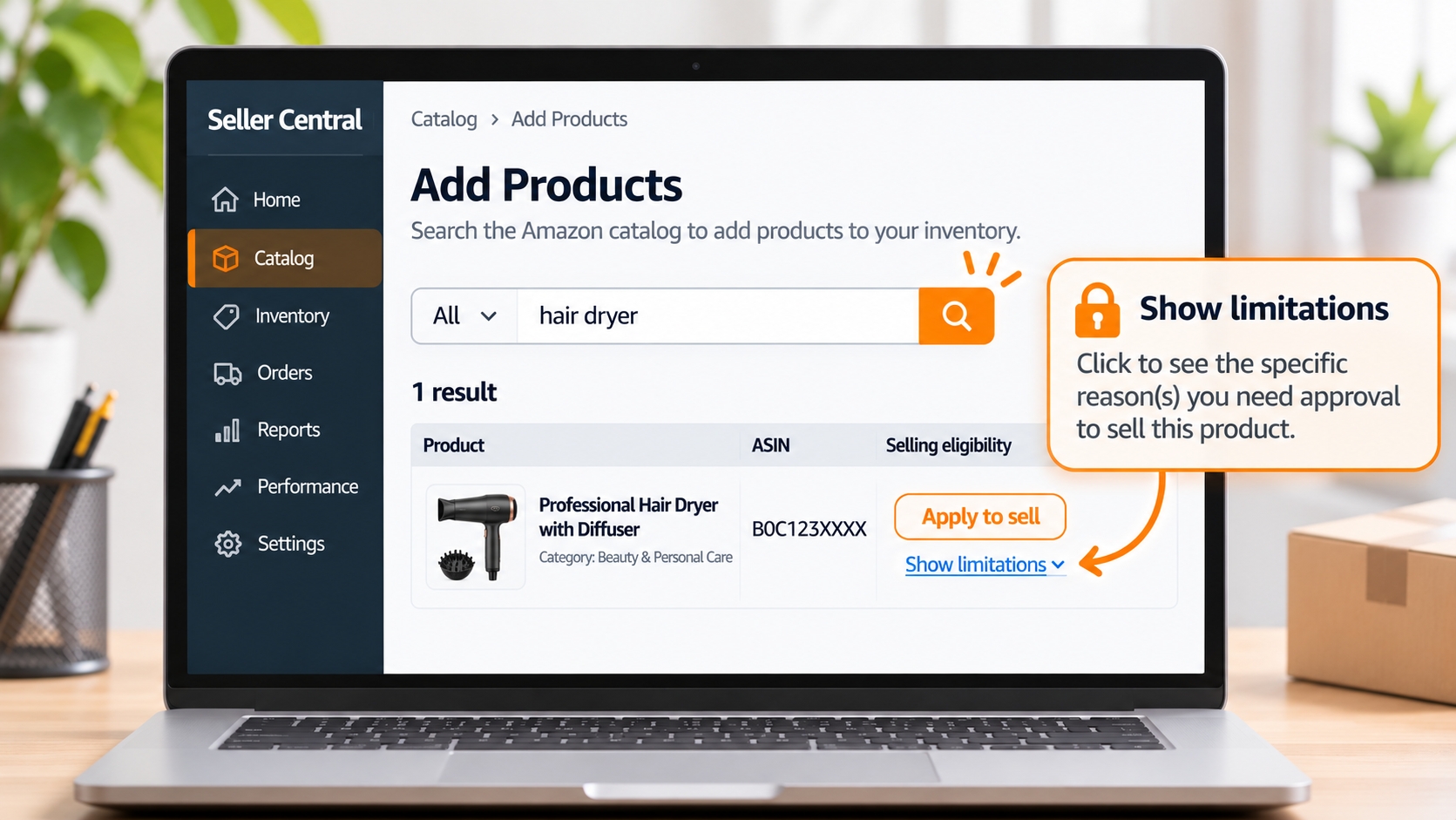
Search the Product or ASIN in Seller Central's Add Products Tool
Sign in to Seller Central, open the Catalog menu, and choose Add Products. Search by ASIN, UPC, EAN, model number, or keyword, then open the matching result. The button displayed reflects your account's eligibility at that particular moment rather than the product's overall popularity. As a result, a product that your competitor can sell without restrictions may still require approval for your account. Re-check periodically, because brand gates are applied and removed over time.
Understand "Sell This Product," "Apply to Sell," and "Not Available"
These three statuses are not interchangeable, and misreading them is the most common pre-purchase mistake. "Sell this product" means you can list now. "Apply to sell" means approval is possible but not yet granted. "Not available" usually means you cannot list this item at all, or the listing is closed to new sellers. The table below maps each status to the action it deserves.
| Status shown | What it means | Action |
|---|---|---|
| Sell this product | No gate for your account right now | Verify compliance before ordering inventory |
| Apply to sell | Approval is possible but not granted | Read the limitation, gather documents, then apply |
| Not available | Listing is closed, prohibited, or blocked for you | Do not source inventory; choose another product |
Use "Show Limitations" to Identify the Exact Approval Required
When a listing displays a restriction, click the "Show limitations" link beneath the status. You will usually find the specific reason, such as brand approval, category approval, or a compliance documentation requirement, along with instructions for accessing the application process. Read the reason before you gather anything. A brand gate and a safety-document request require completely different evidence, and submitting one when the other is required simply resets your review clock.
Check Similar Listings When You Are Creating a New ASIN
If your product does not exist on Amazon yet, open several close competitors in the same node and check their offer status. When nearly every similar listing is gated, assume yours will be too. You can also begin creating the listing in Seller Central and stop before submitting: the product setup screen warns you when the category or brand requires approval. Do this before you place a purchase order, not after the freight forwarder calls.
How to Get Ungated on Amazon: Step-by-Step Application Process
The application form itself is short, but preparing the required documentation takes time. Follow the five steps below in order to avoid one of the most common mistakes: submitting documents that do not address Amazon's actual requirements. If you are still choosing what to sell, pair this process with a structured product research workflow so you only apply for products worth the effort.
Step 1: Confirm Your Account and Product Eligibility
Start with the boring checks. You need an active professional selling account in good standing, with no open policy violations and a completed deposit and tax setup. Confirm the product is not prohibited, not recalled, and not excluded from the category for legal reasons. If your Account Health dashboard shows unresolved issues, address them before applying. Reviewers have access to the same account health indicators, and a poor account standing can result in rejection even when your application documents are complete and accurate.
Step 2: Open the Relevant Selling Approval Application
Most approvals start from the "Apply to sell" button in Add Products, which routes you into the correct queue for that category or brand. Brand approvals sometimes run through Brand Registry instead, and some categories have a dedicated request form under Selling Applications in Seller Central. Follow the application process indicated by the limitation message you encountered. If you cannot locate the correct application, search Seller Central Help using the category name along with "selling approval" instead of guessing which process to follow.
Step 3: Review Every Required Document Before Submission
Read the document list line by line and note what is mandatory versus optional, what file types are accepted, and whether any date window applies. Invoice recency matters: many categories expect documents dated within roughly the last 180 days, though the exact rule varies. List every requirement on one page and check it off against your supplier file before you open the upload form.
Step 4: Upload Your Evidence and Submit the Application
Upload clear, legible documents, as an invoice photographed at an angle or scanned poorly can easily result in rejection. Name files clearly, group multi-page documents into single PDFs where the form allows it, and keep totals consistent across every page. In the notes field, state plainly what you sell, who your supplier is, and which brand and category the documents cover. Do not pad the submission with unrelated certificates.
Step 5: Track Your Application and Confirm Approval
Amazon does not publish a guaranteed review timeline, and response times vary by category and workload. Track the application through the case log and the selling applications page rather than opening duplicate cases, which slows review. Once approved, read the confirmation carefully to confirm the exact scope granted, then re-check the ASIN in Add Products before you order inventory against it.
Amazon Ungating Requirements: Which Documents Do You Actually Need?
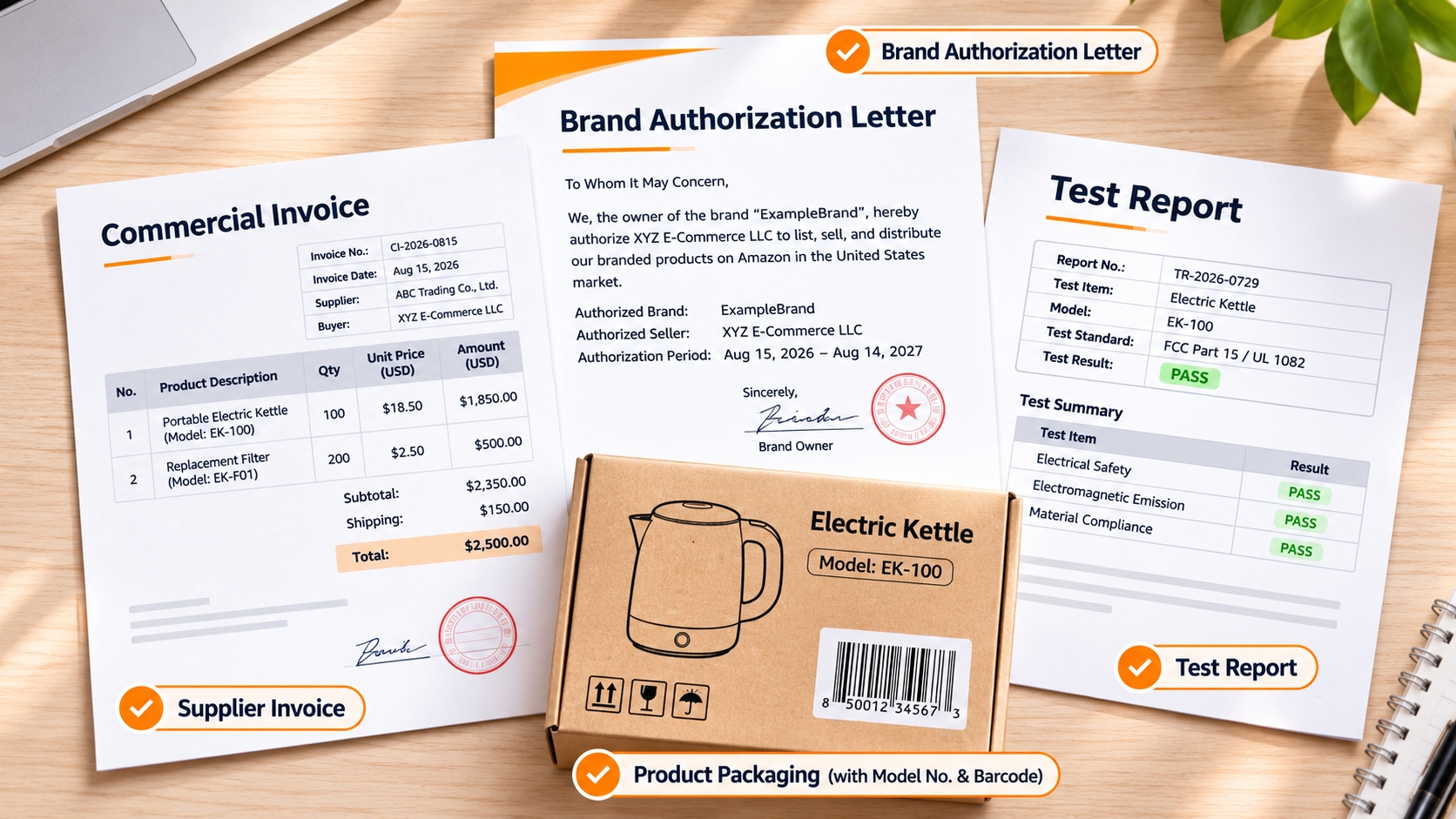
Amazon asks for the minimum evidence needed to verify that your inventory is authentic and traceable, but what that means in practice depends entirely on the gate. Most requests fall into four buckets: supplier invoices, brand authorization, product and packaging photos, and category-specific safety documents. The checklist below covers the invoice standard first, because it is the one document almost every application requires.
Supplier Invoices: What Amazon Needs to Verify
A qualifying invoice is a commercial document from a supplier, not a retail receipt. It should show the supplier’s business name, address, phone, and website; your business name exactly as it appears in Seller Central; the product name, brand, model or part number; unit quantity and itemized pricing; and a recent issue date. Reviewers check whether the supplier is verifiable independently. Many categories expect purchase quantities consistent with wholesale sourcing, although Amazon does not publish a universal minimum requirement. The commonly mentioned threshold of ten units is a convention among sellers rather than an officially stated rule that applies to every application.
| Document | What it proves | Common mistake |
|---|---|---|
| Commercial supplier invoice | Authentic, traceable sourcing | Buyer name differs from the Seller Central legal entity |
| Brand authorization letter | Permission to resell a gated brand | Letter is unsigned or does not name your legal entity |
| Product and packaging photos | The item matches the listing identifiers | UPC or model number is unreadable in the image |
| Safety certificate or test report | The product meets category safety standards | Report covers a different model or an expired standard |
| Safety data sheet | Hazard and handling information | Sheet is for the raw material, not the finished product |
When Brand Authorization Letters Are Necessary
A letter of authorization is typically required for brand gating rather than category gating. It should come from the brand owner or an authorized distributor on company letterhead, be signed and dated, and name your legal entity, the brand, and the scope of permission. Vague language such as "authorized reseller" without a brand and entity name is often rejected. In many cases Brand Registry enrollment is a faster and more durable route than a one-off letter.
Product Photos, Packaging, and Matching Identifiers
When photos are requested, reviewers want to see the actual item you will ship: the front, back, and any label showing the brand, model number, UPC, and manufacturing details. Photograph the packaging as well as the product, in good light, with text sharp enough to read. Every identifier in the photo must match the invoice and the listing. A different model number on the box than on the invoice is treated as a mismatch, not a minor error.
Safety Certificates, Test Reports, and Category-Specific Evidence
Regulated categories add documents on top of invoices. Children's products commonly need a children's product certificate supported by testing from an accredited laboratory; consumables may need facility registration or good manufacturing practice evidence; electronics may need certification relevant to the market; chemicals need safety data sheets. Submit only the documents the application requests. Extra, irrelevant paperwork lengthens review without improving your odds.
What Improves Your Chances of Getting Approved?
Approvals are rarely decided by how much you submit and almost always decided by how easy you make verification. A reviewer working through a queue needs to connect your account, your supplier, and your product in a few clicks. The four habits below are what separate first-pass approvals from week-long back-and-forth cases, and they cost nothing except preparation time.
Source From Verifiable Manufacturers or Authorized Distributors
The single strongest predictor of approval is a supplier a reviewer can look up. A manufacturer with a working website, a business address, and a history of issuing proper invoices clears review faster than a trading company with no online footprint. Before you buy, ask for a sample invoice and check that the supplier’s name, address, and contact details appear on it. If they cannot produce that, they cannot support an ungating application.
Make Every Product Detail Match Across the Application and Documents
Mismatches are the leading cause of avoidable rejections. The legal entity on your Seller Central account, the buyer name on the invoice, the brand in the listing, the model number on the packaging, and the quantity in the application should all line up exactly. Pay close attention to small differences, such as abbreviations, the use of a trading name instead of the registered business name, or variations in model suffixes. Reviewers focus on whether the information matches across documents rather than interpreting what you intended.
Submit Clear, Complete Evidence Instead of Unnecessary Paperwork
More documents do not mean more credibility. A tight submission contains exactly what the application lists, in readable files, in the requested format. If a requirement is genuinely unclear, ask through a case before uploading guesses. Where a category allows optional supporting documents, include only those that directly strengthen the required evidence. For example, you might provide a supplier's business license alongside the invoice rather than submitting a collection of unrelated certificates.
Resolve Account Health Issues Before Applying
Eligibility is evaluated against your account, not just your paperwork. Open intellectual property complaints, a high order defect rate, late shipment problems, or unresolved policy warnings can block an approval regardless of document quality. Clear or appeal what you can, wait for the metrics to recover, and only then apply. Applying into a weak account risks a denial that is harder to overturn than a first-time submission.
Pre-submission checklist
- Supplier invoice is recent, itemized, and shows a verifiable business identity
- Buyer name matches the legal entity in Seller Central exactly
- Brand, model, and quantity are identical across invoice, photos, and listing
- Every requested document is present, legible, and in the accepted file type
- Account health shows no unresolved policy or intellectual property issues
Why Amazon Ungating Applications Get Rejected and What to Do Next
A rejection is information, not a verdict. Most denials trace back to one of four causes, and each has a specific correction that is different from simply resubmitting. Read the rejection message slowly and match it to the patterns below before you open another case. Repeating an identical submission is the one move guaranteed to waste time.
Invoice Rejected: Supplier, Quantity, or Product Details Cannot Be Verified
This is the most common denial. Typical triggers include an invoice that looks like a retail receipt, a supplier whose contact details cannot be checked, quantities that look like personal use, an invoice older than the accepted window, or a product description that does not match the ASIN. The solution is to obtain a new invoice from a verifiable supplier that reflects wholesale purchase quantities and matches your listing details. Screenshots or edited PDF documents are not acceptable substitutes.
Brand Approval Denied: Authenticity or Authorization Cannot Be Established
Brand denials usually mean the authorization chain is incomplete. A letter from a distributor who is not themselves documented as authorized, an unsigned letter, or a document that does not name your entity will all fail. Strengthen the chain: obtain a letter from the brand owner, or evidence that your supplier is an authorized distributor, and consider Brand Registry enrollment if you own or license the brand. Authenticity doubts also arise when your sourcing is inconsistent across invoices.
Application Incomplete: Missing Photos, Certifications, or Information
Incomplete applications are often self-inflicted: a required photo angle was skipped, a certificate covers a different model, or a text field was left blank because the answer seemed obvious. Go back to the original requirement list and compare it item by item with what you uploaded. If the rejection does not say what is missing, ask one clear question in the existing case instead of starting a new one.
"Your Account Does Not Qualify" or No Approval Option Appears
Sometimes there is no application to submit. This can happen when the category is temporarily closed to new sellers, when your account lacks the selling history some categories expect, or when the specific listing is simply not open. Check the category policy pages and Seller Central Help before assuming an error, and treat a closed category as a research signal: the barrier is real, and it protects incumbents as much as it blocks you.
How to Correct a Rejection Without Repeating the Same Mistake
Write down the stated reason, then identify the root cause underneath it. Rebuild the document set from the requirement list rather than patching one file. When you resubmit, summarize what changed in one or two sentences so the reviewer can see the correction. If you have addressed the underlying issue but your application is rejected again for the same reason, politely escalate the matter through your existing support case and attach the relevant evidence instead of opening multiple cases.
What Changed in 2026? Safety Requirements Beyond Ordinary Ungating
Approval is increasingly the beginning of a compliance relationship rather than a one-time transaction. Two developments matter most for US sellers planning 2026 launches: tighter product safety evidence in regulated categories, and an updated commercial liability insurance requirement. Both requirements apply in addition to the standard ungating process and may affect products you are already selling, not just new applications.
Enhanced Product Safety Requirements and Third-Party Testing
Amazon continues to expand the categories where it asks for test reports from accredited laboratories rather than supplier self-declarations, particularly for children's products, consumables, and items with batteries or chargers. The exact requirements vary by category and are updated without a single global announcement, so confirm them in Seller Central Help and the category policy pages before you order production. Budget for testing as a line item in your product cost, not an afterthought.
Commercial Liability Insurance Requirements Effective November 2, 2026
Amazon has communicated an updated commercial liability insurance requirement taking effect on November 2, 2026. Verify the current monthly proceeds threshold, required coverage limit, and acceptable insurer standards in Seller Central Help before purchasing a policy, because thresholds have changed in the past and some categories or brands carry additional conditions. Confirm that the certificate of insurance names the correct legal entity and includes the required additional insured language.
Why Approval Does Not Eliminate Ongoing Compliance Obligations
Approved categories can be re-verified, listings can be audited, and policies can tighten mid-year. Keep supplier invoices, certificates, and test reports throughout the time you sell the product and for a reasonable period afterward. Retaining these records for several years is a prudent practice. Set a quarterly reminder to re-check your gated categories in Add Products. Compliance drift is quiet: nothing breaks until a listing goes down during your best sales week.
Is Getting Ungated Worth It? Evaluate the Market Before Applying
Ungating costs money, time, and supplier leverage. A gate is a barrier, but a barrier is only valuable if the market behind it is worth defending. Before investing in testing, insurance, or a larger initial inventory order, conduct the same commercial analysis you would perform for an unrestricted category. Carefully assess whether the selling restrictions create a genuine market opportunity or simply conceal an already saturated market.
Compare Demand and Competition Before Paying for Approval Requirements
Look at estimated monthly sales, review counts on the top listings, price trends over the last year, and how concentrated sales are among the first few sellers. A category with strong demand and a handful of entrenched listings may still be worth entering if reviews are weak and prices are stable. A category with flat demand and dozens of identical offers is not worth an approval process, no matter how prestigious the gate looks from outside.
Estimate the Full Cost of Entry, Including Inventory and Compliance
Add up inventory, freight, testing, certifications, insurance premiums, prep and labeling, referral and fulfillment fees, and the working hours your ungating application will consume. Compare that total against realistic monthly profit rather than revenue. Many sellers underestimate compliance costs because they are paid in small increments across several vendors. If payback extends beyond a year at conservative sales estimates, the gate is probably not the right first project.
Use SellerSprite to Research the Opportunity Behind a Gated Category
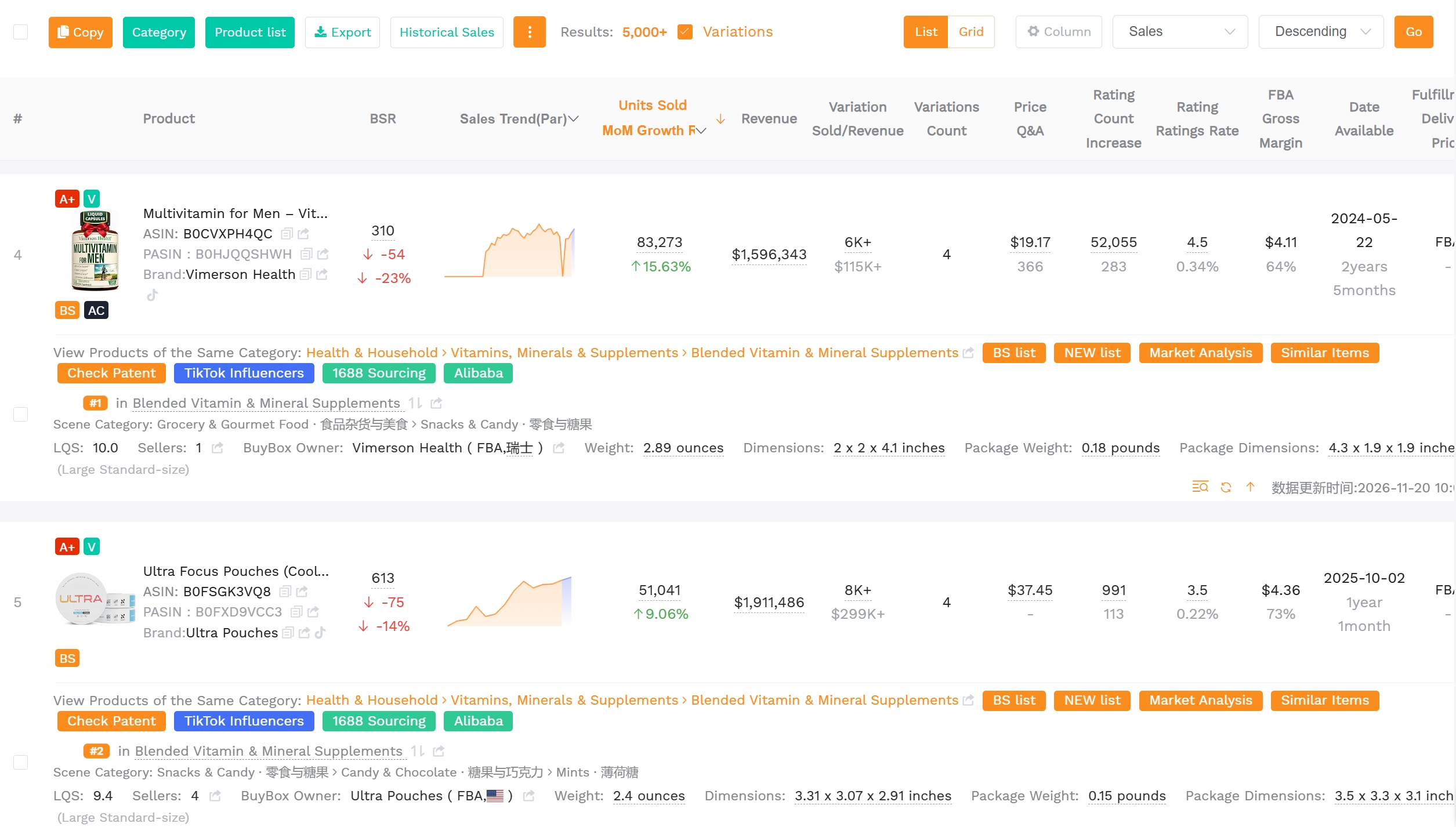
Run the candidates through SellerSprite Product Research to see sales estimates, keyword volume, price history, and competition density side by side. Compare gated candidates with open-category alternatives on the same metrics so the decision is like for like. Data will not tell you whether Amazon will approve you, but it will tell you whether approval is worth chasing.
Decide Whether to Apply, Choose Another Product, or Skip the Market
Set your criteria before you look at the data, then apply them without negotiating. A workable rule: apply when demand is proven, your supplier is verifiable, and projected payback is under twelve months; choose a different product when any one of those fails; skip the market entirely when the gate is closed to new sellers or the product is prohibited. Writing the rule down in advance is what stops a sunk-cost decision later.
What Happens After You Get Ungated?
Approval day feels like a finish line and behaves like a starting gun. The first 30 days after ungating determine whether your listing survives its first audit, so treat scope confirmation, record keeping, and account monitoring as launch tasks rather than admin. Sellers who skip these steps tend to rediscover the gate the hard way.
Confirm the Approved Brand, Category, and ASIN Scope
Open the approval confirmation and note exactly what was granted: which brand, which category node, and whether individual ASINs were specified. Test the scope by checking one approved ASIN and one similar ASIN that was not part of the application. If you plan to expand within the brand, verify that each new ASIN is covered before you order stock. Scope misunderstandings cause most post-approval listing blocks.
Maintain Valid Sourcing and Compliance Records
Keep every invoice, certificate, and test report in a folder organized by product and supplier, and refresh invoices as they age out of the accepted window. If you reorder from a new supplier, treat it as a documentation event and capture the invoice before the shipment ships. This archive is what lets you respond to a verification request in hours instead of weeks, which is often the difference between a brief pause and a lost season.
Monitor Account Health and Changes to Selling Eligibility
Check your account health dashboard weekly and your gated categories quarterly. Watch for policy update notices in Seller Central, since category requirements can tighten without affecting your current listings until the next audit. Closely monitor your order defect rate, late shipment rate, and any intellectual property complaints after launch. Operational issues often become apparent during sudden increases in sales volume, and gated listings may face stricter scrutiny than unrestricted ones.
Conclusion
Amazon gated categories reward preparation and punish improvisation. The sequence is consistent regardless of category: confirm the type of gate in Seller Central, verify that the market justifies the effort, source from a supplier whose documents a stranger could check, and submit a clean document set that matches your listing detail for detail. Following these steps does not require special relationships or connections. What matters is having a clear checklist and consistently following it.
Treat approval as an operating permission rather than a trophy. Keep records current, watch your account health, and re-verify eligibility as Amazon updates category policy. Do that, and a gated category becomes a barrier that works in your favor instead of a wall you hit after the inventory arrives.
FAQ
How Do I Know if I Am Gated on Amazon?
Search the ASIN in Seller Central under Catalog, then Add Products. If the result shows "Apply to sell" or a limitation notice instead of "Sell this product," you are gated. Click "Show limitations" to see the specific reason. Checking before you buy inventory is the only reliable way to avoid sourcing products you cannot list.
Can New Amazon Sellers Get Ungated?
Yes, but the bar is higher. New accounts may need to build a short selling history before some categories are available, and brand approvals often depend on verifiable supplier documentation. Start with categories that accept first-time applications, keep account health clean, and consider Brand Registry if you own or license the brand.
Do I Need to Purchase 10 Units to Get Ungated?
There is no published universal minimum. Ten units is a widely repeated seller convention because invoices showing single units can look like retail purchases rather than wholesale sourcing. Reviewers want quantities consistent with a reseller, so match your order size to the category and product value, and make sure the invoice supports it.
Can I Use a Retail Receipt Instead of an Invoice?
Generally no. Ungating reviews are designed to verify wholesale sourcing, and retail receipts usually do not show a verifiable supplier relationship, wholesale pricing, or sufficient quantity. Retail receipts are sometimes accepted in specific used or collectible contexts, but for standard category and brand ungating, plan on a commercial supplier invoice.
How Long Does Amazon Ungating Take?
Amazon does not publish a guaranteed review time, and it varies by category, application volume, and document quality. Simple category approvals can move within days; complex brand or regulated-category reviews can take considerably longer. Incomplete submissions add a full cycle, so accuracy is the fastest route to a decision.
Is Amazon Ungating Permanent?
No. Approval can be re-verified, narrowed, or revoked if Amazon updates category policy or finds evidence problems. Brand gates are also applied and lifted over time, which is why periodic re-checks matter. Treat approval as an active permission and keep your sourcing documents ready for review at any point.
Do I Need Separate Approval for Every Brand or ASIN?
It depends on the gate. A category approval can cover many ASINs in that node, while a brand approval typically covers one brand but may span multiple ASINs in it. ASIN-level restrictions apply to individual listings and need individual action. Always confirm the granted scope in the approval confirmation before ordering inventory for additional products.
Can I Sell a Restricted Product if Amazon Shows "Not Available"?
No. "Not available" means the listing is closed to you, may be prohibited, or is otherwise blocked. It is not an invitation to find a workaround. Listing anyway risks suppression, cancellation, or account suspension. If the product also appears on Amazon's prohibited list, no approval exists, and the correct move is to choose a different product.
Next Steps
- Pick three candidate products and check each one in Seller Central's Add Products tool today, before you contact a supplier.
- For each candidate product, record whether the selling restriction applies at the category, brand, or ASIN level, along with the exact documents requested in the limitation message.
- Validate demand, competition, and total cost of entry in SellerSprite before you commit to testing, insurance, or an opening order.
- Build a reusable document folder per product so an ungating application can be assembled in under an hour.
- Run your first compliant application with a documented checklist, then review what you would do differently before applying for a second category.
Ready to research the opportunity behind a gate before you apply? Create a free SellerSprite account and compare gated candidates with open-category alternatives on the same data set.
References
- Amazon: Selling approvals, listing limitations, and supplier invoice requirements View
- Amazon: Brand approval, authorization letters, and reselling branded products View
- Amazon: Grocery category approvals and supporting documents View
- Amazon: FBA dangerous goods eligibility and hazmat documentation View
- Amazon: Selling fees and category-specific referral fee rates View
- U.S. Consumer Product Safety Commission: Children's Product Certificate and testing requirements View
- U.S. Food and Drug Administration: Food facility registration and labeling guidance View
- Amazon: New commercial liability insurance requirements effective November 2, 2026 View
- SellerSprite: Amazon product research guide View
By SellerSprite Success Team
The SellerSprite Success Team focuses on Amazon marketplace research and practical seller education. Our ongoing work covers product selection, keyword demand, competitive analysis, listing optimization, advertising performance, and changes to Amazon selling policies. We develop guidance that connects marketplace data with actionable workflows and sources readers can verify independently.
Last updated: 2026-11-20