TL;DR: Keyword mapping is the strategic process of assigning specific, high-intent search terms to individual listing components and PPC campaigns to maximize relevance, indexing, and Amazon sales velocity.
Key Takeaways
- Keyword mapping bridges the gap between raw data and a high-converting Amazon product listing.
- Effective mapping requires distinguishing between high-volume terms for SEO and high-conversion terms for PPC.
- A well-structured mapping document prevents keyword cannibalization and ensures total indexing coverage.
Table of Contents
Note on marketplaces: This guide is specifically optimized for the US market.
Understanding Keyword Mapping in the Amazon Ecosystem
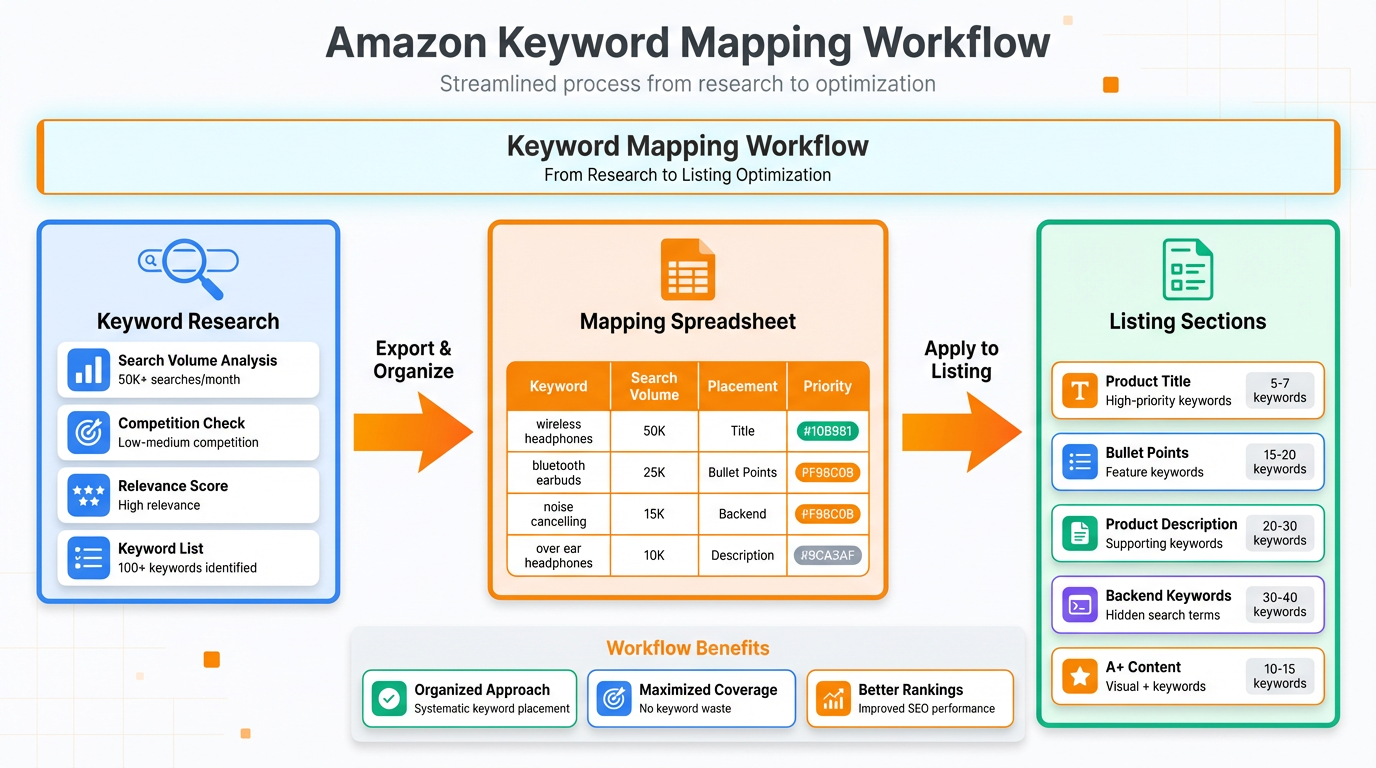
Keyword mapping is the architectural blueprint of your Amazon business. It is not merely a list of words but a strategic assignment of search terms to the most influential parts of your Amazon presence. For many sellers, the challenge isn't finding keywords—it's knowing exactly where to put them. By aligning your Amazon SEO and Listing Optimization efforts through mapping, you ensure that the A9 algorithm recognizes your product's relevance for every possible buyer query. This process begins with deep Amazon Keyword Research to identify high-volume seed keywords and long-tail variations that reflect true buyer intent.
The Strategic Pillars: SEO vs. PPC Keyword Strategy
One of the most common mistakes is treating SEO and PPC keywords as identical. While there is overlap, their functions differ significantly. Amazon SEO focuses on indexing and long-term organic ranking, where broad relevance is key. In contrast, a PPC Keyword Strategy focuses on conversion efficiency and ACOS. Your mapping document must distinguish between keywords that are great for "broad awareness" (perfect for the backend search terms) and "high-intent buying" (best for Exact Match PPC campaigns). By analyzing your Search Term Report, you can identify which terms are driving clicks but not sales, allowing you to refine your mapping to prioritize high-converting traffic.
Step-by-Step: Creating Your Keyword Mapping Document
Creating a master keyword mapping document is a rigorous but rewarding task. Start by gathering data from building a target Amazon keyword list. First, categorize your keywords by search volume and relevance. Assign the top 3-5 high-volume, high-relevance terms to your Product Title. Next, map secondary keywords to your Bullet Points, ensuring they flow naturally within sales-oriented copy. Finally, place technical specifications, synonyms, and misspellings into your Backend Search Terms. This tiered approach ensures that you don't over-optimize (keyword stuffing) while still maintaining a comprehensive digital footprint that the Amazon algorithm can crawl efficiently.
Integrating Mapping with Listing Optimization
Once your map is complete, the final step is execution through Listing Optimization. This is where data meets creativity. Your mapping tells you what words to use; your copywriting tells the customer why to buy. Remember that indexing involves more than just text in 2026; ensure your image alt-text (where applicable in A+ content) also reflects your mapping strategy. Continually update your map based on performance data. If a keyword is ranking on Page 1 organically, you might reduce PPC spend on it. If a keyword has high impressions but low CTR, you may need to re-evaluate its placement or the relevance of your main image to that specific search term.
FAQ
How do I create a keyword mapping document for my Amazon product listings?
Start with a spreadsheet containing your researched keywords, their search volumes, and relevance scores. Create columns for 'Title', 'Bullets', 'Description', and 'Backend'. Assign keywords based on priority: High-volume terms go to the Title, while secondary and long-tail terms are distributed across bullets and backend search terms to ensure full indexing coverage.
What is the difference between keyword mapping for Amazon SEO and Amazon PPC?
Keyword mapping for SEO is focused on broad indexing and organic relevance to help the A9 algorithm categorize your product. Mapping for PPC is more granular, focusing on conversion-heavy terms and match types (Broad, Phrase, Exact) to maximize Return on Ad Spend (ROAS) and manage ACOS effectively.
How can keyword mapping help improve my Amazon organic ranking and conversion rate?
Keyword mapping improves organic ranking by ensuring your listing is indexed for the most relevant, high-traffic terms. It improves conversion rates by ensuring that the keywords you rank for actually match the buyer's intent, leading to more relevant traffic and a higher likelihood of purchase.
Next Steps
- Audit your current listings using SellerSprite's Keyword Tools to identify gaps in your mapping.
- Build a comprehensive keyword map for your top 5 ASINs to see immediate ranking improvements.
References
By SellerSprite Success Team
The SellerSprite Success Team consists of seasoned Amazon SEO specialists and data analysts dedicated to helping sellers master the US marketplace through data-driven insights and advanced optimization strategies.


