Amazon businesses thrive beyond launches, ads, and ranking. They are secured by efficient operations, swift issue detection, and disciplined weekly checks.
In this chapter, you will learn how to handle unfulfillable inventory, audit FBA reimbursement opportunities, adapt to brand content changes, test extra sales channels carefully, and protect your listing from avoidable damage.
Think of this as your SellerSprite operations safety net. While it may not make the business exciting day to day, it ensures the business remains calm, clean, and resilient.
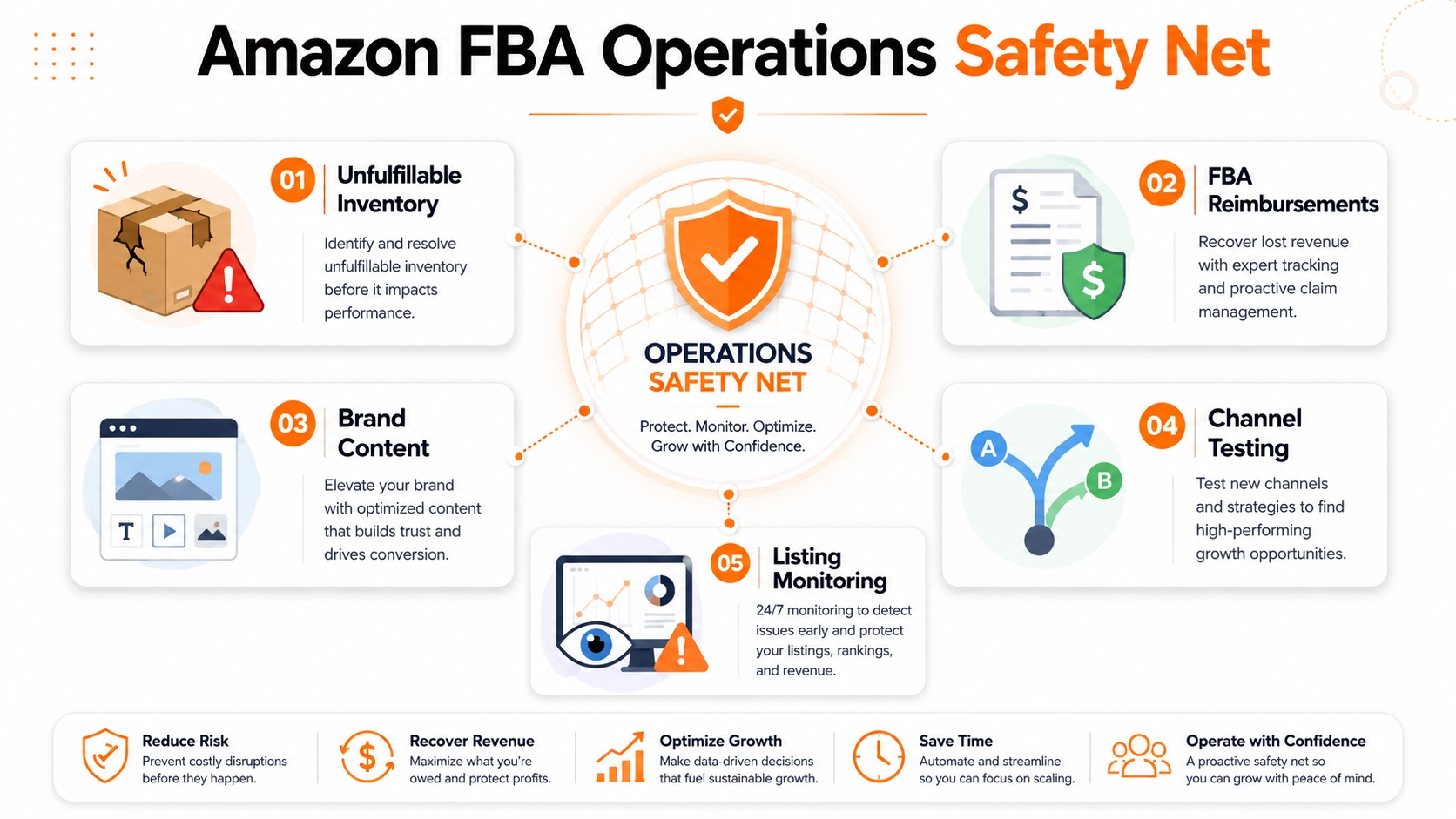
Key Takeaways
- Unfulfillable inventory needs a default plan before it quietly incurs storage costs, removal costs, or lost recovery value.
- Amazon may reimburse eligible FBA inventory that is lost or damaged under its policies, so sellers should regularly audit their reports.
- Amazon Posts are no longer available, so sellers should repurpose lifestyle content into active brand surfaces such as Brand Stores, Brand Story, Sponsored Brands creative, and Amazon Live, where eligible.
- Extra marketplaces can help some products, but they should be tested one SKU at a time with clear inventory controls.
- Monitor Buy Box status, seller count, dimensions, category, reviews, seller feedback, and suppression signals before small issues become expensive.
- Use SellerSprite Product Tracker, Keyword Tracker, Keyword Mining, Reverse ASIN, and Review Analysis tools to support visibility checks and decision-making.
Table of Contents
- Manage Unfulfillable Inventory Before It Hurts Margin
- Audit FBA Reimbursements Without Overcomplicating It
- Repurpose Brand Content After Amazon Posts
- Test Extra Sales Channels Carefully
- Protect Your Listing With a Weekly Monitoring Checklist
- Comparison and Selection
- Examples and Templates
- FAQs
- Summary and Next Steps
- About the author
- References
Manage Unfulfillable Inventory Before It Hurts Margin
Unfulfillable inventory is FBA inventory that Amazon decides cannot be sold as new. This often happens after a customer returns, but the condition can vary widely. A unit may be truly damaged, or it may simply have packaging that no longer looks retail-ready.
Amazon Seller Central lets sellers set automated preferences for removing unfulfillable inventory. Without a removal preference, Amazon may dispose of inventory based on capacity and returns evaluation.
Practical rule
Take control of unfulfillable inventory decisions. Set rules that optimize your margin, product value, inspection capacity, and marketplace location.
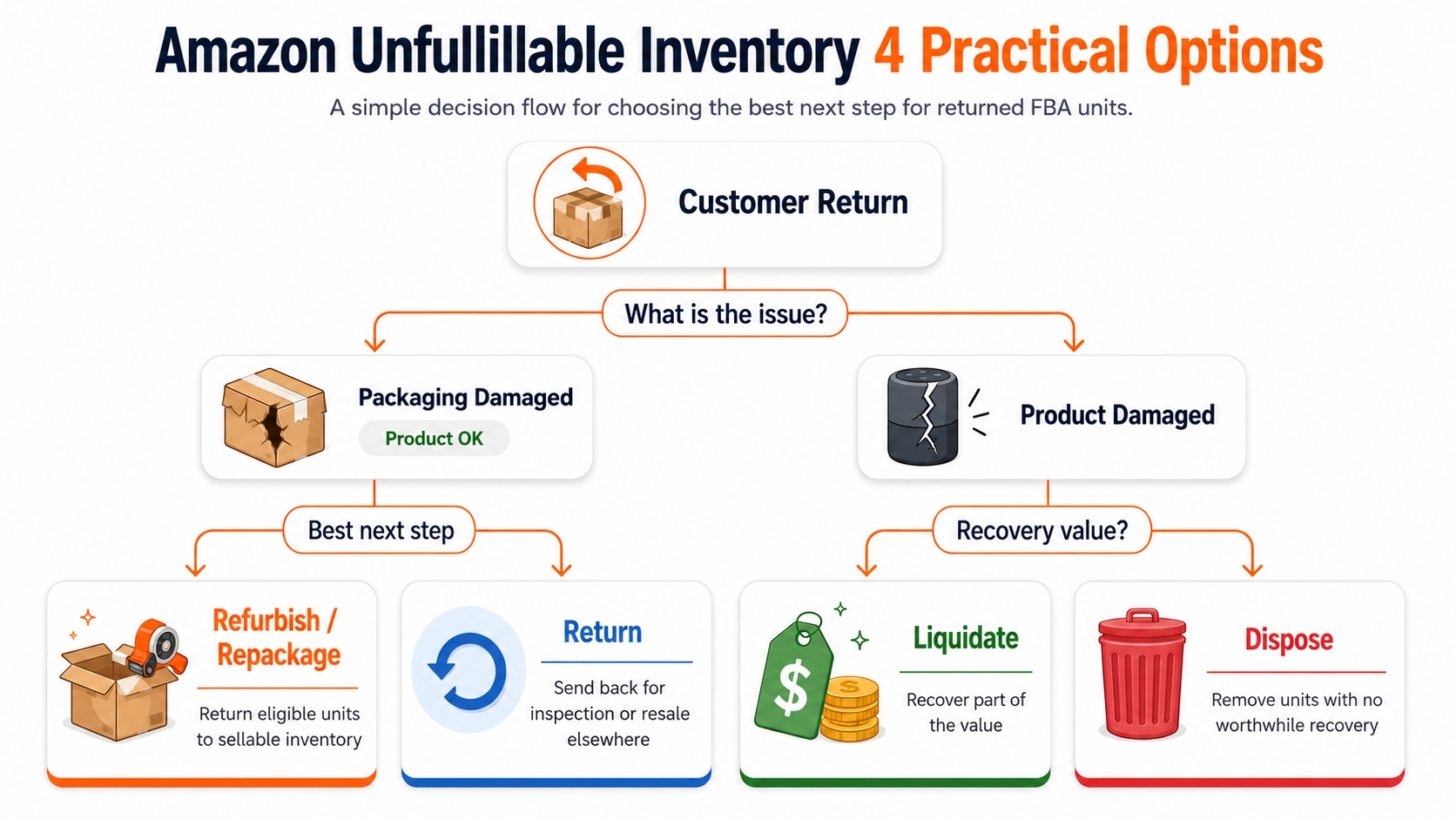
The four practical options
- Refurbishment or repackaging: If the product is sellable but the packaging is damaged, eligible items may be repacked and returned to sellable inventory.
- Liquidation: If the product cannot be resold as new, liquidation can recover a portion of value, minus applicable fees and program rules.
- Disposal: Amazon charges a fee to dispose of the unit. This is simple, but it may destroy value if the item is still usable.
- Return: Amazon ships the unit to an address in the same marketplace country so you can inspect, repackage, resell elsewhere, or decide the next step.
Setup steps in Seller Central
- Open Seller Central.
- Go to the gear icon and choose Fulfillment by Amazon.
- Find automated unfulfillable settings.
- Select Edit.
- Choose whether to enable or disable automation.
- Select refurbishment, liquidation, return, or disposal preferences based on your product strategy.
- If you select return, enter a local return address for that marketplace.
- Choose the schedule, then update the settings.
Tip
If landed cost is high and inspection is easy, returns may recover more value. If the product is cheap, fragile, or costly to handle, liquidation or disposal may be better.
Common mistake
Treating all unfulfillable units as worthless. Many are unsellable for minor issues. Review the economics before choosing automatic disposal.
Audit FBA Reimbursements Without Overcomplicating It
FBA fulfillment includes receiving, storing, moving, shipping, and processing returned inventory. Because physical inventory moves through many steps, a small percentage can be lost or damaged. Amazon's FBA reimbursement policy explains that reimbursement may apply when eligible units are lost, damaged, or removed from the fulfillment network under qualifying conditions.
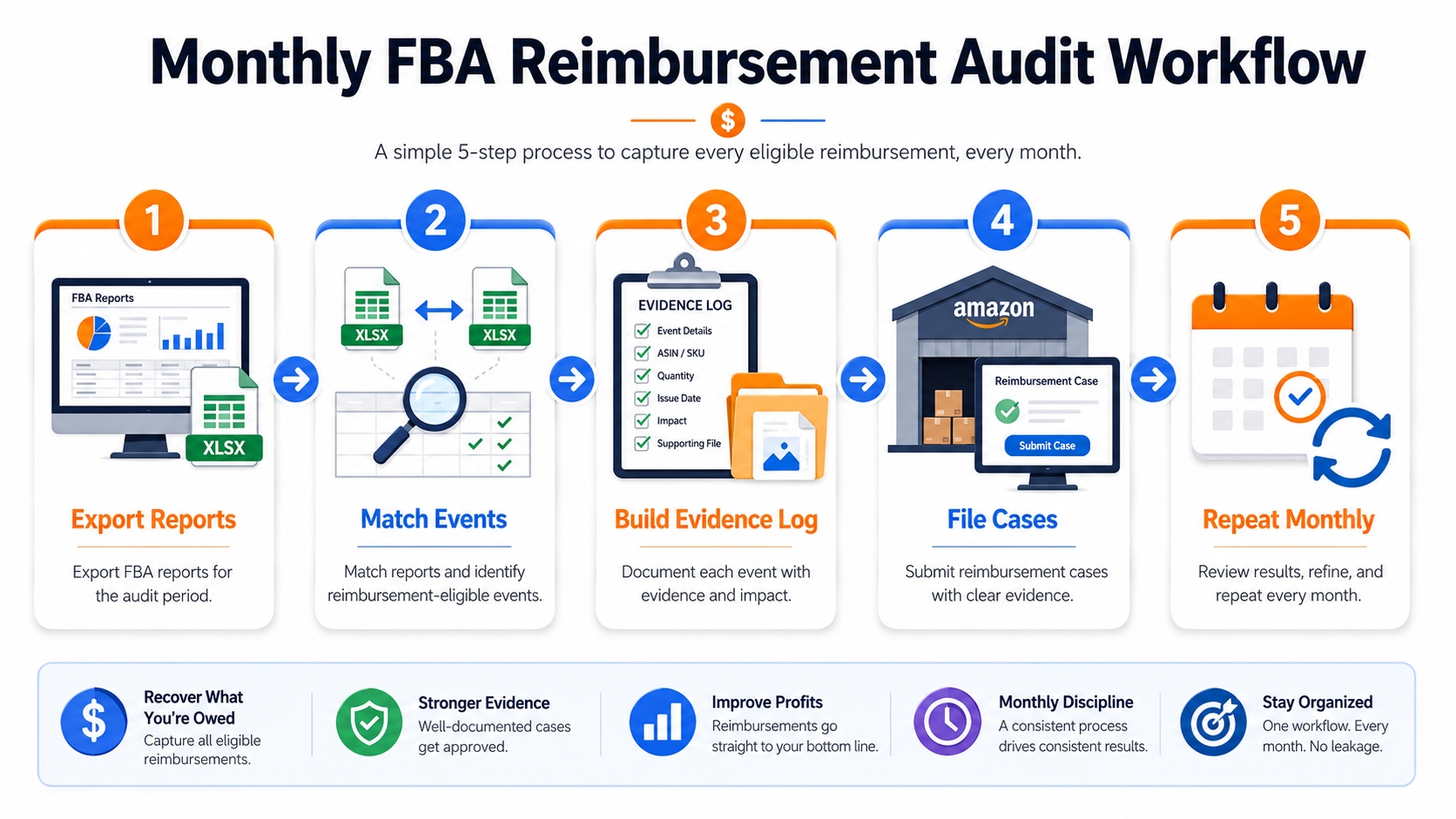
A simple monthly audit workflow
- Export inventory reports: review adjustments, removals, returns, damaged inventory, and reimbursements.
- Match events: compare lost or damaged units against reimbursements already issued.
- Build an evidence log: record ASIN, FNSKU, event date, quantity, report source, and case status.
- File carefully: submit reimbursement cases only when your documentation is clear.
- Repeat monthly: small reviews are easier than one stressful annual cleanup.
Risk control
File only strong, unique claims. Maintain an evidence-based audit to ensure your Seller Central case history remains professional and confident.
Where SellerSprite fits
SellerSprite does not replace Seller Central reimbursement reports. Instead, it helps you protect visibility while you audit operations. Use Product Tracker to watch ASIN changes and Keyword Tracker to confirm whether ranking drops align with inventory, pricing, or listing issues.
Repurpose Brand Content After Amazon Posts
Amazon Posts were discontinued in July 2025, and new creation was disabled in June 2025. Amazon Ads now points brands to alternatives like Brand Stores and Amazon Live.
The lesson still matters: reusable lifestyle content is valuable. The channel changed, but the creative habit remains useful.
Use the content library model
- Lifestyle images: use real product use cases and simple feature callouts.
- Short captions: write one benefit per caption and include a core product keyword naturally.
- Short videos: demonstrate use, setup, or before-and-after outcomes.
- Repurposing surfaces: Brand Store, Brand Story, A+ modules, Sponsored Brands creative, Amazon Live, and off-Amazon launch content where relevant.

How SellerSprite helps
Use SellerSprite Keyword Mining and Reverse ASIN to find the language customers use. Then use Review Analysis to turn common buyer phrases into captions, image text, A+ modules, and Brand Story blocks.
Test Extra Sales Channels Carefully
Extra sales channels can help some products, but they should not distract you from your Amazon foundation. The right question is not "Can I sell this somewhere else?" The right question is "Can I test one extra channel without creating inventory, fulfillment, or customer service chaos?"
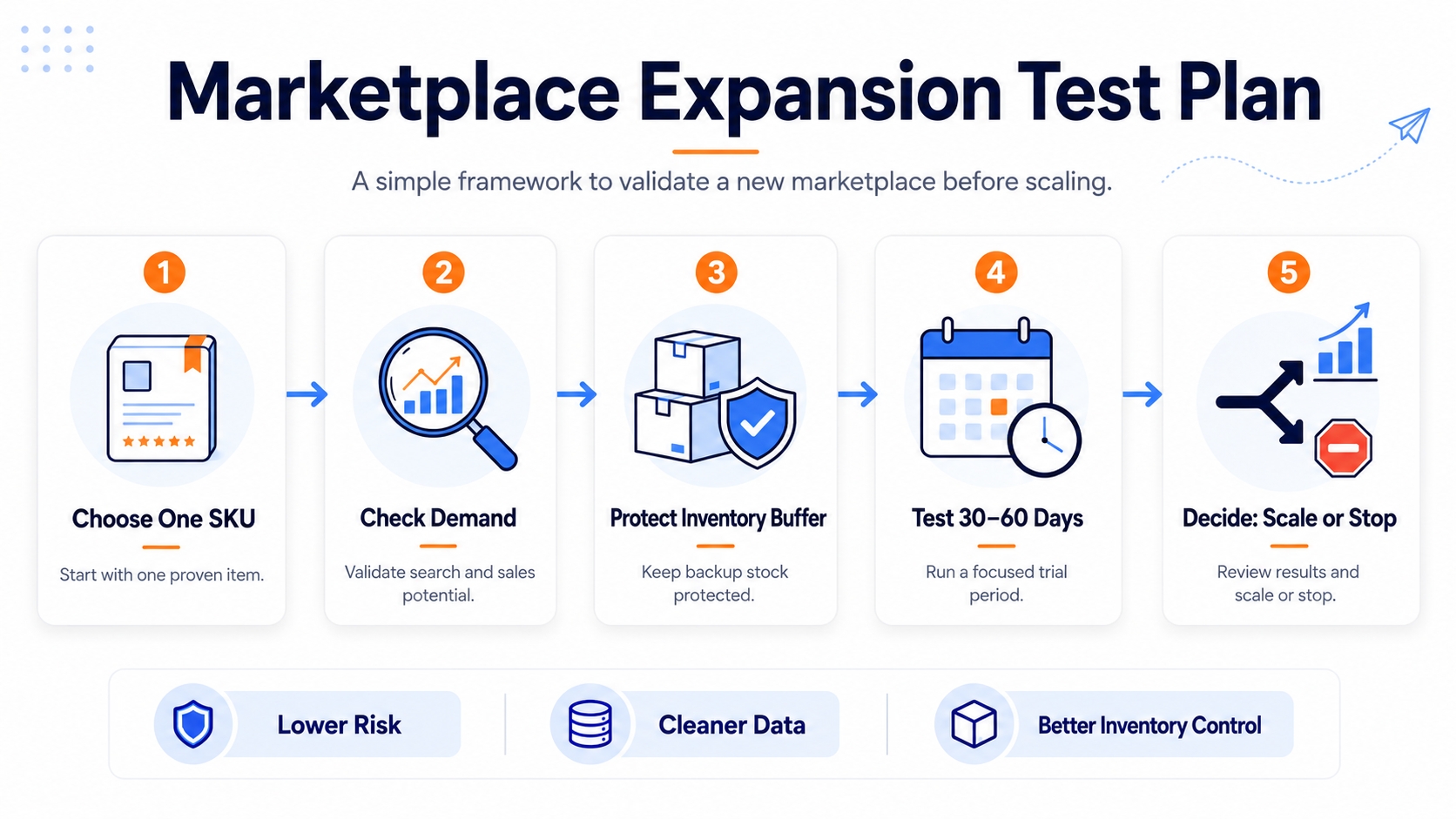
A low-risk testing framework
- Choose one SKU: pick a product with stable inventory and predictable fulfillment.
- Check demand: manually search the target marketplace and confirm that similar products are selling.
- Protect inventory: leave a buffer so Amazon campaigns and external channel orders do not collide.
- Measure for 30 to 60 days: track orders, fees, returns, customer service time, and net profit.
- Scale only if clean: expand after the process is profitable and stable.
Tip
Treat a second marketplace as an experiment, not a rescue plan. Strengthen your Amazon listing first if it needs improvement.
Protect Your Listing With a Weekly Monitoring Checklist
Listing problems is easiest when they are caught early. The Featured Offer's position atop the product detail page depends on competitive price, shipping, order experience, and inventory availability. Losing it can quickly impact sales, so stay alert and act swiftly.
The seven signals to monitor
| Signal | Why it matters | First response |
|---|---|---|
| Featured Offer lost | The main purchase button may no longer favor your offer | Review price, inventory, shipping, account health, and other offers |
| Seller count changed | Unexpected sellers can create offer competition or counterfeit risk | Document the offer and review brand protection options |
| Dimensions changed | Incorrect size or weight can increase FBA fees | Compare to actual product specs and open a case if needed |
| Category changed | Ranking, relevance, and browse visibility may shift | Confirm the correct browse node and request correction |
| One to three star reviews | Conversion can drop if review issues repeat | Use Review Analysis to identify patterns and fix root causes |
| Listing suppressed | Your product may lose discoverability | Check policy messages and correct the trigger immediately |
| Negative seller feedback | Seller reputation may affect trust and operational health | Review the issue, respond professionally, and fix process gaps |
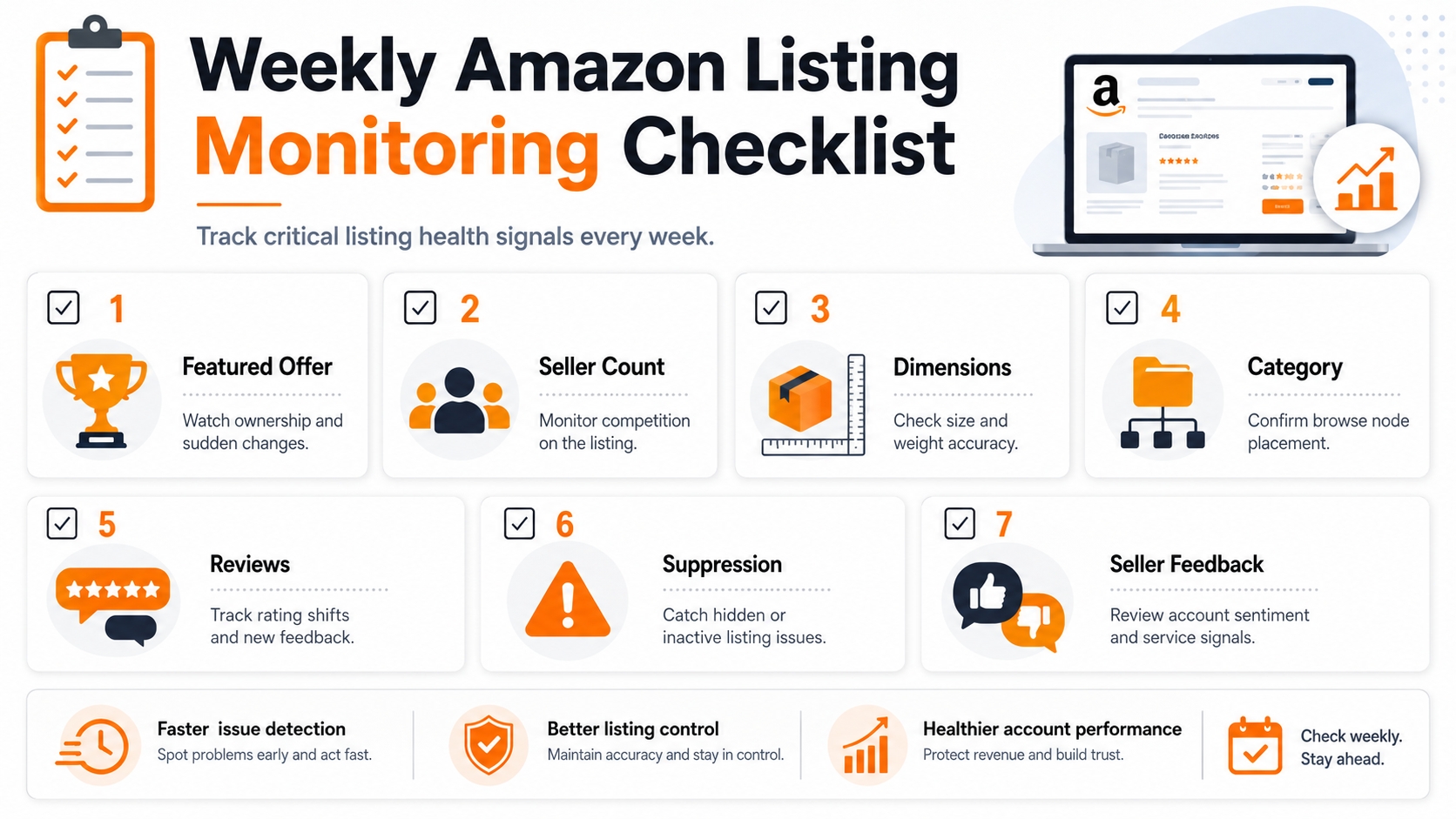
SellerSprite workflow
Add your key ASINs to SellerSprite Product Tracker, monitor core launch keywords in Keyword Tracker, and leverage Review Analysis when low ratings occur. Focus only on signals that truly affect revenue; this disciplined approach drives results.
Comparison and Selection
Use this table to decide what to implement first.
| Operating area | Priority | Time cost | Best timing |
|---|---|---|---|
| Unfulfillable inventory settings | High | Low | Before launch or immediately after first returns |
| FBA reimbursement audit | High | Medium | Monthly |
| Brand content repurposing | Medium | Medium | After listing images and A+ assets exist |
| Cross channel test | Optional | Medium | After Amazon listing is stable |
| Listing monitoring checklist | High | Low | Weekly |
Examples and Templates
Example 1: Weekly operations checklist
Copy and paste
1. Check Featured Offer status for top ASINs.
2. Check seller count for unexpected offers.
3. Confirm category and dimensions are unchanged.
4. Review one to three-star reviews and negative seller feedback.
5. Confirm no suppression or policy warning is active.
6. Check SellerSprite Product Tracker and Keyword Tracker for unusual movement.
Example 2: Monthly reimbursement audit columns
- Month audited
- ASIN and FNSKU
- Event type
- Units affected
- Report source
- Expected reimbursement
- Reimbursement received
- Case ID
- Status and notes
Example 3: Unfulfillable inventory decision template
Copy and adapt
If the unit value is high: return for inspection unless the damage rate is consistently severe.
If packaging damage is common: consider refurbishment where eligible.
If handling cost exceeds the recovery value: liquidation or disposal may be the cleaner option.
If inventory is seasonal: decide quickly so storage and timing do not erase value.
FAQs
Q1: Should I automatically dispose of all unfulfillable inventory?
A: No. Disposal is simple, but it can destroy value. Compare disposal fees, return fees, inspection costs, resale potential, and product value before choosing a default.
Q2: How often should I audit FBA reimbursements?
A: Monthly is a practical baseline. Higher volume sellers can audit every two weeks to keep evidence fresh and cases easier to manage.
Q3: What should I monitor first if I only have one product?
A: Start with Featured Offer status, seller count, listing suppression, review changes, and category changes. These can affect sales quickly.
Q4: How can SellerSprite help with Amazon operations?
A: Use SellerSprite Product Tracker for ASIN movement, Keyword Tracker for ranking movement, Keyword Mining and Reverse ASIN for keyword planning, and Review Analysis for customer issue patterns.
Summary and Next Steps
Amazon operations are not only about fixing problems after they happen. They are about creating a simple rhythm that catches issues early, protects inventory value, and keeps your listing healthy.
Set your defaults, audit monthly, track weekly, and keep improving. Calm systems create confident sellers.
Next step action checklist
- Set or review automated unfulfillable inventory settings in Seller Central.
- Create a monthly FBA reimbursement audit sheet.
- Build a reusable creative library for brand assets.
- Test extra channels only after your Amazon listing is stable.
- Add your ASINs and core keywords into SellerSprite trackers.
- Review the seven listing protection signals every week.
Share Your Sourcing Journey With SellerSprite Community
Join the SellerSprite community on the Facebook Group to share your sourcing journey, ask questions, and get support from fellow Amazon sellers.
View The SellerSprite Course Directory
Ready for the next step? Open the SellerSprite Academy course directory to continue building your Amazon FBA skills chapter by chapter.
About the author
SellerSprite Team publishes practical, execution-focused playbooks for Amazon sellers, combining platform workflows, SellerSprite Seller Tools, and reusable templates so you can scale with fewer mistakes.


