TL;DR: Learn how to identify low competition Amazon keywords with high demand by analyzing SERP quality, ad pressure, and buyer intent, then use strategic long-tail expansion and gap analysis to dominate niche opportunities in 2026.
Key Takeaways
- "Low competition" means winnable SERP positioning, manageable ad costs, and realistic conversion potential, not just low search volume.
- Use a 3-layer competition model: SERP quality, ad density, and buyer intent alignment to avoid misleading keyword scores.
- Long-tail keywords with modifiers (use case, compatibility, problem/solution) offer higher intent and lower CPCs than broad terms.
- Leverage reverse ASIN research and keyword gap analysis to uncover underserved customer needs your competitors miss.
- Always validate keywords with real SERP checks before investing in SEO or PPC campaigns.
Table of Contents
- What "Low-Competition" Really Means (And Why High Demand Changes the Game)
- The 3 Competition Layers You Must Evaluate (Not Just One Score)
- Define Your "Winnable Keyword" Criteria (Before Research)
- Step 1: Start With High-Demand Niches, Then Drill Down to Long-Tails
- Step 2: Find Low-Competition Keywords With SellerSprite (Fast Workflow)
- Step 3: Validate "Low Competition" Without Guessing (SERP Reality Checks)
- Step 4: Use Keyword Gap Analysis to Find Missed Opportunities
- Step 5: Turn Winners Into an SEO + PPC Plan (So You Actually Capture Demand)
- Mini Case Study Template (Fill-in-Your-Own Example)
- Common Mistakes (Why "Low Competition" Keywords Still Fail)
- FAQ
- References
Note on marketplaces: This guide is specifically optimized for the US market.
What "Low-Competition" Really Means (And Why High Demand Changes the Game)
Many sellers assume "low competition" means low search volume or few advertisers. But in reality, a truly low-competition keyword on Amazon is one where you can realistically rank, convert, and profit, even as a new or growing brand.
Definition: Low Competition Amazon Keyword
A keyword is "low competition" when it meets all three criteria: winnable SERP positioning (top 10 results aren't dominated by mega-brands), manageable ad pressure (few sponsored listings, CPC under $1.00), and realistic conversion expectations (clear buyer intent, product-market fit).
Demand vs. Difficulty: Why High-Demand Keywords Are Usually Expensive
High-demand keywords attract more sellers and advertisers. According to an statistical Amazon Trends Report, top-performing keywords in profitable niches often have 10x the ad competition of long-tail variants. But that doesn't mean you should avoid them entirely.
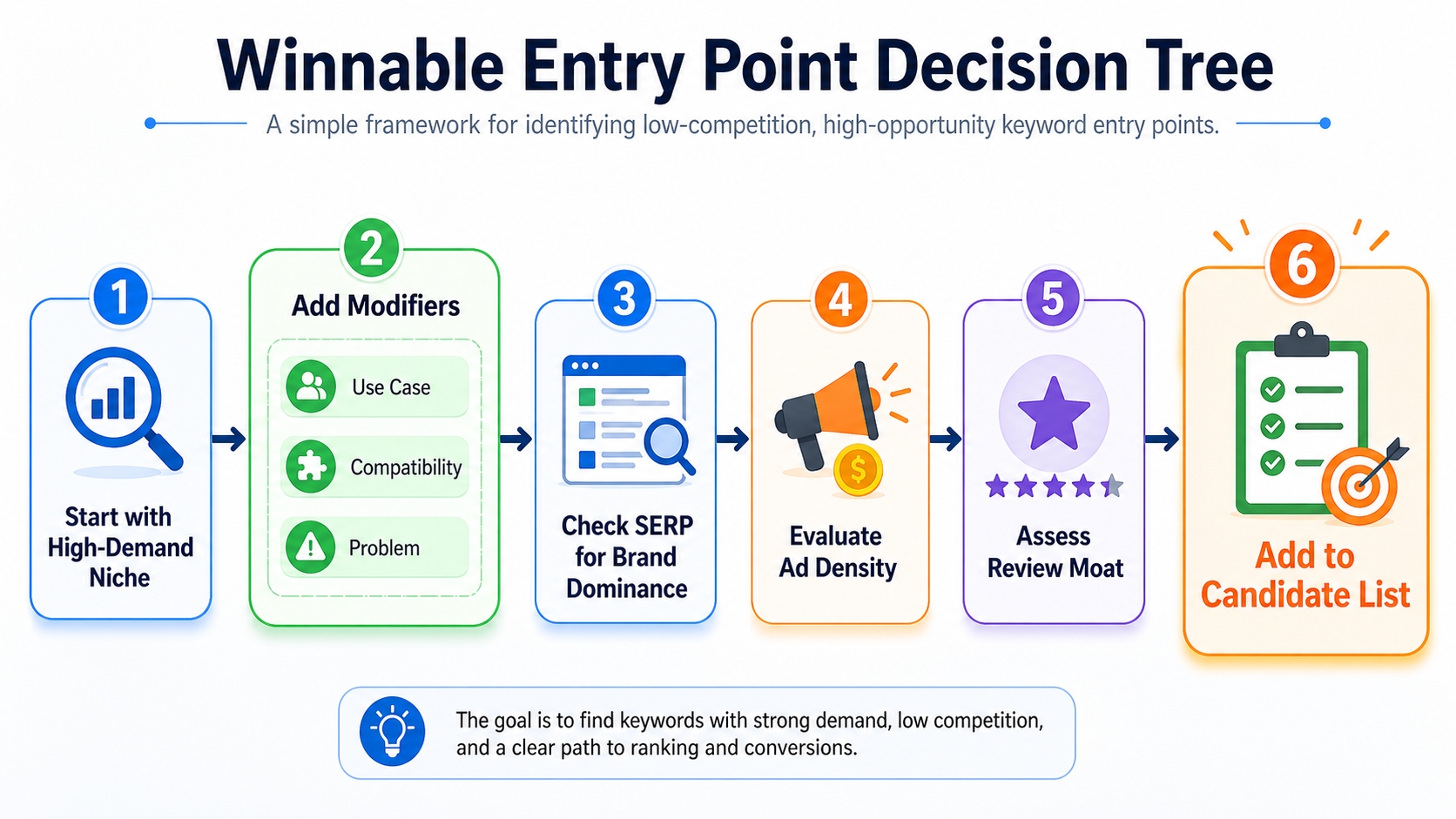
Instead, your goal is to find winnable entry points: long-tail versions of high-demand terms where buyer intent is strong but competition is fragmented or poorly served.
The Goal: Find "Winnable Entry Points" Inside Big Niches (Not Avoid Big Niches)
Big niches like "protein powder" or "yoga mats" are saturated, but they also represent massive demand. The key is not to compete head-on, but to target sub-segments like "vegan protein powder for women over 40" or "non-slip travel yoga mat" where competition drops significantly.
These are your winnable entry points: high-intent, lower-competition keywords that let you build traction before scaling into broader terms.
The 3 Competition Layers You Must Evaluate (Not Just One Score)
Most Amazon keyword tools give you a single "difficulty" score. But that number can be misleading. True competition has three dimensions: organic SERP quality, paid ad pressure, and buyer intent alignment.
SERP Competition: Review Moat, Listing Quality, Brand Dominance
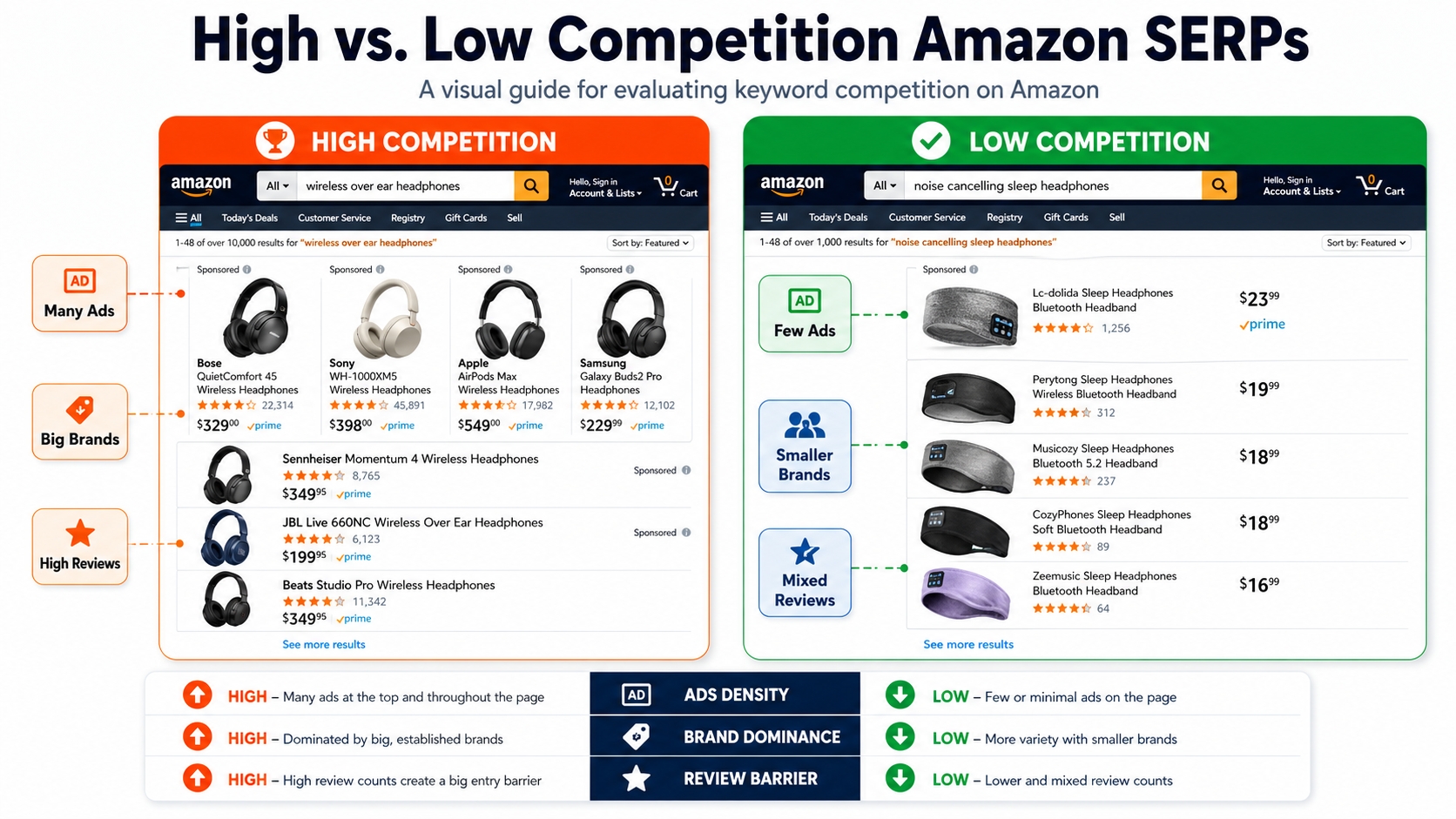
Even if a keyword has low ad competition, the organic results might be dominated by brands with thousands of reviews. This creates a review moat, which means a barrier to ranking that can't be overcome with SEO alone.
Look at the top 10 listings: Are most from established brands like Amazon Basics or Anker? Do they have clean images, bullet points, and A+ content? If yes, this keyword may not be winnable for a new seller.
Quick Check: Median Reviews in Top 10 + How Many Big Brands Control Page One
A simple rule: if the median review count in the top 10 is over 1,000 and more than 5 listings are from major brands, consider it high competition. Under 300 reviews and 2 or fewer big brands? That's a potential win.
Ad Competition: Sponsored Density + CPC Inflation Risk
High ad density (3+ sponsored products above the fold) signals strong commercial intent and high CPCs. Use tools like SellerSprite Reverse ASIN tool to estimate average CPC and sponsored impression share.
If CPC exceeds your break-even ACoS, even a high-converting keyword won't be profitable. Always factor in your margin when evaluating ad competition.
Intent Competition: Are Buyers Comparing Options or Buying Immediately?
Some keywords attract window shoppers; others attract ready-to-buy customers. "Best wireless earbuds" suggests comparison shopping, while "Apple AirPods Pro replacement case" indicates immediate purchase intent.
Target keywords with transactional intent because they convert better and are less sensitive to minor listing flaws.
Competition Snapshot Checklist
- Median review count in top 10 ≤ 300?
- Fewer than 3 major brands on page one?
- Fewer than 3 sponsored ads above the fold?
- Average CPC < 20% of product price?
- Top listings have weak differentiation or poor images?
- Keyword matches your exact product variant?
- Buyer intent is transactional (not informational)?
- Customer questions reveal unmet needs?
- Reviews mention missing features you offer?
- No dominant brand with >50% of top 10 spots?
Define Your "Winnable Keyword" Criteria (Before Research)
Before diving into keyword research, define what "winnable" means for your business. This prevents wasted effort on keywords that look good on paper but don't align with your goals.
Your Constraints: Margin, Break-Even ACoS, Lead Time, Review Count
If your product has a 30% margin, your break-even ACoS is 30%. That means any keyword with CPC > $3.00 for a $10 product is risky. Similarly, if you're launching with 0 reviews, avoid keywords dominated by 1,000+ review listings.
Your Targets: P1 (Profit Now) vs. P2 (Growth) vs. P3 (Exploration)
Categorize keywords by priority:
- P1: High intent, low competition, immediate ROI
- P2: Medium competition, scalable, supports brand growth
- P3: Experimental, long-term play, low volume
Your Exclusion Rules: Irrelevant Terms, Competitor Brands, Mismatched Use Cases
Automate filtering by excluding:
- Competitor brand names (e.g., "for iPhone")
- Irrelevant use cases (e.g., "for cats" if you sell dog products)
- Unrelated categories (e.g., "industrial use" for consumer goods)
Step 1: Start With High-Demand Niches, Then Drill Down to Long-Tails
Begin with high-volume core terms in your niche, then expand into long-tail variations using modifiers. This ensures you're targeting real demand, not just low-competition ghosts.
Build the Niche "Core Term" List (Head + Mid-Tail)
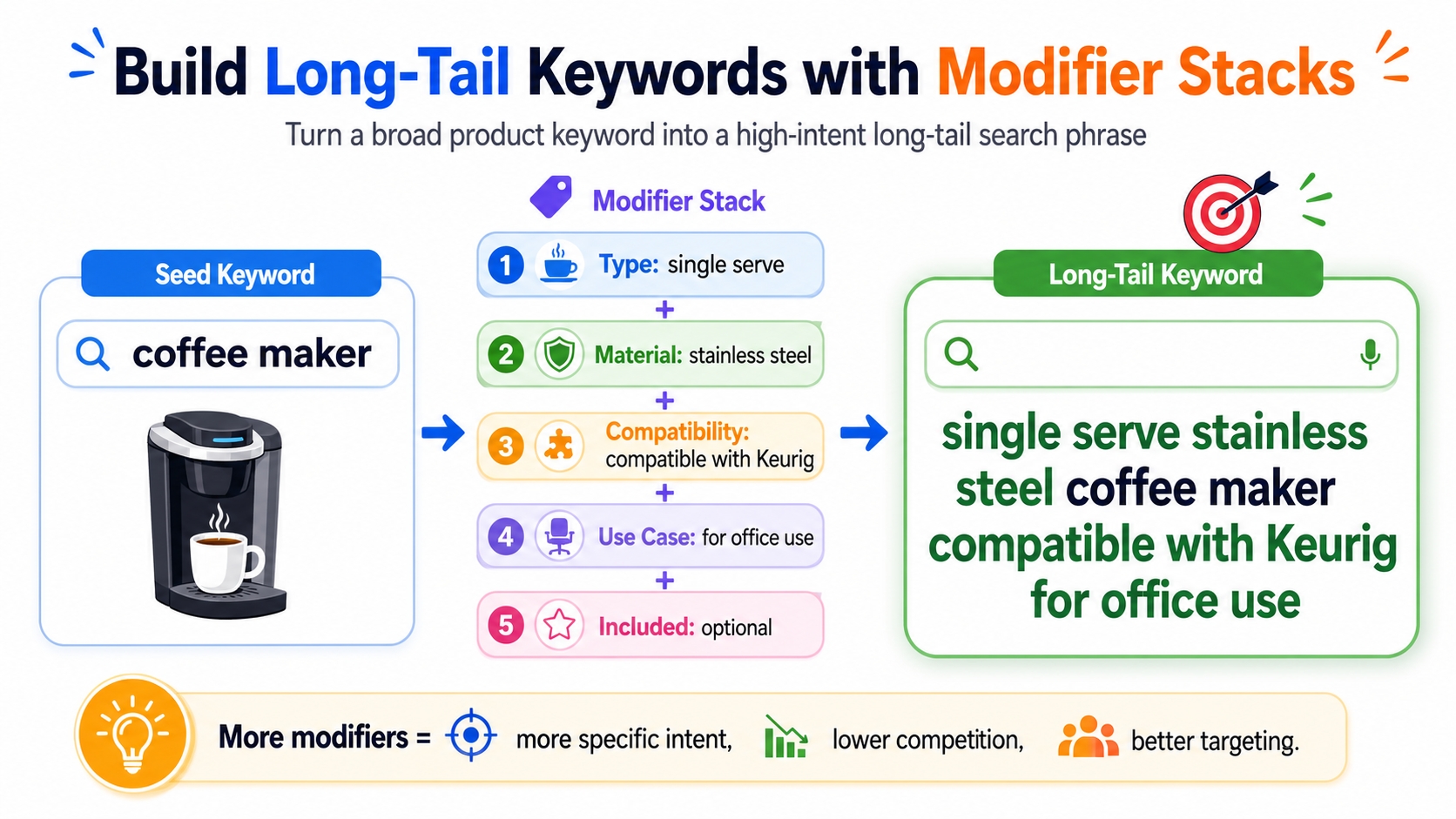
Use Amazon keyword research tools to identify head terms (e.g., "coffee maker") and mid-tail terms (e.g., "single serve coffee maker"). These form your foundation.
Create Modifier Stacks That Generate Long-Tail Opportunities
Combine core terms with modifiers to create long-tail keywords. Here are the most effective types:
Attribute Modifiers: Size, Material, Pack, Strength, Feature
Examples: "large", "stainless steel", "12-pack", "extra strength", "with timer".
Use-Case Modifiers: For Travel, For Kids, For Hiking
Examples: "for camping", "for toddlers", "for office use".
Compatibility Modifiers: Compatible With X, Fits Y
Examples: "compatible with Keurig", "fits iPhone 15".
Problem/Solution Modifiers: For Back Pain, For Oily Skin
Examples: "for sensitive skin", "anti-slip", "noise cancelling".
Why Long-Tails Win: Clearer Intent, Lower CPC, Higher CVR (Often)
Long-tail keywords have lower search volume but higher conversion rates. A study found that long-tail keywords convert 2.3x higher than broad terms, with 40% lower CPCs on average.
Step 2: Find Low-Competition Keywords With SellerSprite (Fast Workflow)
SellerSprite streamlines the entire process, from discovery to validation. Here's how to use it effectively.
Keyword Research: Pull Demand + Core Keyword Set
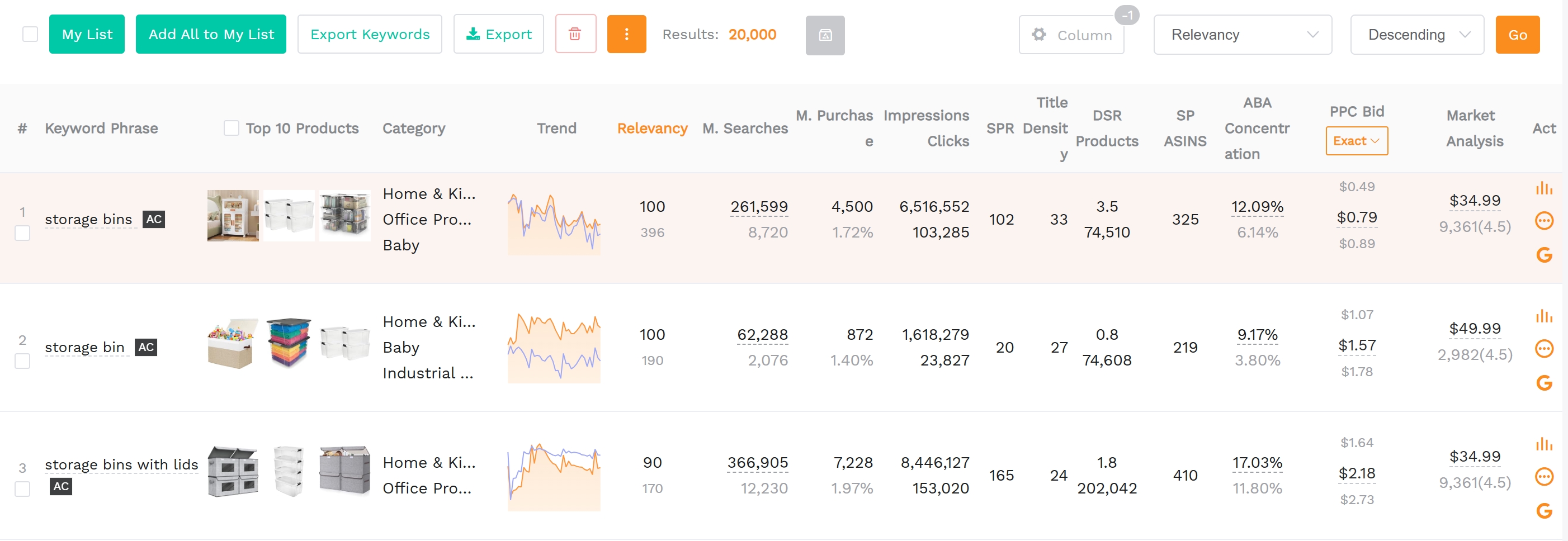
Start with the Keyword Research tool to extract high-demand keywords in your niche. Filter by monthly search volume and relevance.
Keyword Mining: Expand Modifier-Based Long-Tails You Can Win
Use the "Keyword Mining" feature to auto-generate long-tail variations. Apply your exclusion rules and sort by relevancy and SPR.
Reverse ASIN: Extract Competitor Traffic Terms and Identify Gaps
Enter top competitor ASINs to see which keywords they rank for. Look for terms with high traffic but poor listing alignment; these are your gap opportunities.
Build a "Candidate List" With Tags
Organize keywords using tags for easy filtering and prioritization.
Intent Tag (Core/Attribute/Use Case/Compatibility/Problem)
Helps map keywords to content strategy (e.g., problem keywords go in bullet points).
Priority Tag (P1/P2/P3)
Ensures focus on high-ROI terms first.
Channel Tag (SEO/PPC/Both)
Aligns keyword use with campaign type.
Keyword Candidate Table (Copy/Paste Template)
Keyword | Search Volume | CPC | Relevancy | SPR | Intent Tag | Priority | Channel | SERP Fit | Notes
Step 3: Validate "Low Competition" Without Guessing (SERP Reality Checks)
Never trust a keyword competition score alone. Always validate with real SERP analysis.
The SERP-Fit Test: Do Page-One Results Match Your Exact Product?
If the top results are for a different product type (e.g., you sell a case but results show screen protectors), the keyword isn't relevant even if it ranks.
The Review Moat Test: Are Top Results Beatables for Your Stage?
If you have 10 reviews and the top listing has 2,000, you'll need more than good SEO to compete. Look for listings with weak differentiation or outdated images as entry points.
Launch-Friendly Signs: Mixed Review Counts, Weak Differentiation, Messy Listings
These are red flags for competitors, and green lights for you.
The Ad Pressure Test: How Many Sponsored Slots Dominate the Query?
More than 3 sponsored ads? CPC is likely inflated. Use SellerSprite's CPC estimation metric to confirm.
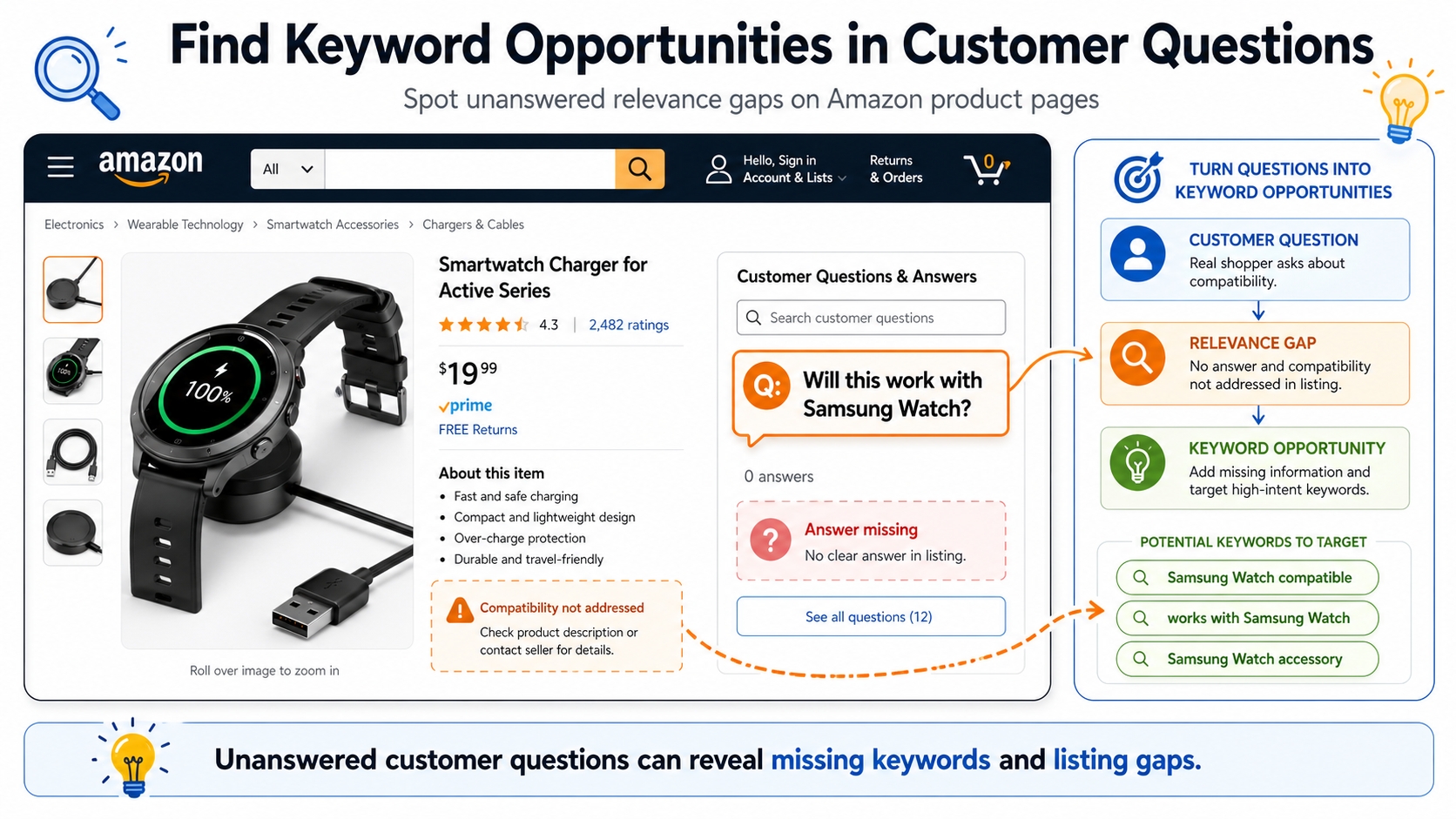
The "Relevance Gap" Test: Buyers Search It, But Results Don't Satisfy Well
Check customer questions and reviews. If buyers ask, "Does this fit X?" and no listing confirms it, that's a relevance gap you can exploit.
Step 4: Use Keyword Gap Analysis to Find Missed Opportunities
Your competitors are ranking for terms you're not. Use gap analysis to find them.
Build Your Competitor Set (3-10 ASINs)
Choose top-ranking ASINs in your niche. Include both direct competitors and adjacent players.
Export Keywords With Reverse ASIN and Isolate "Competitor-Only" Terms
Use SellerSprite's Reverse ASIN tool to extract keywords. Filter for terms your product ranks for zero, but competitors do.
Prioritize Gaps That Match Your Differentiation
Focus on gaps in:
Underserved Use Cases
E.g., "for left-handed users" if your product supports it.
Compatibility Angles
E.g., "fits model X" if others don't mention it.
"Almost Satisfied" Problems Revealed in Reviews
E.g., "I wish it had a carrying case" → target "with travel case".
Step 5: Turn Winners Into an SEO + PPC Plan (So You Actually Capture Demand)
Winning keywords mean nothing without execution. Here's how to deploy them.
SEO Mapping by Intent Cluster
Group keywords by intent and map them to listing elements:
Title: One Primary Term + Key Differentiator
E.g., "Noise-Cancelling Earbuds for Travel with 24-Hour Battery".
Bullets: One Intent Theme Per Bullet
Dedicate each bullet to a modifier type: use case, compatibility, problem/solution.
Backend: Leftover Variants (No Repetition, No Stuffing)
Include synonyms and common misspellings, but avoid keyword stuffing.
PPC Match-Type Ladder
Start broad, then refine:
- Discovery: Broad/Phrase match to gather data
- Promotion: Promote converting terms to Exact match
Negative Keyword Rules to Protect ACoS
Add negatives early to block irrelevant traffic. But keep learning campaigns running with low bids to discover new terms.
Stop Irrelevant Spend Fast While Keeping Learning Alive
Balance efficiency with exploration.
Mini Case Study Template (Fill-in-Your-Own Example)
Use this template to apply the framework to your niche.
Starting Niche + Core Term
E.g., "yoga mats", core term: "non-slip yoga mat".
Long-Tail Stack Created (Attributes/Use Case/Compatibility)
E.g., "extra thick non-slip travel yoga mat for beginners with carrying strap".
SERP + Ad Density Checks (What Looked "Winnable")
Median reviews: 180; 2 sponsored ads; 1 major brand. Passed checklist.
Results to Track: Rank Lift, CVR, CPC, ACoS by Cluster
After 60 days: ranked #3 organically, CVR 8.2%, ACoS 24%.
Common Mistakes (Why "Low Competition" Keywords Still Fail)
Chasing Low Competition But Low Intent (No Sales)
Low competition ≠ high conversion. Always validate intent.
Ignoring Review Moat and Brand Dominance
You can't outrank 5,000-review listings with SEO alone.
Not Separating Discovery vs. Scale Campaigns
Use different budgets and KPIs for testing vs. scaling.
Copying Competitor Keywords Without Offer Alignment (CVR Drops)
If your product doesn't solve the problem, the keyword won't convert.
FAQ
How to find low competition keywords on Amazon?
Use tools like SellerSprite Keyword Mining to identify high-demand, low-difficulty keywords. Combine core terms with modifiers (use case, compatibility, problem) to create long-tail variations. Validate each keyword with SERP checks: review count, ad density, and listing relevance.
What are the best tools for Amazon keyword research in 2026?
Top tools include SellerSprite, Helium 10, and Jungle Scout. SellerSprite excels in reverse ASIN analysis, keyword gap detection, and low-competition long-tail generation. For a full comparison, see our guide to the best Amazon keyword research tools.
What is a "good" keyword difficulty for a new listing?
For new listings, aim for keywords where the median top 10 review count is under 300, fewer than 3 sponsored ads, and no dominant brand presence. This increases your chances of ranking and converting without heavy ad spend.
How many long-tail keywords should I target first?
Start with 10-15 high-priority long-tail keywords (P1). Focus on those with clear intent, low competition, and strong alignment with your product. Expand as you gather performance data.
Next Steps
- Use SellerSprite Keyword Mining to find low competition Amazon keywords in your niche.
- Apply the Competition Snapshot Checklist to validate each keyword before launching.
References
By SellerSprite Success Team
The SellerSprite Success Team combines 10+ years of Amazon marketplace experience across data science, e-commerce operations, and growth marketing. We've helped thousands of sellers optimize their keyword strategies using real-time analytics and proven frameworks.


