Finding profitable products on Amazon is not about luck. It is a repeatable Amazon FBA product research process that turns messy ideas into a short list of winners you can launch with confidence.
This guide is written for Amazon sellers in North America and Europe (US, CA, UK, DE, and more), especially FBA sellers who want a data-driven product research strategy that works across marketplaces.
Key takeaways
- Use a 5-step workflow: Idea, Demand, Competition, Profit, Validation.
- Start with long-tail keywords to uncover low-competition niches and product angles.
- Mine reviews to build differentiation, not just copy the best seller.
- Model unit economics early to avoid products that sell but do not profit.
- Pre-launch testing (polls and feedback) reduces expensive inventory mistakes.
Table of contents
- Who this guide is for
- The 5-step workflow overview
- Step 1: Define your Amazon product criteria
- Step 2: Generate product ideas (Amazon, Google, Etsy)
- Step 3: Validate demand and competition
- Step 4: Evaluate profitability and calculate costs
- Step 5: Validate with real buyers (pre-launch testing)
- Tools summary: SellerSprite plus free alternatives
- Mini case study
- Product research checklist
- FAQ
- About the author and why trust this guide
- References
Who this guide is for
- New sellers choosing a first product for Amazon FBA in the US, CA, UK, DE, or EU marketplaces.
- Intermediate sellers who want a repeatable Amazon product research strategy instead of guessing.
- Brand builders who want to differentiate with features, packaging, or bundles driven by review insights.
- Teams that need a shared system: one spreadsheet, one workflow, one decision standard.
Quick definition: What is a profitable product on Amazon?
A profitable product is one where demand is consistent, competition is beatable, unit economics are healthy after fees and logistics, and your offer has a clear reason to win (not just a lower price).
The 5-step workflow overview
Think of product research as a funnel. You start wide with ideas, then filter with data until only strong opportunities remain.
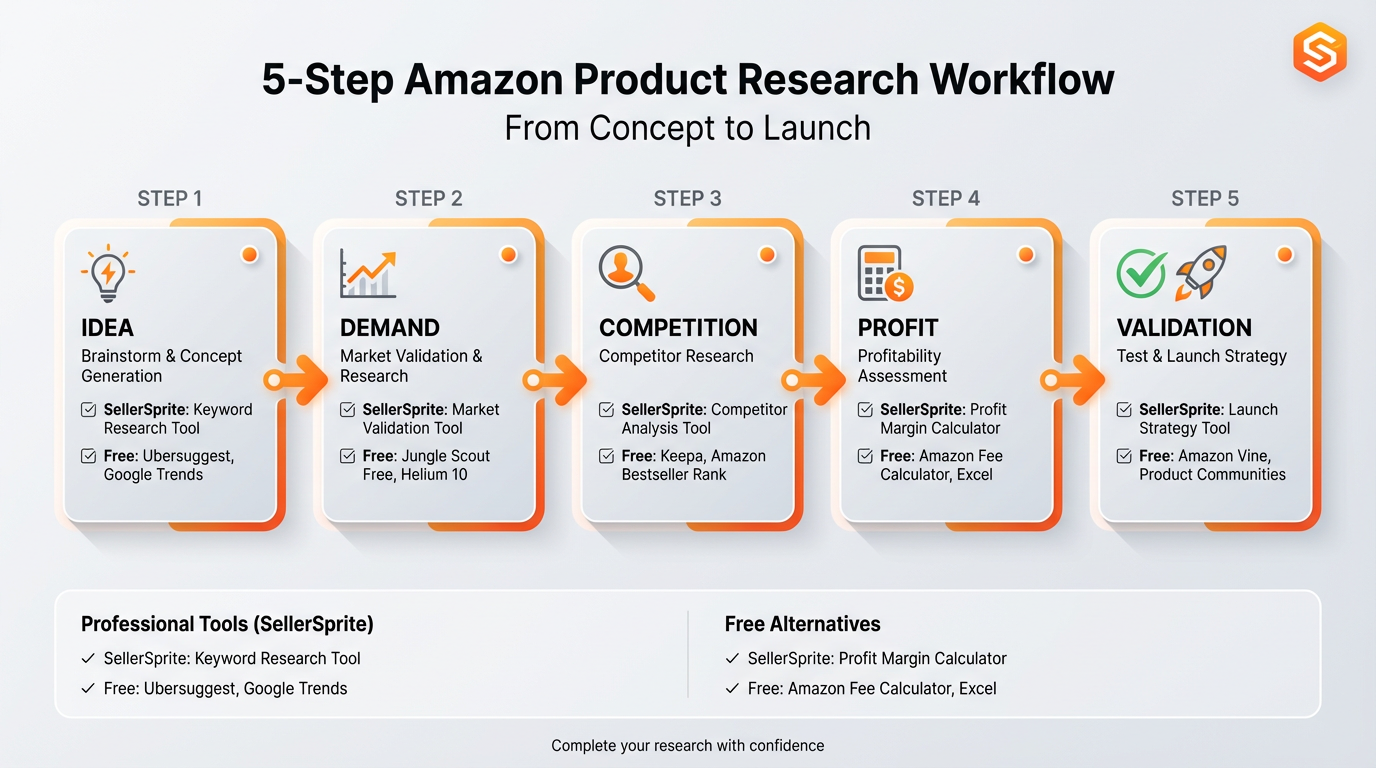
- Idea: generate product ideas from Amazon search behavior and other channels.
- Demand: confirm people actively search and buy (not just talk about it).
- Competition: assess how hard it is to rank and convert against existing listings.
- Profit: model unit economics including Amazon fees, shipping, and COGS.
- Validation: get real feedback before investing heavily in inventory.
Step 1: Define your Amazon product criteria
Your criteria prevent you from falling in love with products that look exciting but do not fit your business model. Set your rules first, then research.
Quick definition: What is BSR?
BSR (Best Sellers Rank) is Amazon's category ranking signal. Lower numbers generally indicate higher sales velocity within that category, but BSR alone is not your profit.
A practical starter criterion (edit to your situation)
- Price band: pick a range where fees and ad costs still allow a margin (example: $20 to $60 on Amazon.com).
- Size and weight: avoid oversized and heavy items early unless you have logistics advantages.
- Complexity: fewer moving parts reduce returns and quality issues.
- Review barrier: target niches where top listings are not protected by thousands of reviews.
- Compliance risk: be cautious with restricted, hazmat, ingestible, or regulated categories.
- Differentiation angle: requires at least one clear improvement (feature, bundle, material, or use-case).
Your next 10-minute task
Write your criteria in one paragraph, then turn it into 6 to 10 bullet rules. Paste it at the top of your idea sheet so every product is judged the same way.
Step 2: Generate product ideas (Amazon, Google, Etsy)
Most sellers start with random product lists. A better approach is to start with real search behavior, because search reveals what shoppers actively want.
Quick definition: What is a long-tail keyword?
A long-tail keyword is a longer, more specific search phrase (example: "insulated lunch bag for kids with name tag"). Long-tail searches often signal clearer intent and can be easier to rank than broad terms.
2.1 Use Amazon Autocomplete to find long-tail product ideas
Start on the marketplace you plan to sell on. For example, use Amazon.com (US) if you sell in the US, and repeat later for Amazon.co.uk or Amazon.de if you expand.
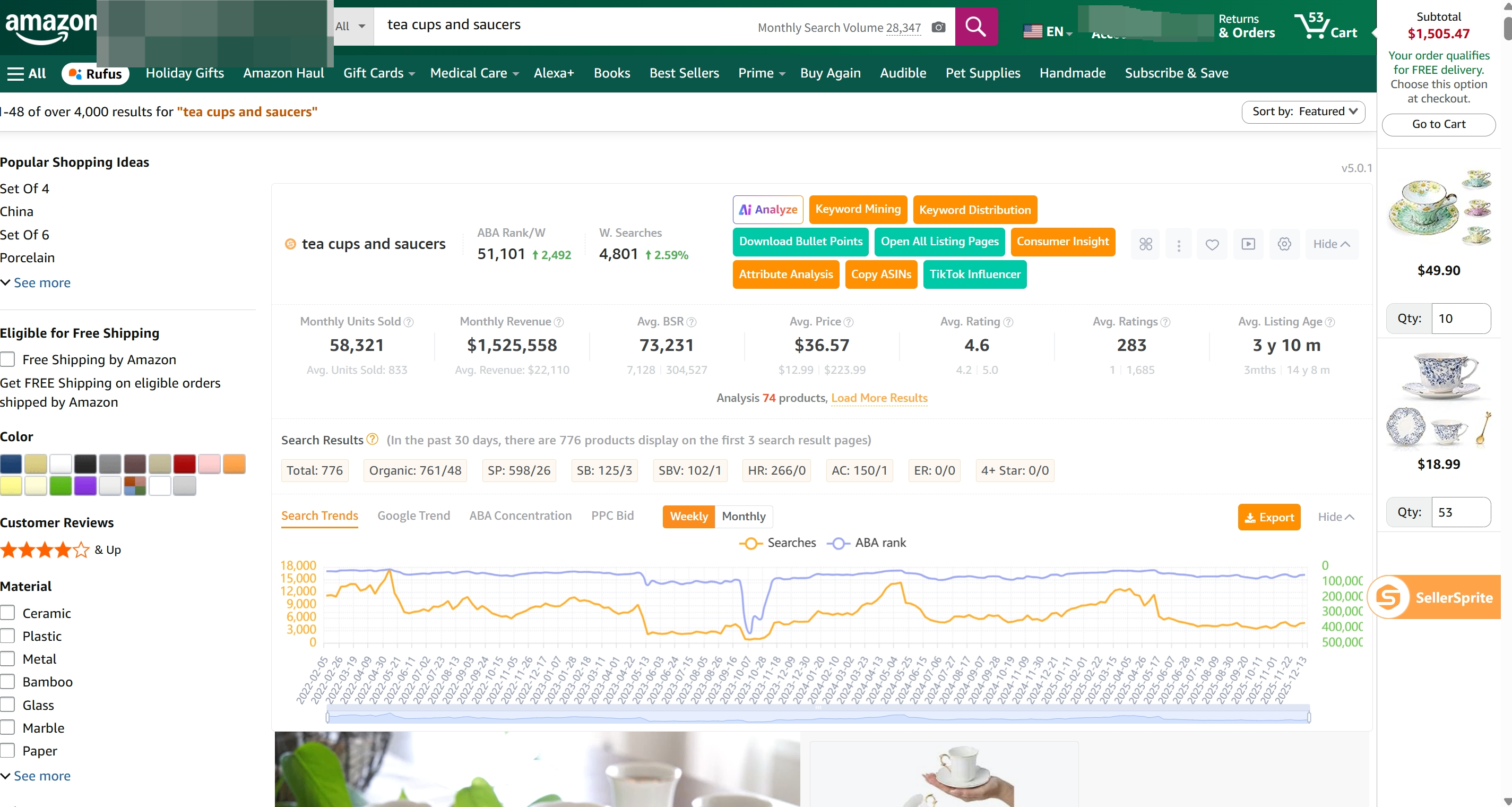
- Type a seed phrase into the Amazon search bar (category keyword, problem, or use-case).
- Copy Autocomplete suggestions into your idea sheet (these are real shopper queries).
- Use the SellerSprite Chrome Extension (Quick View) to speed-check search volume and product signals while you browse.
- Keep a short list of 20 to 50 candidates before you filter hard.
2.2 Validate outside Amazon with Google Trends and Etsy
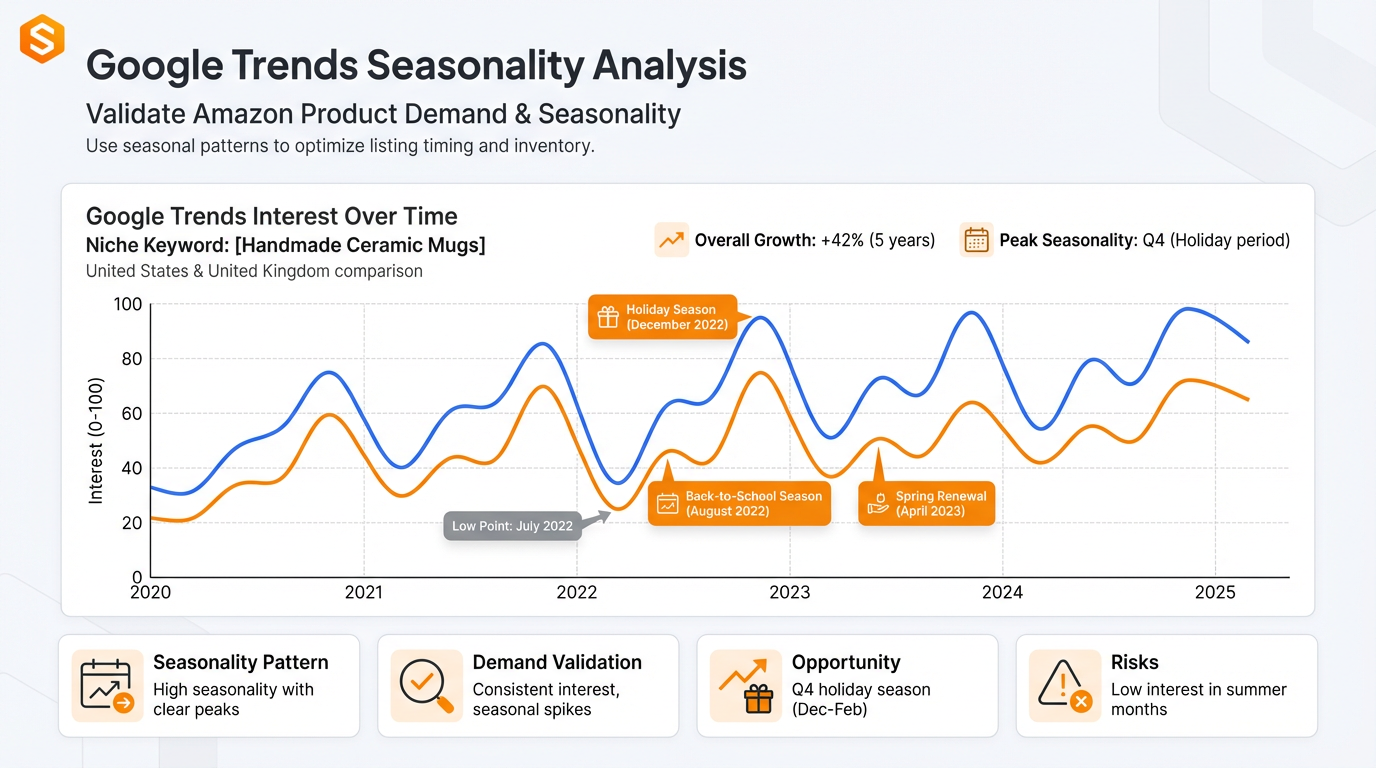
You are not trying to "prove" a product with one chart. You are trying to reduce uncertainty by stacking signals from multiple sources.
- Google Trends: check seasonality and whether interest is rising, stable, or fading in the US, UK, or DE.
- Google Search: scan forums, niche blogs, and Q and A pages for pain points and language customers use.
- Etsy: look for unique variants and bundle ideas, then translate them into an Amazon-ready value proposition.
2.3 Build an idea sheet that makes Step 3 fast
For each idea, capture the minimum data you need to decide quickly:
- Marketplace (US, CA, UK, DE)
- Seed keyword and 3 to 5 long-tail keywords
- Search volume trend and seasonality note
- Top 3 competitor ASINs
- Your differentiation hypothesis (what you will improve)
Boost your Amazon sales
Discover SellerSprite to research product keywords and competitors. Explore features and success stories on SellerSprite.
Your next 10-minute task
On Amazon.com, enter 3 seed keywords from a category you know. Collect 10 Autocomplete long-tail keywords per seed. Save them to your idea sheet and highlight any that include a specific feature (material, size, audience, or use-case).
Step 3: Validate demand and competition
Step 2 gives you ideas. Step 3 decides whether those ideas survive. Here, you answer two questions: does it sell, and can you compete?
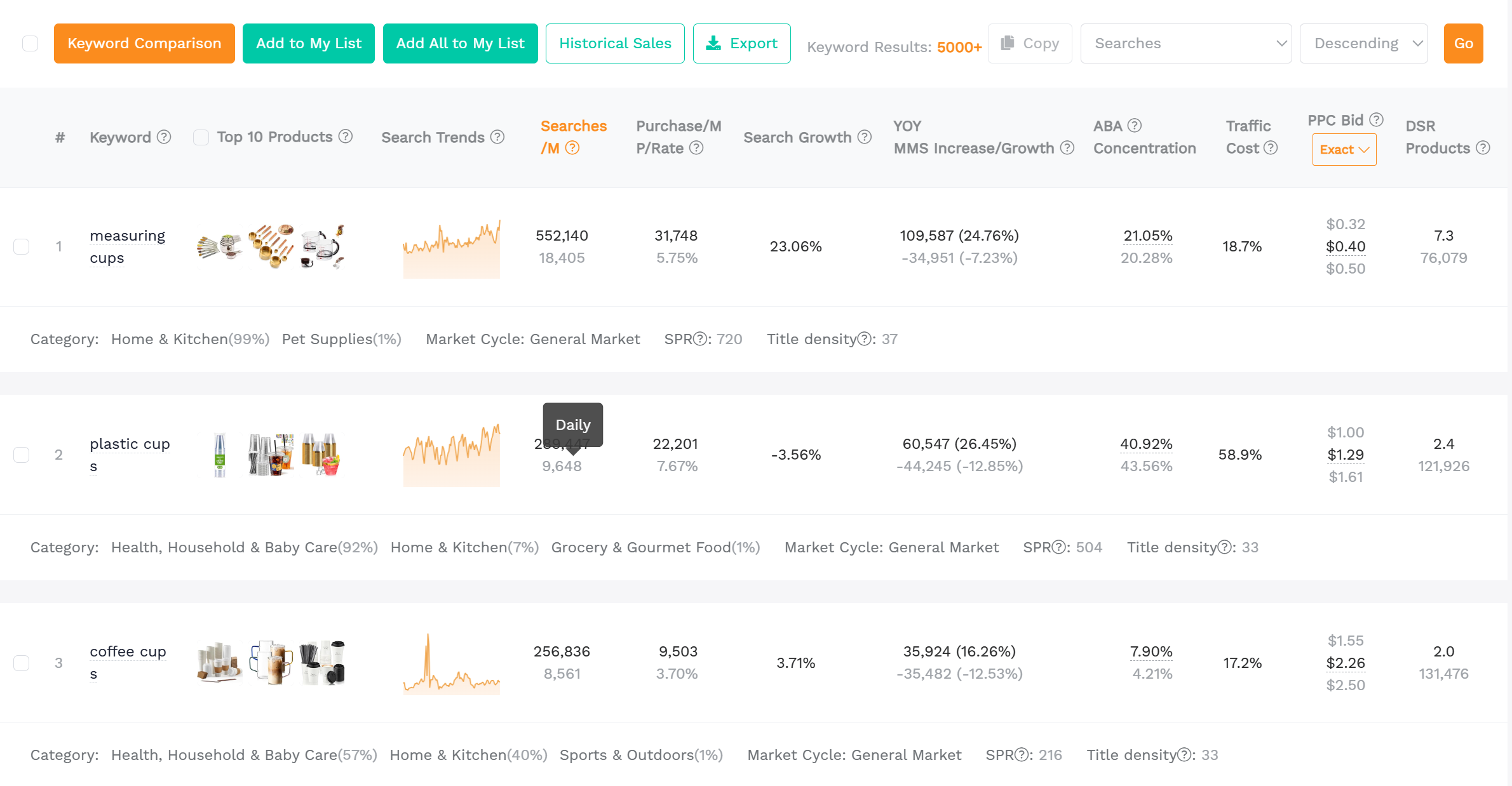
3.1 Demand checks that are hard to fake
- Keyword demand: are there multiple long-tail keywords, not just one broad term?
- Sales reality: use BSR plus a sales estimator to sanity-check monthly volume.
- Consistency: look for steady demand, not a one-week spike.
- Price integrity: if the niche is in a race to the bottom, the margin will suffer.
Quick definition: What is Reverse ASIN?
Reverse ASIN means starting from a competitor product (an ASIN) to find the keywords that drive its traffic and rankings. It helps you understand what you would need to rank for and where gaps might exist.
3.2 Competition checks that protect your time
Use a simple competition scorecard in your idea sheet:
- Review barrier: how many reviews do the top 10 listings have?
- Listing quality gap: are the top listings actually good, or can you win with better content and offer?
- Keyword overlap: do top competitors dominate every relevant keyword, or are there underserved long-tail clusters?
- Brand dominance: is the niche controlled by a few strong brands with clear moats?
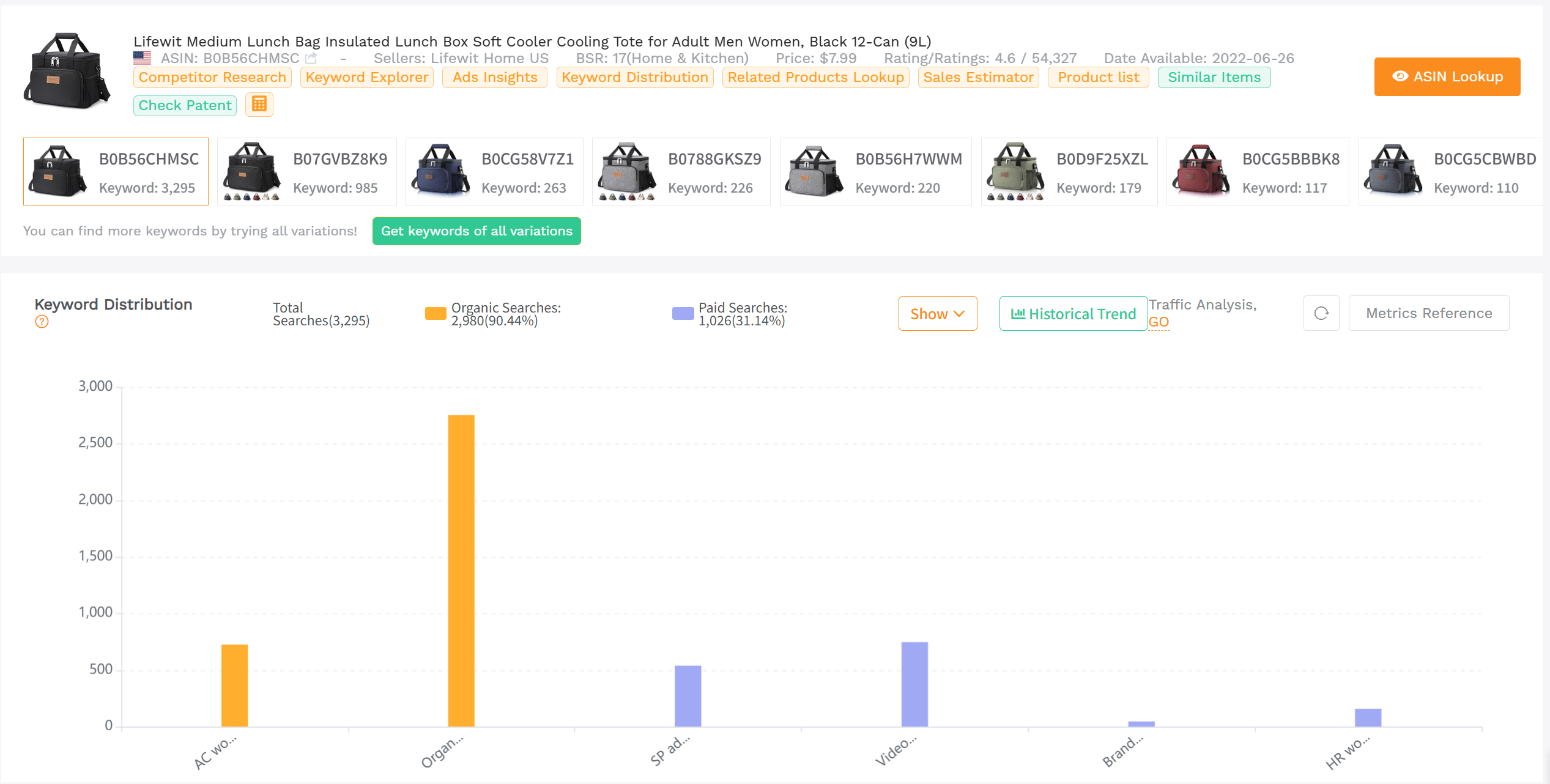
3.3 Review analysis: your roadmap to differentiation
Most newbie sellers skip review mining and launch "me too" products. Review analysis tells you exactly what to fix and what to keep.
- Pick 3 to 5 top competitor ASINs in your target marketplace.
- Collect recurring complaints (breaks, leaks, sizing, missing accessories, unclear instructions).
- Turn the top 2 complaints into product requirements (materials, packaging, bundle, design).
- Turn the top 2 compliments into your primary marketing claims.
Your next 10-minute task
Choose one idea. Open the top 3 competing listings. Write down the top 5 repeated complaints and the top 5 repeated compliments. Convert them into: 2 product requirements, 2 bundle ideas, and 3 bullet claims for your future listing.
Step 4: Evaluate profitability and calculate costs
A product can sell well and still be a bad business. Step 4 protects you from revenue traps by forcing unit economics clarity before you commit.
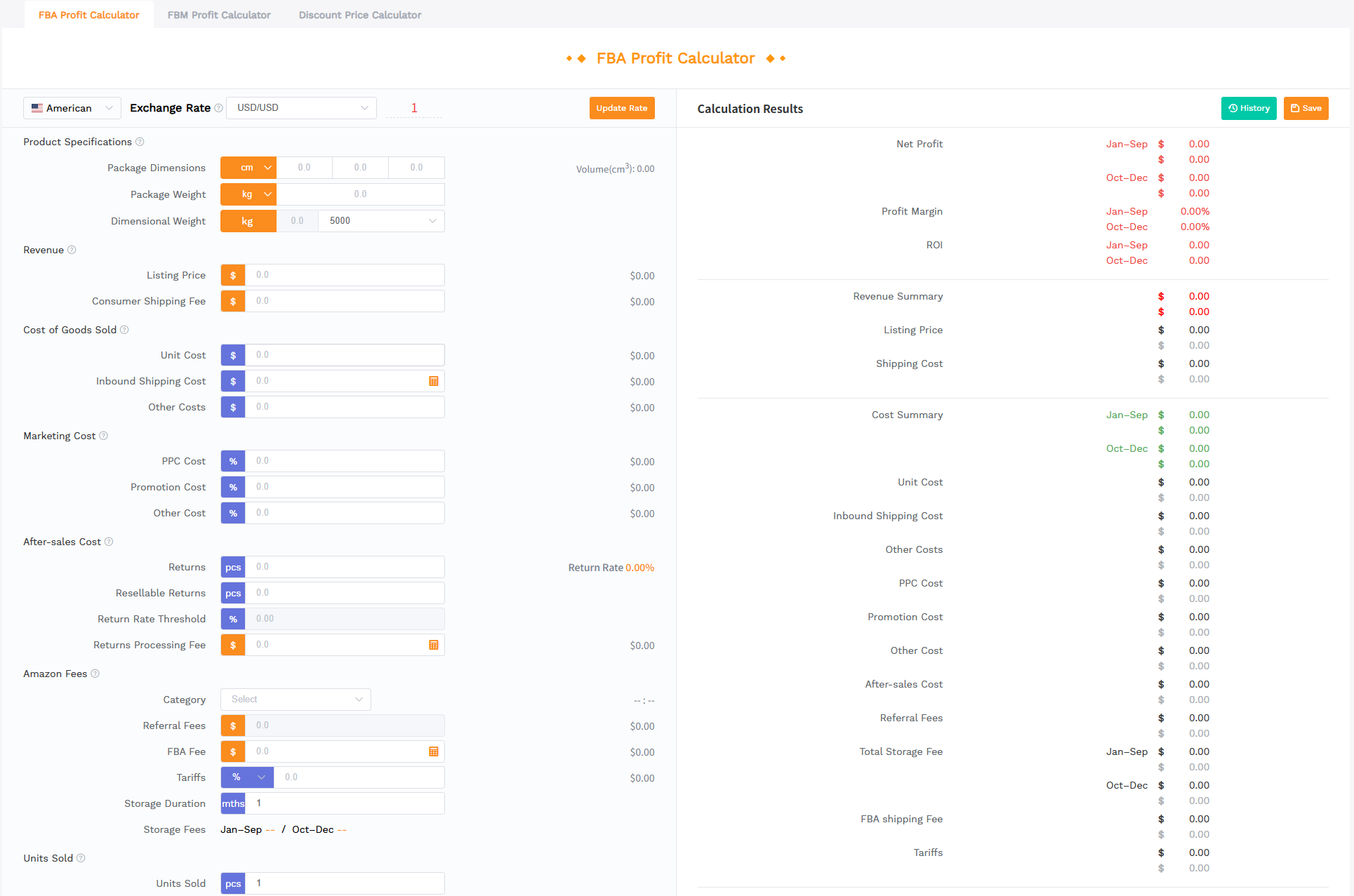
4.1 The cost stack you must model
- Manufacturing or unit cost: include packaging and inserts.
- Shipping and logistics: freight, duties, prep, and inbound to Amazon.
- Amazon fees: referral fee plus FBA fulfillment fees, storage, and other category-specific costs.
- Ad costs: early launch often requires ads; do not ignore TACoS reality.
- Returns and damage: fragile and complex products often cost more than expected.
A simple unit profit formula
Unit profit = Selling price - (COGS + inbound shipping + Amazon fees + expected ad cost + returns allowance)
4.2 What margin should you target?
Many sellers aim for a healthy margin buffer (often 25% to 30% or higher) because price pressure, coupons, and ad costs can quickly shrink your profit. If your model only works with perfect conditions, it is not a good product.
Your next 10-minute task
Pick your best idea and estimate costs conservatively. Add 10% buffer to shipping and 5% buffer to returns. If your margin still looks healthy, keep it. If not, revise the product (bundle, adjust materials, or change niche) before you invest.
Start your SellerSprite journey.
Create your free account and start validating product ideas with data.
Step 5: Validate with real buyers (pre-launch testing)
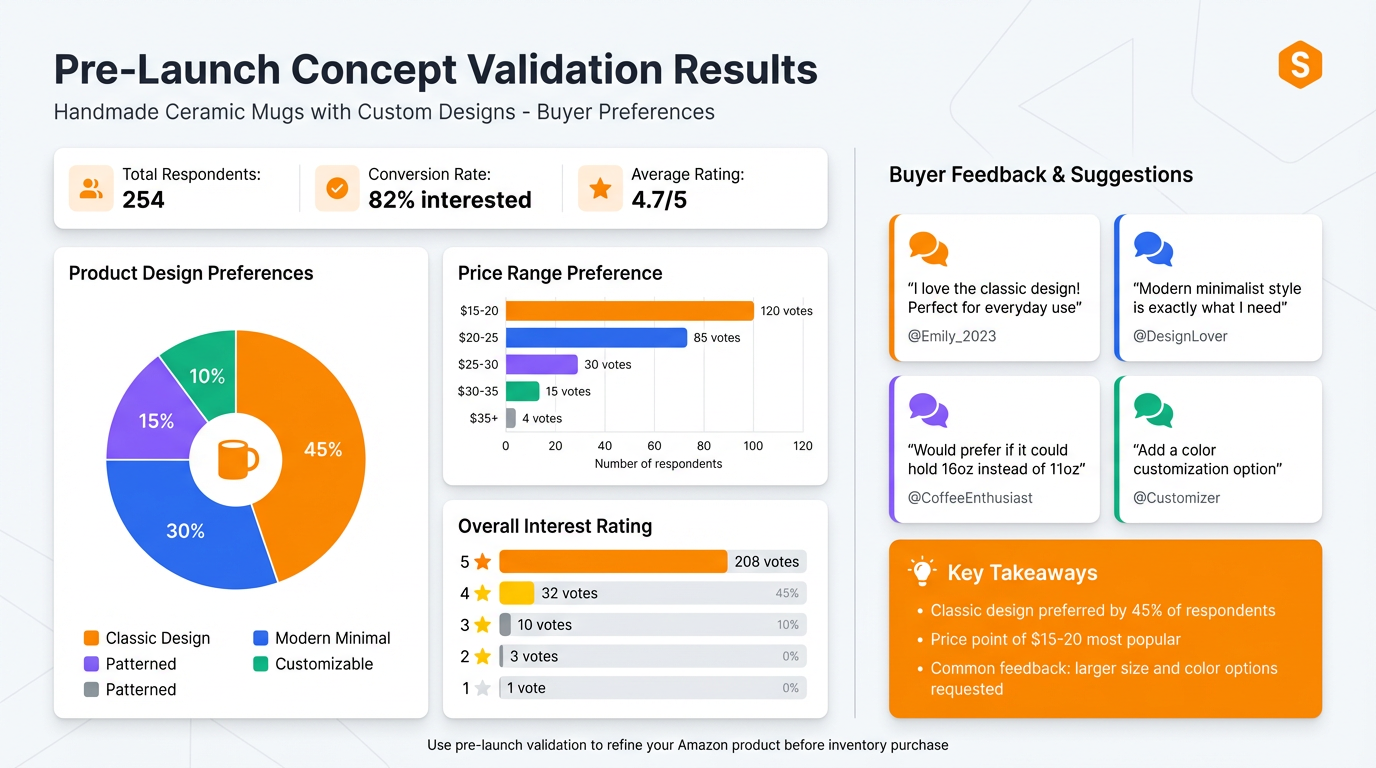
Before you spend thousands on inventory, get unbiased feedback from your target customers. This step is an insurance policy for your launch.
5.1 How to run a fast poll (PickFu style)
- Create a concept image: use a 3D render or clean mockup if the product is not manufactured yet.
- Choose competitors: include 2 to 4 top listings from your marketplace (Amazon.com, Amazon.co.uk, or Amazon.de).
- Ask one clear question: "Which would you buy and why?" is better than 5 confusing questions.
- Filter the audience: match your real buyer profile (age, interests, household type).
- Extract actions: turn comments into design fixes, bundle additions, and copy angles.
Your next 10-minute task
Write your buyer persona in 3 lines (who they are, what they care about, what they avoid). Then draft 2 poll questions and save them. When your concept images are ready, you can launch the poll in minutes.
Tools summary: SellerSprite plus free alternatives
Below is a practical tool map based on the workflow. Use SellerSprite where speed and accuracy matter most, and use free sources to add extra signals.
SellerSprite core modules by stage
- Discover: Product Database and Research for filtering Amazon catalog opportunities.
- Validate: Keyword Mining and Reverse ASIN to understand demand and competitor traffic.
- Speed checks: Chrome Extension (Quick View) for on-the-fly product signals while browsing.
- Differentiate: Review Analysis to extract customer complaints and feature requests.
- Estimate: Sales Estimator to translate BSR into a sales context for decisions.
- Model: Profitability Calculator for margin checks before you invest.
- Trends: Google Trends integration to check seasonality and interest direction.
Free and low-cost alternatives (use as supporting signals)
- Amazon Search Autocomplete: fast long-tail discovery.
- Amazon Best Sellers and Movers and Shakers: trend discovery and category browsing.
- Amazon Reviews: manual review mining plus "search within reviews".
- Google Trends and Keyword Planner: demand direction and broader search language.
- Etsy: unique variants and design inspiration.
- PickFu or similar: pre-launch validation with real feedback.
Mini case study
The fastest way to learn this process is to see how the pieces connect. Below are two anonymized, simplified examples that mirror common outcomes sellers report when they combine keyword research, review mining, and profitability checks. Results vary by execution, costs, and marketplace conditions.
Case A: Home and Kitchen, Amazon.com (US)
- Starting point: broad keyword was competitive, but long-tail clusters showed strong intent (leakproof, dishwasher safe, kids).
- SellerSprite used: Keyword Mining, Reverse ASIN, Review Analysis, Sales Estimator.
- Differentiation: fixed the top two complaints (leaks and broken latches) and bundled one accessory frequently requested in reviews.
- Profit check: used Profitability Calculator to reject a heavier variant and choose a lighter configuration with better fee economics.
- Outcome (illustrative): faster conversion due to clearer value proposition and fewer negative review drivers.
Case B: Pet Supplies, Amazon.de (DE)
- Starting point: demand existed, but competitors were copy-paste listings with unclear instructions and weak visuals.
- SellerSprite used: Chrome Extension (Quick View) for fast checks, Review Analysis to find localization gaps, and Google Trends to confirm seasonality.
- Differentiation: improved instructions and packaging, added one feature repeatedly requested, and localized the listing to match DE search language.
- Validation: ran a small poll on images and messaging to pick the best main image concept before launch.
- Outcome (illustrative): stronger early reviews and more consistent conversion due to fewer expectation mismatches.
Product research checklist
Copy and use this as your decision gate:
- Criteria defined (price, size, risk, differentiation rule)
- 50 ideas collected from Autocomplete and category browsing
- 10 ideas short-listed with keyword demand and sales reality checks
- Top competitor ASINs analyzed (keywords, reviews, listing quality gaps)
- Review mining completed (top complaints converted into requirements)
- Profit model completed with conservative buffers
- Pre-launch validation plan prepared (poll questions, concept images)
Share Your Sourcing Journey With SellerSprite Community
Join the SellerSprite community on the Facebook Group to share your sourcing journey, ask questions, and get support from fellow Amazon sellers.
FAQ
How many product ideas do I need before filtering?
Aim for 30 to 50 ideas first. A larger pool makes it easier to spot patterns in keywords, pricing, and review gaps.
Do I need paid tools to find profitable products on Amazon?
You can start with free sources, but paid tools can compress weeks of manual work into hours by giving structured keyword, competitor, and profitability data in one place.
How long does product research take?
Most sellers can shortlist 3 to 5 strong candidates in 7 to 14 days if they follow a strict workflow and avoid chasing every shiny idea.
What is the biggest mistake new sellers make?
Skipping review analysis and profitability modeling. That leads to copycat products with weak differentiation and thin margins.
Can this workflow work for Amazon UK or Germany?
Yes. Repeat the keyword and competitor steps per marketplace because demand, language, and competition differ across Amazon.co.uk and Amazon.de.
About the author and why trust this guide
About the author
Written by the SellerSprite Academy team (Customer Success and Growth), based on common workflows used by Amazon sellers to evaluate product opportunities across the US and EU marketplaces.
Why trust this guide?
- The workflow is designed to be auditable: every decision ties to a data point or customer feedback.
- Fee and marketplace mechanics reference official Amazon documentation where possible.
- Demand validation includes both Amazon-native and off-Amazon signals to reduce blind spots.
References
- Jungle Scout Consumer Trends Report Q1 2024 (go-to sites for online product search)
- Amazon selling fees overview (pricing and fees)
- Amazon referral fees (Seller Central help)
- Amazon FBA fees and fee calculations (Seller Central help)
- Google Trends: how trends data works
- Amazon Brand Analytics API reference (Brand Analytics)
View The SellerSprite Course Directory
Ready for the next step? Open the SellerSprite Academy course directory to continue building your Amazon FBA skills chapter by chapter.


