TL;DR: Amazon Seller Account Verification is a mandatory Know Your Customer (KYC) process requiring specific documents like government ID, address proof, and bank statements. Ensuring these documents are high-resolution, valid, and name-consistent is the key to fast approval.
Key Takeaways
- Amazon verifies your identity, business address, and banking details to comply with global KYC and anti-money laundering regulations.
- Acceptable address proof must be current (within 90 days), show your full name and address, and be in full color.
- The most common reason for failure is mismatched names or addresses between documents and your Seller Central settings.
- Verification typically takes 1-3 business days if documents are submitted correctly, but can take longer during peak seasons.
Table of Contents
Note on marketplaces: This guide is specifically optimized for the US market.
Quick Answer
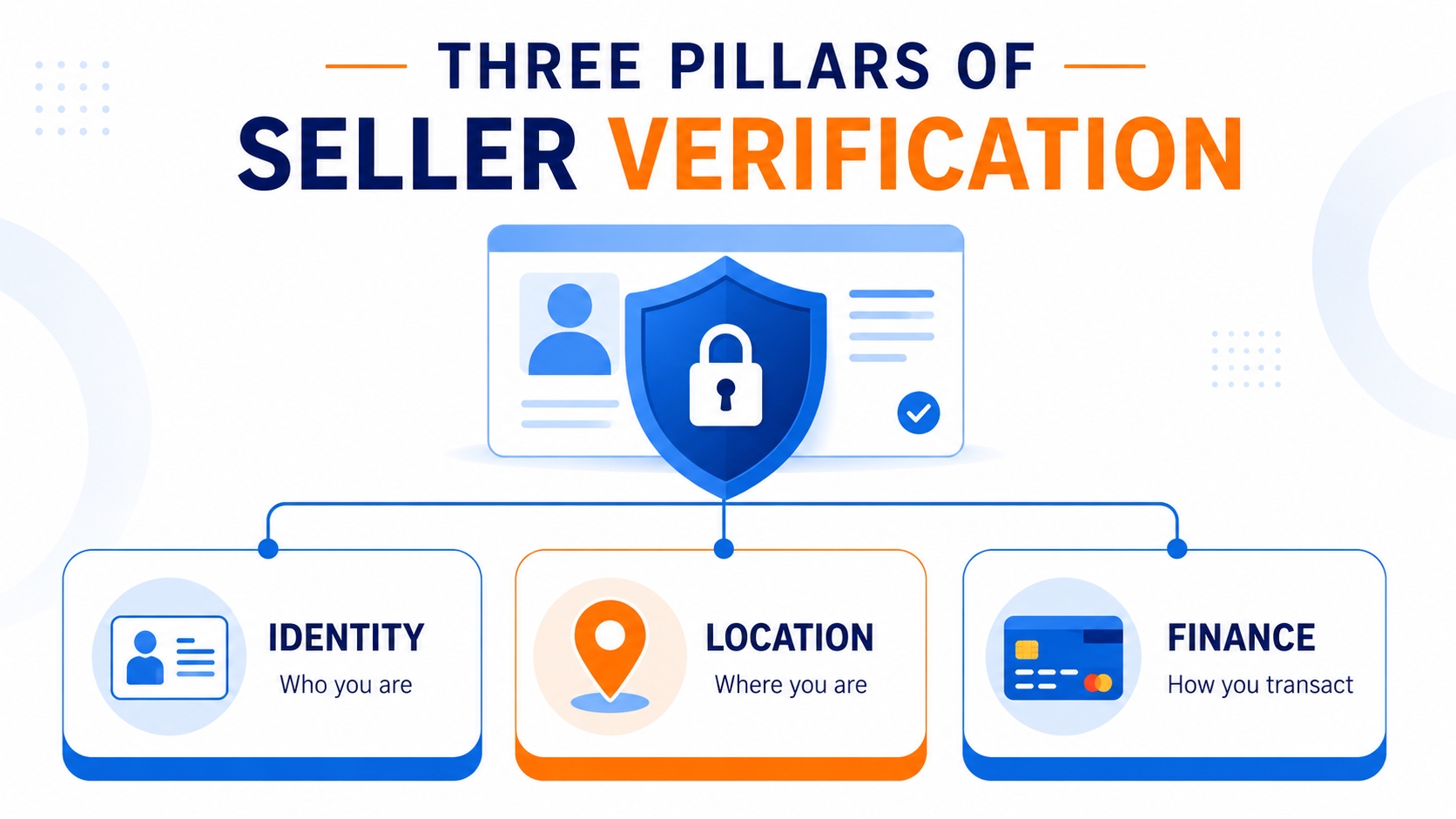
When you register to sell on Amazon, the platform initiates a rigorous Know Your Customer (KYC) process to ensure the legitimacy of every seller. This process is designed to protect both the marketplace and consumers from fraud and counterfeit goods. Generally, Amazon verifies three primary pillars of your business existence: your true identity, your physical location, and your financial capability to transact. Understanding exactly what is required before starting can save you days of administrative back-and-forth.
What Amazon usually verifies
The scope of verification depends on your business entity, but for the vast majority of US sellers, Amazon focuses on these specific data points. First, they verify the Legal Entity, which means ensuring the business name and registration numbers match official government records. Second, they verify the Beneficial Owners, meaning the real individuals who own 25% or more of the company must provide valid identification. Finally, they verify the Financial Instruments, specifically the credit card used for seller fees and the bank account where deposits will be sent. Each of these requires distinct documentation that must be flawless to pass the automated and manual review systems.
Why Seller Verification Matters
Verification is often viewed by new sellers as a bureaucratic hurdle, but it is a fundamental component of maintaining a secure e-commerce ecosystem. Without strict verification protocols, the platform would be vulnerable to money laundering, counterfeit operations, and malicious actors who could ruin the shopping experience for legitimate buyers. This rigor also protects honest sellers by ensuring a level playing field where competitors are verified, tax-compliant businesses. If you are just setting up your store, you might want to review the essential settings in Seller Central to ensure your account info is correctly entered before uploading documents.
Identity trust
At its core, the verification process builds a chain of trust between Amazon, the seller, and the customer. By requiring government-issued IDs, Amazon can confirm that a real human is behind the storefront. This is crucial because anonymous selling can lead to "hit and run" scams where sellers disappear after taking payment. Identity trust ensures that sellers have a reputation at stake, which encourages adherence to Amazon's high standards of customer service and product quality.
Payment and tax compliance
The financial aspect of verification serves two critical functions: facilitating smooth transactions and meeting legal obligations. In the US, Amazon is required by the IRS to collect Tax Identification Numbers (TIN) such as EIN or SSN. Verifying these details ensures that tax reporting is accurate and that funds can be transferred securely to your bank account without freezing due to suspicious activity. Verifying your credit card also ensures that Amazon can collect seller fees automatically, preventing account suspension due to non-payment.
Marketplace safety
Amazon's reputation is built on buyer trust. Marketplace safety initiatives rely heavily on seller verification to block bad actors before they can list products. By cross-referencing watchlists and public records, Amazon attempts to prevent individuals banned for previous violations from simply registering under a new name. This ongoing vigilance helps reduce counterfeit goods and IP infringement, maintaining the integrity of the marketplace for brands and retailers alike.

Document Checklist
Preparation is the single most effective strategy for passing Amazon Seller Account Verification on the first try. Having your documents ready in the correct format significantly reduces the likelihood of a rejection. Below is a comprehensive checklist of the documents you will likely need. Keep in mind that for specific business tools that can help streamline your workflow, you can check out this Amazon Seller Login Toolkit.
Essential Document Checklist
- Government ID: Passport or Driver's License (color, valid).
- Business License: Articles of Incorporation or Organization.
- Bank Statement: Showing account number and name (no redactions).
- Address Proof: Utility bill or bank statement (dated within 90 days).
- Credit Card: Statement or front of card (CVV/back information not needed).
Government-issued ID
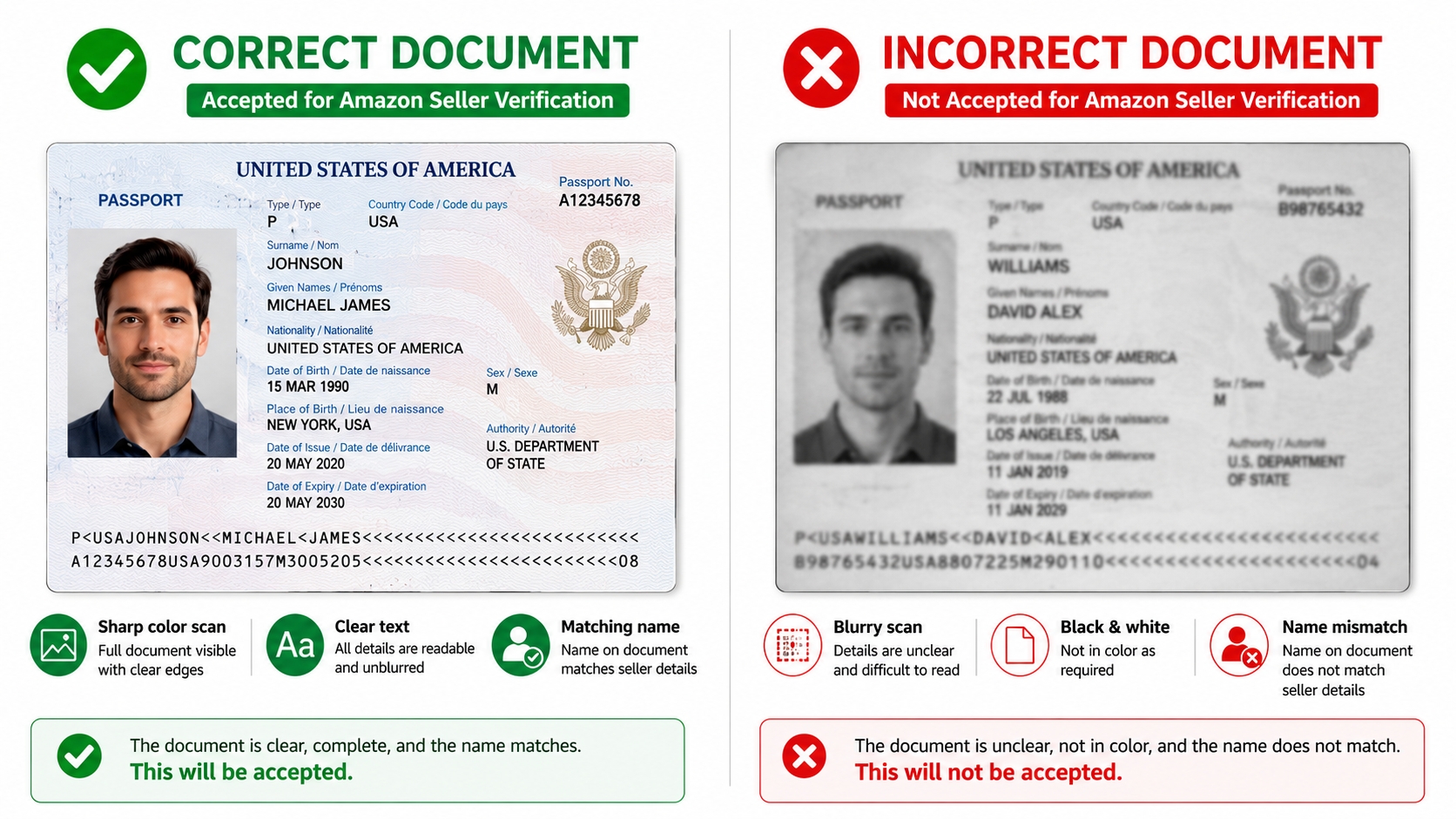
For individual sellers or beneficial owners of a business, a valid, government-issued photo ID is mandatory. A passport is generally preferred because it contains all necessary information and is universally recognized. If using a Driver's License, ensure it is not expired and is readable. The document must be uploaded in full color; black and white copies or scans are almost always rejected immediately. The uploaded image must be high-resolution, ensuring that the text is sharp and the photo is clearly visible. If you are having trouble accessing your account to upload these, refer to the Amazon Seller Login Guide for troubleshooting steps.
Address proof
Amazon requires proof that you reside or operate your business from the address listed on your Seller Central account. Acceptable documents include utility bills (electricity, water, gas) or bank statements issued by a regulated financial institution. The document must clearly show your full name and the address exactly as it appears in your Amazon settings. Crucially, it must be dated within the last 90 days. An old utility bill from six months ago will not be accepted as it does not prove current residency.
Bank account
To receive payments, you must verify your bank account. Amazon typically asks for a bank statement or a voided check. The statement must display your name (or business name) and the bank account number. A common misunderstanding is that sellers can block out sensitive information; for verification purposes, the account number must be visible, but you can obscure transaction amounts if you wish, provided the personal details remain clear. This verification ensures that funds are routed to the correct legal entity.
Credit card
Amazon requires a valid credit card to charge for professional seller subscriptions and other selling fees. You can usually verify this by providing a statement that shows the last four digits of the card and the cardholder's name. Alternatively, a clear photo of the front of the credit card is often accepted. For security, do not upload photos of the back of the card, and ensure the CVV code is covered. The name on the card must match the registered seller account name.
Business registration
If you are registering as a company (LLC, Corp, Partnership), Amazon requires official documents proving the entity's existence. In the US, this is usually the Articles of Incorporation or Organization filed with the Secretary of State. These documents must list the business name and the registered address. If your documents are in a foreign language, you must provide a notarized English translation certified by a qualified translator.
Name and address consistency rules
This is arguably the most critical rule for verification. The name on your ID must match the name on your bank statement and business registration exactly. If your ID shows "Robert J. Smith," but your bank statement says "Bob Smith," verification may fail. Similarly, addresses must match down to the zip code. If an abbreviation is used differently (e.g., "St" vs. "Street"), Amazon's system is usually smart enough to handle it, but significant discrepancies will trigger a manual review and potential rejection. Always enter your information exactly as it appears on your official legal documents.
Common Verification Mistakes
Even experienced sellers can stumble during the verification process due to minor oversight. Most rejections are automated based on image quality and data matching rules. By understanding the pitfalls that trap other sellers, you can ensure your submission sails through the initial review. Below are the frequent reasons why accounts get flagged for additional review or rejection.
Blurry uploads
Image quality is the number one culprit for failed verifications. Taking a photo of a document with your phone in a poorly lit room often results in glare, shadows, or blurriness. Amazon's OCR (Optical Character Recognition) software cannot read text that is out of focus. Always use a flatbed scanner or a high-resolution camera tripod. Ensure the document is placed on a dark, contrasting background to clearly define the edges of the paper.
Expired documents
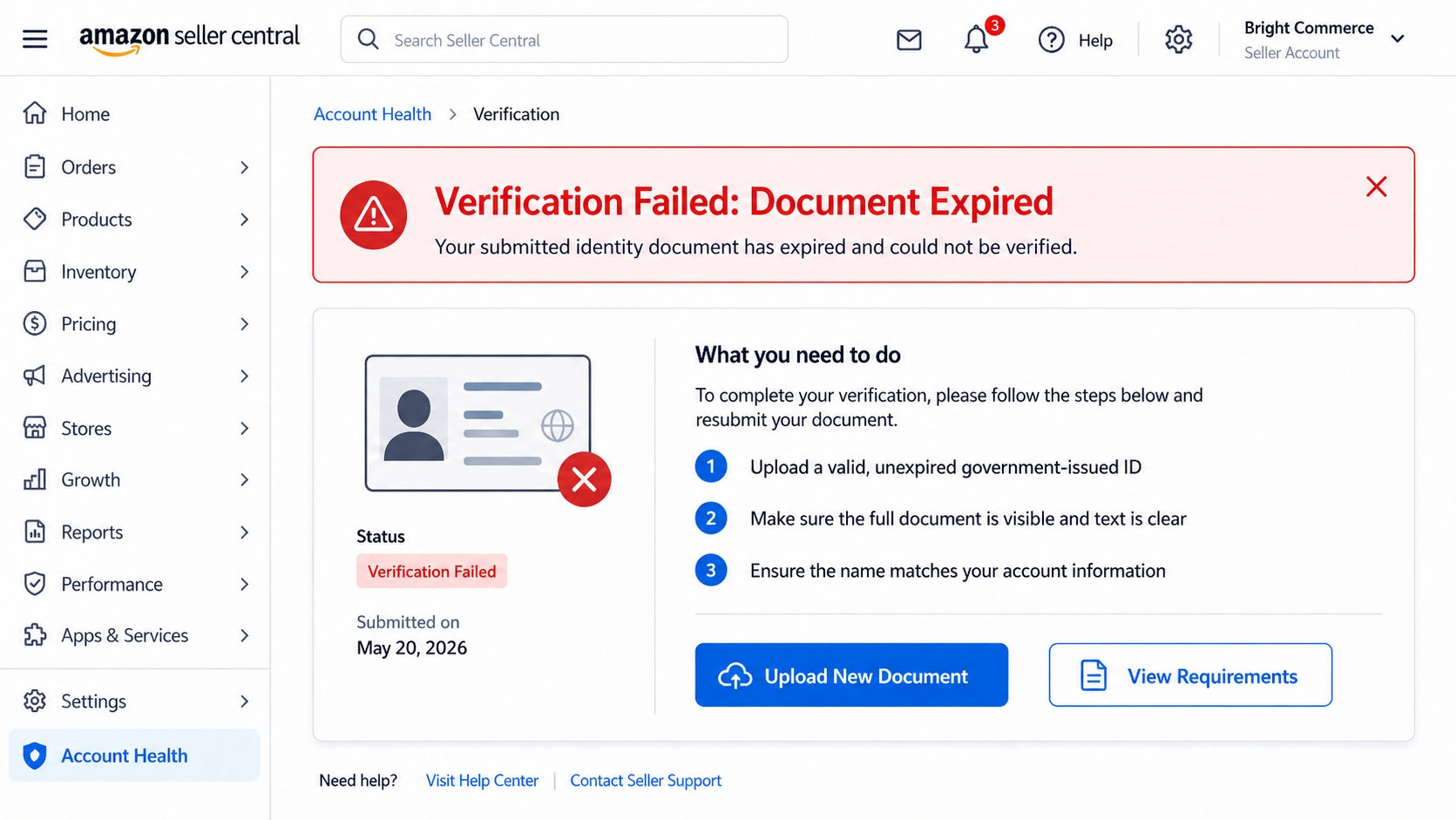
It may seem obvious, but sellers frequently submit expired driver's licenses or passports. Amazon's validation systems cross-check the expiration date automatically. An expired ID is not considered a valid form of identification. Similarly, address proofs older than 90 days are considered stale evidence of residency. Always double-check the dates on every document before pressing the upload button.
Mismatched business name
If you registered as "Smith Enterprises LLC" but your bank statement only lists "John Smith," Amazon will reject it because the legal entity names do not match. The bank account must be in the name of the business or clearly show the beneficial owner's name if it is a sole proprietorship. If there is a "Doing Business As" (DBA) scenario, you must provide the DBA registration document linking the two names.
Unsupported statement format
Amazon has specific preferences for file formats and document types. For example, a screenshot of an online banking interface is often rejected because it lacks the official letterhead or formatting of a formal statement. They typically prefer PDFs of official monthly statements. Additionally, web-generated printouts for utility bills may be rejected if they lack the logos and footer information typical of a mailed bill.
What to Do if Verification Fails
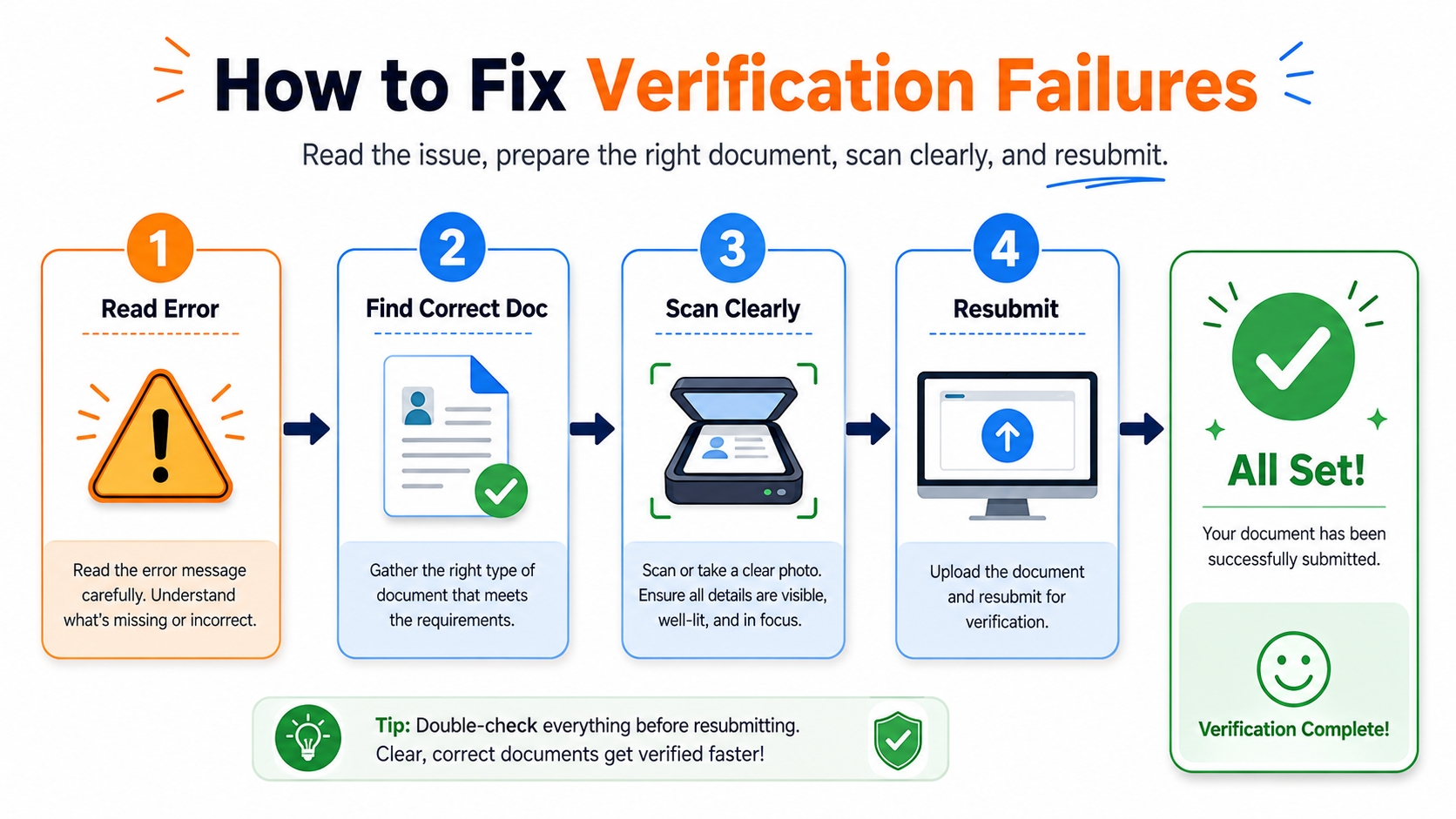
Receiving a verification rejection notification can be stressful, but it is rarely the end of the road. Amazon usually allows you to correct the issue and resubmit. Panic and repeated support tickets without evidence can actually harm your case. Instead, approach this systematically to identify the root cause and provide a precise solution. Most failures are reversible if handled with patience and attention to detail.
Read the rejection reason
The performance notification or alert in your Seller Central dashboard will contain a specific code or explanation for the failure. It might say "Image Quality Poor," "Document Expired," or "Name Mismatch." Do not guess the problem. Treat the rejection message as a diagnostic tool. Amazon is telling you exactly which rule you violated. Align your corrective action 100% with this specific feedback. For example, if they say the address is mismatched, do not re-upload the exact same document hoping for a different outcome; you must provide a different document that matches.
Re-upload corrected documents
Once you have identified the error, take the necessary steps to rectify it. If it was a blurry image, scan it again. If it was a date issue, find a newer document. Amazon typically provides a "Upload Documents" button in the alert banner. Use this to submit the new files. Ensure you are uploading the correct document for the correct category (e.g., don't upload a utility bill in the ID section). Organization and precision during the resubmission phase demonstrate your professionalism and attention to detail.
Contact support only with complete evidence
If you are certain your documents are correct and the system is repeatedly rejecting them, you may need to contact Seller Support. However, avoid generic "Help me" messages. Instead, write a clear, concise appeal case. Explain that your documents comply with the requirements, list what you have uploaded, and provide timestamps. If necessary, provide the source files (like the original PDF from the bank) as attachments. Opening a case without providing new evidence usually results in a canned response telling you to follow the on-screen instructions.
FAQ
Why does Amazon verify seller accounts?
Amazon verifies seller accounts to comply with international regulations like the US Patriot Act and anti-money laundering laws. This ensures that all sellers are legitimate, traceable entities, which protects the marketplace from fraud, maintains consumer trust, and ensures tax compliance.
What documents are needed for Amazon seller verification?
You typically need a government-issued ID (passport or driver's license), a recent utility bill or bank statement for address proof (within 90 days), a bank account statement for payment setup, and business registration documents like Articles of Incorporation if you are a company.
How long does Amazon seller identity verification take?
If your documents are clear and match your account information perfectly, verification can be completed within 24 to 48 hours (1-2 business days). However, during peak seasons or if manual intervention is required due to discrepancies, it can take up to several weeks.
Why did my Amazon seller verification fail?
Failures are usually due to low-quality uploads (blurry or too dark), expired documents, or mismatched information (e.g., your ID name does not match your utility bill name). Another common reason is using an unsupported file type or submitting a screenshot instead of a formal statement.
What counts as address proof for Amazon seller verification?
Valid address proof includes a utility bill (electricity, water, internet) or a bank/credit card statement. The document must be in color, dated within the last 90 days, and clearly display your name and the full address that matches your Seller Central registration.
Next Steps
- Gather all your documents (ID, Proof of Address, Bank Statement) and ensure they are high-quality color scans.
- Use an all-in-one tool like SellerSprite to help you move forward to your next market and product research.
References
- Amazon Seller Central Help – Verify Your Identity & Address View
- Amazon Seller Identity & Document Verification Guide View
By SellerSprite Success Team
The SellerSprite Success Team is dedicated to empowering Amazon sellers with data-driven insights and actionable strategies. With years of combined experience in e-commerce, compliance, and Amazon algorithms, we help sellers optimize their operations, navigate account hurdles, and maximize profitability.


