TL;DR: Amazon ASINs and product identification start with one question: is this exactly the product you intend to sell or research? An Amazon Standard Identification Number (ASIN) identifies a product in Amazon's catalog, not a particular seller's inventory or advertising campaign. Before adding an offer, creating a listing, or researching competitors, confirm the exact brand, model, variation, and package configuration. Then distinguish the catalog ASIN from your GTIN, seller SKU, and FBA barcode. Once the product identity is correct, ASIN-based keyword data becomes far more useful for listing optimization.
Key Takeaways
- ASINs identify catalog products. Several sellers may attach offers to the same detail page while using their own SKUs and prices.
- UPC, EAN, ISBN, and GTIN are not synonyms for ASIN. They support broader product identification, whereas a seller SKU tracks your own offer or stock.
- Match first; create only when the product truly differs. An incorrect variation or pack count can make a visually similar ASIN the wrong destination.
- The 2026 FBA barcode change matters. US resellers must use Amazon barcodes for FBA products, including items carrying manufacturer barcodes; eligible brand owners have a different option.
- Reverse ASIN is the research step, not the identity test. Check the right child ASIN, marketplace, and comparable product set before borrowing keyword ideas.
Table of Contents
- An ASIN Identifies the Catalog Product, Not Your Offer
- ASIN vs. GTIN vs. SKU vs. FNSKU: Which Code Does What?
- How to Find an ASIN and Confirm the Exact Product
- When to Match an Existing ASIN, Create One, or Request an Exemption
- The Parent ASIN Trap: Variation and Pack-Count Identity
- A 2026 FBA Barcode Rule That Changes the Labeling Check
- Why the Right ASIN Can Still Be the Wrong Research Target
- From Verified Product IDs to Useful Reverse ASIN Keywords
- Diagnose an ASIN Problem Before Editing the Listing
- An Identity Ledger Worth Keeping Across Teams
- The Bottom Line: Catalog Accuracy Comes Before Discoverability
- FAQs
- References
Marketplace note: This guide focuses on the US Amazon catalog and seller workflows. Listing permissions, product types, and barcode requirements can vary by account and marketplace. Use Amazon's current Seller Central instructions for the final decision. An illustrative ASIN, research estimate, or keyword ranking is never evidence of listing approval.
An ASIN Identifies the Catalog Product, Not Your Offer
ASIN stands for Amazon Standard Identification Number. Amazon uses this 10-character identifier to organize products in its catalog. You can usually find it in a product detail page's URL or product information, or in Seller Central.
The subtle distinction is that a product detail page and a seller's offer are not the same object. A single page may display a shared title, images, and reviews, while several sellers offer the same item at different prices, conditions, and delivery terms. A seller's SKU identifies their own inventory record, not a new catalog product.
That matters operationally. If two teams call a supplier model by one internal name but record two different child ASINs, they may report different sales trends, attach the wrong FBA labels, or optimize different keyword targets without noticing the mismatch. The business problem is not a lack of keywords. It is a lack of a consistent product identity.
Identity principle: Use the ASIN to answer which Amazon catalog product? Use your SKU to answer which inventory or offer record is ours? And use the actual physical unit to verify that both answers are correct.
ASIN vs. GTIN vs. SKU vs. FNSKU: Which Code Does What?
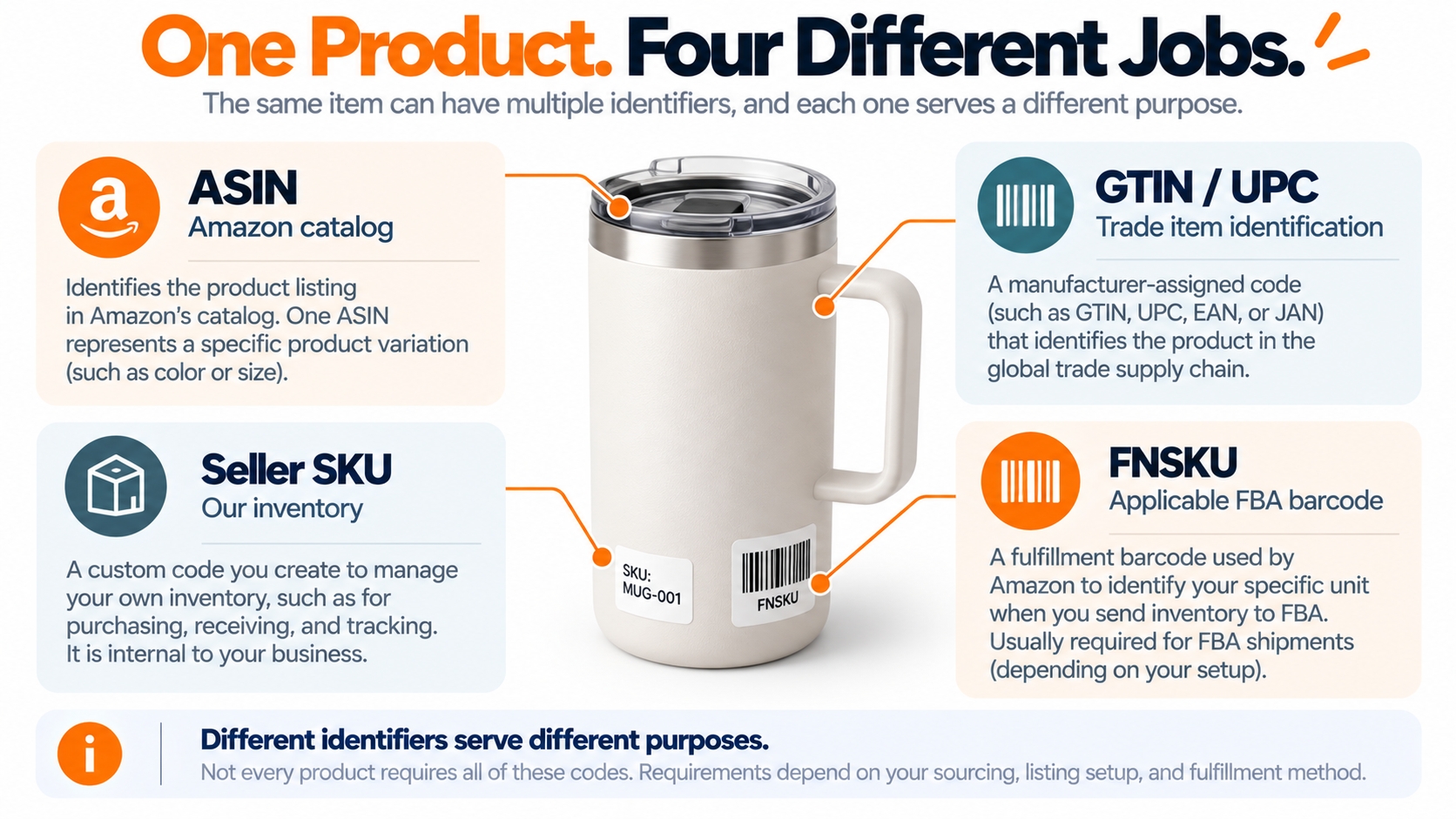
Product identification is easier when you arrange codes by their job: catalog, global trade, internal inventory, and fulfillment. The label printed on a carton may contain more than one kind of identifier, but one code should not be copied into another field simply because both are scannable.
| Identifier | Main purpose | Typical source | Do not confuse it with |
|---|---|---|---|
| ASIN | Amazon catalog product identity, usually 10 characters | Amazon product detail page or Seller Central | Your seller-specific SKU or a universal product barcode |
| GTIN (including UPC/EAN) | Trade item identity across retailers and supply chains | Brand owner, manufacturer, authorized GS1 record | A newly invented ASIN or an internal stock code |
| ISBN | Book publishing product identification; used in Amazon book catalog workflows | Publisher or authorized ISBN agency | A universal identifier for non-book products |
| Seller SKU | Your own offer and inventory management record | Created in your selling account or inventory system | An identifier shared by every seller of that product |
| FNSKU / Amazon barcode | Identifies units in applicable FBA labeling workflows | Amazon-generated label in Seller Central | The UPC that identifies the manufacturer's trade item |
| Model / part number | Manufacturer specification and exact version matching | Product and manufacturer documentation | An automatic substitute for an approved GTIN or ASIN |
UPC and EAN are types of GTIN; they are not additional Amazon catalog IDs. An ISBN is used for books, and some book ASINs correspond to ISBN-10. A seller may assign different SKUs to offers for the same ASIN, for example to distinguish condition or fulfillment workflows. The product itself still needs to match the catalog details.
If you are establishing a product ID for a new branded item, verify rights to the GTIN and consult Amazon's guide to product IDs and GTINs. Amazon's detail page rules prohibit using false identifiers or GTINs you do not own or have authorization to use. Buying an arbitrary barcode from an unverified seller does not fix the underlying ownership problem.
How to Find an ASIN and Confirm the Exact Product
There are three practical places to find a candidate ASIN. The first is the product URL, where an ASIN often appears after /dp/. The second is the product details or product information section on the retail page. The third is Seller Central, including the Add Products and Manage All Inventory workflows.
Finding a candidate is not the same as validating a match
Before using that ASIN, compare the catalog information with the physical item, manufacturer documentation, and the offer you intend to create. For example, a blue 20-ounce item and a blue 30-ounce item may look almost identical in a search result yet be different purchasable variants. The same warning applies to single units versus multipacks and to older versus updated models.
- Brand and manufacturer: check the brand name on the actual product and packaging, not only the marketplace title.
- Model and version: compare model numbers, generations, specifications, and compatibility claims.
- Size, color, and quantity: confirm the exact purchasable variation and pack count.
- Condition and included items: ensure your offer's condition and accessory completeness can be accurately described.
- Marketplace: confirm that the target ASIN and offer are valid for the marketplace you will list or analyze.
A shared catalog page is where product-level content lives; offer-level information such as price, condition, and fulfillment belongs to a particular seller. Confusing these layers can make a valid product appear to be incorrectly represented even when its ASIN is real.
Practical check: Capture the candidate ASIN alongside the exact product name, variation attributes, pack quantity, marketplace, and verification date. If any important attribute is uncertain, stop before connecting inventory or creating a keyword report.
When to Match an Existing ASIN, Create One, or Request an Exemption
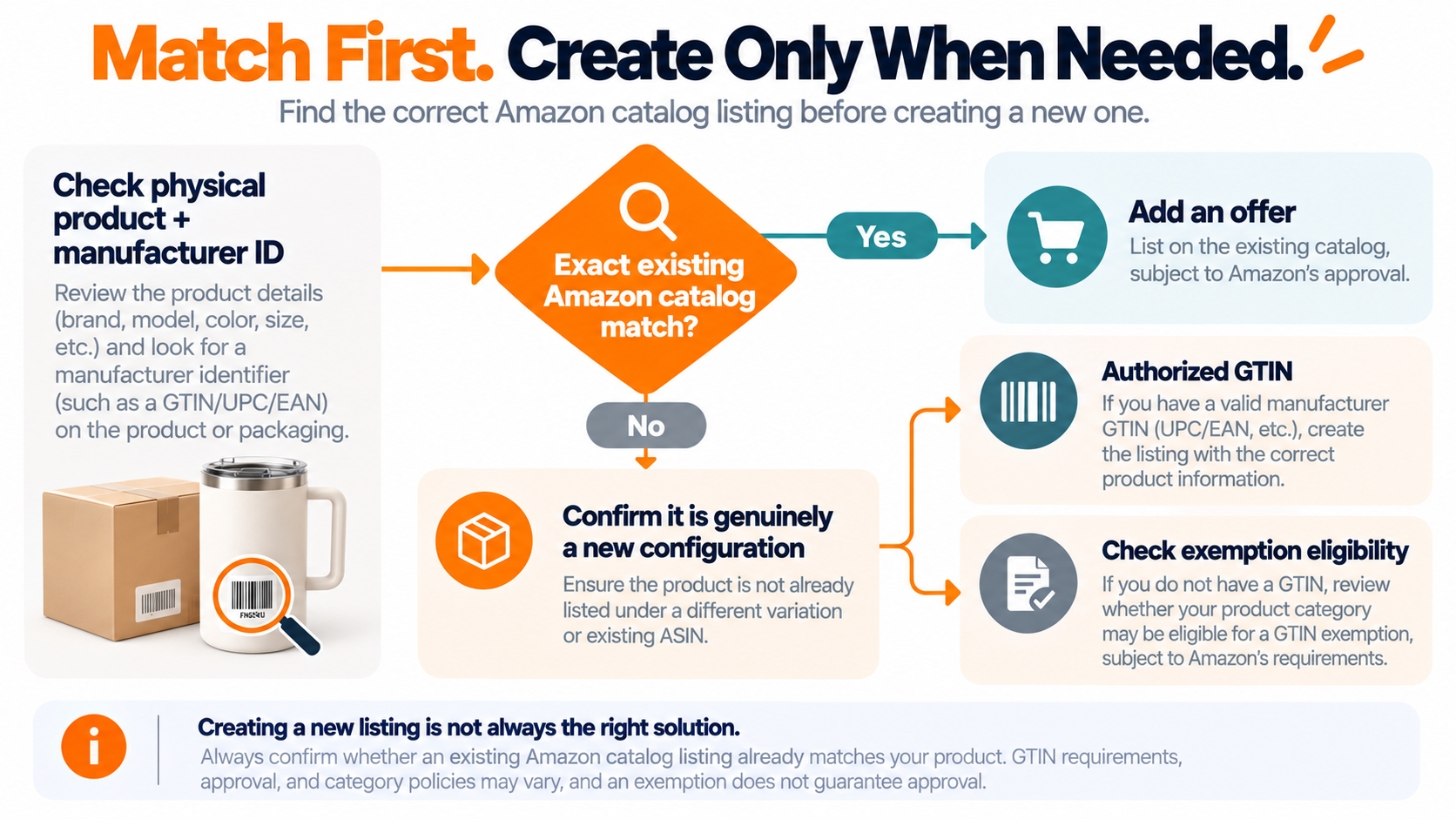
Amazon's general rule is to attach your offer to an existing catalog product when it really is the same item. A genuinely new product or version may need a new ASIN. Before creating one, search with the manufacturer's GTIN, product name, and identifying details in Seller Central.
Exact catalog match
Add your own offer to the existing ASIN after checking listing permissions. You control the offer, not the shared product identity.
Truly different product
Create a new listing through Amazon's process with the correct authorized product ID and category attributes.
No GTIN available
Check whether your product and category qualify for a GTIN exemption. Approval is conditional, not a shortcut for mismatching products.
For exact screens and sequence, follow Amazon's match-or-create listing walkthrough. The Add Products flow can match an existing listing using its product ID, or guide you through creating a new one. If no GTIN exists, the listing workflow may offer an exemption application requiring accurate product and packaging images.
Two restrictions are especially important. Amazon prohibits creating duplicate detail pages for products already in its catalog, and its ASIN creation policy does not allow non-standard multipacks presented as manufacturer configurations. A newly branded version of a generic item must not be created by changing the old ASIN's brand field.
An ASIN is not a selling license: Even after finding an exact match, your account may need product, brand, or category approval. A GTIN exemption addresses the identifier requirement for eligible listings; it is not permission to sell restricted products.
The Parent ASIN Trap: Variation and Pack-Count Identity
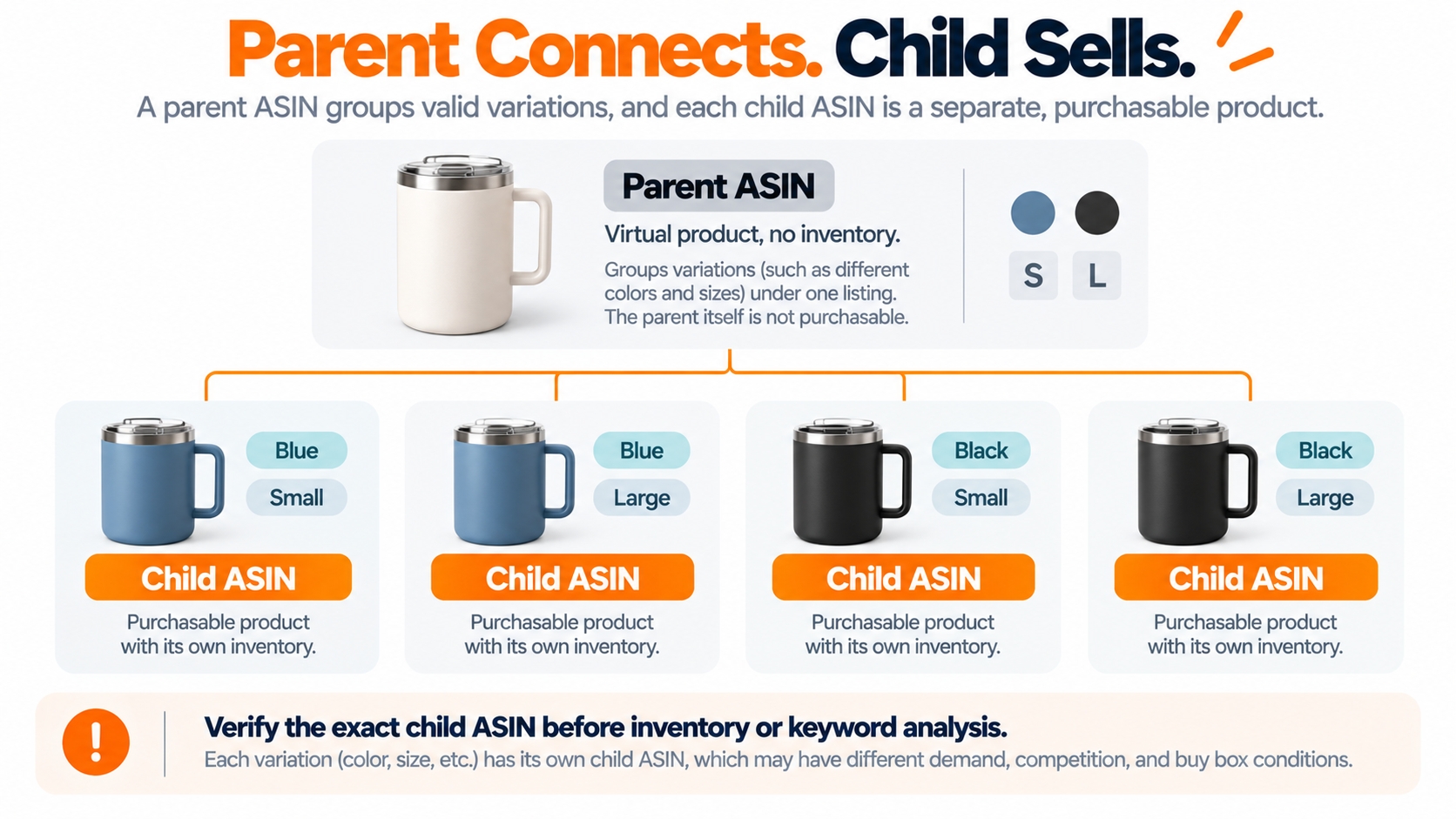
A parent ASIN connects valid variants within one product family. It is a virtual relationship record, not a purchasable unit and not a stocked SKU. Each child ASIN represents a specific buyable version, such as a size-color combination supported by that category's variation theme.
When a seller searches a product family, Amazon may show a variation selector on the page. But when a seller checks inventory, compares a precise version, or studies variation-specific search visibility, the child ASIN matters. Mistaking the parent for the product being shipped can break that chain of evidence.
Variation is not permission to combine similar-looking items
Valid variation families share the same core function and permitted non-varying attributes, with differences limited to an allowed theme such as size or color. A replacement cable and a portable charger cannot become legitimate variants merely because both are accessories. A new model with materially different features may also require its own detail page, not a hidden addition to an older family.
Pack counts deserve a separate check: a manufacturer-created two-pack and a single unit are not interchangeable inventory records. Confirm Amazon's ASIN creation and bundling rules before trying to make your own multipack appear as a standard variation.
A 2026 FBA Barcode Rule That Changes the Labeling Check
Catalog identification continues after the listing is created. FBA also needs the right unit-level barcode so inventory can be received and tracked. An ASIN identifies the product in the catalog; the barcode required on the physical unit depends on Amazon's fulfillment labeling rules.
US FBA requirements changed on March 31, 2026: Amazon now requires resellers to use Amazon barcodes for products even when the product has a manufacturer barcode. Eligible brand owners may continue using manufacturer barcodes without stickers. This is an operational rule, not a reason to assign a different catalog ASIN.
If your shipment requires an Amazon barcode, print the corresponding label from Seller Central for the actual SKU and product condition, then ensure the barcode and product name match what is packed. Check that other readable barcodes are covered when required. A scan failure or mismatched FNSKU can cause receiving issues even when the online ASIN is correct.
Do not swap the codes: Use the appropriate ASIN for catalog identity and the shipment-specific label generated by Seller Central for fulfillment. A self-designed label or barcode copied from a competitor listing is not a substitute for Amazon's current labeling requirements.
Why the Right ASIN Can Still Be the Wrong Research Target
A valid ASIN can represent a product that does not compete with your exact offer. A premium brand and an entry-level substitute may appear for the same query while satisfying different buyer expectations. Likewise, the parent ASIN or a different child variation may not represent the version whose keyword performance you intend to study.
Before using ASINs for demand research, write down what a useful comparison would mean for the buyer: same core use, compatible specifications, similar package quantity, realistic price band, and the same marketplace. Historical Best Sellers Rank adds context but is a relative rank, not an exact sales count or a promise of demand for your offer.
Identity question
Is this the same physical product or a truly comparable configuration?
Search question
Which relevant shopper queries bring similar products into consideration?
Keep offer-level changes separate too. A seller's price, condition, stock, or shipping promise can move without the ASIN changing. That does not establish a new product identity, and it does not tell you why an organic search ranking moved without further investigation.
From Verified Product IDs to Useful Reverse ASIN Keywords
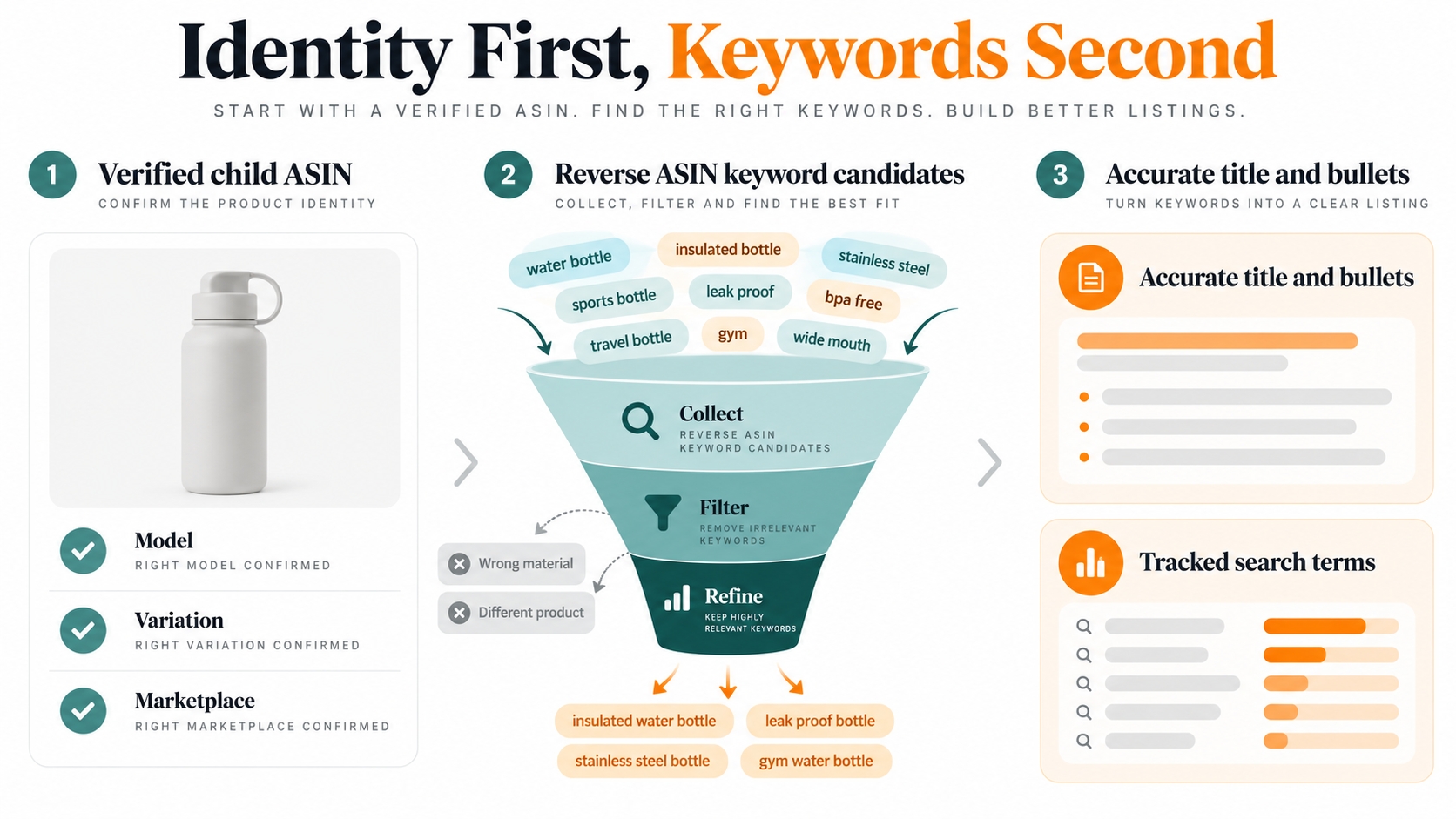
Only after verifying the catalog and competitive context should you reverse-search ASINs for keywords. Select comparable products, remove terms that do not describe your actual item, and map the remaining phrases to accurate product attributes and buyer needs. This sequence makes the keyword export more useful than simply collecting the largest possible list.
Build a comparable child-ASIN set
Start with roughly three to five relevant child ASINs as a manageable editorial example, not a required SellerSprite quota. Confirm the marketplace, product type, significant variations, and buyer intent. Add the ASIN and verification date to your worksheet so later exports can be traced to the correct listing.
Separate keyword coverage from product identity
The SellerSprite Reverse ASIN guide explains how the tool displays search terms that brought an ASIN into Amazon's first three result pages during its specified lookback window. It also offers variation-specific views and a multiple-ASIN path for studying keywords across a family. These are research signals, not an official Amazon indexing report or proof of causation.
Filter for actual product relevance before sorting by volume. A competitor may rank for a term that names a different material, incompatible use case, or branded product; copying it can weaken listing clarity. Group the surviving words by product type, fit, dimensions, buyer problem, and important differentiators.
Map terms to truth, then monitor the same ASIN
Use the clearest high-intent phrasing in buyer-visible fields where it accurately describes the product. Supporting terms can inform descriptions and eligible backend search fields without stuffing. Record the ASIN and edited field, then monitor its performance after enough time for the source data to update. SellerSprite publishes different update intervals for rank-related and monthly search-volume datasets, so avoid comparing timestamps as though every metric refreshed at once.
What Reverse ASIN cannot fix: It cannot verify that your supplier product matches the catalog item, authorize an offer, correct a variation, or turn unrelated high-volume search terms into truthful product claims. Start with the product record, then use keyword intelligence for discovery.
Diagnose an ASIN Problem Before Editing the Listing
Not every catalog mismatch requires a new listing. Before acting, distinguish an offer issue from a product identity issue and collect evidence for the applicable correction path. The following examples are diagnostic starting points rather than guaranteed fixes.
| Observed issue | Likely layer to inspect | Safer first action |
|---|---|---|
| A product search leads to a page for a different model | ASIN, GTIN, model, package attributes | Re-check manufacturer identifiers and the physical unit before matching the listing. |
| A new ASIN seems identical to an existing one | Duplicate product detail pages | Check whether both pages truly represent the same item; use Amazon catalog support or its duplicate-page process where appropriate. |
| The variation reports unexpected search terms | Parent versus child ASIN selection | Verify the child, theme, and country before interpreting Reverse ASIN results. |
| FBA shipment receives a barcode warning | Seller SKU, label, condition, and receiving rules | Reprint the applicable Amazon barcode from Seller Central and review the 2026 labeling policy. |
| Keyword analysis looks strong, but the offer is irrelevant | Comparable product and buyer-intent selection | Replace mismatched competitor ASINs before copying their terms. |
| A branded product appears under the wrong brand | Catalog contribution and authorization | Document the mismatch; follow official detail-page correction channels, not a casual brand-name rewrite. |
Amazon has a duplicate-page merge process for genuinely identical products, but merges are conditional and are not an acceptable way to make different models or brands appear interchangeable. Be especially cautious where Brand Registry ownership and active offers affect eligibility.
An Identity Ledger Worth Keeping Across Teams
A simple product identity ledger prevents marketplace research, listing operations, sourcing, and FBA preparation from quietly using different identifiers for the same project. It is most useful when every field has an owner and a last-checked date, rather than becoming an old spreadsheet that no one trusts.
At minimum, record: marketplace, verified ASIN, parent or child status, brand, model, GTIN where applicable, exact variation and pack quantity, internal SKU, relevant FNSKU or barcode labeling requirement, listing approval status, source evidence, and the date of the latest check. Store research exports with the matching ASIN and date.
Before a listing launch
Confirm the physical product against the catalog identity and the applicable creation or match workflow.
Before an FBA shipment
Check the offer's SKU, condition, label type, and the unit actually packed.
Before a keyword refresh
Confirm the marketplace and child-ASIN set have not drifted away from the target product.
For expanding teams, make identity checks a handoff requirement: sourcing verifies the manufacturer's product, catalog operations verify Amazon's record, fulfillment confirms the physical label, and marketing documents the ASIN set behind each keyword report. That creates clearer accountability than treating ASINs as interchangeable strings.
The Bottom Line: Catalog Accuracy Comes Before Discoverability
An ASIN is the beginning of a product-level decision, not the end of it. A correct identifier connects the right physical product to Amazon's shared catalog, your offer, fulfillment labeling, and research records. A mistaken one can contaminate all four.
The most reliable order of work is therefore simple: identify the exact unit, confirm the catalog relationship, choose the correct listing route, then analyze its search opportunity. Keyword optimization becomes more credible when the product underneath it has been identified correctly.
FAQs
What is an Amazon ASIN?
An ASIN is Amazon's 10-character catalog identifier for a product. It is not the seller's internal SKU, a universal UPC, or an FBA shipping label.
Where can I find an ASIN on Amazon?
Look for it after /dp/ in a product URL, in Product details or Product information, or in Seller Central for inventory you manage. Verify the exact variation rather than copying only the family's parent identifier.
Is an ASIN the same as a UPC or GTIN?
No. An ASIN belongs to Amazon’s catalog; a UPC or EAN is a type of GTIN used to identify trade items across businesses. ISBN is a book identifier. A GTIN can help Amazon match the product to an ASIN.
Can different sellers have different SKUs for the same ASIN?
Yes. Multiple sellers can offer the same catalog product, while each seller manages its own offer details and SKU records. The shared product page is not a shared inventory ledger.
Does a parent ASIN have stock or sales of its own?
A parent ASIN is a virtual grouping record with no purchasable inventory. Child ASINs identify the buyable variations. When comparing or tracking a particular version, confirm its child ASIN.
When should I create a new ASIN rather than use an existing one?
Create a new ASIN only when the product or authorized version is genuinely not represented by an existing matching catalog product. Amazon prohibits duplicate pages and invalid variation relationships.
Can I sell a product without a GTIN?
Some products can qualify for a GTIN exemption through Amazon's listing flow. It is conditional and does not waive brand, category, or product-selling restrictions.
Does an FNSKU replace my product's ASIN?
No. An FNSKU or Amazon barcode is part of an applicable FBA labeling workflow, while the ASIN identifies the product in Amazon's catalog. US resellers must observe the barcode rules effective March 31, 2026.
Does an ASIN guarantee a product is indexed for keywords?
No. It provides product identity, not a promise of search ranking. Use accurate listing content and validate relevant search terms with marketplace and variation context. Reverse ASIN tools provide research observations, not indexing guarantees.
Can I edit the ASIN itself to change my brand or product model?
Do not treat an ASIN as a field you can repurpose for another product. Amazon's detail-page rules prohibit brand changes that turn an existing product into a different branded item. Use the appropriate catalog-correction or new-listing process.
References
- Amazon: Understanding ASIN Numbers. View
- Amazon: What Are Product IDs or GTINs?. View
- Amazon: Product Detail Pages and Offers. View
- Amazon: How to Create a New ASIN. View
- Amazon Seller Central: Product Detail Page Rules. View
- Amazon Seller Central: Product Variations Overview. View
- Amazon Seller Central: ASIN Creation Policy. View
- Amazon Seller Central: Use Amazon Barcodes for FBA (2026 requirements). View
- SellerSprite: Reverse ASIN for Beginners. View
- SellerSprite: Data Update Frequency. View
- SellerSprite: Build a Target Amazon Keyword List. View
- Amazon Seller Central: Merge Duplicate Product Pages. View
By SellerSprite Content Team
The SellerSprite Content Team works at the intersection of Amazon marketplace research, product-data analysis, and ecommerce education. Its areas of study include catalog structure, ASIN-level competitive intelligence, keyword behavior, listing optimization, and seller workflows. The team develops research-based explanations that connect platform documentation with the practical data checks used in product and listing decisions.
Last reviewed: October 20, 2026