TL;DR: Amazon Brand Analytics (ABA) provides first-party, buyer-intent keyword data that outperforms guesswork. This guide walks brand-registered sellers through a repeatable ABA keyword research workflow using Search Terms, SQP, and SellerSprite to drive SEO and PPC results.
Key Takeaways
- Amazon Brand Analytics delivers real buyer search behavior, so use it to prioritize high-intent, conversion-ready keywords.
- Combine ABA's Search Terms and Search Query Performance (SQP) reports to identify winning queries and leakage opportunities.
- Always validate ABA data with SERP analysis and expand coverage using tools like SellerSprite for long-tail depth.
Table of Contents
- What "ABA Keyword Research" Is (And Why It's Different)
- What Data You Can Actually Get From ABA (And What You Can't)
- Set Your Goal and Marketplace Scope
- The Step-by-Step ABA Keyword Research Workflow
- Turning ABA Keywords Into Listing SEO
- Turning ABA Keywords Into PPC
- Special ABA Use Cases
- Common Mistakes ABA Users Make
- Mini Walkthrough: From ABA to PPC Plan
- FAQ
- References
Note on marketplaces: This guide is specifically optimized for the US market.
What "ABA Keyword Research" Is (And Why It's Different)
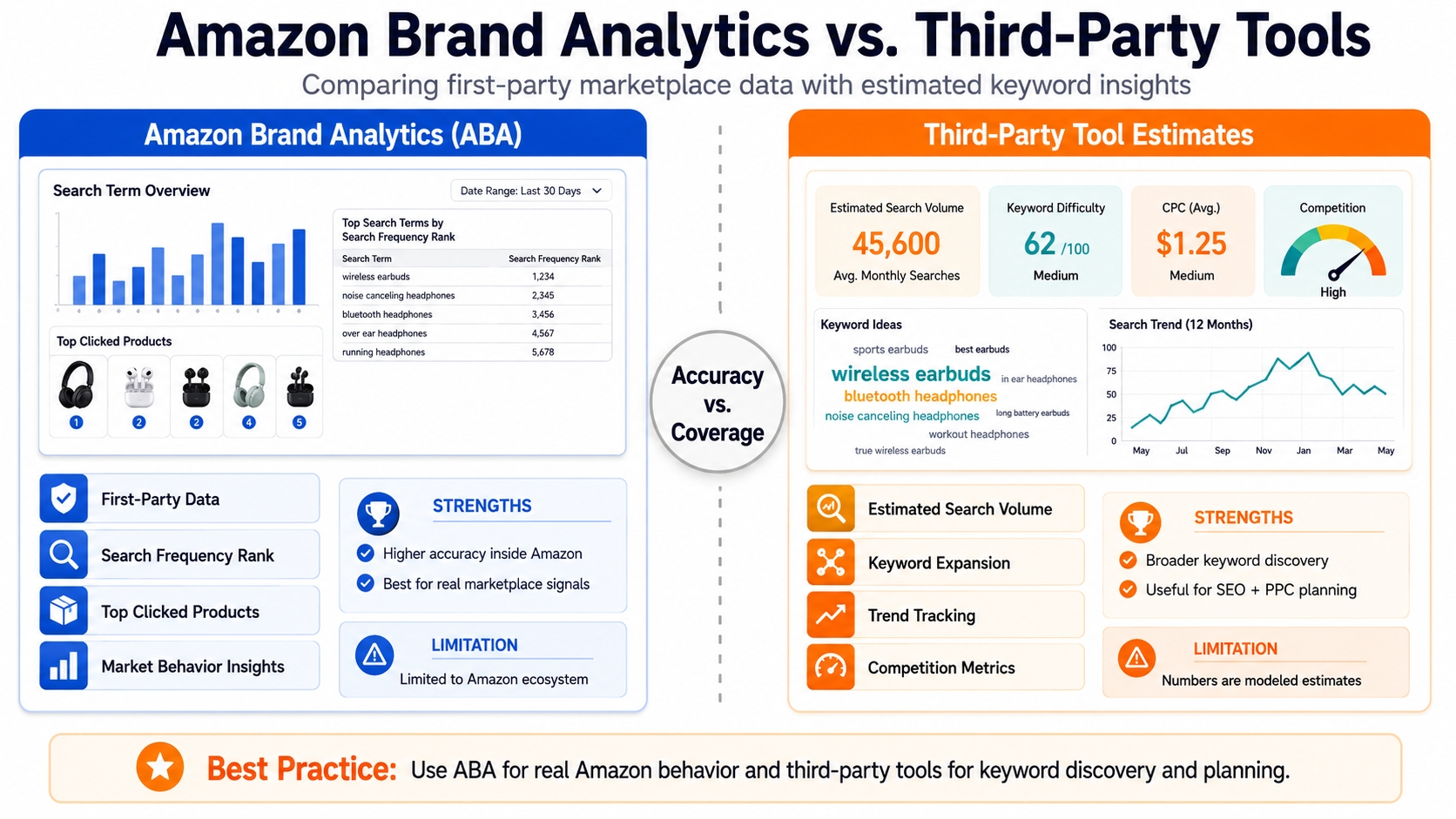
Amazon Brand Analytics (ABA) keyword research uses first-party, anonymized shopper behavior data from Amazon to identify what real buyers are searching for and which queries lead to clicks and purchases. Unlike third-party tools that estimate search volume, ABA reveals actual demand signals, making it the gold standard for brand-registered sellers.
Definition: ABA keyword research is the process of using Amazon's proprietary search data, such as Search Terms and Search Query Performance (SQP), to uncover high-intent, conversion-ready keywords that real shoppers use to find products like yours.
ABA vs. "Tool-Only" Keyword Research (Why First-Party Signals Matter)
Most Amazon keyword research tools rely on reverse-engineered data, browser extensions, or scraped SERPs. While useful, they often miss buyer intent and conversion context. ABA, in contrast, is sourced directly from Amazon's ecosystem, showing not just what people search, but which queries result in clicks and purchases for your brand.
For example, a third-party tool might show "wireless earbuds" as high-volume, but ABA reveals that "wireless earbuds for small ears" has a higher conversion rate for your niche ASIN, enabling smarter PPC and SEO decisions.
Who This Guide Is For: Brand Registered Sellers + When to Use It
This guide is designed for brand-registered sellers on Amazon, especially those using Amazon keyword research tools to scale. Whether you're launching a new product, optimizing an existing listing, or managing a portfolio, ABA gives you a competitive edge by aligning your strategy with real shopper behavior.
Use ABA keyword research when you need data-driven decisions rather than guesses for SEO, PPC, or product development.
What Data You Can Actually Get From ABA (And What You Can't)
ABA provides powerful insights, but it's not all-encompassing. Understanding its strengths and limitations helps you use it strategically and know when to supplement with tools like SellerSprite.
Core ABA Datasets You'll Use for Keywords
Search Terms Report (Demand + Clicked/Purchased Product Signals)
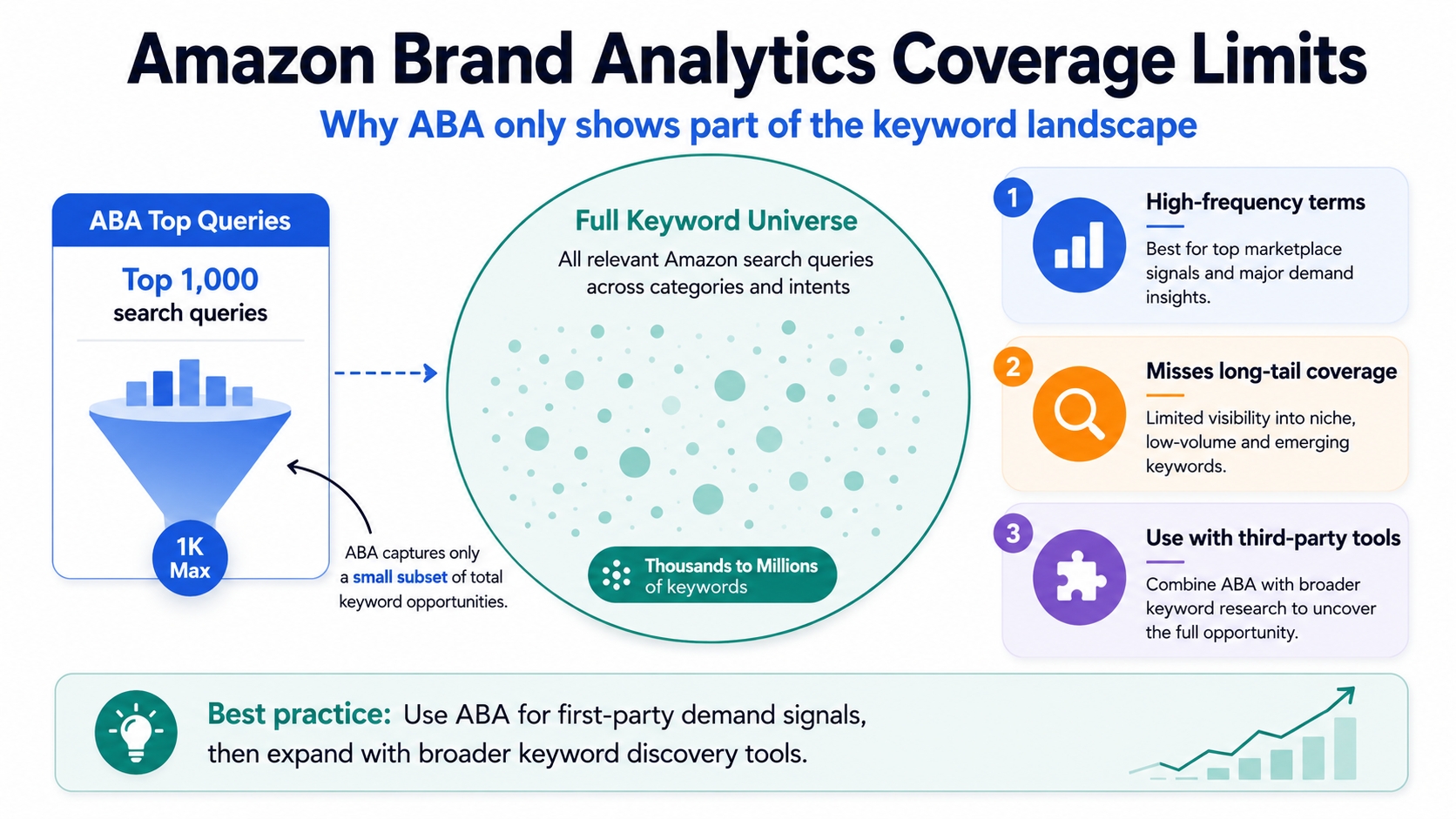
The Search Terms report shows the top 1,000 search queries in your category over the past 30 days. For each query, you get:
- Search Frequency Rank (SFR): How often a query is searched (1 = most frequent).
- Click Share: % of clicks your brand received for that query.
- Purchase Share: % of purchases your brand captured.
This helps identify high-demand, high-conversion opportunities.
Search Query Performance (SQP) (Your Brand's Query Performance)
The SQP report shows how your brand and ASINs perform for specific search terms. You can see:
- Impressions, clicks, and units sold per query.
- Performance by brand vs. competitors.
- Queries where you appear but don't convert (leakage).
This is critical for diagnosing listing gaps and optimizing conversion paths.
ABA Advantages for Sellers
Buyer-Intent Queries (Not Guesswork)
ABA shows real searches that led to purchases with no estimation. This eliminates the risk of targeting vanity keywords that don't convert.
Conversion-Oriented Prioritization (Not Just Volume)
Unlike tools that only show search volume, ABA lets you prioritize keywords by actual conversion share, helping you focus on queries that drive sales, not just traffic.
ABA Limitations and Blind Spots
Coverage Limits (You Only See What Amazon Exposes)
ABA only shows the top 1,000 queries per category. Long-tail variations and niche terms may be missing, requiring expansion via tools like SellerSprite's Keyword Mining.
Lag and Sampling (Why You Shouldn't Over-Optimize Daily)
ABA data is updated weekly and based on sampled behavior. Avoid overreacting to short-term fluctuations, use 3-month trends for decision-making.
Competitor Visibility Is Indirect
ABA shows your brand's performance but not individual competitor ASINs. Use SERP checks and reverse ASIN tools to fill this gap.
ABA Pros vs. Limits: Quick Checklist
- ✅ Pros: Real buyer intent, conversion data, brand-specific insights, no guesswork
- ✅ Best For: SEO indexing, PPC efficiency, leakage analysis, launch discovery
- ❌ Limits: Top 1,000 only, no long-tail depth, indirect competitor data
- 💡 Fix With: SellerSprite for expansion, SERP validation, trend analysis
Set Your Goal and Marketplace Scope (So Data Becomes Action)
Before diving into ABA, define your objective and marketplace. This ensures your keyword research drives real business outcomes.
Choose the Objective
SEO Indexing + Rank Growth
Focus on high-SFR queries where your brand has low click share, which indicates a ranking or content gap.
PPC Efficiency (Lower Wasted Spend)
Target high-purchase-share queries to reduce ACOS. Avoid bidding on queries where you don't convert.
Launch Discovery vs. Mature Optimization
For new products, use ABA to find "winnable" mid-tail queries. For mature listings, focus on leakage recovery and brand defense.
Choose Marketplace + Time Window
ABA data varies by marketplace. The US report reflects broader trends; CA/UK/EU may show regional nuances. Use 3-month rolling data to smooth noise.
Build Your "Keyword Portfolio" Buckets
- Core (Must-Win): High SFR, high purchase share – defend these.
- Growth (Mid-Tail): Moderate volume, high intent – scale here.
- Profit (Long-Tail): Low volume, high conversion – efficiency plays.
The Step-by-Step ABA Keyword Research Workflow (Repeatable SOP)
Follow this 6-step process to turn ABA data into actionable keyword strategies.
Step 1: Pull Seed Keywords From ABA Search Terms
- Filter for relevance: Focus on queries in your category with intent matching your product.
- Capture the theme: Group queries like "waterproof hiking boots men" and "durable men's hiking shoes" under "Men's Outdoor Footwear."
- Export to master sheet: Use columns: Query, Theme, SFR, Click Share, Purchase Share, Notes.
Step 2: Use SQP to Find Your "Winning Queries" and "Leakage Queries"
- Winners: High impressions, high conversion – scale with PPC and SEO.
- Leakage: High impressions, low conversion – indicates listing mismatch (e.g., title, images, bullets).
- Prioritize: Fix brand-level leakage before ASIN-level issues.
Step 3: Add Buyer-Intent Tags
- Intent types: Transactional ("buy"), informational ("review"), navigational ("brand X") – focus on transactional.
- Modifiers: Tag for size, color, pack, compatibility, "for kids," etc.
- Create clusters: One cluster = one message (e.g., "Eco-Friendly Reusable Water Bottles for Kids").
Step 4: Validate SERP Reality
- SERP-fit test: Do page-one results match your product exactly?
- Review moat: Are top listings dominated by brands with 1,000+ reviews?
- Sponsored density: High ad count = high CPC pressure.
Step 5: Expand Beyond ABA With SellerSprite
- Expand variations: Find long-tail versions of core queries.
- Reverse ASIN: Discover keywords competitors rank for.
- Trend checks: Avoid seasonal spikes that won't sustain.
Step 6: Prioritize Keywords With a Simple Scoring Model
Use this formula:
Score = Relevance × Intent × Ability-to-Win × Business Value
| Keyword | SFR | Intent | Relevance | Score |
|---|---|---|---|---|
| wireless earbuds for small ears | 420 | Transactional | High | 9.2 |
| noise cancelling headphones gym | 680 | Informational | Medium | 5.1 |
Output: Top 10 "Act Now," 20 "Test," 20 “Watchlist.”
ABA Keyword Research SOP (Summary)
- Pull seed keywords from ABA Search Terms
- Use SQP to find winners and leakage
- Add buyer-intent tags
- Validate SERP reality
- Expand with SellerSprite
- Prioritize with scoring model
Turning ABA Keywords Into Listing SEO (Keyword Mapping That Actually Works)
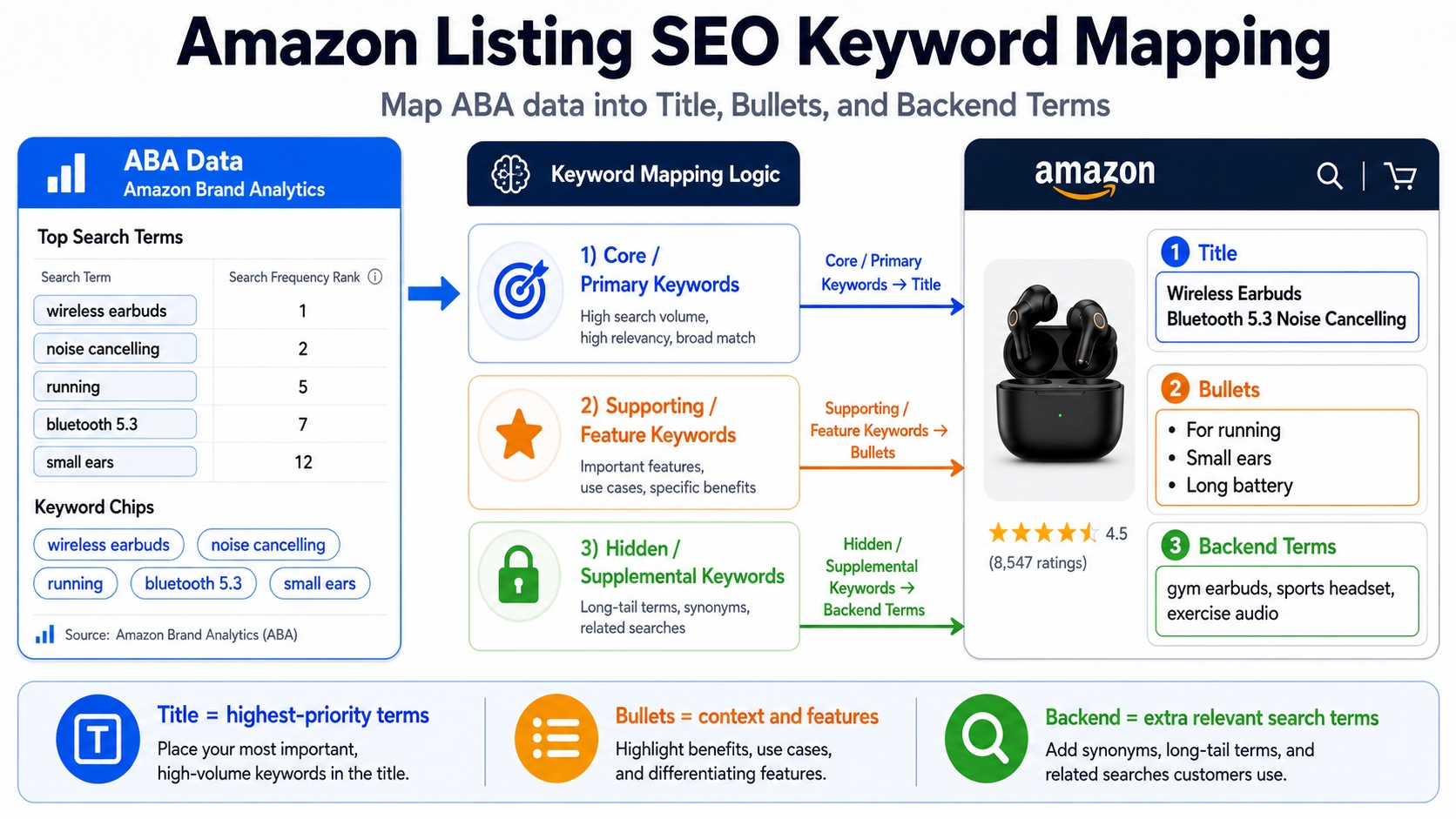
Map by Cluster, Not by Random Keyword Lists
Title: 1 Primary Term + Differentiator
Example: "Wireless Earbuds for Small Ears – Secure Fit, 8-Hour Battery." Prioritize readability over keyword stuffing.
Bullets: 1 Intent Cluster Per Bullet
Each bullet should address a single buyer need with benefit + proof (e.g., "Perfect Fit for Small Ears – Tested on 100+ Users").
Backend: Leftover Relevant Variants
Include synonyms and long-tails (e.g., "tiny earbuds," "small size wireless") without repeating front-end content.
Indexing and Change-Log Discipline
Make one change at a time. Wait 7-14 days. Measure rank, CTR, CVR. Iterate.
Common SEO Traps for ABA Users
- Targeting high-SFR queries that don't match your product (e.g., "gaming headphones" for basic earbuds).
- Keyword stuffing instead of improving conversion elements.
Turning ABA Keywords Into PPC (Harvest, Test, Scale)
Build Campaigns by Cluster (Clean Reporting, Less Overlap)
- Exact: Proven winners – defend and scale.
- Phrase: Controlled expansion.
- Broad/Auto: Discovery – with strict negatives.
Use ABA Insights to Set Smarter Tests
- High-demand queries → tighter bid controls early.
- High-intent long-tails → efficiency plays with lower ACOS targets.
Create a Keyword Harvesting Loop
- Promote converting search terms to Exact match.
- Add negatives to prevent cannibalization.
Special ABA Use Cases (Where ABA Is a Superpower)
New Product Launch: Pick "Winnable" Mid/Long-Tail First
Avoid competing for "bluetooth speaker" at launch. Instead, target "waterproof bluetooth speaker for shower" where competition is lower and intent is higher.
Catalog Expansion: Identify Adjacent Themes Your Brand Can Own
If "yoga mats for hardwood floors" performs well, consider launching eco-friendly versions or matching accessories.
Defense Strategy: Protect Your Brand's Converting Queries
Use branded and generic Exact campaigns to block competitors from stealing your high-intent traffic.
Seasonality: Build a Calendar From Recurring Query Patterns
ABA shows seasonal spikes (e.g., "gifts for runners" in Q4). Plan inventory and campaigns accordingly, and then validate with SellerSprite trend data.
Common Mistakes ABA Users Make (And How to Avoid Them)
Treating ABA as "The Full Keyword Universe"
ABA is powerful but incomplete. Always expand with tools like SellerSprite.
Overreacting to Short Windows
Use 3-month trends, not single-month data, to avoid noise.
Ignoring SERP Difficulty and Offer Mismatch
High SFR doesn't mean winnable. Always check SERP fit.
Not Converting Insights Into a Keyword Map + PPC Structure
Data without action is wasted. Build a map and campaign plan every cycle.
Mini Walkthrough: From ABA → Keyword Map → PPC Plan (Template)
Mini Case: Wireless Earbuds for Small Ears
- Theme: Comfortable fit for small ear canals
- Top Queries: "small earbuds," "wireless earbuds for small ears," "tiny bluetooth earphones"
- Score: 9.2 (High intent, high relevance)
- Listing Map: Title + 1 bullet focused on fit; backend: "tiny," "small size"
- PPC: Exact campaign on "small earbuds," Phrase on "wireless earbuds for small ears"
- KPIs: Track CTR, CVR, ACOS, rank weekly
FAQ
How to access Amazon Brand Analytics for keyword research?
You must be brand-registered with Amazon Brand Registry. Go to Seller Central → Brand → Amazon Brand Analytics. Available reports include Search Terms and Search Query Performance (SQP).
Is ABA enough for keyword research by itself?
ABA is essential but not sufficient. It lacks long-tail depth and real-time updates. Combine ABA with tools like SellerSprite for full coverage and trend analysis.
What's the best way to prioritize ABA keywords?
Use a scoring model: Relevance × Intent × Ability-to-Win × Business Value. Focus on high-purchase-share, high-intent queries with SERP fit.
What are the best tools for Amazon Brand Analytics keyword tracking?
SellerSprite offers advanced ABA keyword tracking and expansion. It integrates ABA data with reverse ASIN, trend analysis, and long-tail discovery.
How often should I refresh ABA-based keyword decisions?
Refresh every 3 months to account for data lag and seasonality. Use monthly checks for high-priority campaigns, but base decisions on 3-month trends.
Next Steps
- Access your Amazon Brand Analytics dashboard and download your Search Terms and SQP reports.
- Start your keyword research with SellerSprite to expand and prioritize ABA data.
References
By SellerSprite Success Team
The SellerSprite Success Team combines 10+ years of Amazon marketplace expertise with data science to help brands scale profitably. We specialize in ABA-driven SEO, PPC optimization, and keyword intelligence, backed by real-world seller results and continuous research updates.


