TL;DR: Reverse ASIN analysis reveals the keywords a competitor's Amazon product ranks for, enabling faster, data-driven keyword research. It's essential for launching new products, optimizing listings, and scaling PPC campaigns with real-market insights.
Key Takeaways
- Reverse ASIN reveals the keywords driving visibility for any Amazon product, organic and sponsored.
- It accelerates keyword research by leveraging real competitor performance data instead of starting from scratch.
- Use reverse ASIN to uncover keyword gaps, optimize SEO, launch targeted PPC campaigns, and refine product positioning.
Table of Contents
- Reverse ASIN Explained
- How Reverse ASIN Works
- Why Reverse ASIN Is Crucial for Sellers
- What Reverse ASIN Can Tell You (And What It Can't)
- Step-by-Step: How to Use Reverse ASIN in Your Workflow
- How to Apply Reverse ASIN Results to Amazon SEO
- How to Apply Reverse ASIN Results to Amazon PPC
- Common Mistakes Sellers Make With Reverse ASIN
- Reverse ASIN "Myth vs. Fact"
- FAQ
- References
Note on marketplaces: This guide is specifically optimized for the US market.
Reverse ASIN Explained (Simple Definition + Why Sellers Care)
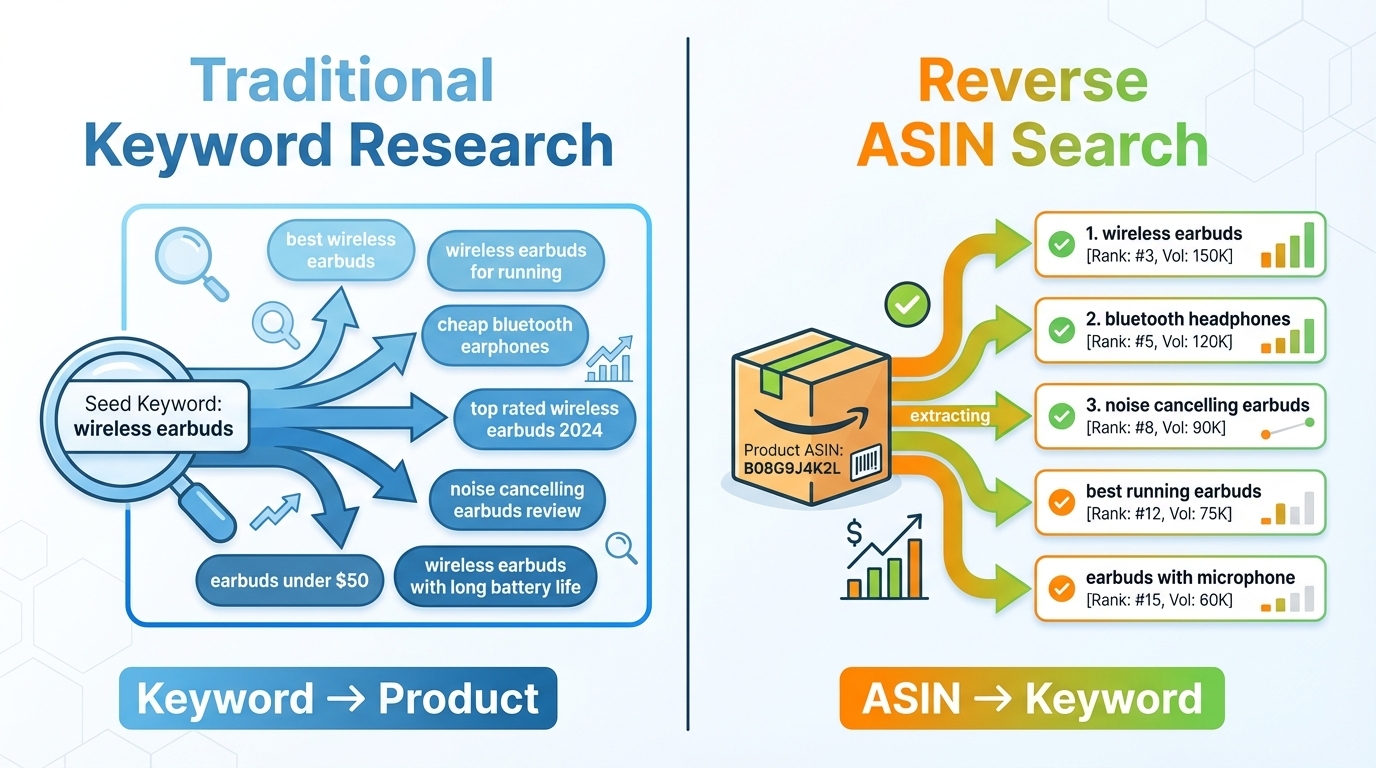
Reverse ASIN is a powerful Amazon product research technique that flips traditional keyword research on its head. Instead of starting with a keyword and finding products, you start with a competitor's ASIN and discover the keywords they rank for, both organically and in ads.
Definition: Reverse ASIN analysis identifies the search terms a product gains visibility from on Amazon, based on ranking and advertising data.
This method gives sellers instant access to real-world keyword performance data. Rather than guessing what shoppers might type, you see exactly what's working for top competitors.
Reverse ASIN vs. Traditional Keyword Research
Traditional keyword research starts with a seed term (e.g., "wireless earbuds") and expands into related phrases using tools. While useful, it's speculative based on search volume estimates and assumptions about buyer intent.
Reverse ASIN, on the other hand, starts with proven performance. You analyze a high-ranking product and extract the actual keywords it ranks for. This provides real-market evidence of what drives traffic and conversions.
What Sellers Get From Reverse ASIN
- Faster keyword discovery: Skip months of trial and error by borrowing from proven winners.
- Real-market validation: See which keywords actually convert, not just which ones get searches.
- Competitive intelligence: Understand how rivals position their products and what language resonates with buyers.
How Reverse ASIN Works (The Concept Behind the Data)
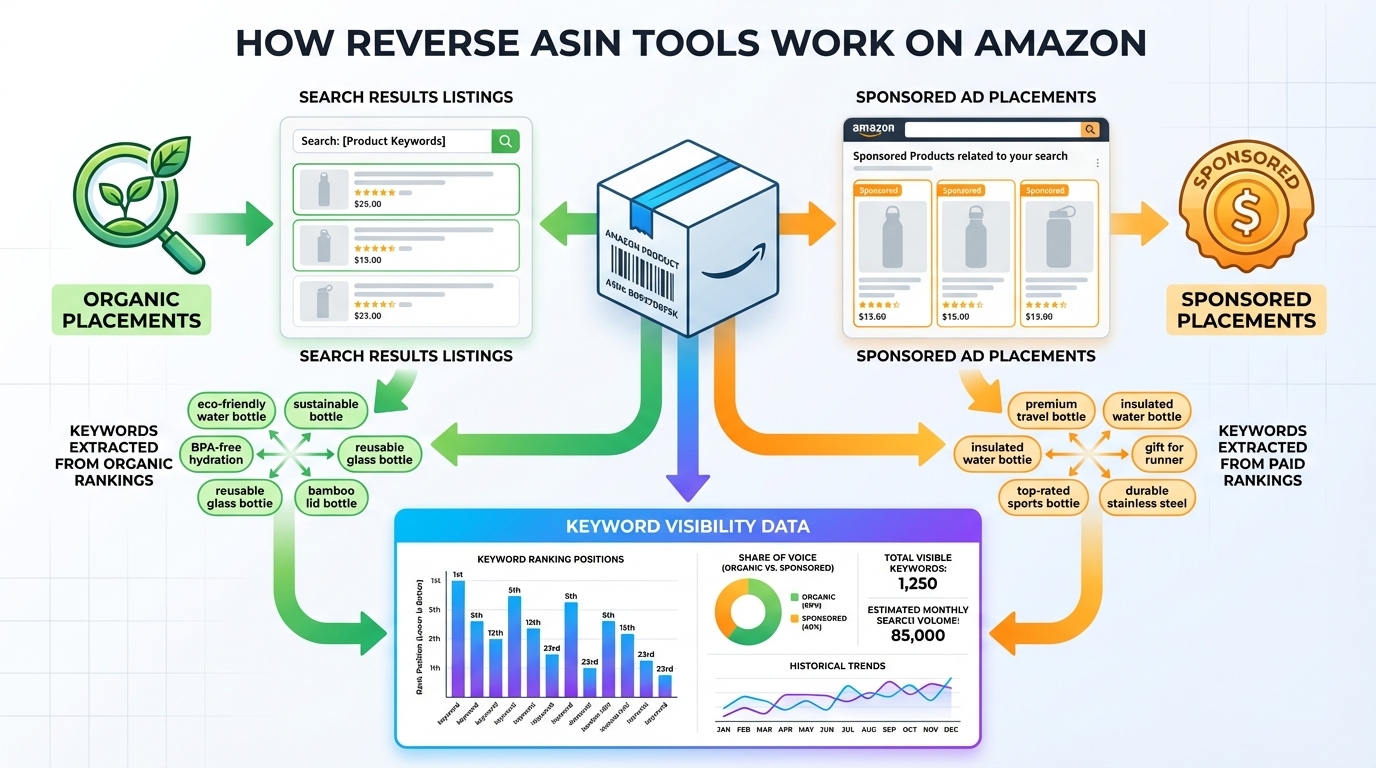
Reverse ASIN tools don't have direct access to Amazon's internal backend keyword database. Instead, they use sophisticated data modeling to infer which keywords a product is visible for based on observable signals.
What Most Tools Are Actually Measuring
These tools analyze two primary types of visibility:
Organic Visibility (Ranking Keywords)
By tracking where a product appears in Amazon search results for millions of queries, tools can map which keywords drive organic rankings. For example, if ASIN B08XYZ1234 consistently shows up on page 1 for "noise cancelling earbuds for travel," it's inferred that the product ranks for that term.
Sponsored Visibility (Ads Keywords/Placements)
Tools also monitor ad placements. If a product appears in the "Sponsored" section for "best gym earbuds 2026," it suggests the seller is bidding on that keyword. This reveals high-intent, conversion-focused terms that competitors are willing to pay for.
Why Results Vary by Marketplace, Time Window, and Tool
Reverse ASIN data isn't static. Results can differ based on:
- Marketplace: A product may rank for different keywords in the US vs. UK due to language, demand, or competition.
- Time window: Seasonal trends, promotions, or algorithm updates can shift keyword performance monthly.
- Tool methodology: Some tools use larger query panels or more frequent crawls, leading to variations in coverage and accuracy.
What Reverse ASIN Is NOT (Important Expectations)
It's Not a Direct "Backend Keywords" Reveal
Amazon does not expose a product's backend search terms. Reverse ASIN tools infer visibility based on ranking and ad data, not the actual keywords entered in the backend. So while you get strong clues, it's not a complete dump of hidden keywords.
It's Not Guaranteed "Top Converting Keywords" Without Validation
Just because a keyword drives visibility doesn't mean it converts well. Some high-traffic terms may have low purchase intent (e.g., "cheap"). Always validate with your own PPC data, conversion rates, and SERP relevance checks.
Why Reverse ASIN Is Crucial for Sellers (Real Use Cases)
Top-performing Amazon sellers don't guess; they reverse-engineer success. Here's how reverse ASIN delivers tangible value across key business functions.
Launching Faster: Build a Keyword List Without Starting From Zero
When launching a new product, time is money. Instead of building a keyword list from scratch, run a reverse ASIN on 3-5 top competitors. Within minutes, you'll have a robust, battle-tested keyword foundation to inform your listing and PPC strategy.
Competitor Teardown: Understand Positioning and Buyer Language
Reverse ASIN reveals how competitors frame their products. Are they emphasizing "long battery life" or "sweatproof design"? This insight helps you refine your messaging to match or outperform them.
Keyword Gap Analysis: Find What You're Missing vs. Top Competitors
Compare your current keyword profile with top competitors. If they rank for "wireless earbuds for small ears" and you don't, that's a clear gap to exploit. Use tools like SellerSprite's Reverse ASIN to identify and prioritize these opportunities.
PPC Expansion: Discover High-Intent Terms to Test and Scale
Many high-converting keywords never appear in standard keyword tools. Reverse ASIN uncovers these hidden gems, especially long-tail, buyer-intent phrases like "noise cancelling earbuds for airplane travel." Add them to your Sponsored Products campaigns for better ROAS.
Listing Refresh: Recover Rankings by Fixing Mapping and Relevance
If your product is underperforming, reverse ASIN can diagnose issues. Are you missing key attribute terms? Is your title misaligned with buyer search behavior? Use competitor keyword data to realign your content and regain visibility.
Use Reverse ASIN When…
- Launching a new product
- Optimizing an underperforming listing
- Planning a PPC campaign
- Conducting competitive analysis
- Refreshing seasonal or mature products
What Reverse ASIN Can Tell You (And What It Can't)
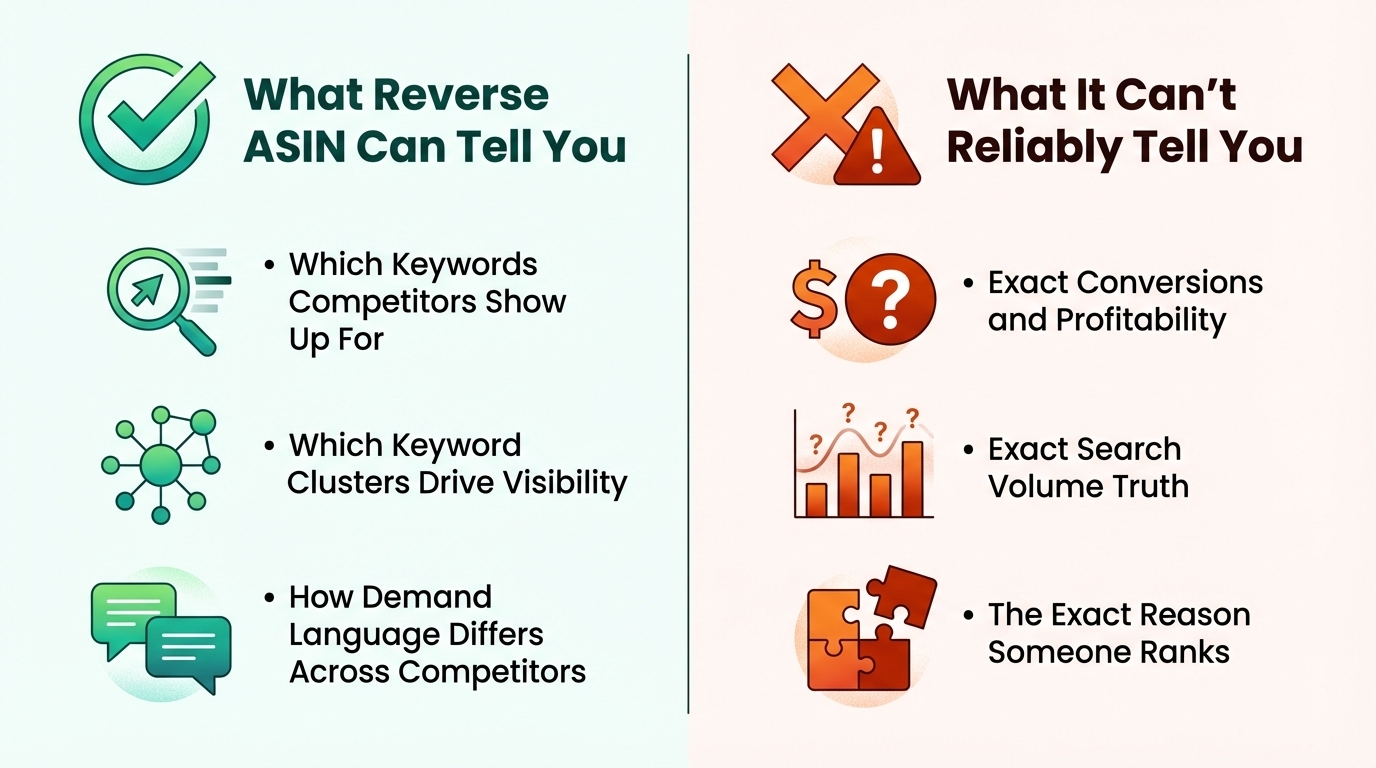
What It Can Tell You
Which Keywords Competitors Show Up For
You'll get a comprehensive list of search terms where a competitor appears in search results, both organically and in ads. This includes core category terms, long-tail phrases, and niche modifiers.
Which Keyword Clusters Drive Visibility (Core, Attributes, Use Cases)
Reverse ASIN helps you identify patterns. For example, a top competitor might dominate in "waterproof" and "swim"-related terms, indicating a strong use-case positioning. Cluster these to build thematic content.
How Demand Language Differs Across Competitors
One brand may focus on "premium sound quality," while another emphasizes "affordable gym earbuds." These differences reveal market segmentation and help you find whitespace.
What It Can't Reliably Tell You
Exact Conversions and Profitability (Without Your Data)
Visibility ≠ conversion. A keyword may get impressions but not sales. Only your own PPC and sales data can confirm profitability.
Exact Search Volume Truth (Estimates Vary)
Search volume is estimated. Different tools use different models, so treat numbers as directional, not absolute.
The Exact Reason Someone Ranks (Needs Context)
Ranking is influenced by more than keywords: price, reviews, inventory, and conversion rate. Reverse ASIN gives you part of the puzzle, but not the full picture.
Step-by-Step: How to Use Reverse ASIN in Your Workflow
Follow this proven 5-step process to turn reverse ASIN data into actionable insights.
5-Step Reverse ASIN Checklist
- Choose 3-5 relevant competitor ASINs
- Run reverse ASIN and export keywords
- Clean and filter the list
- Cluster keywords by intent
- Apply to SEO and PPC
Step 1: Choose the Right Competitor ASIN Set (Quality Input = Quality Output)
Same Use Case + Similar Price Band + Similar Format/Specs
Focus on products that serve the same customer need, are priced similarly, and have comparable features. For example, if you sell $40 wireless earbuds with 20-hour battery, don't analyze $100 premium models or $20 basic ones.
Avoid Bundles vs. Singles, Category Giants, Off-Position Variants
Bundles (e.g., earbuds + case + charger) often rank for different terms. Avoid Amazon Basics or Apple unless you're in that tier. Also skip variants that are clearly mispositioned (e.g., a "gaming" earbud with no latency specs).
Step 2: Run Reverse ASIN and Export Keywords
Recommended Outputs: Keyword List + Rank Type + Relevance Indicators
Use a tool like SellerSprite's Reverse ASIN Tool to extract keywords, filter by organic/sponsored, and sort by relevance or estimated volume.
Step 3: Clean and Filter the List
Remove Branded Terms You Can't Compete On
Delete terms like "AirPods Pro alternative" unless you're targeting that niche. These won't help your organic ranking.
Remove Irrelevant/Ambiguous Queries
Filter out junk like "earbuds not working" or "how to pair." These aren't purchase-intent keywords.
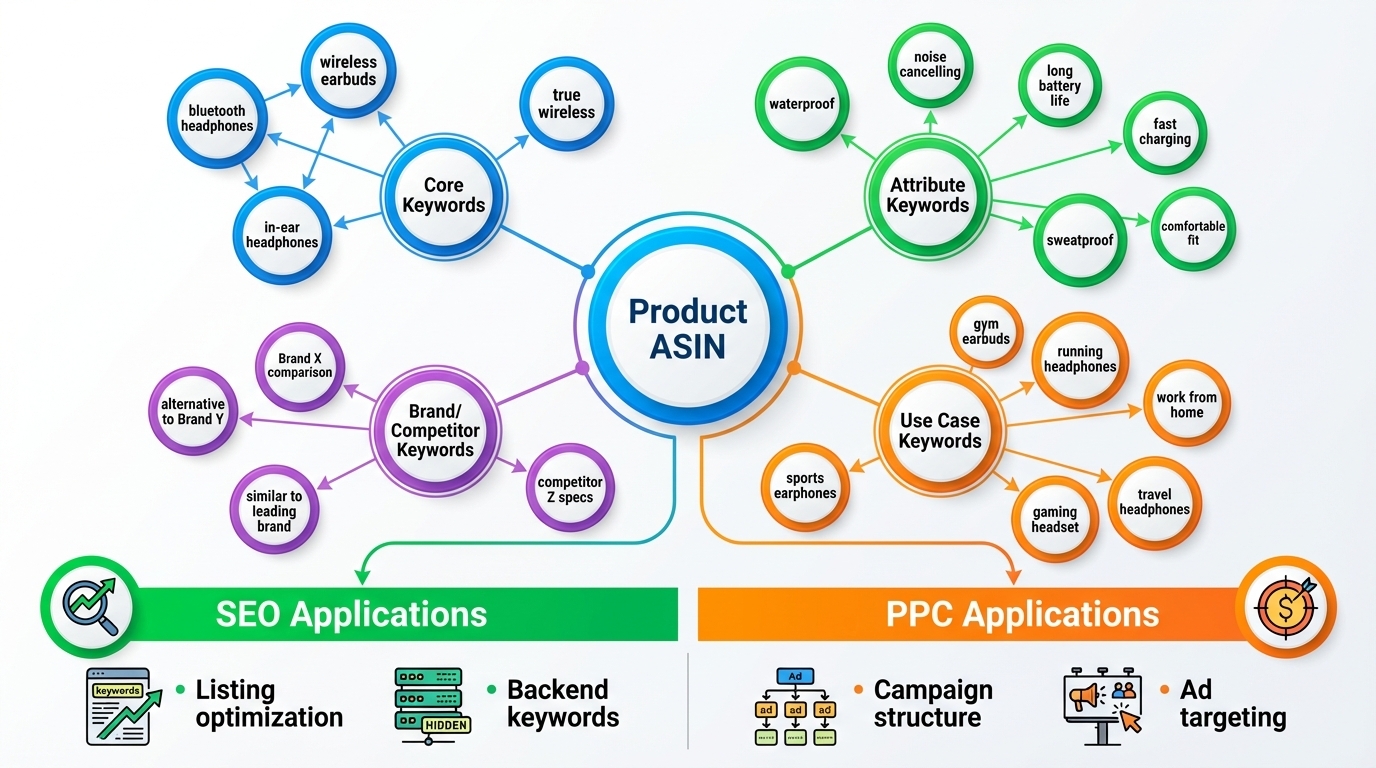
Step 4: Cluster Keywords by Intent
Core Category Terms
e.g., "wireless earbuds," "Bluetooth earbuds"
Attribute Modifiers (Size/Material/Pack/Features)
e.g., "small fit," "sweatproof," "2-pack"
Use-Case Modifiers ("For…", "With…", "Compatible With…")
e.g., "for running," "for travel," "compatible with iPhone"
Problem/Solution and Comparison Terms
e.g., "long battery life," "noise cancelling," "vs Jaybird"
Step 5: Turn Clusters Into Actions (SEO + PPC)
Map clusters to your listing and ad campaigns. For example:
- SEO: Add "sweatproof wireless earbuds for running" to bullet points
- PPC: Create an Exact match campaign for “noise cancelling earbuds for travel”
How to Apply Reverse ASIN Results to Amazon SEO (Keyword Mapping)
Your listing is only as strong as its keyword alignment. Use reverse ASIN insights to optimize every field.
Where Keywords Should Go: Title vs. Bullets vs. Backend
Title: Primary Term + Key Differentiator (Readability First)
Include your main keyword (e.g., "Wireless Earbuds") and a key selling point (e.g., "30-Hour Battery, Sweatproof"). Keep it under 200 characters and readable.
Bullets: 1 Intent Theme Per Bullet (Benefit + Proof)
Each bullet should address a keyword cluster. Example: "Sweatproof Design - IPX7 rated for intense workouts and rainy runs."
Backend: Variants, Synonyms, Long-Tail Leftovers (No Repetition)
Use backend search terms for variations (e.g., "earphones," "in-ear headphones") and long-tail phrases that don't fit naturally in the visible content.
Indexing Sanity Checks (Before/After Changes)
After updating your listing, use a tool to verify keyword indexing. Check if your target terms now appear in search results when you type them into Amazon.
Avoid Keyword Stuffing: Relevance and Conversion Come First
Amazon penalizes unnatural content. Prioritize clarity and benefit-driven language. Keywords should enhance, not dominate, your message.
How to Apply Reverse ASIN Results to Amazon PPC (Test → Scale)
Reverse ASIN fuels smarter, higher-ROAS PPC campaigns by revealing what competitors are bidding on.
Match-Type Plan: Exact (Scale) / Phrase (Shape) / Broad (Discover)
Start with Exact match for high-intent terms (e.g., "sweatproof wireless earbuds"). Use Phrase for broader reach, and Broad to discover new variants.
A Simple Testing Framework (7-14 Days)
Decide Thresholds: Clicks, Orders, ACoS/ROAS Guardrails
Run tests for 7-14 days. Kill keywords with no clicks or orders. Scale those with ROAS > 3x or ACoS < 30%.
Add Negatives Early to Prevent Wasted Spend
Exclude irrelevant terms (e.g., "cheap," "free") and competitor brands to protect budget.
Use PPC Winners to Improve Listing Copy (Feedback Loop)
If "long battery life earbuds" converts well in ads, add that phrase to your bullets and title. Let PPC data refine your SEO.
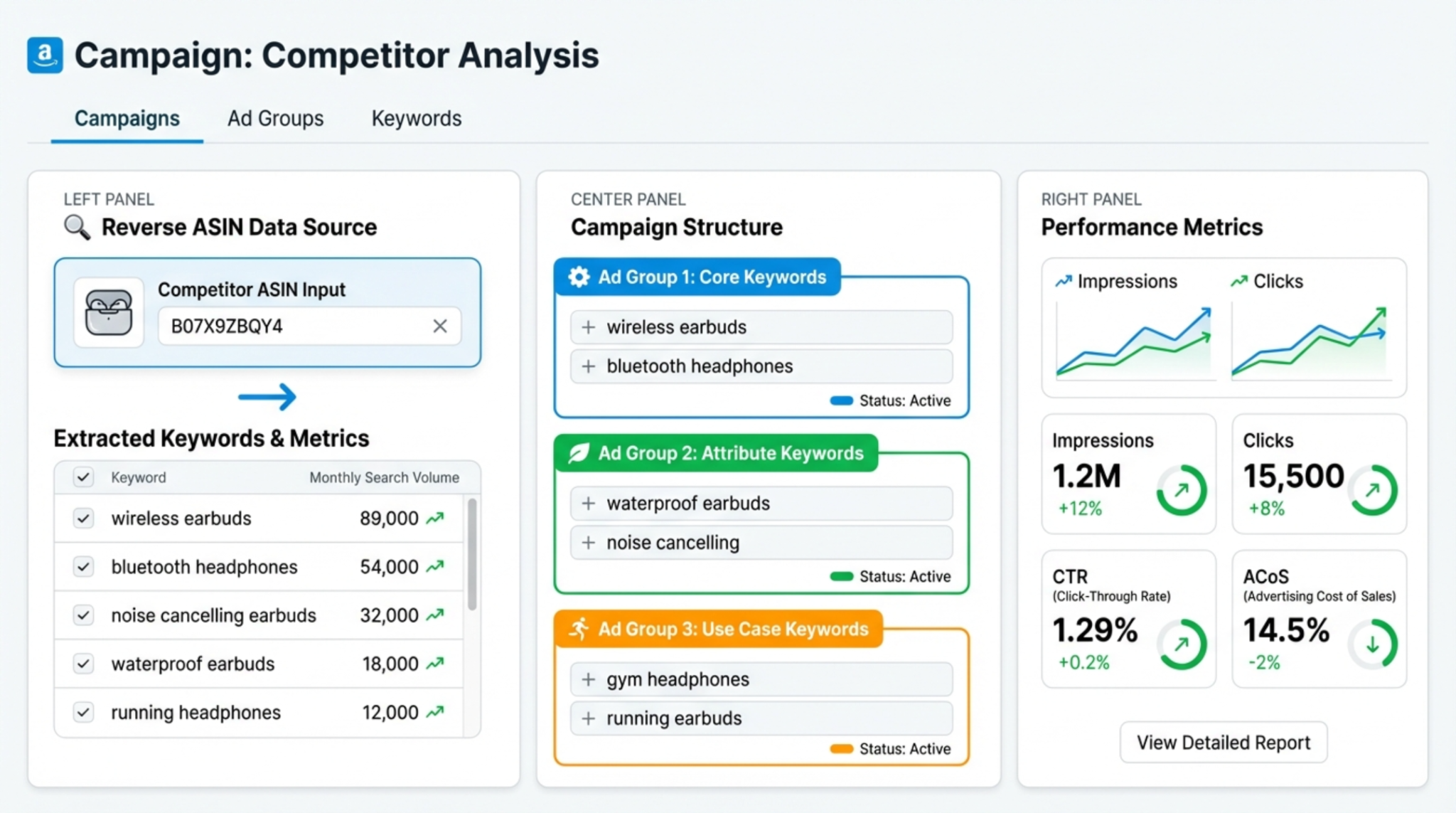
Common Mistakes Sellers Make With Reverse ASIN (And How to Avoid Them)
Picking the Wrong Competitors (Wrong Intent = Wrong Keywords)
Analyzing a luxury product when you sell budget-friendly items leads to irrelevant keyword suggestions. Always match intent, price, and use case.
Copying Keywords Without Offer Alignment (Hurts CVR)
Don't claim "premium sound" if your product lacks audio quality. Misalignment kills conversion rates and hurts long-term performance.
Chasing Volume and Ignoring Intent (Profit Drops)
High-volume keywords like "earbuds" are competitive and often low-intent. Focus on buyer-ready phrases like "best wireless earbuds for gym" instead.
Not Validating With Amazon Signals (SERP Check, PPC Data, Relevance)
Always cross-check reverse ASIN findings. Search the keyword on Amazon: does your product appear? Run small PPC tests before scaling.
Troubleshooting: Results Look Messy?
Check your marketplace setting, verify ASIN relevance, and apply filters (organic/sponsored, volume threshold). Start with 3-5 clean competitors.
Reverse ASIN "Myth vs. Fact"
Myth: Reverse ASIN Reveals Exact Backend Keywords
Fact: It infers visibility based on ranking and ad data. The actual backend keywords remain hidden. Always validate with SERP checks and performance data.
Myth: More Keywords = Better Ranking
Fact: Relevance and conversion performance drive rankings. A focused, high-converting listing outperforms a keyword-stuffed one every time.
FAQ
How many competitor ASINs should I analyze?
Start with 3-5 high-performing, relevant competitors. Too few limits insight; too many introduces noise. Focus on quality over quantity.
What is the best tool for reverse ASIN lookup?
SellerSprite's Reverse ASIN Tool offers accurate, up-to-date data with filtering by organic and sponsored visibility. It integrates seamlessly with keyword clustering and PPC planning.
Why is reverse ASIN important for Amazon FBA sellers?
It accelerates product launches, uncovers hidden keyword opportunities, and provides competitive intelligence; all critical for standing out in a crowded FBA marketplace.
Should I reverse the parent or child ASIN?
Always use the child ASIN (specific variation) rather than the parent. The parent aggregates data across variants, diluting accuracy. For example, analyze the black 10-pack, not the parent for all colors and sizes.
Next Steps
- Try SellerSprite's Reverse ASIN Tool to analyze your top competitor.
- Read our Reverse ASIN Strategy Guide for advanced tactics.
- Sign up for SellerSprite and start optimizing your Amazon keyword strategy today: Free Trial.
References
- Reverse ASIN Strategy Guide View
- How to Perform Reverse ASIN Search View
- Amazon Keyword Research Guide View
By SellerSprite Success Team
The SellerSprite Success Team combines deep expertise in Amazon algorithm behavior, data science, and e-commerce growth strategies. With years of hands-on experience helping thousands of sellers optimize listings, dominate keyword rankings, and scale PPC profitability, we deliver actionable, evidence-based insights you can trust.


