If you already understand Amazon PPC basics and want a cleaner way to combine amazon ppc phrase match, broad match, and ASIN targeting, this guide is for you. You will learn how to build a practical Sponsored Products structure, when to use phrase vs broad, how to filter product targets, and how to lower wasted spend without overcomplicating your account.
This guide is written from a US marketplace perspective and uses USD examples. The same structure usually transfers well to CA, UK, EU, and JP after you adjust bids, taxes, and conversion expectations for each marketplace.
Who this guide is for
Amazon sellers who already know the basics of Sponsored Products and now want a more strategic campaign structure for discovery, ranking, competitor conquesting, and controlled scaling.
What you will be able to do after reading
Build a phrase match and broad match structure, layer in ASIN targeting and product targeting more intelligently, reduce wasted budget, and create a repeatable optimization workflow with SellerSprite.
Key takeaways
- Phrase Match is the middle ground between control and discovery. It keeps the core phrase intact while still giving Amazon room to match close variations.
- Broad Match is best used for search term expansion, not for unlimited spending. It should usually launch with lower bids and tighter budget control.
- ASIN targeting is part of product targeting and is one of the most direct ways to appear on competitor product detail pages and adjacent shopping paths.
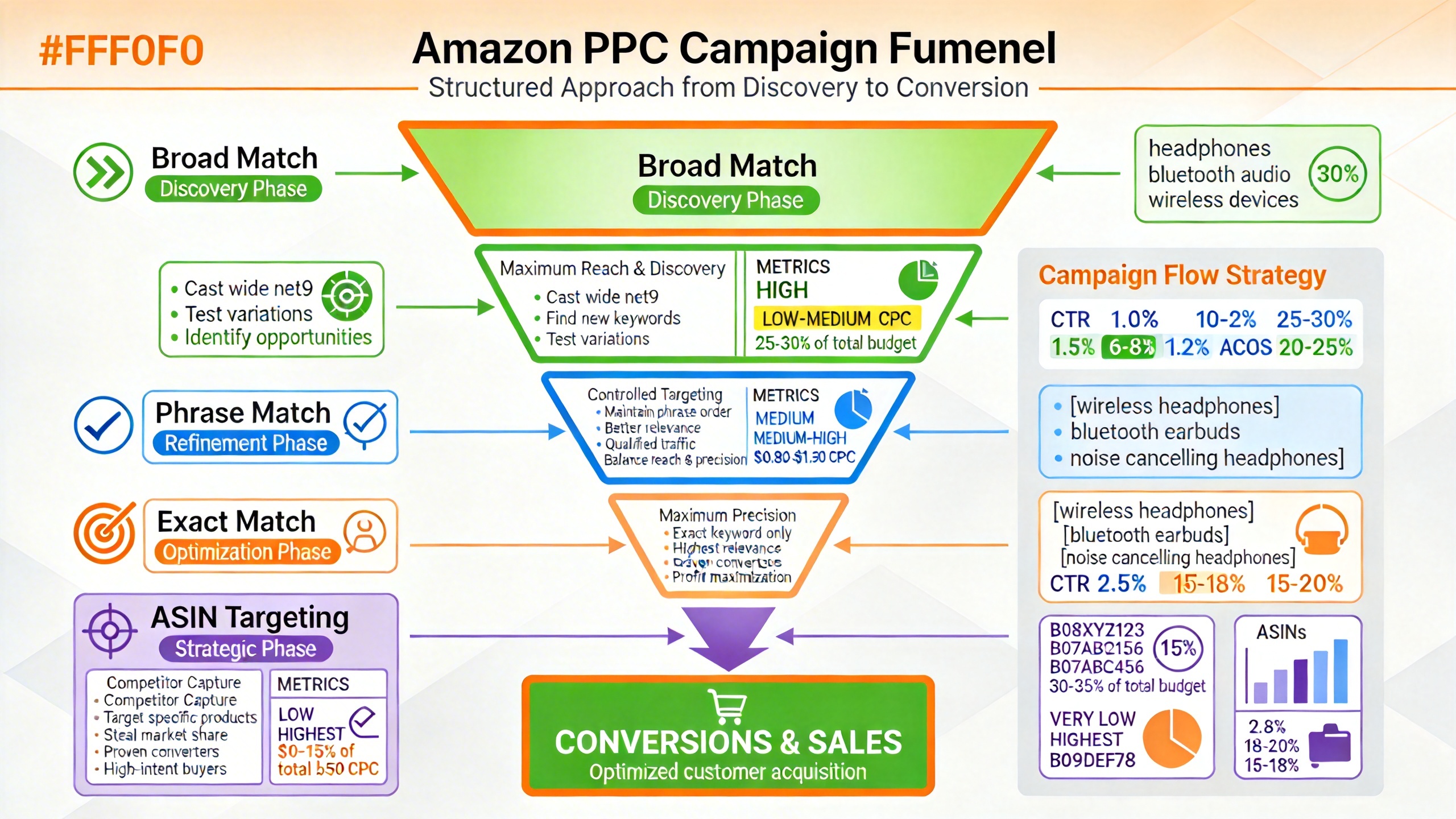
- A clean funnel often looks like this: Auto and Broad for discovery, Phrase for controlled expansion, Exact for ranking and harvest, ASIN targeting for conquesting and complementary traffic.
- The biggest launch mistake is letting Broad consume too much budget before Phrase, Exact, and qualified ASIN targets have enough data.
- SellerSprite makes the workflow faster by helping you mine keywords, reverse engineer competitor ASINs, and review ad opportunities before you push targets live.
Table of contents
- Match Types 101: Phrase vs Broad in Amazon PPC
- What Is ASIN Targeting and Why It Matters
- Building a Campaign Structure Combining Phrase, Broad, and ASIN
- Step-by-Step Setup: From Keyword List to Live Campaign
- Optimization: Bids, Negatives, and Scaling
- GEO and Marketplace Notes
- Common Mistakes and Real World Campaign Patterns
- Checklist and Next Steps with SellerSprite
- FAQ
- About the author
- References
Match Types 101: Phrase vs Broad in Amazon PPC
Before you build any campaign, you need to decide what job each targeting type should do. That is where many accounts go wrong. Sellers often launch broad match, phrase match, exact match, and product targeting all at once, but without assigning a clear role to each campaign.
In practice, phrase match is usually the best next step after exact because it expands reach while keeping the core phrase logic more controlled. Broad match is more useful when your goal is search term discovery, not precision. ASIN targeting sits outside the keyword funnel and gives you product-level placement opportunities that keyword targeting alone cannot cover.
| Targeting type | Traffic reach | Control level | Best use case | Operator note |
|---|---|---|---|---|
| Exact Match | Lowest | Highest | Ranking, harvesting proven terms, and defending high-intent queries | Use this to protect your winners and push terms that already convert. |
| Phrase Match | Medium | High | Controlled expansion around proven roots | This is often the cleanest bridge between ranking and discovery. |
| Broad Match | Highest | Lowest | Search term discovery, query expansion, niche exploration | Let it discover, but do not let it dominate early spend. |
| ASIN Targeting | Variable | High | Competitor conquesting, defense, complementary traffic | Best when filtered, segmented, and matched to a clear shopper intent. |
- Type, Traffic reach, Control level, Best, Control level, Best, Control level, Best, Control level, BestPhrase Match when you already know your core keyword roots.
- Use Broad Match when you want to uncover new search term variations.
- Use ASIN targeting when you want visibility on specific product pages, not just search results.
What Is ASIN Targeting and Why It Matters
ASIN targeting is one form of Amazon product targeting. Instead of bidding on a shopper query, you choose the product pages, brands, or product groups where you want your ad to appear. That makes it one of the most useful tactics for competitor conquesting, cross-sell traffic, and new product visibility.
The reason ASIN targeting matters so much is simple: many profitable clicks do not come from a search result page alone. They come from shoppers comparing products side by side, reviewing alternatives, or browsing complementary items on detail pages.
When ASIN targeting works best
- You want to appear on lower-rated or overpriced competitor listings.
- You have a stronger offer, better review velocity, stronger bundle, or better coupon.
- You want to capture adjacent demand from complementary products.
- You want more control than broad keyword expansion can give you.
Keyword targeting vs category targeting vs ASIN targeting
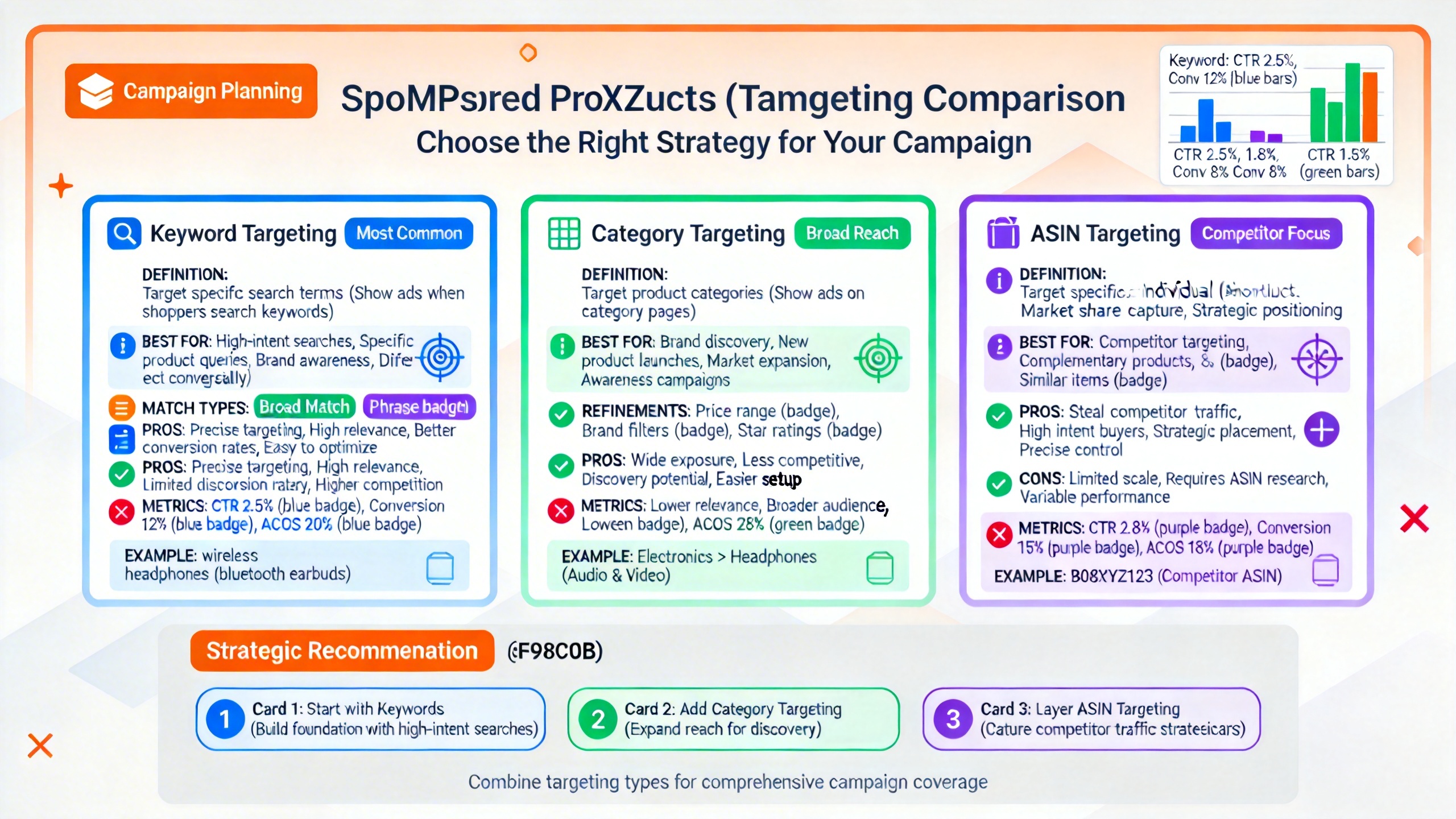
Use keyword targeting when you know the shopper query you want. Use category targeting when you want a wider product-level reach inside a relevant shelf. Use ASIN targeting when you know exactly which products, brands, or competitor detail pages are worth attacking first.
Pro tip
Do not build an ASIN list by relevance alone. Filter by review count, rating quality, price gap, and offer strength. A relevant target with stronger reviews and a better price is often a bad conquesting candidate. A slightly smaller target with weaker proof and worse merchandising can convert far better.
Key points
- ASIN targeting is not only for direct competitors. Complementary traffic can be profitable too.
- Category targeting is broader. ASIN targeting is more surgical.
- The best ASIN targets are usually filtered, grouped, and bid by intent level.
Building a Campaign Structure Combining Phrase, Broad, and ASIN
A scalable PPC account is easier to optimize when each campaign has one job. That means separating match types instead of stacking everything into one campaign and then trying to diagnose performance later.
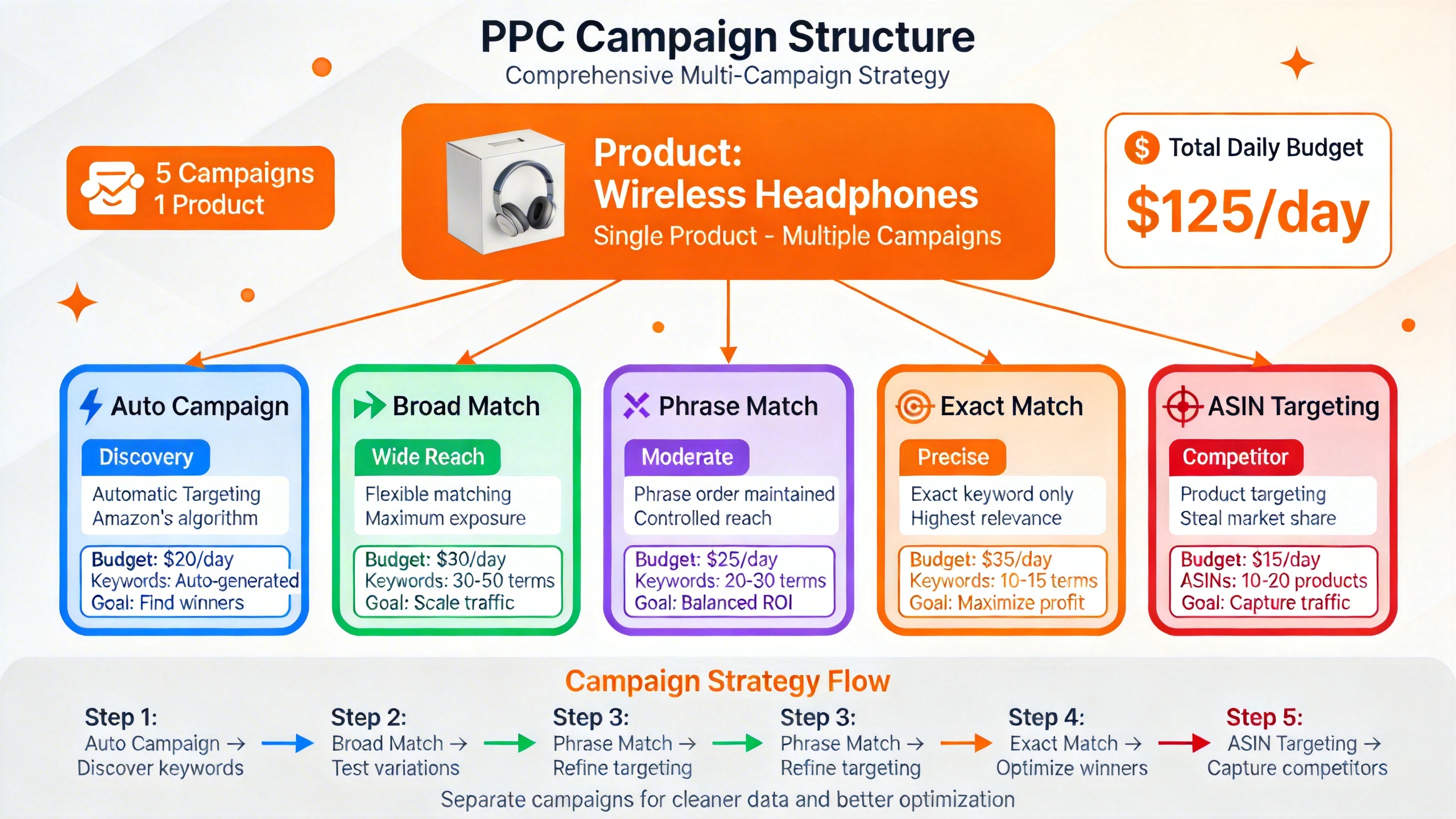
A practical funnel structure
- Auto: Early discovery and term collection.
- Broad: Controlled expansion and variant discovery.
- Phrase: Mid funnel scaling around proven roots.
- Exact: Harvesting, ranking, and protecting winners.
- ASIN targeting: Competitor conquesting, complementary traffic, and brand defense.
Recommended account logic
Keep one targeting type per campaign. In most cases, keep one advertised ASIN per main launch campaign as well. That makes spending diagnosis, placement review, and search term harvesting much easier.
| Lifecycle stage | Suggested budget focus | Main objective |
|---|---|---|
| Launch | Auto 25% to 35%, Broad 15% to 25%, Phrase 15% to 20%, Exact 10% to 15%, ASIN 15% to 25% | Collect data, validate offer, find conversion paths |
| Stabilization | Exact 25% to 35%, Phrase 20% to 25%, Broad 10% to 15%, ASIN 20% to 25%, Auto 5% to 10% | Improve efficiency, scale winners, reduce waste |
| Clearance or inventory push | Broad 15% to 25%, Phrase 15% to 20%, Exact 10% to 15%, ASIN 25% to 35%, Auto 5% to 10% | Expand reach, recover traffic, move units faster. |
In a highly competitive niche, you may need to shift more budget into Exact and carefully filtered ASIN campaigns. In a newer or less saturated niche, Broad and Phrase may have more room to discover profitable terms.
Common mistake
Putting Phrase Match and Broad Match in the same campaign because they "use similar keywords." This usually creates noisy data. If Broad starts pulling weak traffic, Phrase performance becomes harder to read, and your optimization decisions get slower.
Step-by-Step Setup: From Keyword List to Live Campaign
A good launch starts before you touch the ad console. The strongest setups begin with keyword selection, then move into clean ad group separation, and then add filtered ASIN targets based on buyer overlap and competitive weakness.
Step 1: Build your keyword list in SellerSprite
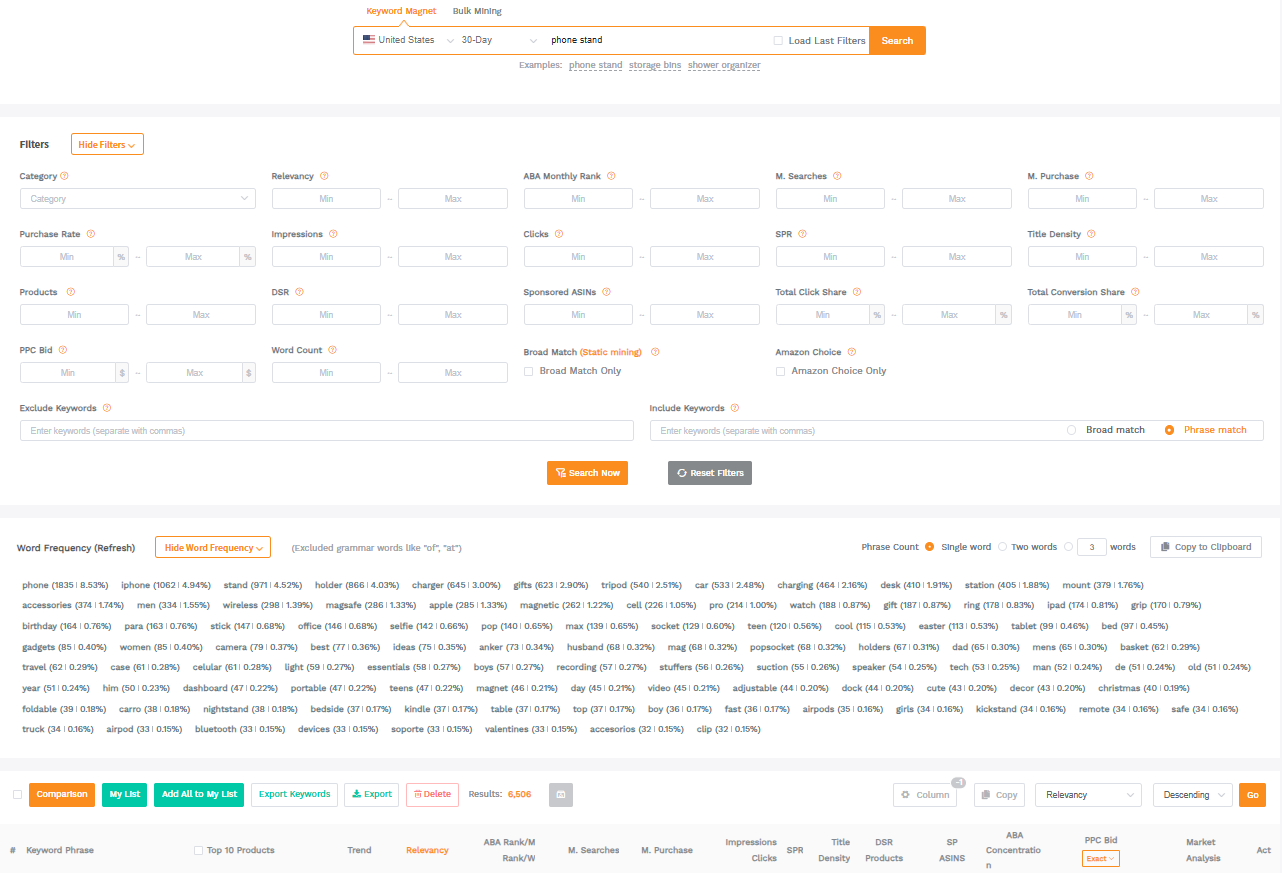
Start with your core seed term in SellerSprite Keyword Mining. Pull relevant roots, high-intent long tail terms, and adjacent phrases with clear buyer intent. Then split those terms into three groups: must-have ranking terms, mid-funnel expansion terms, and discovery terms.
Try this in SellerSprite in 2 minutes.
Enter your main keyword in Keyword Mining, shortlist terms with clear purchase intent, and separate them into Exact, Phrase, and Broad launch lists before you enter Campaign Manager.
Step 2: Create separate Phrase Match and Broad Match campaigns
Use the same core keyword roots across Exact, Phrase, and Broad where possible. That gives you a clean test framework. You are not comparing completely different keyword lists. You are comparing how the same roots behave under different match rules.
A simple naming convention works well:
- Product Name - Phrase - Target ACoS
- Product Name - Broad - Target ACoS
- Product Name - ASIN - Target ACoS
Phrase Match normally launches with slightly lower bids than Exact. Broad Match typically launches at a lower position than Phrase because it carries greater discovery risk. That simple bid ladder prevents Broad from taking over before the account has enough conversion data.
Step 3: Build and filter your ASIN target list
This is where most accounts either waste money or build a real edge. Do not paste in a giant list of "relevant" ASINs and hope the algorithm sorts it out. Split your targets into intent groups:
- Direct substitutes: Similar products competing for the same purchase.
- Weak competitors: Relevant listings with weaker reviews, weaker imagery, worse pricing, or weaker value perception.
- Complementary products: Related items that share the same customer journey.
- Brand defense: Your own ASINs and adjacent catalog pages.
Use Reverse ASIN to find targetable competitors faster
Reverse engineer competitor listings, identify overlapping terms and product clusters, then shortlist ASINs worth conquering before you build your product targeting campaign.
Step 4: Set initial bids and budgets with a clear ladder
If your starting Exact bid for a top keyword is $1.00, a practical launch ladder often looks like this:
| Campaign type | Sample starting bid | Why |
|---|---|---|
| Exact Match | $1.00 | Highest intent and strongest control |
| Phrase Match | $0.85 to $0.95 | Controlled expansion around core phrase roots |
| Broad Match | $0.65 to $0.80 | Discovery traffic needs more protection |
| ASIN substitutes | $0.60 to $0.85 | Highly relevant, but offering a comparison still matters |
| ASIN complementary | $0.35 to $0.60 | Broader intent overlap, so start carefully |
On budgets, the safest launch behavior is not "low budget everywhere." It is "enough budget for each campaign to generate signal, but not enough for Broad to burn through the day before Phrase, Exact, and ASIN get real delivery."
Key points
- Use one targeting type per campaign.
- Reuse core roots across Exact, Phrase, and Broad for cleaner testing.
- Split ASIN targets by intent, not just by relevance.
Optimization: Bids, Negatives, and Scaling
The goal of optimization is not to make the account look neat. The goal is to move the budget from uncertain traffic into proven traffic while keeping discovery alive. That is why timing matters. Do not optimize too late, but do not panic after one day either.
A practical optimization timeline
| Timing | What to review | What to do |
|---|---|---|
| Day 3 | Spend concentration, zero click targets, obvious irrelevance | Trim obvious waste, lower runaway Broad bids, pause dead ASIN clusters with no traction |
| Day 7 | CTR, CPC, early CVR, search term quality, placement spread | Add negative keywords and negative ASINs where needed, promote early winners, and split strong ASIN groups into their own campaigns if required |
| Day 14 | Stable ACoS, repeat winners, term to target migration | Move converting terms into Exact, raise bids on clear winners, narrow category and ASIN sets, scale budgets where conversion is consistent |
When to use negative keywords and negative ASINs
A common beginner mistake is adding too many negatives on day one. That often blocks useful data before you even know what the account wants to do. The smarter approach is to launch with only obvious exclusions, then use search term data and ASIN level placement data to decide what should be blocked.
- Use negative keywords when Broad or Phrase keeps matching to irrelevant shopper language.
- Use negative ASINs when your product targeting keeps serving on weak-fit detail pages or brand pages that attract low-quality clicks.
- Promote winners into Exact Match or dedicated ASIN campaigns instead of leaving all good traffic inside a discovery bucket forever.
When Broad + ASIN makes sense, and when Phrase + ASIN is safer
Use Broad + ASIN together during launch when you need both search expansion and competitor page discovery at the same time. This works best when your offer is strong, your creative is competitive, and your budget can support parallel testing.
Use Phrase + ASIN together when you already know your keyword roots and want a more controlled structure. This is often the safer setup in competitive categories where Broad traffic can get expensive fast.
Pattern we see often
Broad Match spends first, Phrase Match learns second, and ASIN targeting never gets enough delivery to prove itself. The fix is usually simple: lower Broad bids, cap Broad budget share, and give Phrase plus filtered ASIN groups protected budget for 7 to 14 days.
Pattern we see often
ASIN targeting gets blamed for bad ACoS when the real problem is target quality. A giant, unsegmented list of competitor pages usually hides both winners and losers. Split substitute ASINs, weak competitors, and complementary products into separate groups so the data can speak clearly.
Watch spending patterns before they become expensive habits
Use SellerSprite Ads Insights to review performance trends, campaign-level spend concentration, and where your optimization attention should go first.
GEO and Marketplace Notes
This article uses Amazon.com logic, but the structure generally works across other marketplaces. What changes is not the logic itself. What changes are bid pressure, tax impact, translation quality, and local shopping behavior?
US vs EU vs JP
- US: Higher ad density, stronger bid competition, and more room for ASIN conquesting at scale.
- EU and UK: Watch VAT math, local seasonality, and how translation changes shopper wording. Phrase structure often needs tighter keyword curation.
- JP: Search behavior can be more compact, and language nuance matters more. Product targeting can be especially useful when direct keyword translation is weak.
- Across all GEOs, adjust bids based on local CPC and conversion reality instead of copying US bid levels one-to-one.
Key points
- Keep the structure, but localize bids and keyword language.
- Use product targeting more aggressively when keyword translation is unreliable.
- Always benchmark against local CPC and conversion behavior, not imported assumptions.
Common Mistakes and Real World Campaign Patterns
The mistakes below show up again and again across launch and scale accounts. Most of them are not caused by "bad PPC." They come from unclear structure, weak target selection, or budget imbalance.
Five mistakes that damage performance fast
- Using the same bid across Exact, Phrase, Broad, and ASIN campaigns.
This removes the natural control ladder and lets low-precision traffic compete too aggressively. - Launching too many ASINs in one ad group.
You end up with blended performance and slow optimization. - Adding too many negatives before data exists.
You reduce discovery before the account has shown you what works. - Ignoring complementary product targeting.
Some of the most efficient incremental clicks come from adjacent buying behavior, not just direct substitutes. - Letting Broad own the budget.
That is often the fastest way to inflate ACoS and delay real learning.
Example scenario 1: Launch week rebalancing
The table below is an illustrative benchmark scenario, not a universal rule. It shows the kind of spending distortion many sellers see in the first week when Broad launches too hot.
| Campaign | Before rebalance | Main action | After 7 more days |
|---|---|---|---|
| Broad | 62% of spend, weak CVR | Lower bids, add obvious negatives, cap budget share | 34% of spend, cleaner search term mix |
| Phrase | Underdelivering | Protect the budget, keep roots stable | Higher click share, better conversion signal |
| ASIN | Too wide, mixed quality | Split weak competitors from complementary products | Winners easier to identify and scale |
Example scenario 2: Phrase plus ASIN rescue
Another pattern we see is mixing Phrase Match and product targeting inside one campaign for convenience. It feels simple at launch, but optimization gets messy fast. Once the account is separated into one targeting type per campaign, the seller can usually see which spend belongs to query expansion and which belongs to product page conquesting. That alone often speeds up optimization by a full review cycle.
What changed the outcome
Not a trick bid. Not a new keyword. Cleaner structure, better ASIN filtering, and a stricter rule about budget ownership between Broad, Phrase, and ASIN campaigns.
Checklist and Next Steps with SellerSprite
If you want a simple execution flow, use the checklist below before you launch, then work through the SellerSprite workflow right after.
One-page launch checklist
- Separate Broad, Phrase, Exact, and ASIN targeting into different campaigns.
- Reuse core keyword roots across match types for cleaner comparison.
- Split ASIN targets into substitutes, weak competitors, complementary products, and defense.
- Set a clear bid ladder instead of one flat bid.
- Keep negatives simple at launch, then optimize from real data.
- Review spend and term quality on Day 3, Day 7, and Day 14.
PPC workflow with SellerSprite
- Use Keyword Mining to build your launch term list.
- Use Reverse ASIN to identify competitor pages and overlapping demand.
- Split targets by intent before importing them into product targeting campaigns.
- Launch Phrase, Broad, and ASIN campaigns with a disciplined bid ladder.
- Use Ads Insights to spot spend concentration, term movement, and where to optimize first.
Share Your Sourcing Journey With SellerSprite Community
Join the SellerSprite community on the Facebook Group to share your sourcing journey, ask questions, and get support from fellow Amazon sellers.
View The SellerSprite Course Directory
Ready for the next step? Open the SellerSprite Academy course directory to continue building your Amazon FBA skills chapter by chapter.
FAQ
Should I launch Broad Match and Phrase Match at the same time?
Yes, if your budget can support both and you separate them cleanly. Broad helps you discover, while Phrase helps you scale around stronger roots with more control.
When should I use Broad Match with ASIN targeting?
Use Broad plus ASIN during launch or expansion when you need both new query discovery and new product page placements. Keep both tightly managed so Broad does not starve ASIN testing.
When is Phrase Match with ASIN targeting the better choice?
It is usually the better choice when you already know your keyword roots, your niche is competitive, or your budget is limited and you need cleaner data sooner.
Should I add negative keywords on day one?
Only obvious ones. Too many negatives at launch can block useful discovery. Most accounts improve faster when negatives are added after the real search term and product placement data starts to appear.
Can ASIN targeting work for complementary products, not just direct competitors?
Yes. Complementary product targeting is often overlooked, but it can drive efficient traffic when the shopper overlap is real, and your offer makes sense in that buying journey.
How many ASINs should I launch in one campaign?
Start smaller than you think. It is better to launch a segmented set you can read clearly than a giant mixed list that hides your winners and losers in blended data.
About the author
SellerSprite Team. SellerSprite builds workflow tools for Amazon sellers across keyword research, competitor analysis, and PPC decision support. This guide is based on repeat campaign patterns seen across launch, scaling, and optimization workflows, where phrase match, broad match, and ASIN targeting need to work together instead of competing against each other.


