TL;DR: Amazon autocomplete keywords reveal real-time, high-intent search phrases shoppers use. This free, actionable step-by-step guide teaches sellers how to mine, validate, and apply them to listings and PPC.
Key Takeaways
- Amazon autocomplete reflects real customer search behavior, not seller assumptions, so use it to uncover buyer language.
- Combine manual mining (A-Z, 0-9, underscore tricks) with modifier stacks to generate hundreds of long-tail keywords for free.
- Always validate suggestions via SERP checks and keyword tools like SellerSprite to avoid targeting irrelevant or low-opportunity terms.
- Map high-intent keywords to listing elements (title, bullets, backend) and scale them in PPC with structured campaigns and negatives.
Table of Contents
- What Amazon Autocomplete Is (And Why It's a Goldmine for Buyer Keywords)
- Set Up Your Autocomplete Mining Rules (So You Don't Collect Junk)
- Step 1: Manual Autocomplete Mining (Fast and Free)
- Step 2: Use Modifier Stacks to Generate High-Intent Long-Tails
- Step 3: Batch Processing: How to Collect and Clean Suggestions at Scale
- Step 4: Validate Autocomplete Keywords Before You Use Them
- Step 5: Turn Suggestions Into Listing SEO (Keyword Mapping)
- Step 6: Turn Suggestions Into PPC Keywords (Discovery → Scale)
- Example Walkthrough: One Seed Term → 60 Suggestions → Final Keyword Plan
- Common Mistakes (And How to Avoid Them)
- FAQ
- References
Note on marketplaces: This guide is specifically optimized for the US market.
What Amazon Autocomplete Is (And Why It's a Goldmine for Buyer Keywords)
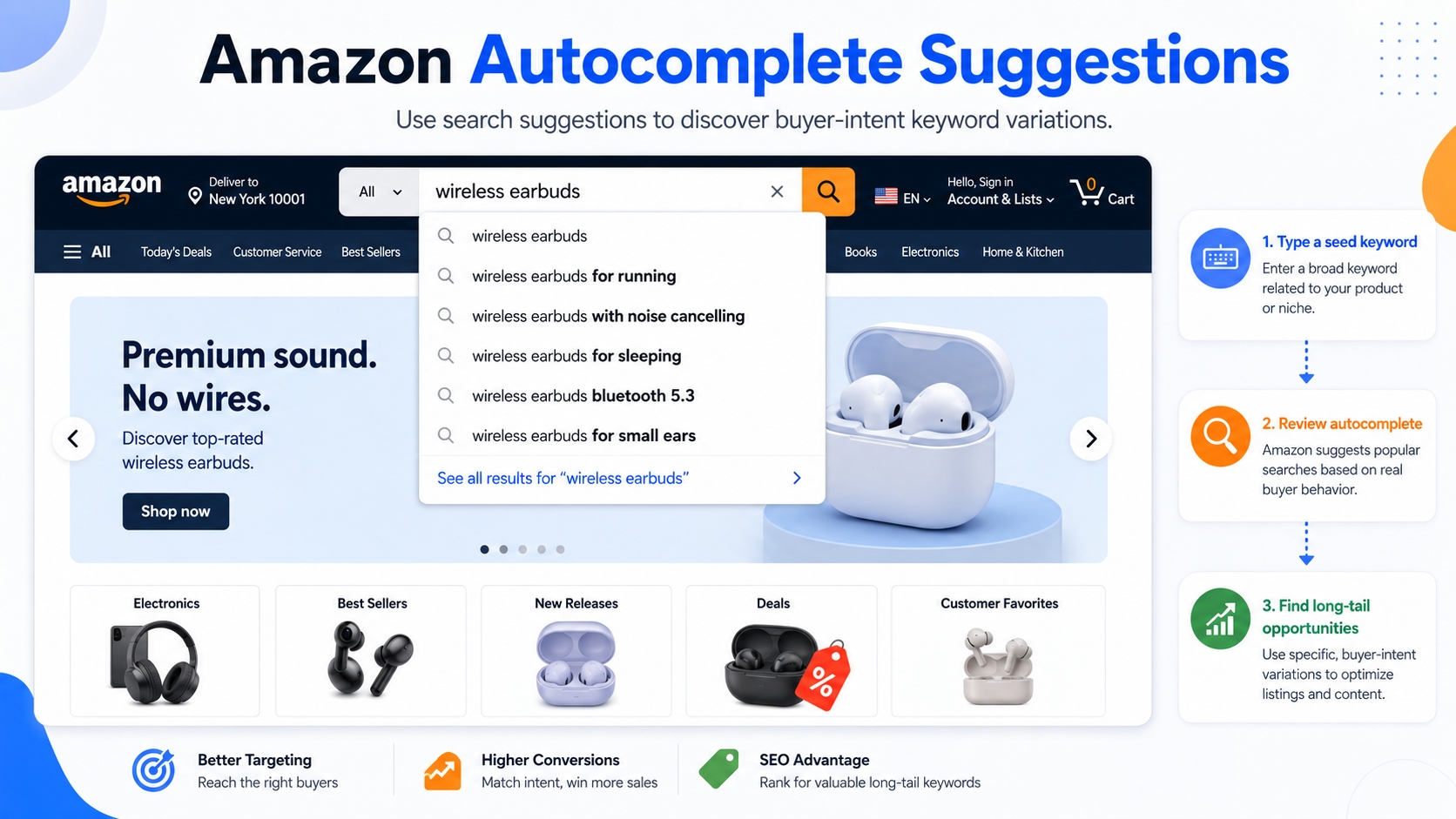
Amazon autocomplete is the dropdown list of search suggestions that appear as you type in the Amazon search bar. These are not random: they're algorithmically generated based on real shopper behavior, search volume, and conversion potential.
Definition: Amazon Autocomplete
Autocomplete = Amazon's real-time suggestions based on popular shopper searches. It reflects actual customer language, not seller jargon. However, it does not show search volume, conversion rates, or profitability data.
Why is this powerful? Because it reveals how real buyers describe products. For example, a seller might call a product a "portable power station," but customers search for "solar generator for camping." Autocomplete surfaces that gap.
Why It Beats "Guessing"
Most sellers optimize listings using internal assumptions or generic keyword tools. But Amazon autocomplete gives you direct access to buyer language. This is critical for Amazon SEO keywords because Amazon's algorithm ranks listings based on relevance to actual customer queries.
What Autocomplete Can't Tell You
While powerful, autocomplete has blind spots:
- No search volume or trend data
- No conversion or profitability insights
- Can include misleading or competitor-driven terms
That's why autocomplete should be the starting point rather than the final word in your Amazon keyword research free strategy.
Set Up Your Autocomplete Mining Rules (So You Don't Collect Junk)
Without structure, autocomplete mining turns into a chaotic keyword dump. To ensure quality, set clear rules before you start.
Pick Your Marketplace and Category Context
Always use Amazon.com for US-focused research. Search intent varies by marketplace; for example, what works in Germany may not apply in the US. Also, consider your product's category. A "blender" in Kitchen & Dining has different modifiers than one in Baby.
Build a Seed List (5-20 Core Terms)
Start with 5-20 seed terms that accurately describe your product. These should be:
- Commonly used by customers
- Aligned with your product's primary function
- Free of brand names (unless you're researching competitors)
Define Your Output Format
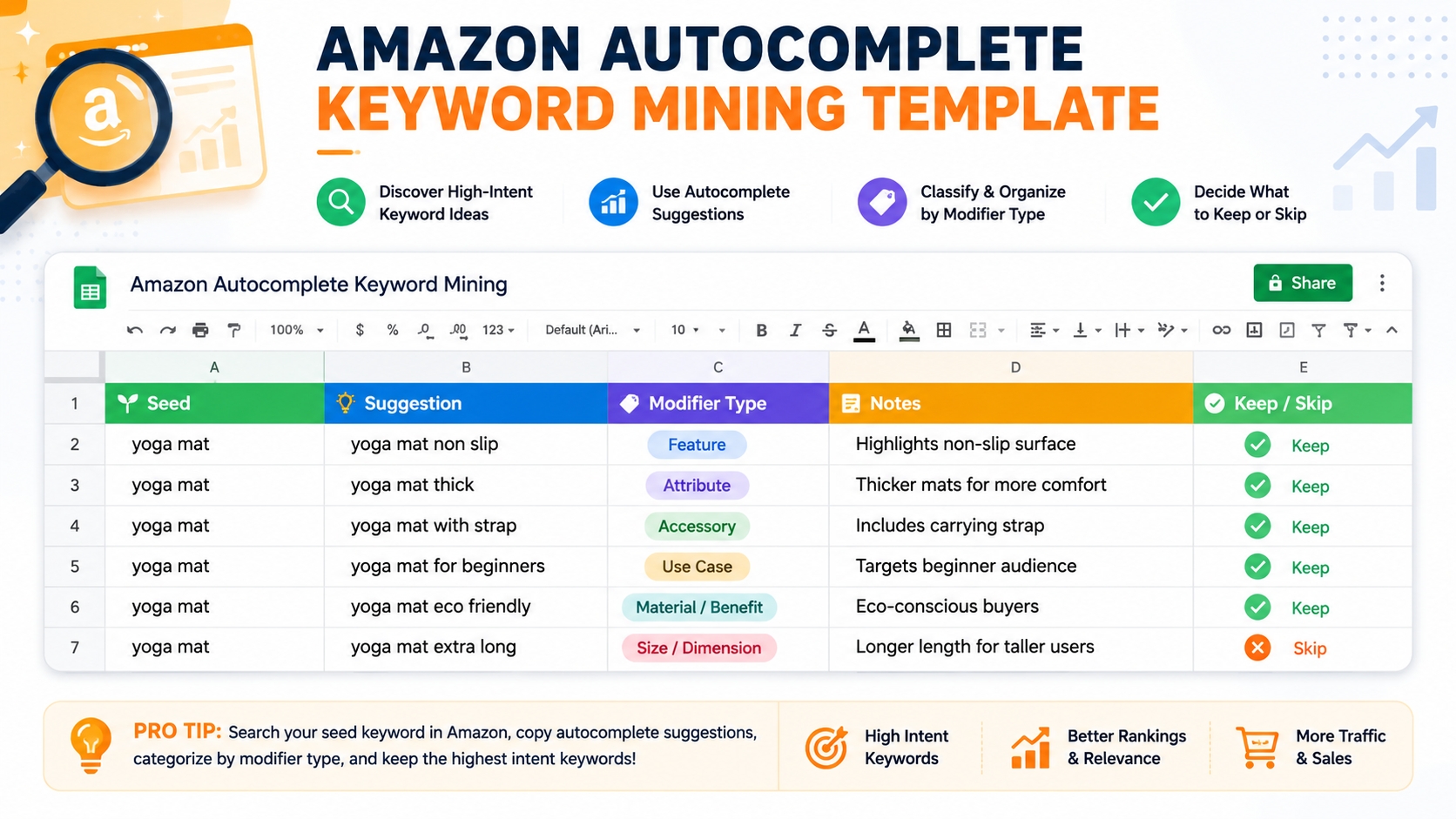
Structure your data for clarity. Use a spreadsheet with these columns:
- Keyword: the full suggestion
- Modifier Type: attribute, use case, compatibility, problem, etc.
- Notes: relevance, keep/skip decision
✅ Mining Rules Checklist
- Use Amazon.com (US marketplace)
- Select seed terms that reflect real buyer language
- Focus on one product category at a time
- Record all suggestions in a structured format
- Tag each suggestion with a modifier type
- Flag irrelevant or competitor terms early
- Deduplicate entries (e.g., singular/plural)
- Validate all keywords before use
Step 1: Manual Autocomplete Mining (Fast and Free)
You don't need tools to start. Use Amazon's search bar to extract hundreds of keyword ideas in minutes.
The Basic Method
Type a seed term (e.g., "dog leash") and capture all suggestions. Then, add a space and type each letter A-Z to force new suggestions. Repeat for numbers 0-9.
The A-Z Expansion Method
After typing your seed, add a space and type each letter from A to Z. For example:
- "dog leash a" → "dog leash adjustable"
- "dog leash b" → "dog leash for big dogs"
This surfaces long-tail keywords that aren’t visible with the base term alone.
The 0-9 Expansion Method
Use numbers to find size, model, pack count, or version-based searches:
- "battery 6" → "battery 6 volt"
- "shampoo 3" → "shampoo 3 pack"
The "Underscore Trick"
Type your seed + space + underscore ("_"). This forces Amazon to show phrases that begin after your seed term. For example:
- "coffee maker _" → "coffee maker replacement carafe", "coffee maker cleaning tablet"
This is a pro move for finding problem/solution and compatibility keywords.
Step 2: Use Modifier Stacks to Generate High-Intent Long-Tails
Modifiers are the secret sauce. They turn generic terms into high-intent, buyer-ready phrases.
The 6 Modifier Families Sellers Should Mine
- Attribute: size, material, color, pack, strength (e.g., "organic", "extra large")
- Use case: for travel, for kids, for hiking (e.g., "for sensitive skin")
- Compatibility: compatible with, fits, replacement for (e.g., "fits iPhone 17")
- Problem/Solution: for back pain, for acne, for dry skin (e.g., "non-slip", "wrinkle remover")
- Quality/Feature: heavy duty, waterproof, rechargeable (e.g., "long-lasting", "fast charging")
- Comparison: alternative, vs, better than (use carefully to avoid trademark issues)
Turn Modifiers Into Repeatable Query Templates
Create templates to systematize your research:
📎 Modifier Stack Library (Copy/Paste)
{seed} for [use case]
{seed} with [feature]
{seed} compatible with [device]
{seed} replacement [part]
{seed} [attribute] [material]
{seed} [problem] solution
{seed} vs [competitor]
{seed} alternative 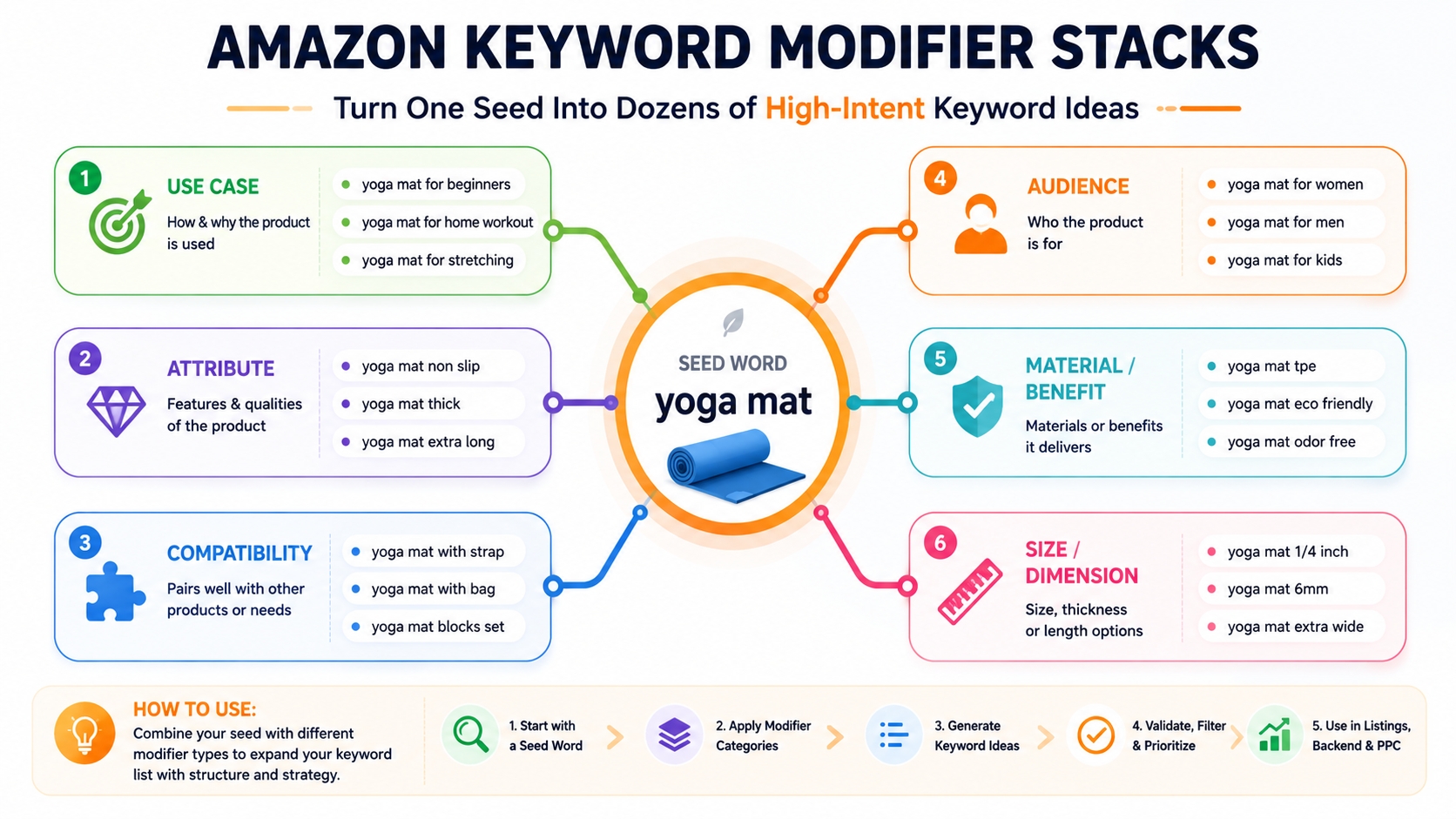
Step 3: Batch Processing: How to Collect and Clean Suggestions at Scale
Once you've gathered raw data, organize it for action.
Build a Simple Spreadsheet Workflow
Use columns to structure your data:
- Seed → Query Pattern → Suggestion → Tag → Keep/Skip
Deduplicate Rules
Remove duplicates caused by:
- Singular/plural ("mat" vs. "mats")
- Spacing/hyphens ("non slip" vs. "non-slip")
- Word order ("for travel" vs. "travel for")
Filter Rules
Remove:
- Irrelevant categories (e.g., "dog leash" suggesting pet food)
- Competitor brand names (unless intentional)
- Misleading intent (e.g., "free", "DIY")
Cluster Suggestions by Intent
Group keywords into clusters:
- Core
- Attribute
- Use case
- Compatibility
- Problem-Solution
Step 4: Validate Autocomplete Keywords Before You Use Them
Not all suggestions are worth targeting. Validate each keyword.
SERP Relevance Check
Search the keyword on Amazon. Does the first page include products like yours? If not, it's not a good fit.
Cross-Check Demand Signals
Use SellerSprite Keyword Mining to check search volume, competition, and related terms. This turns guesswork into data-driven decisions.
Prioritize With a Scoring Model
Score each keyword on:
- Relevance (1-5): How well it matches your product
- Intent (1-5): How close to purchase (e.g., "buy" vs. "review")
- Opportunity (1-5): Low competition, high volume
📊 Validation Scorecard (Example)
| Keyword | Relevance | Intent | Opportunity | Score |
|---|---|---|---|---|
| yoga mat for beginners | 5 | 4 | 3 | 60 |
| yoga mat extra thick | 5 | 5 | 4 | 100 |
Step 5: Turn Suggestions Into Listing SEO (Keyword Mapping)
Now, apply your best keywords strategically.
Title: One Primary Buyer Term + Key Differentiator
Example: "Extra Thick Yoga Mat for Women – Non-Slip, Eco-Friendly, Ideal for Beginners"
Bullets: One Intent Cluster Per Bullet
Each bullet should address a key intent with benefit + proof:
- "Perfect for beginners: Extra cushioning reduces joint strain during practice"
- "Non-slip surface: Stay stable even during hot yoga sessions"
Backend Search Terms: Leftover Variants
Include synonyms and long-tails not used in visible content. Avoid repetition and brand names.
A+ / Images: Address Objections Naturally
Use visuals to reinforce keywords like "easy to clean" or "lightweight for travel."
📌 Keyword Mapping Example
- Title: Extra Thick Yoga Mat for Beginners
- Bullet 1: Non-slip for hot yoga
- Bullet 2: Lightweight for travel
- Backend: eco-friendly yoga mat, mat for sensitive skin
- PPC: yoga mat for back pain, replacement yoga mat
Step 6: Turn Suggestions Into PPC Keywords (Discovery → Scale)
Use your long-tail list to fuel PPC campaigns.
Start With Phrase/Broad for Discovery
Use phrase or broad match to find converting terms. Set daily budgets and monitor closely.
Promote Winners to Exact
Graduate high-performing keywords to exact match using these rules:
- At least 10 clicks
- 1+ order or strong CVR
- ACoS below target (e.g., <30%)
Add Negatives to Stop Waste
Exclude irrelevant searches (e.g., "free", "used", competitor brands) to protect budget.
Example Walkthrough: One Seed Term → 60 Suggestions → Final Keyword Plan
Let's walk through "yoga mat" as a seed:
Raw Capture (A-Z + Modifier Templates)
Using A-Z and "yoga mat for _", we collect 60+ suggestions like "yoga mat for beginners", "yoga mat for hardwood floors".
Cleaning + Intent Tagging
We deduplicate, filter, and tag each. Top clusters: Use Case (beginners, travel), Problem (slip, back pain), Attribute (thick, eco-friendly).
Final Output
- 1 Primary Term: yoga mat for beginners
- 5 Support Terms: extra thick, non-slip, eco-friendly, lightweight, for hardwood floors
- 10-20 Long-Tails: replacement yoga mat, yoga mat for back pain, travel yoga mat with strap
Common Mistakes (And How to Avoid Them)
Collecting Everything (No Filtering)
Not all suggestions are valuable. Use your mining rules to filter early.
Skipping SERP Validation
If the SERP doesn't show relevant products, the keyword won't convert.
Stuffing Titles With Long-Tails
Hurts readability and CTR. Prioritize clarity and benefit.
Not Turning Lists Into Clusters
Unstructured data leads to unfocused listings. Cluster by intent for impact.
FAQ
How to use Amazon autocomplete to find profitable keywords?
Start with a seed term, use A-Z and 0-9 expansion, apply modifier stacks, and validate suggestions via SERP checks and tools like SellerSprite. Focus on high-intent, relevant phrases that match your product.
Are Amazon autocomplete suggestions personalized?
No, they are based on aggregate shopper behavior, not individual history. However, they can vary slightly by region and device.
How often do suggestions change?
Amazon updates autocomplete weekly based on search trends, seasonality, and new product launches. Revisit your research quarterly.
What are the best tools for Amazon autocomplete keyword research?
While manual mining is free, tools like SellerSprite Keyword Mining automate collection, provide search volume, and expand long-tail opportunities.
Why is Amazon autocomplete important for optimizing product listings?
It reveals real customer search behavior and language. Using these terms in your listing improves relevance, visibility, and conversion, which are key factors in Amazon SEO keywords.
Next Steps
- Read the Amazon Keyword Research Guide for a full framework.
- Try SellerSprite Keyword Mining free today to scale your research with data.
References
By SellerSprite Success Team
The SellerSprite Success Team combines 10+ years of Amazon marketplace expertise with data science to help sellers unlock growth. We specialize in keyword research, listing optimization, and PPC strategy, all backed by real seller results and Amazon algorithm insights.