TL;DR: The best AI tools for Amazon sellers in the US don't replace ChatGPT—they do the jobs ChatGPT can't: reading live marketplace data, scoring keywords, rebuilding listings against real search volume, and adjusting PPC bids every day. This guide ranks the categories, shows exactly what each tool is good for, and gives you US pricing bands plus a checklist for building a stack that pays for itself.
Key Takeaways
- ChatGPT is a strong writer but a blind analyst. Amazon-specific AI tools connect to search volume, BSR, review data, and ad reports—that connection is what turns AI output into profit.
- Six categories do most of the work: product research, keyword and listing optimization, PPC automation, review and voice-of-customer mining, creative production, and inventory/profit forecasting.
- A practical starter stack is one all-in-one data platform plus one PPC automation layer. Add specialists only when a specific bottleneck is visibly costing you money.
- Judge a tool by data freshness, actionability, integration depth, and explainability—not by how impressive the chat window feels on day one.
- US pricing runs from free tiers to roughly $39–$250/month for all-in-one research suites, with PPC automation often priced as a percentage of ad spend or an enterprise quote. Always confirm current plans before you buy.
Table of Contents
- Why ChatGPT Isn't Enough for Amazon Sellers
- How We Evaluated These AI Tools
- The Best AI Tools for Amazon Sellers, by Category
- Five Real-World Playbooks for Using AI on Amazon
- What AI Tools for Amazon Sellers Cost in the US
- How to Choose: A 10-Point Checklist
- Common Mistakes to Avoid
- FAQ
- Next Steps
- References
Note on marketplaces: This guide is specifically optimized for the US market. Pricing bands, plan names, and feature availability described below reflect publicly listed US plans at the time of writing; vendors change packaging frequently, so confirm current details on each vendor's pricing page before you commit.
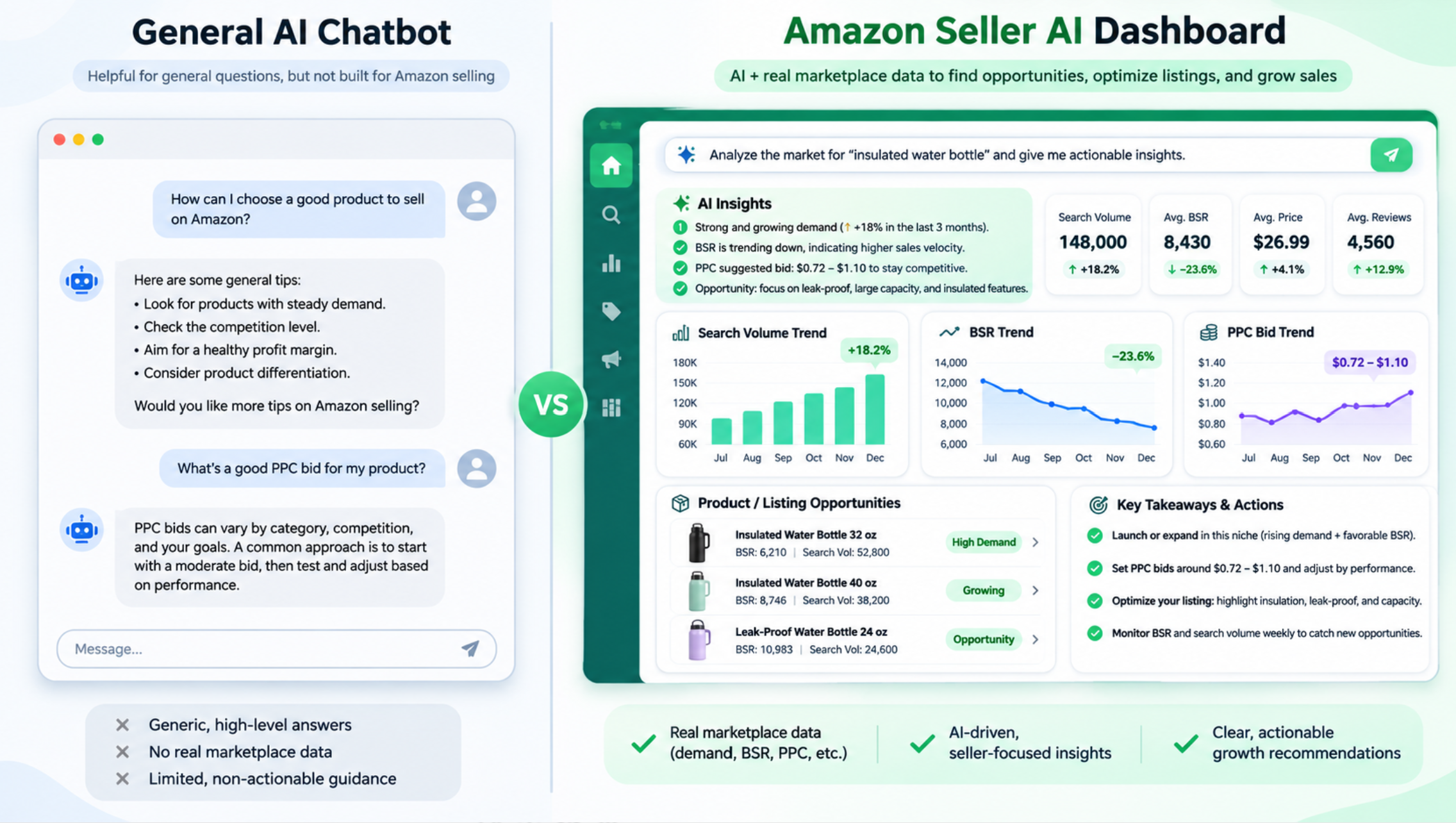
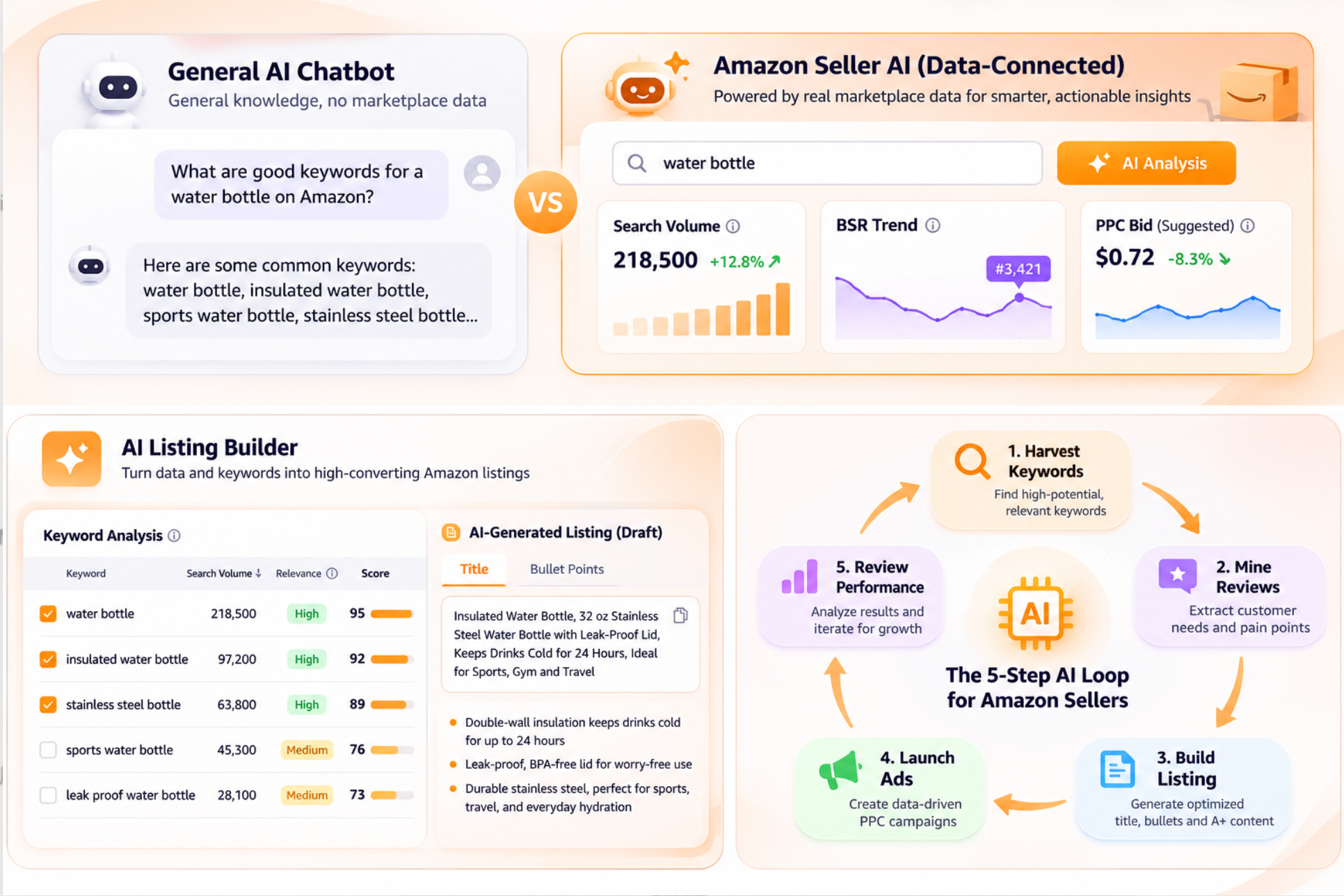
ChatGPT has become the default first stop for Amazon sellers who need a faster bullet point, a polite reply to a buyer message, or a name for a new bundle. That's genuinely useful, and we're not going to pretend otherwise. But ask a general chatbot how many monthly searches "collapsible dog bowl" gets on Amazon.com, whether the top three results have a review moat you can realistically beat, or which of your 47 Sponsored Products campaigns quietly burned budget last week—and it will either guess or decline. That gap is exactly where purpose-built AI tools for Amazon sellers live.
This guide is a working inventory, not a leaderboard. It walks through who each tool is for, what problem it solves, where it stops being useful, and how much you should expect to pay in the US. If you are still building your mental model of how AI fits into the FBA workflow end to end, start with our parent guide on AI for Amazon FBA and then come back here to pick specific tools.
Why ChatGPT Isn't Enough for Amazon Sellers
The core limitation isn't intelligence—it's access. A general large language model reasons from patterns in text it was trained on. It does not see your Seller Central account, your Search Query Performance report, your inventory age, or today's bid landscape in Sponsored Products. It also has no reliable sense of what changed on Amazon this week. For strategy discussions and first drafts, that's fine. For decisions that move real ad dollars or determine whether a product launch survives its first 60 days, it isn't.
What ChatGPT does well—and where it stops
Be honest about the split. A general LLM is excellent at drafting, summarizing, translating, structuring, and brainstorming. It's a thinking partner. It is weak at anything that requires verified marketplace measurement, account-level context, or continuous execution.
- It cannot measure demand. Any search volume or revenue number it produces should be treated as invented until a data provider confirms it.
- It cannot see your ads. It can explain what TACoS means, but it can't look at your campaign structure and tell you which search term to negate tonight.
- It doesn't know Amazon's current rules. Image policy, messaging policy, and category requirements change. Verify in Seller Central, not in a chat window.
- It won't run on a schedule. Amazon optimization is a daily, repetitive loop. That requires software with an account connection, not a prompt.
The practical conclusion: keep ChatGPT or a similar assistant in your stack for writing and thinking, and add tools that own the data and the execution loop.
The six jobs Amazon AI tools actually do
Almost every tool in this market maps to one of six jobs. Knowing the job first makes the vendor comparison much shorter.
- Demand validation and product research — estimating whether a niche is worth entering before you spend on inventory.
- Keyword research and listing optimization — deciding which terms you can realistically rank for and placing them where they convert.
- Advertising automation — bidding, negating, budgeting, and reallocating across campaigns at a speed no human sustains.
- Voice-of-customer mining — turning thousands of reviews and returns into a ranked list of objections, defects, and wording that sells.
- Creative and content production — main images, lifestyle shots, A+ modules, video scripts, and storefront copy at volume.
Operations, forecasting, and profitability — restock timing, cash flow, fee reconciliation, and true margin per ASIN.
How We Evaluated These AI Tools
Who this is for: newer sellers building a first stack, growing sellers who have outgrown spreadsheet PPC, operations and marketing managers who need defensible tooling decisions, and brand or large-account teams evaluating enterprise automation. Each group has a different budget and a different bottleneck, so the recommendations below are organized by job rather than by price.
How we evaluated: we reviewed publicly documented features, pricing pages, and hands-on seller workflows across the six categories above. We did not run a controlled benchmark, and we are not claiming measured performance differences. Where a claim depends on vendor marketing rather than verifiable documentation, we say so.
Transparency note: SellerSprite publishes this blog and appears in the list below. We've kept the evaluation criteria public so you can apply the same test to us, and we've flagged where a category is genuinely better served by a specialist. If a generalist tool fits your case better, that's the right answer for you.
The four criteria that actually matter
- Data freshness and sourcing. How recently was the dataset refreshed, and is the collection method compliant with Amazon's terms? Stale data produces confident but wrong decisions.
- Actionability. Does the tool end in a decision—negate this term, raise this bid, add this keyword, reorder this SKU—or does it end in a chart you still have to interpret?
- Integration and export depth. Can it connect to Seller Central and Amazon Ads, and can you get the data out into a spreadsheet or BI tool without copy-paste?
- Explainability and guardrails. Good AI tells you why it recommends something and lets you cap what it's allowed to change. Fully autonomous black boxes are a liability on a live account.
The Best AI Tools for Amazon Sellers, by Category
Read this section as a shopping list, not a ranking. In each category we name the tools most US sellers shortlist, describe what the tool is genuinely good at, and note the trade-off. If you want the broader software landscape first, our roundup of the best Amazon seller software tools covers the non-AI side of the stack.
1. Product research and demand validation
Shortlist: SellerSprite, Jungle Scout, Helium 10. Best for: new sellers validating a first niche, and brand teams sizing an adjacent category.
This is the category where marketplace data beats general AI by the widest margin. A research tool should let you filter by estimated monthly revenue, review count, price band, size tier, seller type, and BSR history, then map the keywords a product actually ranks for. SellerSprite's product database and keyword research workflows are built around that filter-then-validate loop, and the underlying logic is the same one covered in our guide to the best Amazon product research tool.
What separates good from mediocre: seasonality visibility, a revenue estimate that reconciles with BSR movement over time, and a keyword-to-ASIN map so you can see whether a niche is dominated by one giant listing or spread across many weak ones. Watch out for: treating any revenue estimate as audited truth—these are models, and they carry error margins that widen for low-volume and variation-heavy listings.
2. Keyword research and AI listing optimization
Shortlist: SellerSprite Keyword Research and Listing Builder, Helium 10 (Scribbles, Listing Analyzer), SellerApp. Best for: any seller rewriting a title, bullets, or backend terms—and anyone whose listing is stuck on page two.
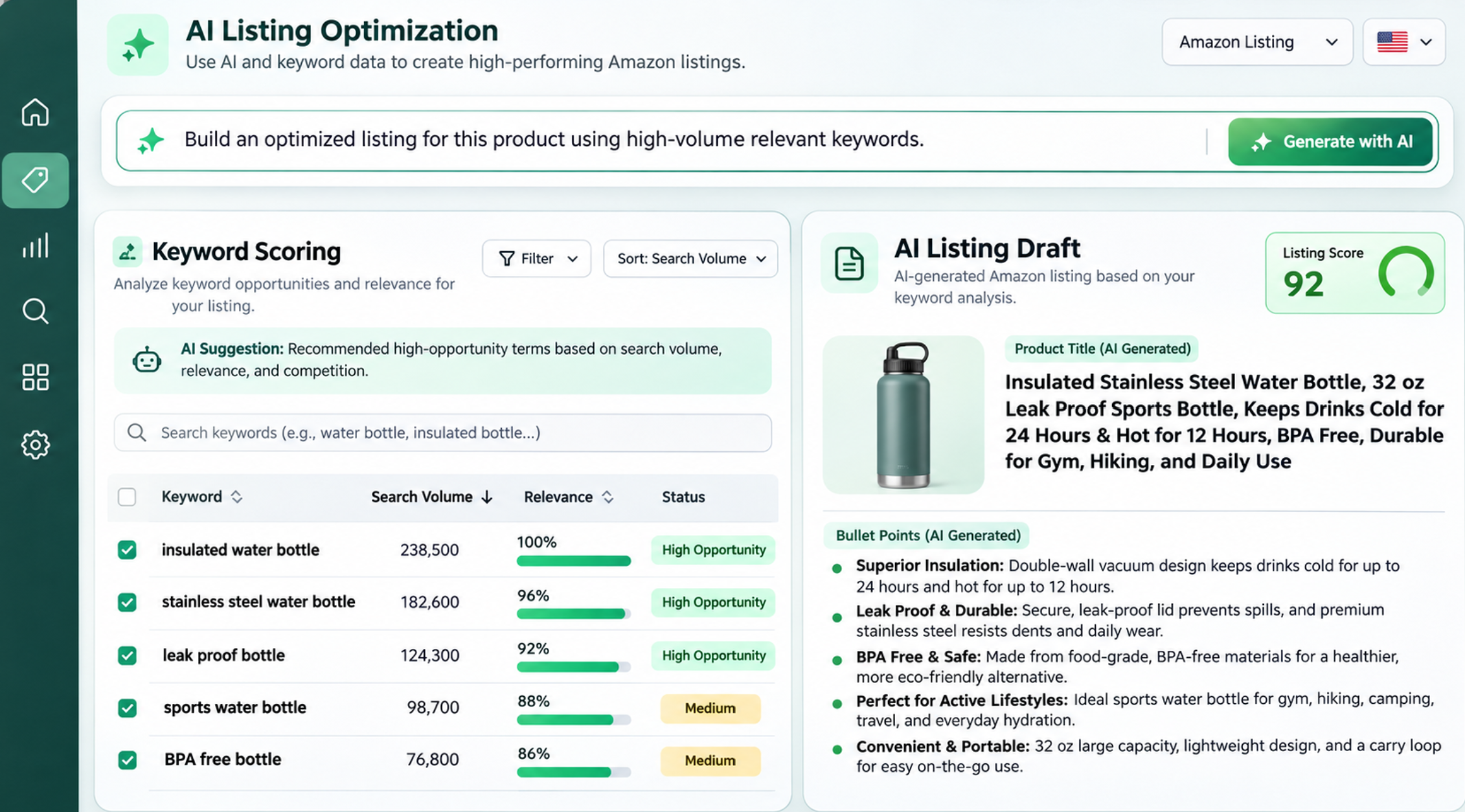
Real AI listing optimization for Amazon happens in three layers. Harvest: pull every relevant term from keyword databases, your own search term reports, competitor reverse-ASIN data, and customer reviews. Prioritize: score each term by volume, relevance, and how beatable the current ranking listings are—not by volume alone. Place: put the highest-intent phrase early in the title, use natural sentences in bullets, and reserve the backend for misspellings, synonyms, and Spanish-language variants for US shoppers.
Watch out for: keyword stuffing. Amazon's ranking still rewards relevance and conversion, and a bullet list that reads like a search-term dump converts worse than one written for a human. Use AI to generate candidates and structure, then edit for readability. Never let an LLM invent product claims, certifications, or compatibility statements—those create compliance risk.
3. PPC automation tools
Shortlist: Perpetua, Quartile, Teikametrics, Helium 10 Adtomic, SellerSprite PPC tools. Best for: sellers spending enough on Sponsored Products, Sponsored Brands, and Sponsored Display that manual bid changes can't keep up.
There are two families here. Rule-based automation (often built into all-in-one platforms) executes logic you define: if ACoS exceeds X over 14 days and clicks exceed Y, reduce bid by Z%. It's transparent, cheap, and easy to audit. Machine-learning bid management (the specialist platforms) forecasts conversion probability per auction and adjusts bids continuously against a target you set, usually TACoS or a total-ad-sales goal. ML tools tend to outperform on large, mature accounts with clean tracking; rule-based tools tend to be safer for small accounts where the algorithm has too little data to learn from.
Watch out for: handing over full control in week one. Start in recommendation-only mode, compare the AI's suggestions against your own for two weeks, and only then grant write access—with a bid change cap and a spend ceiling in place.
4. Review and voice-of-customer mining
Shortlist: Shulex VOC, SellerSprite review analysis, plus Amazon Brand Analytics for search-level context. Best for: anyone improving a product, writing bullets that answer real objections, or briefing a supplier on defect patterns.
AI review analysis clusters hundreds or thousands of reviews into themes: sizing complaints, durability failures after 30 days, confusing instructions, missing accessory, packaging damage. The output you actually want is a ranked list of objections with representative quotes—because that list is simultaneously your bullet copy, your A+ content brief, your product improvement roadmap, and your customer service macro library.
Watch out for: over-fitting to a single loud complaint. Weight by frequency and by star rating. A defect mentioned in 40 one-star reviews matters more than a preference mentioned in 300 five-star reviews.
5. Creative and A+ content production
Shortlist: Canva Magic Studio, Photoroom, Adobe Firefly, Midjourney, plus Jasper or Copy.ai for copy variants. Best for: brands producing lifestyle sets, A+ modules, storefront banners, and video scripts at volume without booking a studio for every SKU.
This is the category where AI has improved fastest and where compliance risk is highest. Amazon's main image requirements still apply: pure white background, product filling roughly 85% of the frame, no watermarks, no borders, no added text. AI is best used for secondary images, lifestyle context, infographics, and A+ module backgrounds—and any generated image must accurately represent what the buyer receives.
Watch out for: AI-generated props or accessories appearing in images when they aren't included, and shifting disclosure expectations for synthetic imagery. Check the current image guidelines in Seller Central and any AI-disclosure requirements before uploading.
6. Inventory forecasting and true profitability
Shortlist: SoStocked, Inventory Planner, SellerBoard. Best for: sellers with 20+ SKUs, seasonal demand, or long supplier lead times.
Forecasting tools use velocity trends, seasonality curves, lead times, and FBA inbound rules to recommend reorder dates and quantities. The genuinely valuable AI layer is not the forecast itself—it's the cash-flow view: how much capital is sitting in inventory, what's aging toward long-term storage fees, and which SKU is quietly unprofitable once referral fees, FBA fees, ads, returns, and inbound freight are all allocated.
Watch out for: forecasts built on too little history. New products and one-off spikes need manual overrides, and any model should let you pin a launch curve or a promotion.
7. Pricing, repricing, and customer service
Shortlist: Aura and Bqool for repricing; eDesk and Gorgias for AI-assisted buyer messaging. Best for: sellers in competitive price bands and teams drowning in repetitive buyer questions.
Repricers balance the buy box against margin floors—set the floor too aggressively and AI will happily walk you into a loss. AI support tools draft replies from your help center and order data, which cuts response time, but Amazon's buyer-seller messaging policy still prohibits promotional messages in that channel. Keep a human approving anything policy-sensitive.
8. General LLMs worth keeping in the stack
ChatGPT, Claude, and Gemini remain the best value per dollar for drafting SOPs, rewriting supplier emails, generating spreadsheet formulas, translating between English and Chinese for sourcing, and stress-testing a launch plan. The rules: never paste account credentials or buyer PII into a consumer chatbot, always verify any number it produces, and treat every output as a first draft from a smart intern who has never logged into Seller Central.
Five Real-World Playbooks for Using AI on Amazon
Tools are only as useful as the workflow wrapped around them. These five playbooks are the ones we see produce the clearest return. Treat the timelines as planning targets, not guarantees—results vary with category, competition, and account history.
Playbook A: Launch a product in 10 working days
- Day 1–2: Filter the product database for a niche with steady demand, fewer than a handful of dominant listings, and a price band you can defend. Export 10 candidates.
- Day 3–4: Reverse-lookup keywords for the top three candidates and check whether the traffic is spread across many terms (good) or concentrated in one head term held by a brand (bad).
- Day 5–6: Run review mining on the leading competitors and list the five most repeated complaints. Those become your differentiation brief to the supplier.
- Day 7–8: Build the listing with an AI keyword-to-copy workflow, then edit for human readability and compliance.
- Day 9–10: Set up a tightly structured launch campaign with an automation rule set and a hard daily budget cap.
Playbook B: Rescue a listing stuck on page two
Diagnose in this order: relevance, conversion, then traffic. Pull the Search Query Performance and search term reports, identify the top 20 terms where you get impressions but a weak click-through rate, and compare your title and main image against the three listings above you. Rewrite the title so the highest-intent phrase appears in the first 80 characters. Replace the main image if it doesn't hold up at thumbnail size. Only after relevance and click-through are fixed should you push ad spend—otherwise you're paying to send traffic to a listing that can't convert it.
Playbook C: Cut wasted ad spend without losing rank
- Export 60 days of search term data and segment into converting, high-ACoS, and zero-order terms.
- Negate zero-order terms with meaningful click volume; move mid-performers into a separate exact-match campaign for controlled bidding.
- Let the automation tool manage bids on the exact-match layer only, with a bid change cap of roughly 20–25% per cycle.
- Protect your top five organic-driving keywords in a dedicated campaign with a higher bid ceiling—these are rank defense, not profit centers.
- Review weekly for four weeks before loosening the caps.
Playbook D: Turn 500 reviews into a product improvement plan
Run AI clustering across your reviews and your top three competitors' reviews together. Tag each cluster by sentiment, frequency, and whether it's fixable by copy (an expectation gap), by packaging, or by the factory. Anything fixable by copy goes into the bullets and A+ immediately. Anything requiring the factory goes into the next purchase order brief. This single exercise often produces more margin than another ad budget increase, because it attacks returns and negative reviews at the source.
Playbook E: Build a 90-day content calendar
Use a general LLM to draft 12 A+ content angles, 8 storefront banner concepts, and 6 short-video scripts based on the objection list from Playbook D. Use an image tool to generate lifestyle concepts, then have a human retouch them for accuracy. Publish one A+ module refresh per month and track conversion rate on the parent ASIN before and after—Amazon's own A+ reporting plus your business reports give you enough signal to judge whether the change helped.
What AI Tools for Amazon Sellers Cost in the US
Budget is where most tool comparisons fall apart, because vendors price on completely different axes: per month, per SKU, per seat, or as a percentage of ad spend. The bands below are directional ranges based on publicly listed US plans reviewed at the time of writing. They are not quotes—confirm on each vendor's site.
| Category | Typical US price band | What you're paying for |
|---|---|---|
| All-in-one research suite | Free tiers up to roughly $39–$99/mo entry; pro tiers often ~$99–$250/mo | Product database, keyword research, listing tools, limited ad analytics |
| PPC automation | Entry plans from ~$50–$500/mo; enterprise often % of ad spend or custom quote | ML bidding, budget pacing, dayparting, cross-campaign reallocation |
| Listing copy and creative AI | $0–$60/mo per seat, or per-image credits | Copy variants, image generation, background removal, video scripting |
| Review / VOC analysis | Free tiers; roughly $20–$100/mo for volume | Theme clustering, sentiment, objection ranking, competitor review benchmarks |
| Inventory forecasting | Roughly $50–$500/mo depending on SKU count or order volume | Reorder forecasting, seasonality modeling, cash-flow and fee reconciliation |
| Repricing | Roughly $50–$100/mo, sometimes per-SKU | Buy box optimization against margin floors and competitor rules |
The rule of thumb: your total tool spend should be a small single-digit percentage of monthly revenue, and each tool should be tied to a number you track—sessions, conversion rate, organic rank, ACoS, or margin. If you can't name the number a subscription is supposed to move, cancel it. Most serious sellers start on free or entry tiers, prove the workflow, and upgrade one tool at a time. You can start a free SellerSprite plan through the signup link at the end of this article and test the research-and-listing loop before paying for anything.
How to Choose: A 10-Point Checklist
Run every candidate tool through this list before you enter a credit card. It takes ten minutes and saves months.
- Does it connect to your actual account? A tool that can't read your Seller Central or Amazon Ads data is a research tool, not an operating system.
- How fresh is the data, and how is it sourced? Ask directly. Vague answers are a red flag.
- Does it end in a decision? Look for a recommended action with a reason, not just a dashboard.
- Can you cap and roll back its changes? Bid limits, budget ceilings, approval modes, and an audit log are non-negotiable for automation.
- Can you export everything? Data lock-in is the most expensive hidden fee in this category.
- Does it explain its recommendations? "Why did you suggest this negated term?" should get a real answer.
- What's the time-to-first-insight? You should get a useful answer in the trial, not after a two-week onboarding.
- Does pricing fit your stage? Percentage-of-ad-spend pricing is painful at low spend and efficient at high spend—model both scenarios.
- Is support responsive in your time zone? Test it during the trial, not after your launch breaks.
- Is the vendor honest about limits? Tools that admit what they can't do are safer than tools that claim to do everything.
Common Mistakes to Avoid
- Auto-publishing AI copy. A generated listing that reads like a keyword list converts worse than a plain one written for a human. Always edit.
- Letting AI invent product claims. Certifications, compatibility, medical or safety statements, and materials must come from your supplier documentation, not a language model.
- Turning on full automation in week one. Run in recommendation mode first, compare against your own decisions, then expand permissions gradually.
- Buying six tools before you have one workflow. Depth beats breadth. One research platform plus one ads tool covers most sellers for the first year.
- Trusting a single revenue estimate. Cross-check product research numbers against BSR movement and, where possible, against your own sales data on similar ASINs.
- Ignoring compliance. Amazon's image guidelines, messaging policy, and data-access terms apply to AI-generated work exactly as they do to human work.
- Pasting sensitive data into consumer chatbots. Account credentials, buyer PII, and unreleased product plans don't belong in a general-purpose chat window.
FAQ
What are the best AI tools for Amazon sellers beyond ChatGPT?
It depends on which job you're solving. For product research and keyword-to-listing work, the tools most US sellers shortlist are SellerSprite, Jungle Scout, and Helium 10. For advertising automation, Perpetua, Quartile, Teikametrics, and Helium 10 Adtomic are the common starting points, with rule-based automation inside all-in-one platforms serving smaller accounts. For review mining, Shulex VOC and SellerSprite's review analysis are widely used. For creative, Canva Magic Studio, Photoroom, and Firefly cover most needs. The right answer is one data platform plus one ads layer first—not five subscriptions at once.
How much do AI tools for Amazon sellers cost in the US?
Most sellers land between $50 and $300 per month total in year one. All-in-one research suites typically range from free tiers to roughly $39–$99/month entry plans and $99–$250/month for pro tiers; PPC automation often runs $50–$500/month for entry plans and shifts to a percentage of ad spend or a custom quote at enterprise scale; review analysis usually sits around $20–$100/month; inventory forecasting and repricing tools are commonly $50–$500/month depending on SKU count. These are directional bands from publicly listed US plans at the time of writing—vendors repackage frequently, so check current pricing pages before you buy.
Which AI tool is best for Amazon listing optimization and PPC automation?
They're usually two different tools, and that's fine. For listing optimization, you want a platform that combines keyword research, reverse-ASIN data, and a listing builder that scores relevance rather than raw volume—SellerSprite, Helium 10, and SellerApp all operate in this space. For PPC automation, choose based on account size: small accounts do better with transparent rule-based automation, while accounts with sustained ad spend usually benefit from ML bid management from Perpetua, Quartile, or Teikametrics. If you want one vendor for both, an all-in-one suite is the pragmatic choice until ad spend justifies a specialist.
Are AI tools for Amazon sellers allowed by Amazon?
Amazon doesn't prohibit using AI to help write listings or manage ads, but you remain fully responsible for what goes live on your account. Listings must follow Amazon's product detail page rules and image guidelines, and buyer-seller messaging rules still prohibit promotional messages in that channel. Separately, Amazon's terms restrict unauthorized automated data collection, so choose vendors that source marketplace data compliantly. Before publishing anything AI-generated, check the current guidelines in Seller Central and any disclosure requirements for synthetic imagery.
Can AI replace a human Amazon PPC manager?
Not fully, and not yet. AI is better than a human at continuous bid adjustment, catching wasted spend at scale, and never forgetting to negate a bad search term. Humans are better at interpreting seasonality anomalies, coordinating ads with promotions and inventory, negotiating with vendors, and deciding when a target ACoS should be relaxed to defend organic rank. The effective model for most brands is AI executing inside guardrails a human sets and reviews weekly.
Do AI-written listings hurt rankings?
There's no penalty for AI assistance as such—Amazon ranks on relevance and conversion, not on who typed the words. What does hurt is the typical AI failure mode: keyword-stuffed titles, repetitive bullets, generic claims, and text that ignores the actual objections buyers raise. The fix is process, not abstinence: use AI to harvest and structure keywords and to draft variants, then have a human make the copy specific, honest, and readable. Measure the result through conversion rate and organic rank rather than assuming the rewrite helped.
What's the minimum AI stack for a brand-new seller?
Two tools and one free assistant. Start with an all-in-one research platform on a free or entry tier for product validation and keyword work, keep a general LLM for drafting and copy editing, and add a simple rule-based ads automation once you're spending enough that manual bid changes slip. Skip inventory forecasting, repricing, and enterprise PPC automation until you have consistent sales—those tools solve problems you don't have yet, and they'll eat the margin you need for inventory.
Next Steps
- Audit what you already pay for. List every subscription and the single metric it's supposed to move. Cancel anything you can't defend in one sentence.
- Pick one research platform and run Playbook A end to end on a real candidate product. If you don't reach a clear go/no-go in ten days, the tool isn't the problem—the workflow is.
- Create a free SellerSprite account to test the research-and-listing loop before upgrading: start your free SellerSprite signup. Bring one ASIN you're considering and validate it with real search-volume data instead of a chatbot's guess.
- Add PPC automation only in recommendation mode for the first two weeks, then grant write access with bid caps in place.
- Re-read the parent guide on AI for Amazon FBA once a quarter so your stack keeps up with what the platforms can actually do.
References
- SellerSprite — AI for Amazon FBA: the complete guide (parent hub) View
- SellerSprite — Best Amazon product research tool View
- SellerSprite — Best Amazon seller software tools View
- Amazon Seller Central — Product detail page rules, image guidelines, and buyer-seller messaging policy View
- Amazon Ads — Sponsored Products, Sponsored Brands, and Sponsored Display documentation View
- Amazon Seller Central — Brand Registry and A+ Content requirements View
Pricing, plan names, and feature availability change frequently. All price bands in this article are directional estimates based on publicly listed US plans reviewed at the time of writing and should be verified against each vendor's current pricing page before purchase.
By SellerSprite Content Expert
Amazon seller tools and marketplace SEO specialist.
Editorial process: AI-assisted draft prepared for human fact-checking, source verification, and brand review before publication.