Key Takeaways
Amazon Seller Central is your gateway to reaching over 200 million monthly Amazon shoppers, with third-party sellers driving 60% of total platform sales.
- Choose Professional plan ($39.99/month) over Individual ($0.99/item) when selling 40+ items monthly for cost savings and advanced features
- Prepare government ID, proof of address, bank account, and credit card before registration to avoid verification delays
- Maintain critical performance metrics: Order Defect Rate <1%, Late Shipment Rate <4%, and Account Health Rating above 200
- Consider FBA for Prime eligibility and Buy Box advantages, or FBM for better control over large/heavy items
- Complete tax setup and understand Amazon's policies immediately after approval to prevent account suspension
Success on Amazon requires understanding both the technical setup process and ongoing performance requirements. With proper preparation and attention to account health metrics, you can build a thriving business on the world's largest e-commerce platform. Amazon Seller Central drives 60% of Amazon's total sales today and stands as a powerhouse platform for third-party sellers. More than 200 million people visit Amazon each month to shop. This creates opportunities for sellers.
Understanding how to use Amazon Seller Central is necessary whether you're launching a private label brand or selling wholesale products. This piece will walk you through everything from creating your account and completing the login process to managing your first product listing and understanding the platform's key features.
What Is Amazon Seller Central?
Definition and Purpose
Amazon Seller Central is the web-based platform where third-party sellers manage every aspect of their Amazon business. Think of it as your command center for controlling inventory, pricing, orders, advertising, reports, and account health. Launched in 2000, this platform lets businesses and individuals sell products to customers on Amazon.
The platform acts as a self-service dashboard where you access tools for managing your entire operation on the Amazon marketplace. Seller Central functions as the hub for your Amazon selling account and serves as a one-stop shop for managing products, adjusting prices, fulfilling customer orders, and keeping business operations running. You can monitor sales, explore business growth opportunities, stay on top of news and announcements, and get support all from this single interface.
Amazon designed Seller Central to equip millions of sellers to reach customers worldwide without building their own online store. It provides the e-commerce infrastructure and access to Amazon's existing client base, which allows business owners to become online retailers.
How Amazon Seller Central Works
You register and choose a selling plan, then access your Seller Central account and log in anytime. The platform provides a centralized dashboard where you manage product listings, view inventory, handle orders, and interact with customers.
You can add items individually or in bulk with descriptions, images, and pricing for product listings. You maintain full control over your product listings, pricing decisions, and inventory management. The system lets you track, confirm, and fulfill customer orders while monitoring stock levels to prevent out-of-stock situations.
Fulfillment options give you flexibility in how you operate. You can choose between handling storage, packaging, and shipping yourself through Fulfillment by Merchant (FBM), or you can send inventory to Amazon's fulfillment network through Fulfillment by Amazon (FBA). Your products become eligible for Amazon Prime shipping when using FBA.
The platform provides access to advertising and promotions, which allows you to run campaigns with Sponsored Products, Sponsored Brands, and discounts to increase visibility. You receive detailed sales reports and analytics to track performance, monitor customer feedback and reviews, analyze advertising campaigns, and make data-driven decisions. Performance metrics affect your selling privileges and Buy Box eligibility. Pricing, fulfillment method, account health, and customer satisfaction scores all factor into whether you win the Buy Box on shared listings.
Seller Central vs. Vendor Central
The difference between these two platforms matters for choosing the right path for your business. Seller Central allows you to sell products to Amazon customers as a third-party seller. You maintain full control over product listings, pricing, inventory management, shipping, and customer service. You receive payments from customers and keep the profit margin between your wholesale and retail prices.
Vendor Central operates as an invite-only program for brand owners and manufacturers who want to sell products wholesale to Amazon. As a vendor, you set the wholesale price and ship products to Amazon, who then handles the retail pricing, inventory management, fulfillment, and customer experience. Vendor support comes from Amazon's Vendor Management team.
Seller Central is open to anyone, while Vendor Central requires an invitation from Amazon. You act as a retailer with direct contact with end consumers on Seller Central. You control your own product listings and content, so you can maintain uniformity across other retail channels. You handle your own customer service or choose to let Amazon manage it through FBA.
The payment structures differ between the two platforms. Seller Central users receive payments every 14 days, while Vendor Central users get paid depending on their contract terms, which can range from Net 30 to Net 90. Sellers who deliver strong performance under Seller Central may receive an invitation to join Vendor Central.
Who Can Use Amazon Seller Central?
Unlike invitation-only programs, Seller Central opens its doors to any person or business that wants to sell on Amazon's marketplace. This accessibility has created a diverse seller ecosystem where more than 60% of Amazon's total sales come from independent sellers, most of which are small and medium-sized businesses.
Private Label Brands
Private label represents the most popular business model among Amazon sellers, with 59% using this approach to create their own brands. Private labeling means sourcing products from manufacturers and selling them under your own brand name rather than the manufacturer's label.
The process works by partnering with third-party manufacturers to produce generic products, then customizing the packaging and branding before listing them on Amazon under your unique brand. You create new product listings for your branded items. This gives you ownership of the brand, design and marketing strategy.
This model offers higher profit margins by eliminating middlemen from the supply chain. You also build long-term customer loyalty around your brand rather than someone else's products. Brand Registry enrollment provides access to improved content tools and counterfeit protection measures.
Private labeling does require upfront investment for sourcing, branding and marketing. Market saturation in certain niches has intensified competition, while supply chain dependencies on manufacturers can create quality control challenges. More than 55,000 independent sellers generated over $1 million in sales in 2024, showing the potential despite these obstacles.
Retailers and Wholesalers
Wholesalers take a different path by reselling existing branded products on Amazon. Rather than creating new listings, you can add your offer to established product listings for recognized brands. You purchase inventory in bulk from authorized distributors or manufacturers, then resell at retail prices.
The wholesaling model lets you own your inventory while choosing between self-fulfillment or using Fulfillment by Amazon. Some sellers partner with distributors to reduce freight costs and streamline their supply chain operations.
Brand restrictions have tightened, but. Many brands now limit who can sell their products on Amazon and require sellers to get written approval or appear on the brand's authorized seller list. Without proper authorization, even invoices from legitimate distributors may not satisfy Amazon's requirements during product approval processes.
Individual Sellers
Individual seller accounts serve specific business models beyond just testing the platform. Seasonal sellers benefit from paying only during active selling months rather than year-round subscription fees. Product testers confirm ideas without monthly overhead eating into budgets before generating revenue.
Hobbyists clearing personal inventory and single-product specialists running simple operations find Individual accounts practical. The pay-per-sale model charges $0.99 per item sold instead of the monthly subscription fee, making it economical when selling fewer than 41 items monthly.
Cash flow advantages matter for new businesses. You avoid fixed monthly costs before proving your business concept or generating sales. The simplified account management eliminates complex features you might not need at first, to name just one example.
The tradeoff involves limited bulk listing capabilities and restricted advertising tools. You also get no access to advanced promotional options that Professional sellers use to boost visibility. Per-item fees become expensive once sales exceed 40 units monthly. At that point, the economics favor upgrading to a Professional account.
Amazon Seller Central Account: Types and Costs
Choosing your Amazon Seller Central account type affects your bottom line from day one. The decision between Individual and Professional plans hinges on your sales volume, business goals, and need for advanced selling tools.
Individual vs. Professional Selling Plans
Amazon offers two distinct paths for sellers. The Individual plan charges $0.99 per item sold with no monthly subscription. This structure works when you sell fewer than 40 items monthly. You get access to tools that manage your business without recurring fees.
The Professional plan operates differently with a flat $39.99 monthly subscription whatever your sales volume. The Professional plan becomes more affordable once you sell more than 40 items monthly. Selling 41 products under the Individual plan costs $40.59 in fees. The Professional plan caps your expense at $39.99.
The plans differ by a lot in capabilities beyond pricing. Professional sellers access bulk listing tools, API integration, enhanced reporting and advertising options. They can also enroll in special programs like Launchpad and Subscribe & Save. Individual sellers work with basic promotional tools and limited reporting. They cannot access the Buy Box. Professional accounts unlock eligibility for 10 additional restricted categories.
You can switch between plans through your Seller Central dashboard anytime. Go to the gear icon, select Account Info, then Selling On Amazon under Manage Your Services. Your Professional subscription activates upon upgrading, though some billing features take up to two days.
Monthly Fees and Commission Structure
Amazon collects referral fees on every transaction in addition to account fees. These commissions vary by product category and represent a percentage of the total sales price, which includes item cost, shipping and gift wrapping charges.
Referral rates span a wide range depending on what you sell. Books, Music, Videos, Games and Software incur 15% fees. Electronics charges split between 8% for items $100 and above or 15% for products under $100. Beauty and Personal Care follows a tiered structure at 8% for items $10 and above or 15% under $10. Clothing and Accessories uses three tiers: 5% for items under $15, 10% for $15-20, and 17% for items $20 and above. Jewelry takes 20% on the first $250, then 5% on the remainder.
Some categories enforce minimum referral fees at $0.30. You pay whichever amount is greater between the percentage calculation or the minimum. A $10 book generates a $1.50 fee at 15%. A $300 jewelry piece incurs $50 on the first $250 plus $2.50 on the remaining $50, totaling $52.50.
Additional Selling Fees to Think Over
Media categories including books, music, DVDs and video games carry a $1.80 closing fee per item. High-volume sellers with more than 1.5 million SKUs face monthly listing fees, though Amazon waives fees for the first 1.5 million.
Returns trigger administration fees when Amazon refunds customers. You receive back the referral fee minus the lesser of $5 or 20% of that fee. Categories with higher return rates see these costs add up. Detailed product descriptions and accurate images help minimize returns by setting proper customer expectations.
Storage fees apply when using Fulfillment by Amazon, calculated on daily average volume in cubic feet. Rates vary seasonally and range from $0.75 to $3.63 per cubic foot. Aged inventory sitting longer than 181 days generates surcharges starting at $0.50 per cubic foot.
Requirements to Open an Amazon Seller Central Account
Gathering the right documents before starting your Amazon Seller Central account application saves time and prevents verification delays. Amazon tightened its verification requirements over the last several years to protect customers and maintain marketplace integrity. You must provide specific information during registration so Amazon can confirm your identity and business location for tax purposes.
Personal Identification Documents
You need a valid government-issued photo ID to verify your identity. Amazon accepts passports, driver's licenses, national IDs, state-issued IDs, resident permit IDs, U.S. green cards, U.S. Border Crossing Cards, and U.S. visas. The identification document you provide must display your full legal name, including your middle name, along with your country of citizenship, country of birth, and date of birth.
On top of that, you must submit proof of address dated within the last 180 days. Acceptable documents include utility bills, phone bills, bank statements, or credit card statements. You need one of these address verification documents if your residential address does not appear on your government ID.
Document quality matters substantially during the verification process. All documents must be genuine, accurate, and unaltered. Never add or modify content in your documents, including highlighting or annotations. Documents should be scanned as PDFs or submitted as high-quality photos. Screenshots are not approved. Bank or credit card statements must have been issued within the last 90 days.
Business Information and Tax Details
Your business address represents your main place of business where you receive services from Amazon. This address matches where you registered your business and where management is located for registered companies. Individual sellers provide their usual place of residence. Amazon performs identity checks to confirm your business belongs and operates from this address.
The tax interview process requires different forms based on your taxpayer status. U.S. taxpayers complete a W-9 form providing either a Social Security Number (SSN) or Employer Identification Number (EIN). Non-U.S. taxpayers complete a W-8BEN form to be exempt from U.S. tax reporting requirements. The IRS requires your Taxpayer Identification Number (TIN) for tax law administration.
You should also provide your tax registration number issued in the same country as your business address. Failure to provide this number might result in incorrect tax charges. Amazon must collect your local tax registration numbers where you store inventory or where you have exceeded specific sales thresholds in certain locations.
Bank Account and Credit Card Requirements
Amazon uses electronic transfers to pay out your sales proceeds. This makes bank account information mandatory. The bank account holder's name must match either your name as the main contact or your business name. Mismatched names cause payout holds and payment delays often. Amazon cannot transfer funds to credit or debit cards or online payment systems like PayPal.
You can use the Amazon Currency Converter service to register a bank account located in a different country from the store where you are selling. This service converts your sales proceeds to the relevant currency for deposit into foreign bank accounts.
Your credit or debit card must accept international charges and have a valid billing address in an eligible country. Amazon accepts American Express, Diners Club, Discover, JCB, MasterCard, and Visa. The card cannot be prepaid, virtual, or a gift card. The expiration date should be at least 6 months from when you add the card.
Amazon will bill your card the monthly subscription fee or $1 for validation purposes. The billing address, CVV code, and cardholder's name must match what appears on your card statement exactly. Any mismatch in credit card information may result in the card being declined.
How to Create Your Amazon Seller Central Account: Step-by-Step
Creating your Amazon Seller Central account takes about 48 to 72 hours if your documents meet all requirements. The registration process has five key steps. Each builds on the previous one to establish your seller identity and business credentials.
Step 1: Sign Up and Verify Your Email
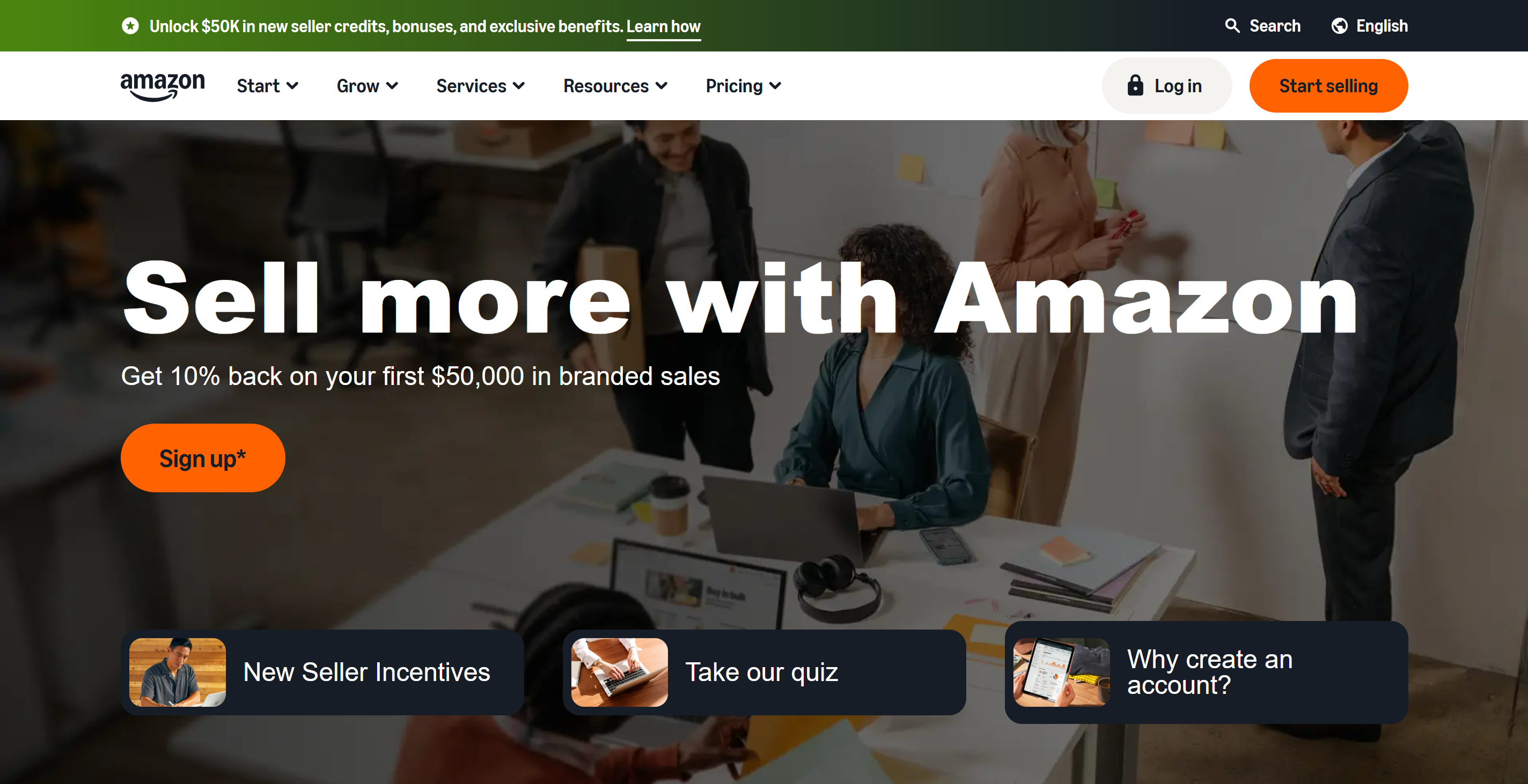
Visit sellercentral.amazon.com and click the "Sign Up" button. Select "Create Your Amazon Account" to begin the registration process. You'll enter your email address and create a password for your account.
Amazon sends a verification code to your email after you submit your information. Enter this code when prompted to confirm your email address. You'll see a screen outlining what you need to complete your account registration after verification. This includes a valid government-issued ID, recent bank statement or credit card statement, a chargeable credit card, and a mobile phone.
Step 2: Choose Your Business Type and Location
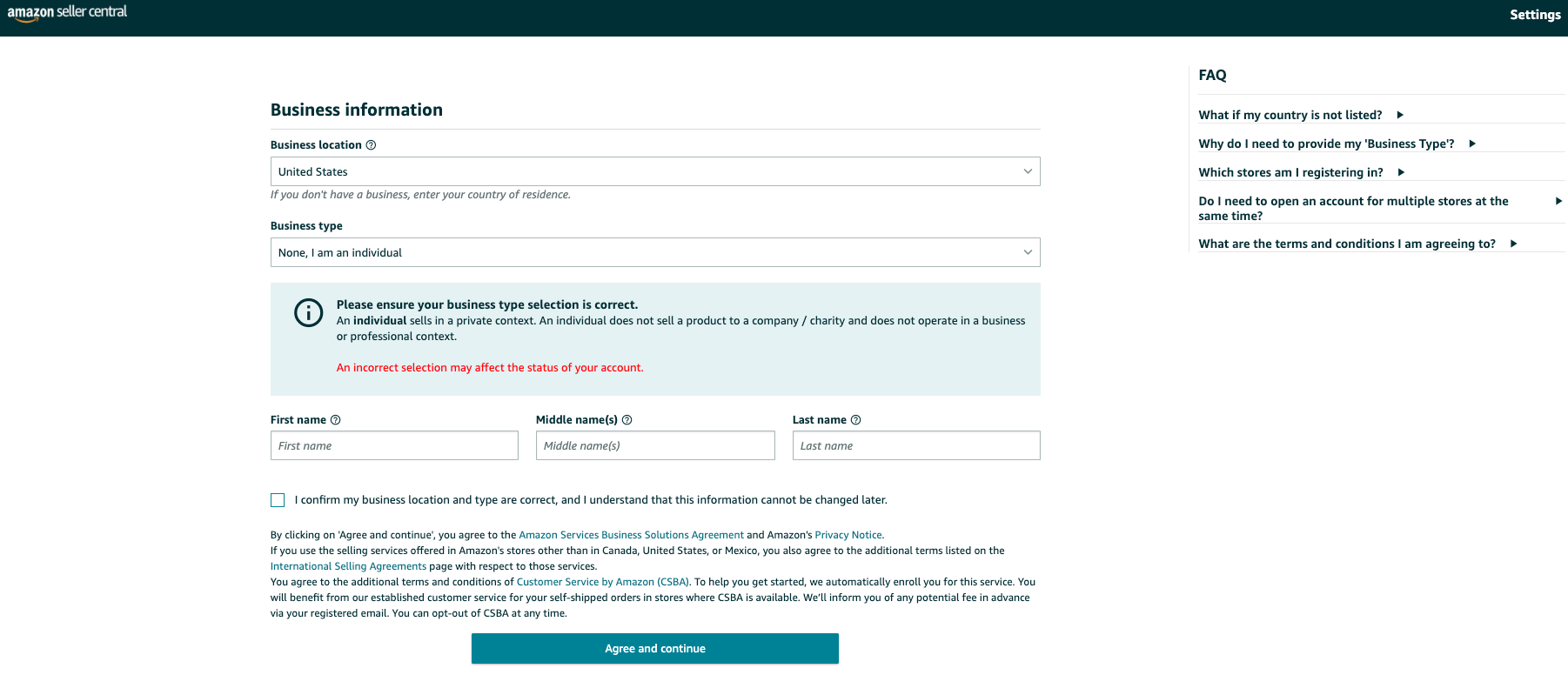
Select the country where your business is located. This choice determines which marketplace you can access and affects your tax obligations.
Choose your business type from these options next: State-owned business, Publicly-owned business, Privately-owned business, Charity, or None (I am an individual). Most sellers select privately-owned business. Select the individual option if you haven't created a business entity yet.
Step 3: Enter Seller and Billing Information
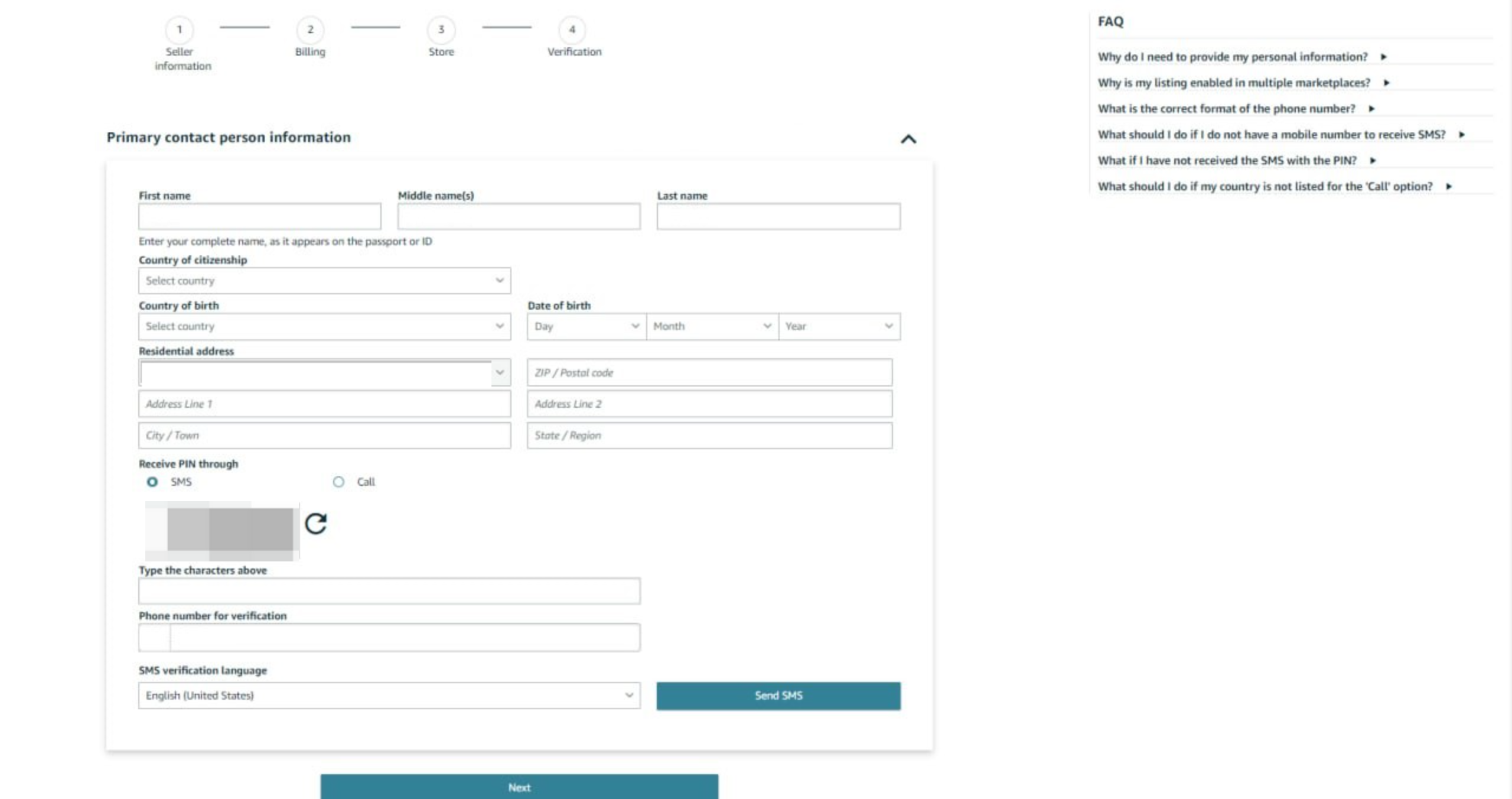
Provide your personal details so Amazon can confirm your identity and contact you when needed. You'll need to verify your phone number through either a text message or call. Amazon sends a PIN that you must enter to complete phone verification.
Your bank account information is required next. The account must be in the name matching either your primary contact name or business name entered earlier. Submit a valid credit card number to pay your selling plan fees. The card holder's name, billing address, and all details must match your card statement to avoid rejection.
Step 4: Set Up Your Store Details
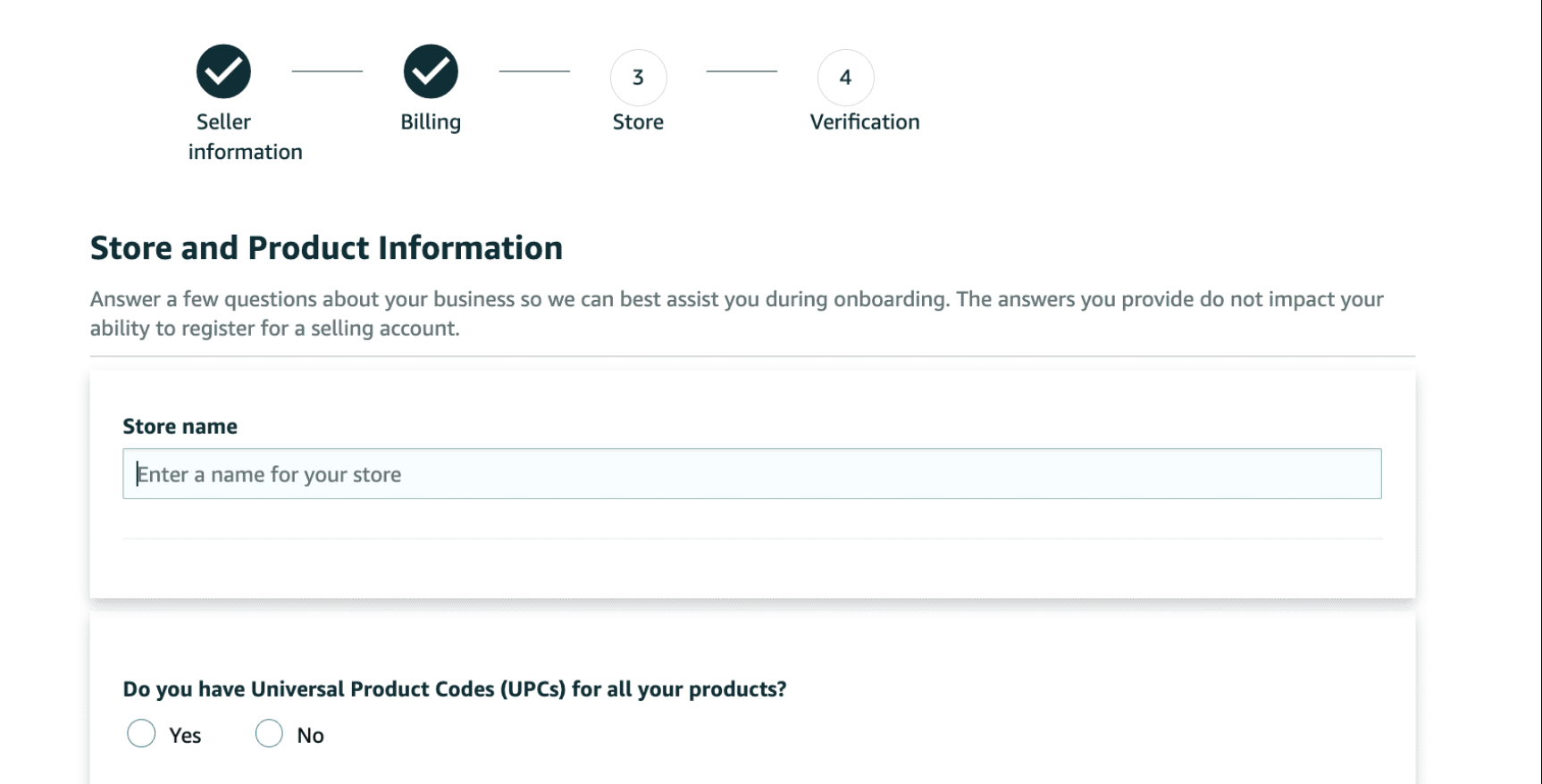
Provide a name for your Amazon store, which you can change later if needed. Indicate whether you have UPC codes for your products, any diversity certifications, and whether you are the manufacturer or brand owner of the products you plan to sell.
Step 5: Complete Identity Verification
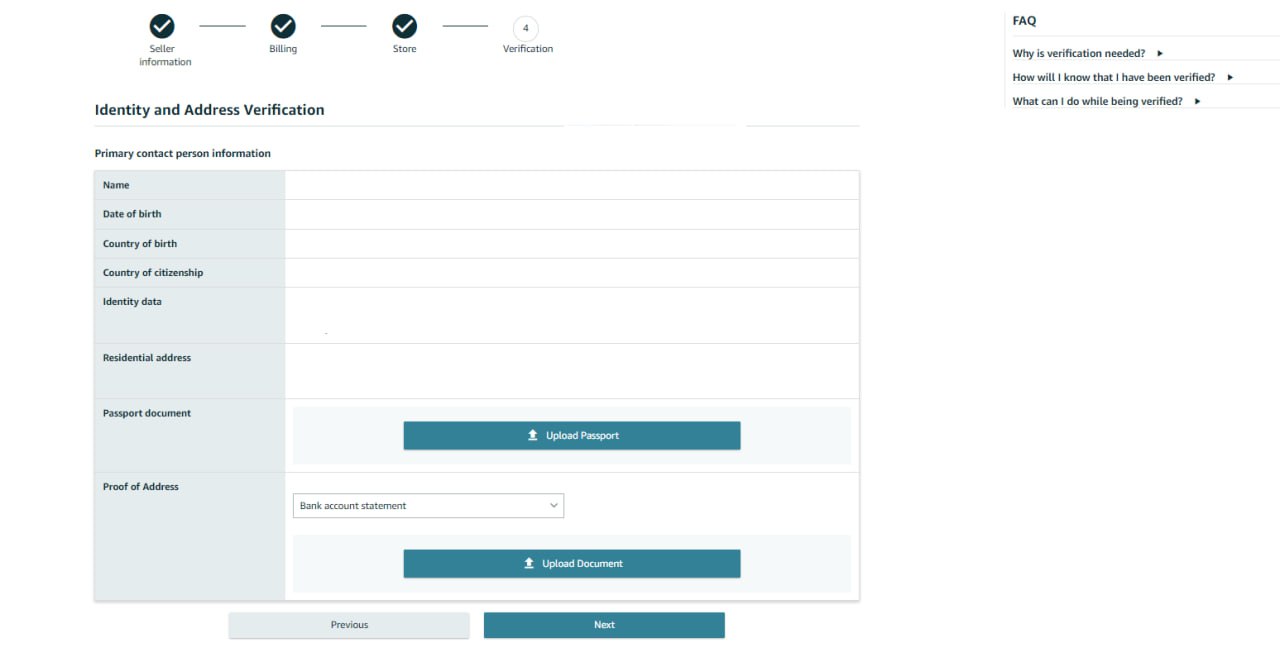
Upload your government-issued photo ID and proof of address document. You must complete five sections in Seller Central before submitting documentation during this phase: Business information, Seller information, Billing, Store, and Verification.
The Verification page displays customized options based on your business type and location. Amazon verifies the identity of the legal representative or beneficial owner who registers the account. You'll provide at least two documents as the primary contact person: an identity document and an additional document.
Amazon reviews your information and may contact you within two business days if clarification is needed. They keep you informed via email to the address you provided during registration.
Amazon Seller Central Login and Dashboard Overview
Accessing Your Seller Central Dashboard
After Amazon approves your seller account, you get access to Seller Central right away and can log in at any time. Visit sellercentral.amazon.com and enter your registered email address and password. Amazon redirects you to your seller dashboard once authentication succeeds.
You can use the Amazon Seller app to manage and grow your ecommerce business on the go, beyond accessing Seller Central from your desktop. The mobile app provides flexibility to check orders, respond to customer messages and monitor sales while away from your computer.
At the time you first log in to your Seller Central account, you'll want to configure its settings and complete or update your account information. Review your public seller profile and Amazon services, payment and business information, shipping and returns settings, tax information, notification priorities, login settings, gift options, user permissions and FBA settings if applicable.
Understanding the Main Navigation Menu
The upper section of Seller Central contains several critical navigation tools. The Marketplace Switcher sits in the upper right corner, displayed as a double-headed arrow button or drop-down menu. If you sell in more than one market, such as the United States and Canada, you can use this feature to check your account information for each marketplace. The flag shown indicates the selected marketplace, so changing marketplaces before accessing account information prevents viewing incorrect data.
The search bar provides the quickest tool to find specific instruction and information in Seller Central. Type any keyword or phrase that describes what you're looking for and press Enter. A search panel appears with all relevant links to content that matches your keyword search, followed by links to additional resources.
The Messages Center allows you to view all Buyer-Seller Messages. You can search by Order ID or email address and apply different filters like response needed, unread and sent messages to prioritize your tasks.
The primary menu bar sits just below the Amazon Seller Central logo and serves as the jumping-off point to every seller activity. This hamburger menu provides access to Catalog to add products, Inventory to manage stock, Orders to fulfill, Advertising to campaign, Reports to analyze and Performance to monitor account health. Menu options may differ depending on your account type, as Professional Sellers have more options on their Advertising menu than Individual Sellers.
Key Dashboard Widgets and Tools
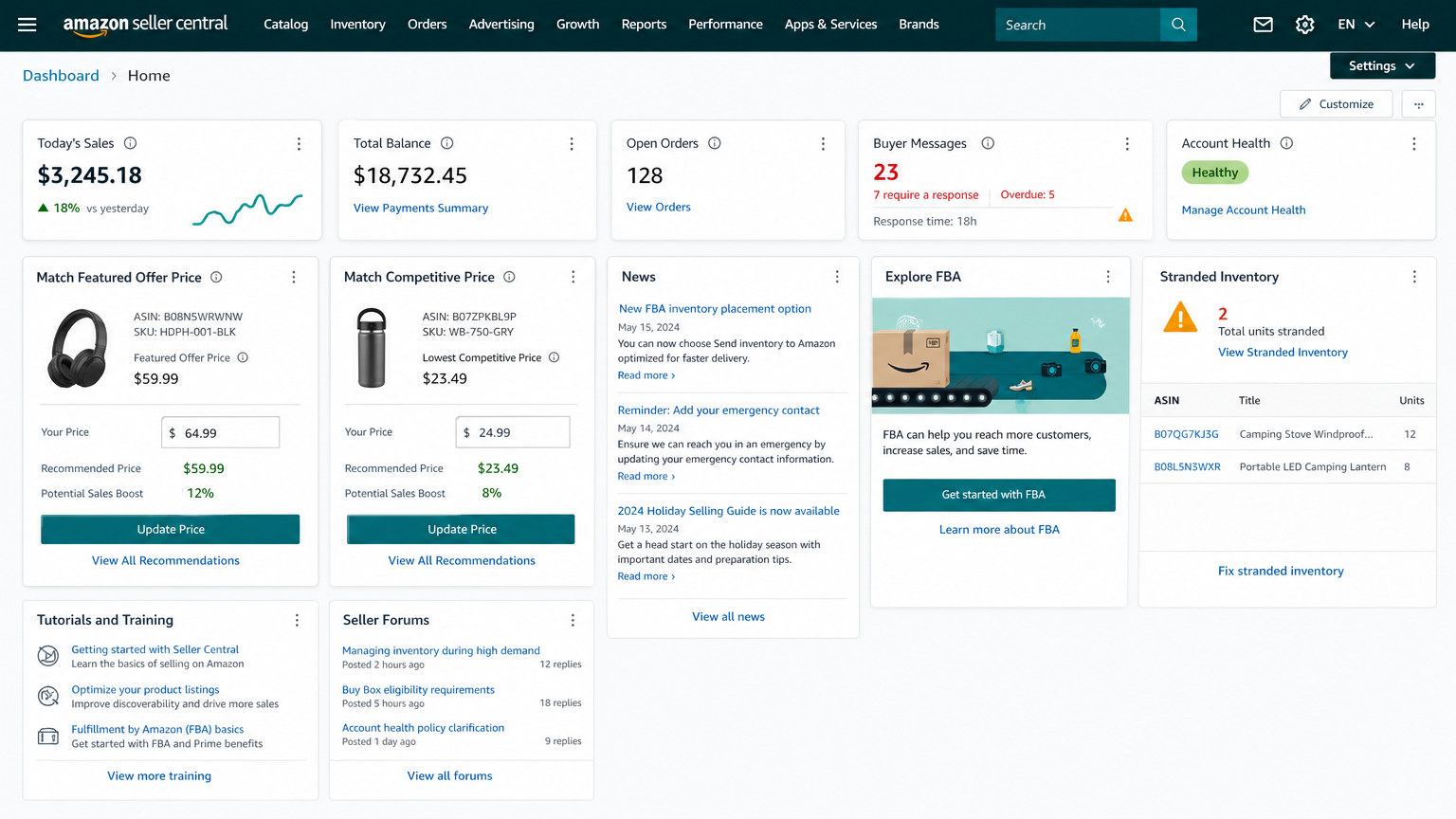
The dashboard displays a row of boxes with important information about your marketplaces, open orders, today's sales, buyer messages, Buy Box wins, IPI score and global promotions sales. Click each box's dropdown icon in the lower-right corner for more details.
Widgets provide shortcuts to key selling tasks, important account notifications, recommended programs and Amazon's dedicated newsfeed where you'll see program updates and policy changes below this summary. Pay close attention to any action-needed items displayed in these widgets.
The Sales Dashboard enables you to filter data by date, product category and fulfillment channel. You can choose to display data in graph or table view and hover over different points in time to compare data from different dates.
Essential Features You Need to Know
Mastering Seller Central's core features separates successful sellers from those who struggle with account suspensions and lost sales. These tools control your daily operations and directly affect your ability to compete in Amazon's marketplace.
Adding and Managing Product Listings
You can add products individually through the Catalog menu. Search for existing listings or create new ones. Inventory file templates allow bulk uploads for multiple products. Use tab-delimited text files containing all necessary product information. These templates require a simple understanding of data files but save considerable time when adding many items at once.
Inventory Management Tools
The Inventory Performance Dashboard sends alerts when stock quantities run low. It provides demand planning to suggest recommended inventory levels and shipment timelines. Your Inventory Performance Index (IPI) measures how efficiently you manage FBA inventory. Think of it as a credit score for inventory efficiency.
IPI scoring assesses how well you replenish popular products and maintain optimal inventory levels. It also tracks how you fix listing problems. Keep 30 to 60 days of inventory on hand. This prevents stockouts and the cancelations they cause. The dashboard displays sell-through rates and aging stock alerts. It recommends actions to optimize storage. Amazon imposes storage restrictions and increases overstock fees if your IPI drops below 450.
Order Fulfillment Options: FBA vs. FBM
Fulfillment by Amazon lets you outsource order fulfillment to Amazon's network. Shipping with FBA costs 70% less per unit than comparable premium options offered by other major US carriers. Amazon handles picking, packing, shipping, customer service and returns when customers purchase. Your products automatically qualify for Prime eligibility. About 82% of all Amazon sales go through the Buy Box, where FBA sellers have the most important advantages.
Fulfilled by Merchant gives you complete control over fulfillment operations. You manage storage, shipping carrier selection and customer service directly. FBM can be more cost-effective for large, heavy or slow-moving items where FBA fees would consume profit margins.
Performance Metrics and Account Health
Amazon's Account Health Rating ranges from 0 to 1,000. It provides immediate status of your account's risk of deactivation. All new sellers start with a score of 200. Green status (200-1,000) means 'Healthy'. Yellow (100-199) signals 'At Risk'. Red (99 or lower) indicates 'Unhealthy' with potential deactivation.
Critical thresholds you must maintain include:
- Order Defect Rate: Below 1%
- Late Shipment Rate: Under 4%
- Pre-fulfillment Cancelation Rate: Below 2.5%
- Valid Tracking Rate: Above 95%
- On-Time Delivery Rate: Above 90%
Policy violations carry severity levels from low to critical. Critical violations can trigger immediate account enforcement. Repeat violations degrade your Account Health Rating faster. Point values increase each time you violate the same policy.
Getting Started: Your First Steps After Account Setup
Once your seller account receives approval, three critical tasks require immediate attention to begin selling. Complete these steps to prevent payment delays, tax calculation errors, and policy violations that could suspend your account.
Creating Your First Product Listing
Go to the Catalog menu in Seller Central and click Add Products. Enter your GTIN or product ID into the search field. You can add your offer to that listing if your product already exists in Amazon's catalog. Click Create a new listing under the search field if it doesn't.
You'll complete multiple tabs to build your product detail page. The Product Identity tab covers simple information like product name, type, item type keywords, variations, and brand name. The Product Description section needs a paragraph explaining what your product is. Add up to five bullet points highlighting key details and upload up to nine photos. The Product Details tab requires additional information like units per item and color. Specify quantity, price, condition under the Offer tab and choose between FBA or Fulfilled by Merchant. The Safety and Compliance tab captures age restrictions, certifications, battery requirements, and hazmat regulations where applicable.
Setting Up Payment and Tax Information
Your business address must represent your main place of business where you receive services from Amazon. Amazon uses these details to calculate tax on your fees and store transactions. Access Settings > Account Info > Business Information to enter your business address.
Complete the tax interview under Settings > Tax Information. Provide your tax registration number issued in the same country as your business address. Configure tax calculation settings by going to Settings > Tax Settings. You can set up state tax registration numbers and jurisdiction priorities there.
Understanding Amazon's Policies and Guidelines
Seller policies cover product listings, customer interactions, shipping, fulfillment, and advertising. Your Account Health Rating ranges from 0 to 1,000 and indicates deactivation risk. Keep your Order Defect Rate under 1% to avoid restrictions. Policy violations can result in account deactivation, loss of Featured Offer eligibility, or fund withholding.
Conclusion
You now have everything you need to start your Amazon selling path through Seller Central. We've covered the complete roadmap to get started, which includes understanding account types and fees, completing registration, and creating your first listing.
The platform might seem complex at first, but you can move through each step confidently with this piece. Focus on maintaining excellent account health metrics and understanding Amazon's policies from day one.
Note that every successful Amazon seller started exactly where you are right now. The key is taking that first step and listing your products while learning as you grow. Your Amazon business awaits, so start your registration today and turn your selling goals into reality.
FAQs
Q1. How does Amazon Seller Central work?
Amazon Seller Central is a web-based platform that serves as your command center for managing your entire Amazon business. Once you register and choose a selling plan, you can log in to access a centralized dashboard where you manage product listings, track inventory, handle customer orders, and monitor sales performance. The platform allows you to add products with descriptions and images, control pricing, choose between self-fulfillment or Amazon's FBA service, run advertising campaigns, and access detailed analytics to make data-driven decisions about your business.
Q2. Is an Amazon Seller Central account free?
Amazon Seller Central offers two account types with different cost structures. The Individual plan charges $0.99 per item sold with no monthly subscription fee, making it suitable for sellers with fewer than 40 items per month. The Professional plan costs $39.99 per month regardless of sales volume. Both plans also require payment of referral fees on each sale, which vary by product category and typically range from 8% to 20% of the total sales price.
Q3. What's the difference between Amazon Seller Central and Vendor Central?
Seller Central allows you to sell products directly to Amazon customers as a third-party seller, maintaining full control over pricing, inventory, and customer service. Vendor Central is an invite-only program where you sell products wholesale to Amazon, who then handles retail pricing and customer experience. With Seller Central, you act as a retailer receiving payments directly from customers every 14 days, while Vendor Central operates on a wholesale model with payment terms ranging from Net 30 to Net 90 days.
Q4. Can you make $100,000 per month selling on Amazon?
While it's possible to generate significant income on Amazon, earnings vary widely among sellers. According to seller data, 50% of Amazon sellers make between $1,000 and $25,000 per month, while 13% earn between $25,000 and $250,000 monthly. More than 55,000 independent sellers generated over $1 million in annual sales in 2024. Success depends on factors like product selection, business model, inventory management, and marketing strategies.
Q5. Who can use Amazon Seller Central?
Amazon Seller Central is open to anyone, individuals or businesses, who wants to sell on Amazon's marketplace. This includes private label brand owners creating their own branded products, retailers and wholesalers reselling existing branded items, and individual sellers managing smaller operations. Unlike Vendor Central which requires an invitation, Seller Central welcomes all seller types, from hobbyists clearing personal inventory to established businesses looking to reach Amazon's 200 million monthly visitors.


