TL;DR: Amazon keyword clustering groups search terms by buyer intent to improve SEO, PPC performance, and listing relevance. This guide walks you through a proven 6-step process with real-world applications.
Key Takeaways
- Keyword clustering organizes Amazon search terms by shared buyer intent, not just synonyms.
- Intent-based clusters improve both organic rankings and PPC efficiency by aligning content with real customer needs.
- Use tools like SellerSprite Keyword Mining to build, expand, and validate your keyword list before clustering.
- Apply clusters directly to your product listing (title, bullets, backend) and PPC campaigns to reduce waste and boost conversion.
- Regularly update clusters using new search term data and competitor insights to stay competitive.
Table of Contents
- What Keyword Clustering Means for Amazon Sellers
- The 3 Cluster Types You'll Use in Real Amazon Work
- Set Your Clustering Goal (So You Don't Create Useless Groups)
- Step 1: Build a Master Keyword List (Best Inputs Win)
- Step 2: Clean & Normalize Keywords Before Clustering
- Step 3: Choose a Clustering Method (Simple First, Advanced When Needed)
- Step 4: Name, Prioritize, and Tag Clusters
- Step 5: Apply Clusters to Your Listing (Keyword Mapping by Cluster)
- Step 6: Apply Clusters to PPC (Cleaner Structure, Lower Waste)
- Example: One Product → Final Clusters (Mini Case Walkthrough)
- Maintenance: Keep Clusters Fresh as the Market Changes
- Common Mistakes and Troubleshooting
- FAQ
- References
Note on marketplaces: This guide is specifically optimized for the US market.
What Keyword Clustering Means for Amazon Sellers
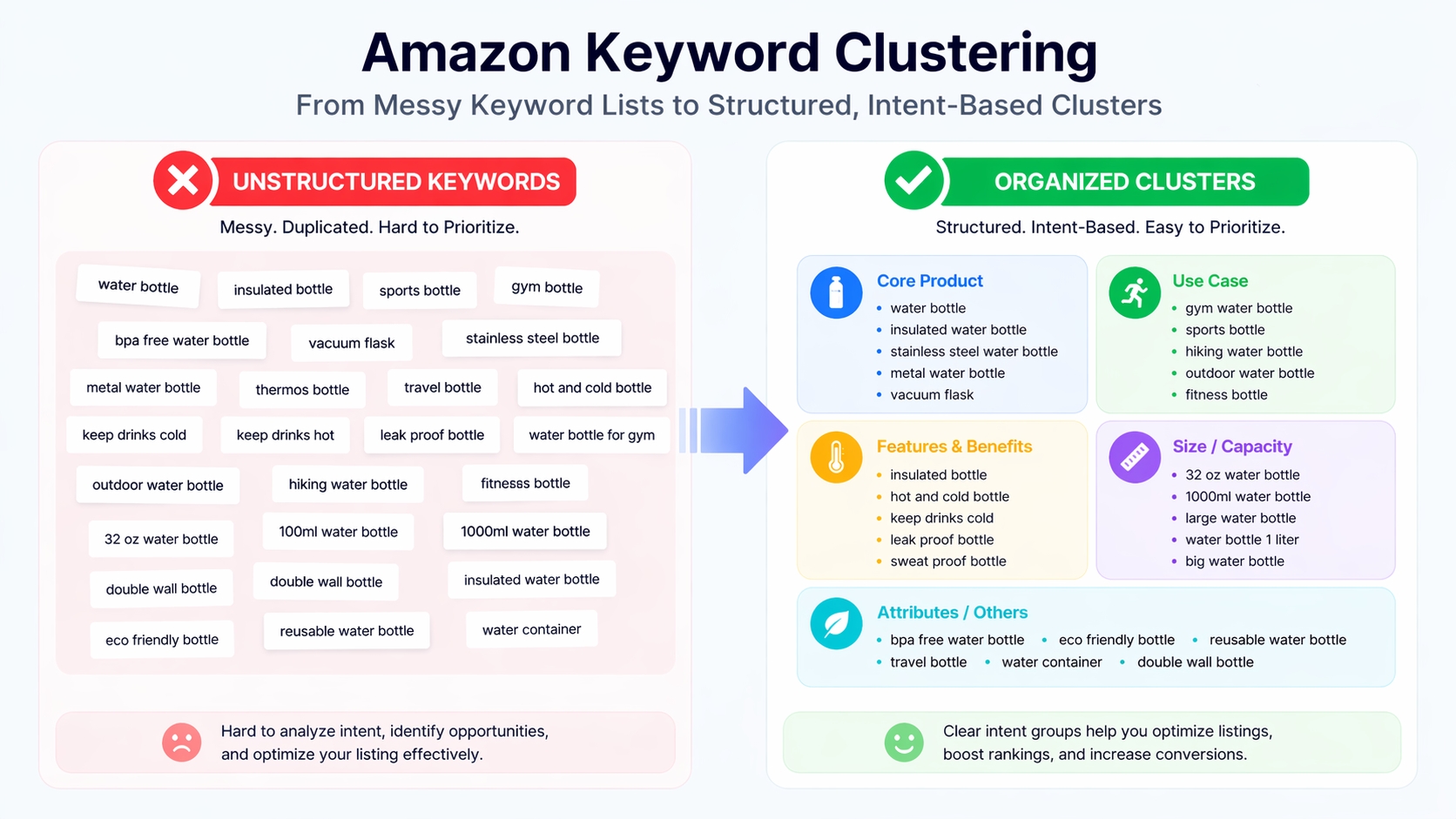
Keyword clustering is the foundation of modern Amazon SEO and PPC strategy. It transforms raw keyword data into actionable insights by grouping search terms based on shared buyer intent.
What Is Keyword Clustering?
Keyword clustering = grouping Amazon search terms by shared buyer intent, not just vocabulary or similarity.
This means that "portable charger for iPhone" and "compact power bank for travel" may belong in the same cluster, even if they don't share exact words, because both reflect a customer looking for a small, mobile charging solution.
Clustering vs. "Synonyms Only": Why Intent Beats Vocabulary
Many sellers make the mistake of grouping keywords only by word overlap. But two phrases with identical words can have different intents. For example:
- "best portable charger for hiking" → Use case: outdoor activity
- "best portable charger under $20" → Price-sensitive buyer
Intent-based clustering ensures your content speaks directly to what the shopper truly wants, increasing relevance and conversion.
What Keyword Clustering Improves
When done right, keyword clustering enhances multiple aspects of your Amazon business:
- Listing structure: Clear, benefit-driven bullets aligned with real customer questions.
- PPC structure: Tightly themed ad groups reduce wasted spend and improve Quality Score.
- Reporting clarity: Measure performance by intent, not just keywords.
- Faster optimization: Identify winning themes and scale them across products.
The 3 Cluster Types You'll Use in Real Amazon Work
Not all clusters serve the same purpose. Understanding the three main types helps you organize your strategy effectively.
Intent Clusters: "What It Is" vs. "For Who" vs. "For What Situation"
These clusters answer the fundamental question: Why is the customer searching?
- What it is: "wireless earbuds", "noise cancelling headphones"
- For who: "gaming earbuds for kids", "sports headphones for runners"
- For what situation: "earbuds for gym", "headphones for airplane travel"
Intent clusters form the backbone of your content and advertising strategy.
Attribute Clusters: Size/Material/Pack/Features/Compatibility
These focus on product specifications that influence purchase decisions:
- Size: "compact", "mini", "large capacity"
- Material: "silicone", "stainless steel", "BPA-free"
- Pack: "2-pack", "value bundle", "refill pack"
- Features: "waterproof", "fast charging", "noise cancelling"
- Compatibility: "for iPhone", "fits Samsung Galaxy", "works with Alexa"
Use these in backend search terms and bullet points to capture niche searches.
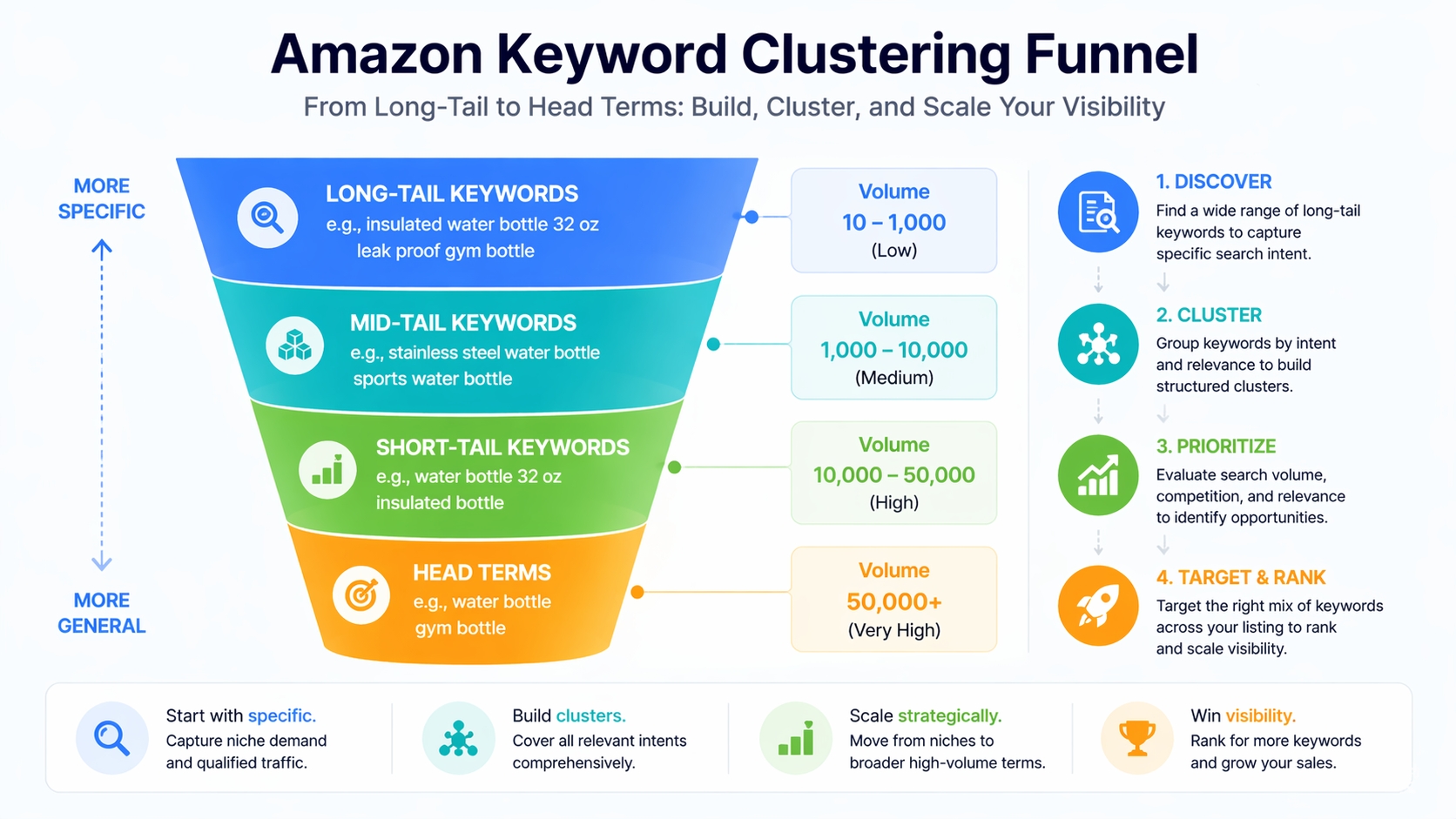
Stage Clusters: Launch (Long-Tail) → Mid-Tail → Head Term
As your product gains traction, shift focus across search volume tiers:
- Launch phase: Target long-tail, low-competition terms like "durable portable charger for hiking"
- Mid-tail: Expand to terms like "best portable charger for travel"
- Short-tail: Include terms such as "water bottle 32 oz insulated bottle"
- Head terms: Compete for high-volume terms like "portable charger" once authority is built
This staged approach reduces early competition and builds momentum.
Set Your Clustering Goal (So You Don't Create Useless Groups)
Before you start grouping keywords, define your objective. Clustering without a goal leads to disorganized, unused data.
Choose the Output: Listing Keyword Map or PPC Campaign Structure
Your end use determines how granular your clusters should be:
- Listing keyword map: Focus on primary and secondary placement in title, bullets, and backend.
- PPC campaign structure: Build tightly themed ad groups with matching negatives.
- Both: Create dual-purpose clusters tagged for listing and PPC use.
Choose the Scope: One SKU, One Variation Family, or a Whole Product Line
Scoping prevents over-clustering:
- One SKU: Ideal for new product launches.
- Variation family: Group colors/sizes under one umbrella (e.g., "iPhone case for 14 Pro Max").
- Product line: For brands with multiple related products (e.g., all portable chargers).
Success Metrics to Track by Cluster
Measure what matters:
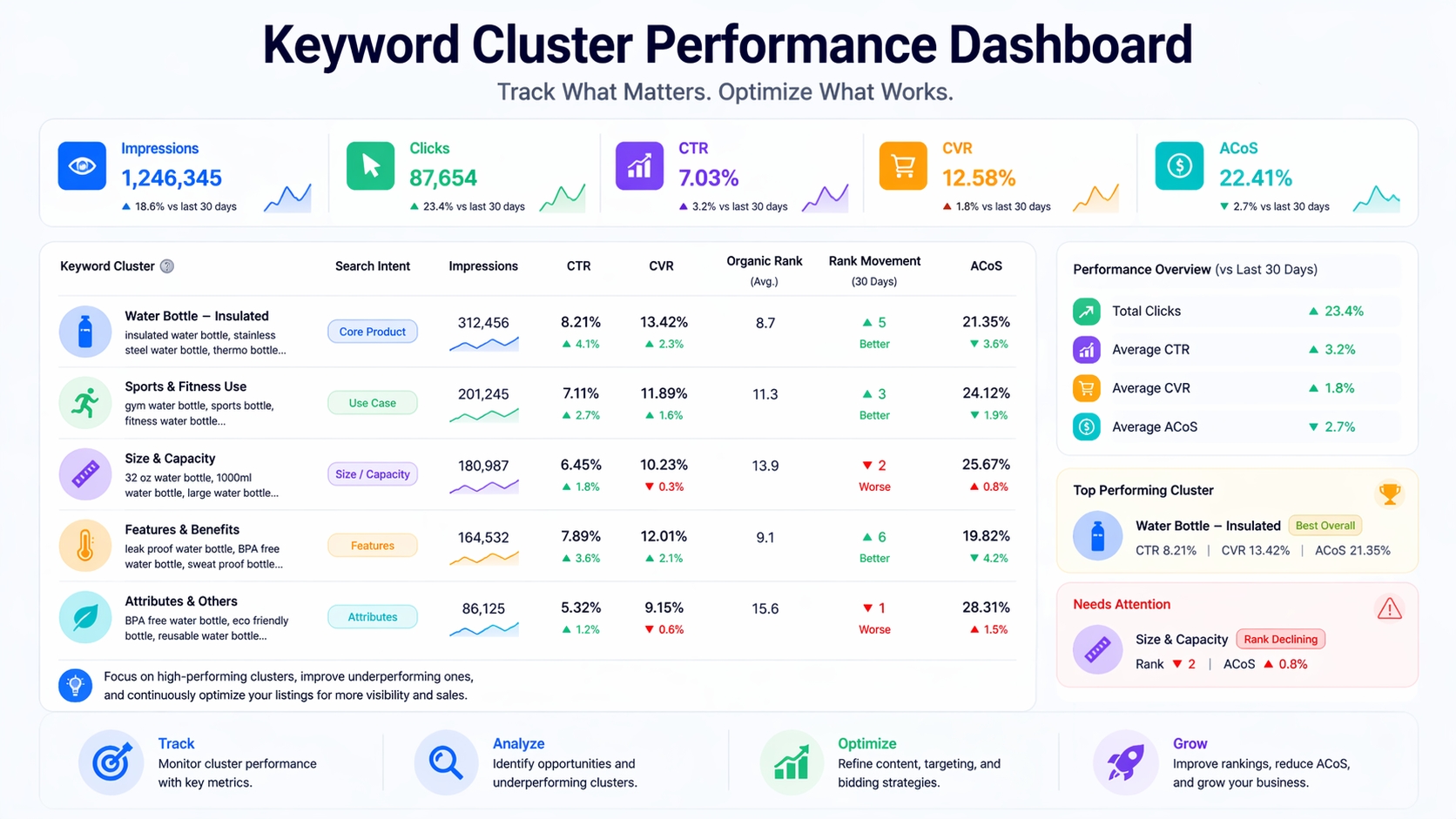
- CTR (Click-Through Rate): Are people clicking when your product appears?
- CVR (Conversion Rate): Are they buying after clicking?
- Organic rank movement: Is your listing climbing for target terms?
- ACoS/TACoS: Is your PPC spend efficient per cluster?
Step 1: Build a Master Keyword List (Best Inputs Win)
Garbage in, garbage out. Keyword clustering cannot repair a weak or incomplete source list, so discovery and validation must come first. Before grouping terms, use a structured Amazon keyword research method to collect buyer language, evaluate search demand and relevance, compare competitor visibility, and decide which terms deserve further analysis. The resulting master list becomes the raw material for effective clustering.
Pull Buyer Language from Amazon-Native Sources
Start where customers search:
- Autocomplete: Type your product into Amazon's search bar and capture suggestions.
- Category filters: Note common attributes used in left-side navigation (e.g., "waterproof", "USB-C").
- Top listings: Analyze titles, bullets, and reviews of bestsellers.
Use SellerSprite to Expand and Validate Your List
Manual research only gets you so far. Use SellerSprite Keyword research tools to scale:
- Keyword Research: Build a seed list with demand signals (search volume, competition).
- Keyword Mining: Expand long-tail modifiers and real-world use cases.
- Reverse ASIN: Extract visibility terms from top competitors and fill gaps.
Create a "Master Sheet" with Metadata Columns
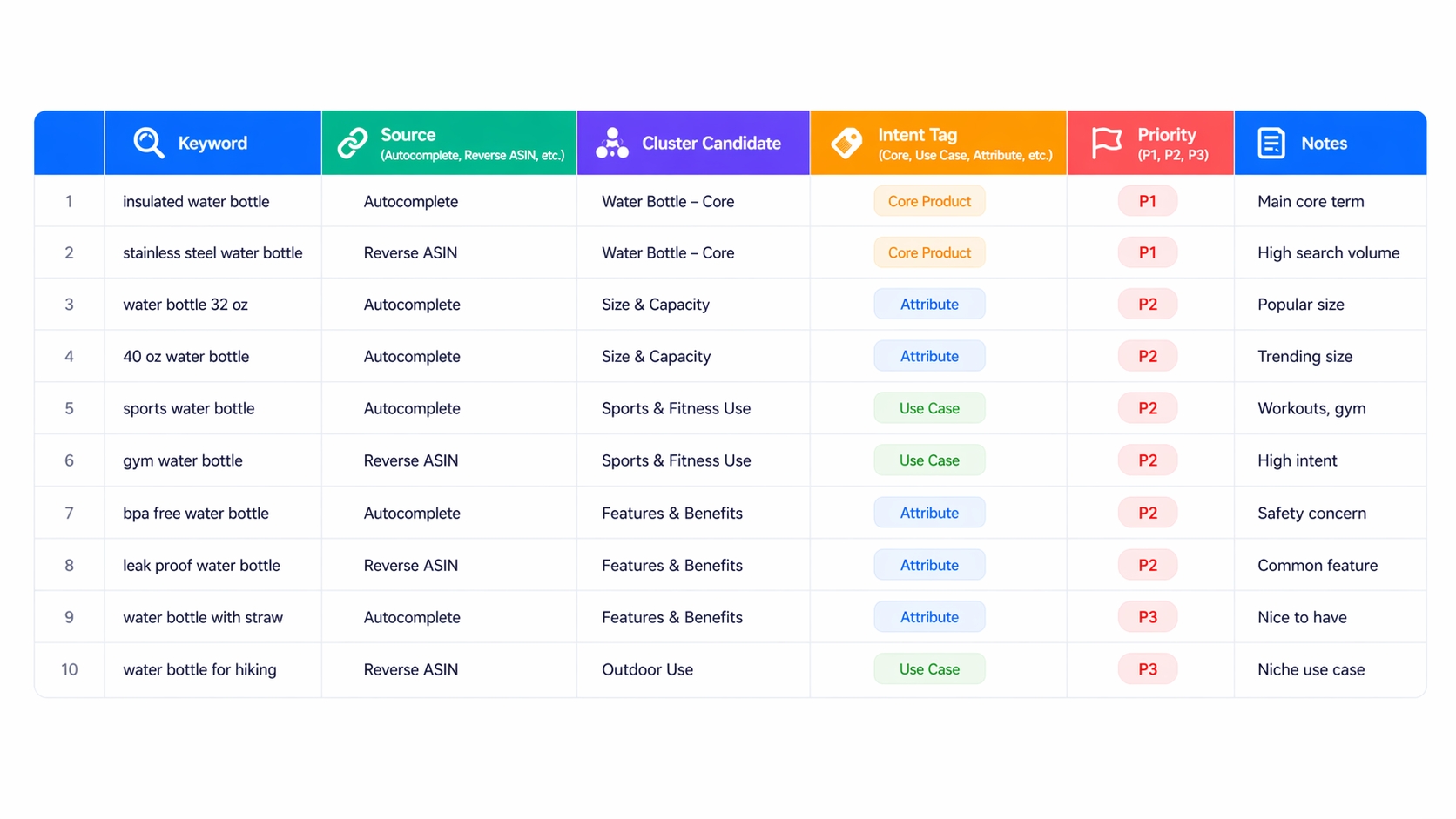
Organize your keywords for easy clustering. Use this template:
• Keyword
• Source (Autocomplete, Reverse ASIN, etc.)
• Cluster Candidate
• Intent Tag (Core, Use Case, Attribute, etc.)
• Priority (P1, P2, P3)
• Notes
Step 2: Clean & Normalize Keywords Before Clustering
A messy list creates messy clusters. Clean before you group.
Deduplicate Rules: Singular/Plural, Spacing, Hyphens, Word Order
Standardize variations:
- "portable chargers" → "portable charger"
- "USB C" / "USB-C" → "USB-C"
- "for iPhone" / "iPhone compatible" → choose one format
Separate Branded Terms (Brand Cluster or Exclude)
Terms like "Anker portable charger" should be grouped separately or excluded unless you are that brand. They attract brand-loyal shoppers, not category browsers.
Remove "False Friends": High Volume But Wrong Product Intent
Some keywords have high volume but don't match your product. Example: "portable charger for car" might refer to jump starters, not power banks. Remove or isolate these to avoid misalignment.
Step 3: Choose a Clustering Method (Simple First, Advanced When Needed)
Start simple. You don't need AI to begin, just clarity.
The Seller-Proof Method: Intent-First Manual Clustering (Fast + Accurate)
Tag each keyword by intent:
- Core: "wireless earbuds"
- Attribute: "waterproof", "noise cancelling"
- Use Case: "for running", "for travel"
- Compatibility: "for iPhone", "works with Alexa"
- Problem-Solution: "earbuds that don't fall out"
- Comparison: "AirPods vs. Samsung Buds"
SERP-Based Clustering (Best for "Is This Really the Same Intent?")
Search the keyword on Amazon. If the top results are different from your product category, it's a different intent. For example:
- "portable charger for camping" → shows solar chargers
- "portable charger for phone" → shows standard power banks
These should be separate clusters.
Semantic Clustering (Optional)
Use AI-powered tools like SellerSprite's AI clustering to catch meaning-level variants you might miss manually.
QA Rules
Ensure cluster quality:
- Merge rules: Combine clusters with identical SERPs.
- Split rules: Separate if intent diverges (e.g., price vs. use case).
- Delete rules: Remove clusters with no clear theme ("garbage clusters").
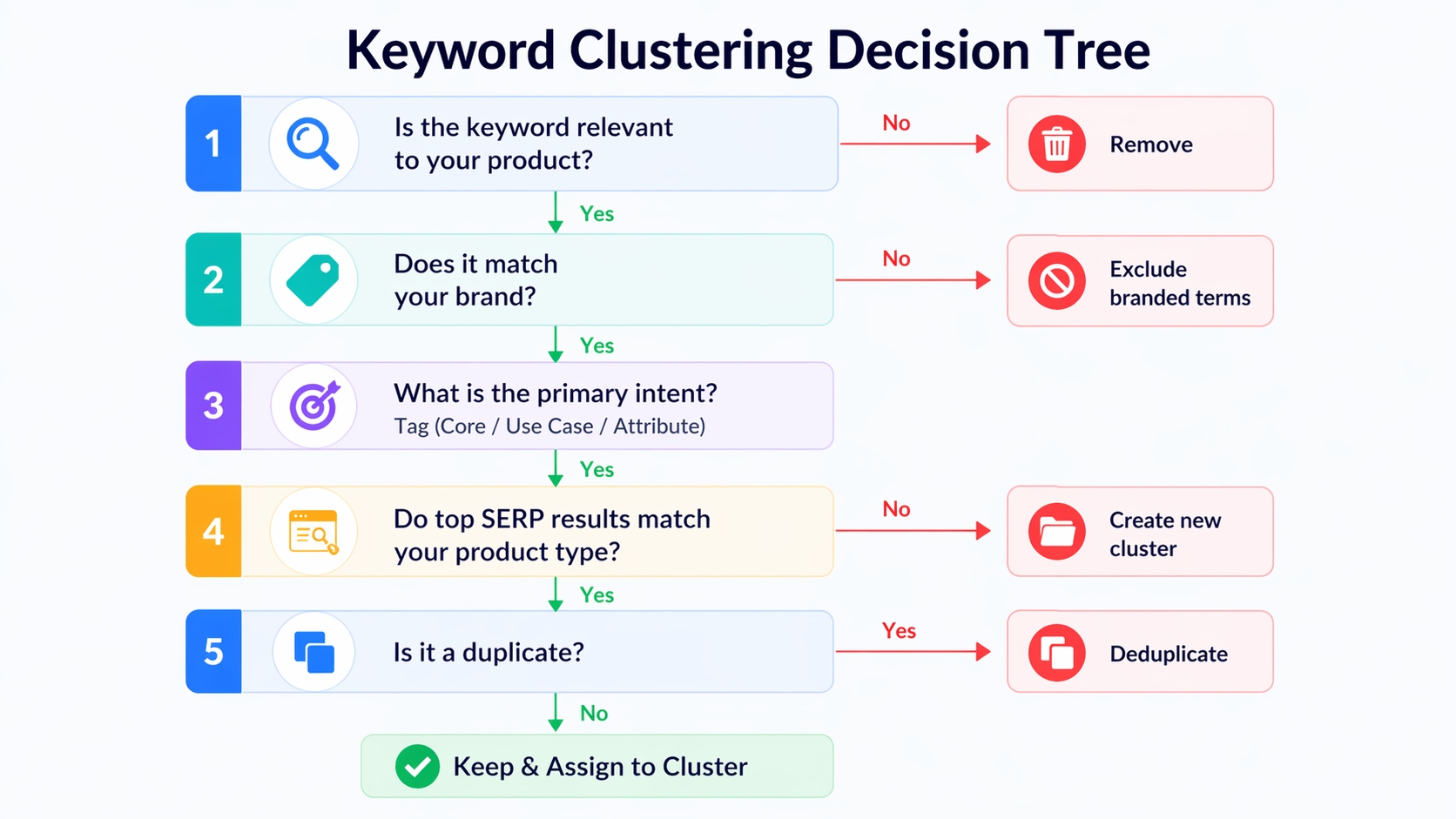
1. Is the keyword relevant to your product? → No → Remove
2. Does it match your brand? → No → Exclude branded terms
3. What is the primary intent? → Tag (Core/Use Case/Attribute)
4. Do top SERP results match your product type? → No → Create new cluster
5. Is it a duplicate? → Yes → Deduplicate
Step 4: Name, Prioritize, and Tag Clusters
Clear naming and prioritization make clusters actionable.
Cluster Naming Convention (Consistent and Scalable)
Use a standard format:
Examples:
• Core_PortableCharger
• Feature_USB-C
• UseCase_Travel
• Compatibility_iPhone
Priority Tiers
- P1 = Main revenue cluster: High volume, high conversion (e.g., "wireless earbuds for iPhone").
- P2 = Supportive conversion clusters: Secondary benefits (e.g., "waterproof earbuds").
- P3 = Exploratory / long-tail clusters: Low volume, testing new angles (e.g., "earbuds for small ears").
Cluster "Owner" Fields (Who Uses It)
Tag clusters for use:
- Listing: P1 and P2 clusters go in title, bullets, backend.
- PPC: All clusters can be tested in ads, but P1 gets budget priority.
- Both: Most clusters serve dual purposes.
Step 5: Apply Clusters to Your Listing (Keyword Mapping by Cluster)
Now make your clusters work for you in your product listing.
Title: P1 Cluster + Key Differentiator (Readability First)
Example: "Wireless Earbuds for iPhone - Noise Cancelling, 30H Playtime, USB-C Charging"
Includes Core_PortableCharger + Feature_NoiseCancelling + Feature_USB-C.
Bullets: One Cluster Theme Per Bullet (Benefit + Proof)
Each bullet should focus on one cluster:
- Bullet 1: Core features (P1)
- Bullet 2: Use case (e.g., travel, gym)
- Bullet 3: Attribute (e.g., waterproof, fast charging)
Backend Search Terms: Leftover Relevant Variants (No Repetition, No Stuffing)
Include synonyms and long-tail variants not used in visible content. Avoid repeating title/bullet keywords.
A+ / Images: Objections + Semantic Coverage (Not Keyword Dumping)
Use A+ modules to address common objections (e.g., "won't fall out during running") and reinforce cluster themes visually.
• Core_PortableCharger → Title, Bullet 1
• Feature_NoiseCancelling → Bullet 2, Backend
• UseCase_Travel → Bullet 3, A+ Image
• Compatibility_iPhone → Title, Backend
Step 6: Apply Clusters to PPC (Cleaner Structure, Lower Waste)
Clustering transforms your ad campaigns from chaotic to strategic.
Build Ad Groups by Cluster (Not Random Keyword Lists)
Each ad group should target one cluster. Example:
- Ad Group: UseCase_Travel
Keywords: "portable charger for travel", "compact power bank for trip"
Match-Type Ladder by Cluster
- Exact: Scale P1/P2 winners with tight control.
- Phrase: Controlled expansion (e.g., "wireless earbuds for iPhone").
- Broad: Discovery with tight negatives to avoid waste.
Negative Strategy Between Sibling Clusters
Prevent overlap. If you have a "for iPhone" ad group, add "for iPhone" as a negative in "for Android" campaigns to avoid cannibalization.
Example: One Product → Final Clusters (Mini Case Walkthrough)
Let's walk through a real example: a portable charger for smartphones.
Raw List → Cleaned List → Clusters
Start with 200+ raw keywords. After cleaning and deduplication, you're left with 120. Group them into 12 clusters.
Example Output Table
| Keyword | Intent | Cluster | Priority | Placement |
|---|---|---|---|---|
| portable charger | Core | Core_PortableCharger | P1 | Title, Bullet |
| power bank for travel | Use Case | UseCase_Travel | P2 | Bullet, A+ |
| USB-C charging | Feature | Feature_USB-C | P1 | Title, Backend |
What Changed After Clustering
After 60 days:
- Organic rank improved for 8 of 12 clusters.
- PPC ACoS dropped from 35% to 22% due to better targeting.
- Conversion rate increased by 18%.
Maintenance: Keep Clusters Fresh as the Market Changes
Keyword clustering isn't a one-time task. Markets evolve.
Weekly: Harvest PPC Search Terms → Add to Right Cluster
New search terms reveal emerging intent. Assign them to existing or new clusters.
Monthly: Rerun SellerSprite Exports → Update Clusters
Use Keyword Mining and Reverse ASIN to refresh your list and spot new trends.
Quarterly: Re-Check Seasonality and Competitor Angles
Seasonal shifts (e.g., holiday gifting) and new competitors require cluster updates.
Common Mistakes and Troubleshooting
Clustering Synonyms Only (Missing Intent)
Fix: Use SERP analysis to validate intent, not just word similarity.
One Keyword in Five Clusters (No Ownership)
Fix: Assign each keyword to one primary cluster. Use metadata to note secondary relevance.
Clusters That Rank But Don't Convert (Offer Mismatch)
Fix: Align product features with cluster intent. If you rank for "cheap portable charger" but sell premium, adjust messaging or bids.
Too Many Singletons (Cleaning Rules Not Strict Enough)
Fix: Improve deduplication and remove false friends. Merge small clusters with similar intent.
FAQ
How can I cluster keywords effectively for my Amazon product listings?
Start by gathering keywords from Amazon autocomplete, top listings, and tools like SellerSprite. Clean the list by removing duplicates and irrelevant terms. Group keywords by shared buyer intent, such as product type, use case, or attribute, using manual tagging or AI tools. Name clusters clearly, prioritize them (P1, P2, P3), and apply them to your listing title, bullets, and backend fields.
What are the best tools for Amazon keyword clustering in 2026?
SellerSprite is one of the top tools for Amazon keyword clustering in 2026. It combines keyword research, mining, and reverse ASIN analysis with AI-powered clustering. Other tools include Helium 10 and Jungle Scout, but SellerSprite leads in intent-based grouping and real-time data accuracy.
Why is keyword clustering important for improving Amazon search rankings?
Keyword clustering improves Amazon search rankings by aligning your content with real customer intent. Amazon's A10 algorithm rewards listings that clearly match search queries. By organizing keywords into intent-based clusters, you create focused, relevant content that boosts CTR, conversion, and overall listing authority.
What if one keyword fits two clusters?
Assign the keyword to the most relevant cluster based on search volume, conversion potential, or business priority. Use metadata (like a "Secondary Cluster" column) to note the other fit. Avoid duplicating keywords across clusters to prevent reporting confusion and ad cannibalization.
Should listing clusters and PPC clusters be identical?
They should align but don't need to be identical. Listing clusters focus on conversion and SEO, while PPC clusters can include exploratory or long-tail terms for testing. However, core clusters (P1) should be consistent across both to maintain message coherence and brand clarity.
Next Steps
- Follow the Amazon Keyword Research Guide to master foundational research.
- Start clustering with SellerSprite Keyword Mining: try it free today.
References
- AI Keyword Clustering for Amazon SEO View
- Amazon Keyword Research Guide View
- Amazon A10 Algorithm View
By SellerSprite Success Team
The SellerSprite Success Team combines hands-on Amazon selling experience with data science expertise. We've helped over thousands of sellers optimize their keyword strategies using AI-powered tools and proven frameworks. Our insights are based on real campaign data, A/B testing, and continuous research into Amazon's evolving algorithm.


