TL;DR: Low Amazon PPC impressions kill sales before they start. This guide provides a diagnostic checklist to identify root causes—such as low bids, budget exhaustion, or listing relevance issues—and offers proven strategies to fix them and restore your ad visibility.
Key Takeaways
- Diagnose via Impression Share: Always check your Impression Share metrics (Lost due to Rank vs. Lost due to Budget) first to pinpoint if the issue is money (bid/budget) or relevance.
- Relevance is King: Low bids aren't the only culprit; if your product listing content or selected keywords don't match customer search intent, Amazon won't show your ads.
- Fix Suppression Issues: Often, low impressions are caused by suppressed listings or categories restricted for advertising, which requires immediate listing hygiene checks.
- Structured Optimization: Fixing low impressions requires a step-by-step approach: Diagnose data, fix listing content, adjust bids, and refine targeting match types.
Table of Contents
Note on marketplaces: This guide is specifically optimized for the US market.
Understanding the Value of Impressions in the Amazon Funnel
In the world of Amazon advertising, impressions are the lifeblood of your sales funnel. An impression is counted every time your ad is displayed on a search results page or a product detail page. If this metric is zero or near zero, the rest of your advertising funnel—Clicks, Cost Per Click (CPC), and Sales—collapses entirely.
For new sellers, seeing low impressions can be discouraging, but for seasoned marketing managers, it is a critical signal that something in the campaign setup or listing health is broken. It is not merely a matter of "luck" or market saturation; it is usually a technical or strategic error. To fix it, you must understand that Amazon's algorithm (A9) prioritizes relevance and revenue potential. If Amazon doesn't believe your ad will convert or be relevant to the searcher, it will serve a competitor's ad instead, regardless of how high your bid is.
Phase 1: Diagnosing Low Impressions (The Data-Driven Approach)
Before you start randomly increasing bids or adding keywords, you must adopt a forensic approach to data analysis. Jumping to conclusions without data is a common mistake that drains budgets without results. Here is the exact diagnostic process you should follow in Amazon Seller Central or Advertising Console.
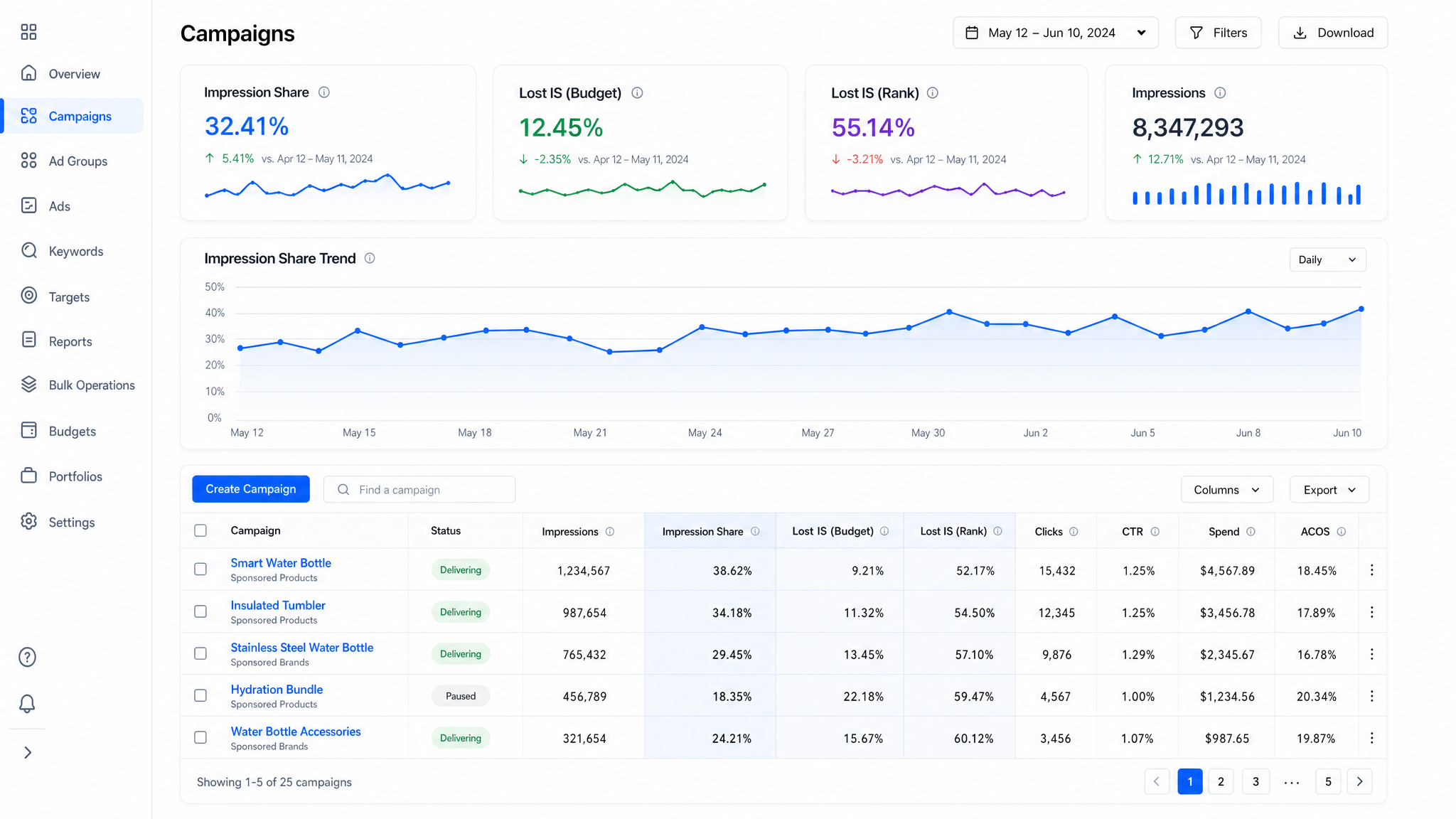
Step 1: Analyze Impression Share Metrics
Navigate to your campaign settings and look for the "Impression Share" columns. You may need to customize your display columns to see them. There are two critical sub-metrics here:
- Lost Impression Share (Rank): This indicates that your bid was too low to win the auction. Amazon displayed an ad, but it belonged to someone else who bid higher.
- Lost Impression Share (Budget): This shows that your campaign was performing well, but your daily budget was exhausted, preventing your ads from being shown for the rest of the day.
If your "Lost Impression Share (Budget)" is high (e.g., >20%), the fix is simple: increase your budget. However, if "Lost Impression Share (Rank)" is high and your Budget is at 0%, your bid is the primary issue. If both are low but you still have no impressions, you are likely facing a relevance or suppression issue.
Step 2: Check for Suppressed Listings
Sometimes the issue is not the ad campaign but the product listing itself. Go to your "Inventory" tab and look for "Suppressed" listings or "All Listings" with quality alerts. If your listing is suppressed for compliance reasons (e.g., missing images, restricted keywords, or category errors), Amazon will not serve ads for it, effectively zeroing out your impressions.
Step 3: Review Search Term Reports
If you have some impressions (but low), download the Search Term Report. This report tells you what customers actually typed to trigger your ad. If you see search terms that are completely unrelated to your product, your targeting is wrong. If you see no search terms at all, your keywords are likely too narrow, or the search volume simply doesn't exist for that specific term.
Phase 2: The Master Checklist of Common Causes
Once you have the initial data, you can cross-reference it against this comprehensive checklist. We have categorized these causes by difficulty, from quick fixes to deeper structural issues.
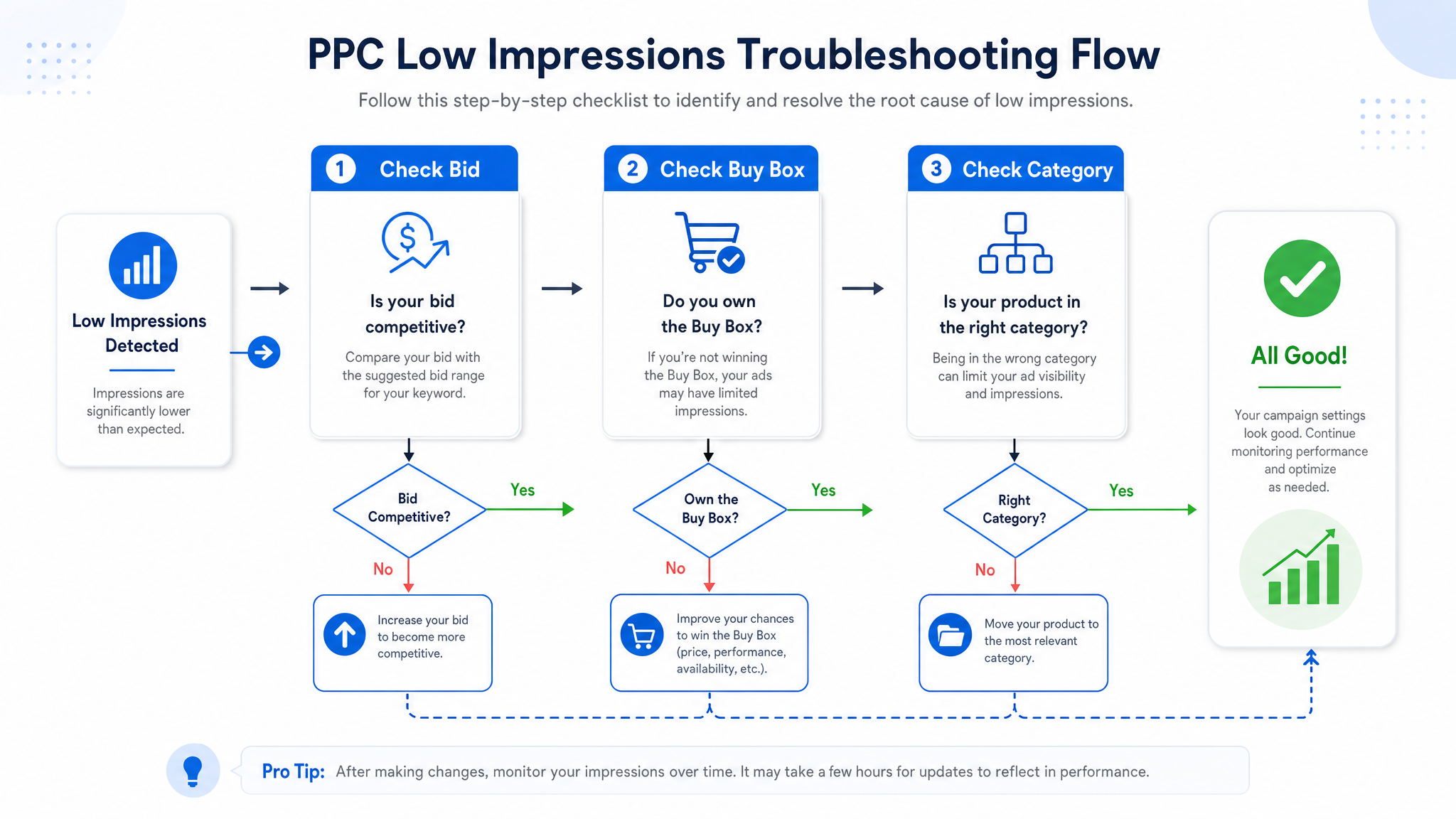
1. The Bid Is Too Low (The Auction Barrier)
This is the most common reason for "why no impressions on Amazon ads." Amazon runs a second-price auction, meaning you must bid enough to beat the second-highest bidder to win the ad slot. If you start with the system-suggested "Suggested Bid" but are barely below the competitive threshold, you will get zero impressions. This is especially true for highly competitive niches like electronics or supplements.
2. Daily Budget Exhaustion
If you set a daily budget of $5 and your CPC is $2.00, your ads will only show 2.5 times per day (technically 2 clicks). Once the budget hits the limit, Amazon stops showing your ads until the next day. This artificially suppresses your impression volume, making it look like your campaign isn't working, when in reality, it's just underfunded.
3. Poor Keyword Relevance & Match Types
Amazon will not show your ad if the keyword does not match the product listing content. For example, if you are selling a "Leather Notebook" but your keyword is "Digital Planner," Amazon will suppress impressions because the content disconnect is too high. Additionally, using only Exact Match keywords in the early stages can starve your campaign of data. Exact match is highly restrictive; unless someone types that phrase exactly, your ad won't show.
4. Lack of Buy Box Ownership
This is specific to sellers who are not the brand owners or who are competing for the Buy Box against other resellers. Sponsored Products ads generally require the seller to own the Buy Box to appear. If a competitor has undercut your price and won the Buy Box, your ads will stop generating impressions immediately.
5. Category or Keyword Restrictions
Some categories on Amazon are gated for advertising, such as medical devices or adult products. If you list a product in a restricted category (or use keywords that trigger adult filters) without proper approval, your ads will get zero impressions. Ensure your product is properly categorized and ungated for advertising.
6. Low Search Volume
Sometimes the error is in the research phase. You might have bid high and set a good budget, but if your keyword is "blue left-handed ergonomic ukulele for beginners," the monthly search volume might legitimately be 10 people. In this case, low impressions are a data validation that there is no demand, not a campaign error.
Phase 3: Actionable Strategies to Improve Ad Visibility
Now that you know the "Why," here is the "How." This section provides actionable steps to increase Amazon PPC impressions, organized by strategy type.
Strategy 1: The "Dynamic Bid - Up and Down" Approach
Static bidding is passive. Amazon's algorithm offers dynamic strategies that can help you win more impressions when it matters. Switching your campaign to "Dynamic Bids - Up and Down" allows Amazon to raise your bid (up to 100%) in real-time for clicks that seem more likely to convert. This helps you capture traffic from highly competitive keywords without you having to manually set a sky-high default bid for every single search.
Strategy 2: Broad Match for Discovery
To jumpstart impressions, you need to cast a wider net. Create a "Discovery Campaign" using Broad Match keywords. This tells Amazon, "Show my ad for anything related to this keyword, even close variants and misspellings." While this might attract some irrelevant traffic (which you later negate), it guarantees a flow of impressions. This is a critical step for new product launches. For a deeper dive into setting this up, read our guide on How to Launch a PPC Campaign for a New Product on Amazon.
Strategy 3: Optimize Listing Content for SEO-PPC Synergy
Your PPC performance is tied to your organic listing SEO. If your backend keywords, title, and bullet points do not contain the keywords you are bidding on, Amazon will consider your ad irrelevant. Ensure your primary keywords are in the Title (first 5 words are crucial) and the Bullet Points. This strengthens the Quality Score of your ad, leading to higher placements and lower CPCs over time. Tools like SellerSprite can help identify high-volume keywords you might be missing.
To learn more about this synergy, refer to our comprehensive Amazon PPC Optimization Strategies Guide.
Strategy 4: Product Targeting (PAT) for Category Entry
If keyword competition is too fierce, bypass it temporarily. Use Product Attribute Targeting (formerly PAT) to show your ads directly on your competitors' product detail pages. This allows you to piggyback on their traffic. By targeting ASINs that are similar but slightly inferior (e.g., lower rating, higher price), you can steal impressions and visibility directly from their listings.
Advanced Troubleshooting for Growth Managers
For established brands and marketing managers managing large portfolios, simple bid adjustments are not enough. You need granular control.
Placement Adjustments (Top of Search vs. Rest of Search)
You can bid differently based on where the ad appears. If you are struggling for impressions, create a placement adjustment that adds +50% or +100% to your bid for "Top of Search" (the first row of results). While expensive, this is the highest-visibility real estate on Amazon and guarantees impressions if you win the slot. Conversely, reduce bids for "Product Pages" if you need to preserve budget for the top slot.
Ad Scheduling (Dayparting)
If your budget is depleting too early in the day (causing zero impressions in the evening), use Ad Scheduling. Run your ads only during the most profitable hours or adjust bids by percentage during those hours. This ensures your budget isn't wasted at 3 AM when no one is converting, but is concentrated during prime-time hours to maximize visibility when it counts.
Granular Campaign Structure
A "bucket" campaign, where you dump 100 keywords, is bad for diagnostics. Split your campaigns. Have one campaign for Automatic targeting (data gathering), one for Broad match (discovery), and separate campaigns for high-performing Exact match keywords (scaling). This allows you to isolate low-impression keywords and fix them without contaminating your profitable keywords. For complex launch strategies, check our article on Amazon PPC Launch Strategy.
FAQ
What are the most common reasons for low impressions on Amazon PPC?
The most common reasons include setting your default bid too low to win the auction, exhausting your daily budget too early in the day, using overly restrictive keyword match types (like only Exact Match), or having a product listing that is suppressed or lacks relevance to the targeted keywords.
How do I fix low ad impressions on Amazon Seller Central?
Start by checking your Impression Share metrics. If Lost IS (Budget) is high, increase your budget. If Lost IS (Rank) is high, increase your bids. Next, ensure your listing is active and not suppressed. Finally, verify your keywords are relevant and consider switching to Broad Match to capture more traffic during the discovery phase.
Does increasing my bid always guarantee more impressions on Amazon?
No. While increasing your bid helps you win auctions, it does not guarantee impressions if there is a fundamental relevance issue. If your listing content does not match the keyword, or if you have violated Amazon's advertising policies, Amazon will suppress the ad regardless of your bid. Always fix relevance first, then bid.
Next Steps
- Audit your campaigns today: Check your Impression Share metrics immediately to identify if you are losing traffic due to Rank or Budget.
- Supercharge your keyword research: Stop guessing which keywords will drive traffic. Sign up for SellerSprite to uncover high-converting keywords your competitors are missing.
References
- Amazon PPC Optimization Guide View
- How to Launch a PPC Campaign for a New Product View
- Amazon PPC Launch Strategy View
By SellerSprite Success Team
The SellerSprite Success Team consists of expert Amazon strategists and data analysts dedicated to helping sellers maximize their marketplace potential. With years of experience in Amazon SEO, PPC advertising, and data analytics, we provide actionable insights to drive business growth.