TL;DR: Amazon PPC optimization is essential for maximizing ad performance, lowering ACOS, and increasing sales. This guide covers strategies, tools, campaign setup, and advanced techniques for sellers at every level—from beginners to enterprise brands.
Key Takeaways
- Amazon PPC optimization improves ad relevance, reduces wasted spend, and increases conversion rates.
- Effective campaign structure separates auto and manual campaigns, targets different keyword match types, and isolates high-performing ASINs.
- Top Amazon PPC tools like SellerSprite automate bid adjustments, provide keyword insights, and streamline reporting.
- New product launches benefit from auto campaigns for discovery and targeted manual campaigns using relevance-first keyword research.
- Regular optimization—weekly reviews, negative keyword additions, and bid adjustments—is critical for long-term success.
Table of Contents
- What Is Amazon PPC Optimization?
- Why Amazon PPC Optimization Matters
- Core Components of Amazon PPC Optimization
- Step-by-Step Amazon PPC Campaign Setup
- Auto vs. Manual Campaigns: When to Use Each
- Advanced Amazon PPC Strategies
- Best Amazon PPC Tools for Management & Automation
- Spoke Content Recommendations
- FAQ
- References
Note on marketplaces: This guide is specifically optimized for the US market.
What Is Amazon PPC Optimization?
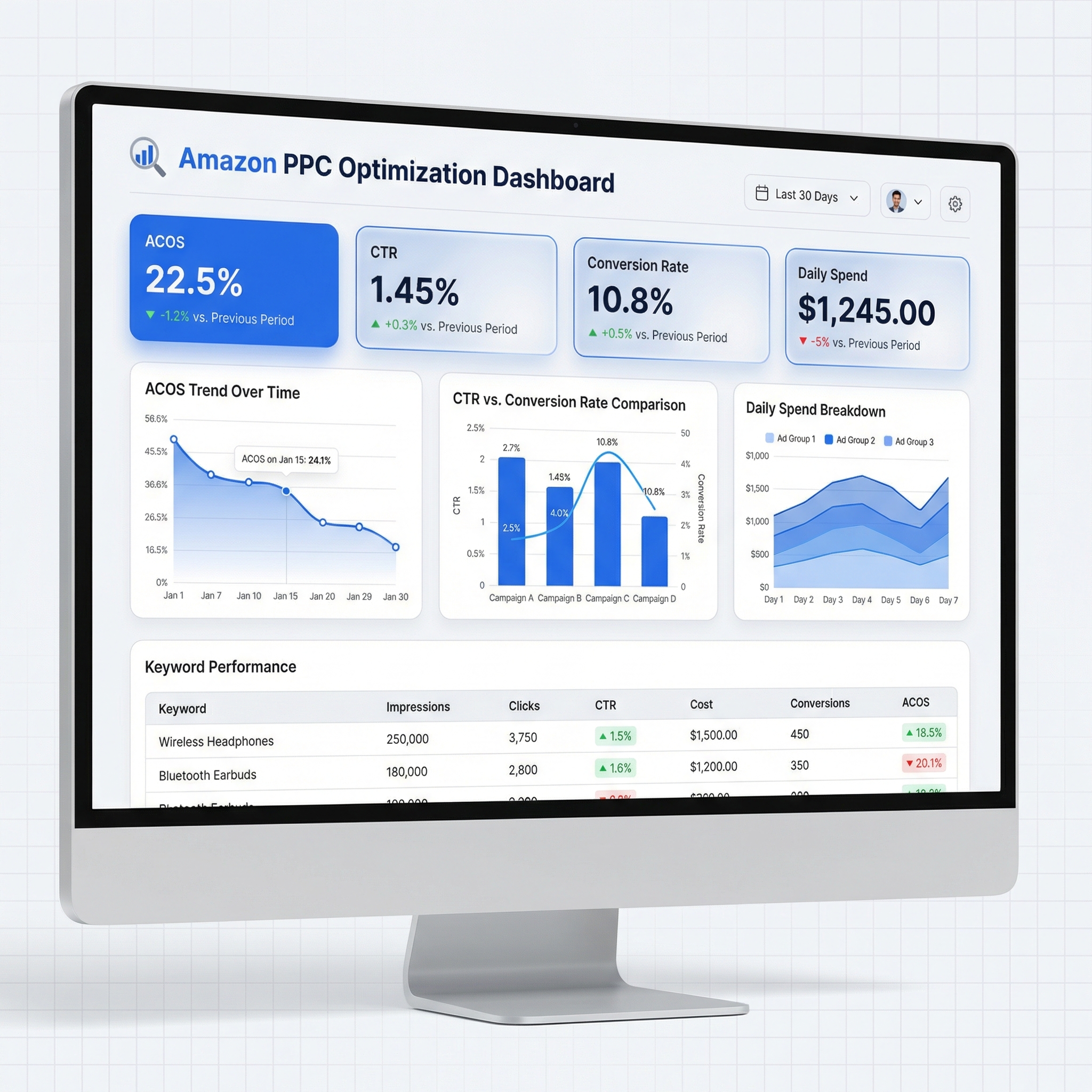
Amazon Pay-Per-Click (PPC) optimization is the ongoing process of refining your sponsored ads to improve performance, increase return on ad spend (ROAS), and reduce advertising cost of sales (ACOS). It involves analyzing data from your campaigns—such as keyword performance, click-through rates (CTR), conversion rates, and spend—and making strategic adjustments to bids, targeting, and ad structure.
For sellers, especially those in competitive niches, simply launching a campaign isn’t enough. Without optimization, you risk overspending on underperforming keywords, missing high-intent shoppers, or cannibalizing organic sales. Effective Amazon PPC optimization ensures that every dollar spent brings measurable value—whether that’s more sales, better visibility, or improved product ranking.
Amazon offers three main ad types: Sponsored Products, Sponsored Brands, and Sponsored Display. While all can be optimized, Sponsored Products are the most commonly used by individual sellers and form the foundation of most PPC strategies. This guide focuses primarily on Sponsored Products but includes principles applicable across ad types.
Why Amazon PPC Optimization Matters
Amazon is a performance-driven marketplace. The algorithm rewards products that convert well, and advertising plays a crucial role in driving those conversions. Here’s why PPC optimization isn’t optional—it’s essential:
1. Controls Advertising Spend
Without optimization, it’s easy to waste budget on keywords with low conversion potential. For example, broad match terms might generate clicks, but if they don’t lead to sales, your ACOS skyrockets. By refining targeting and eliminating irrelevant search terms, you keep your ad spend focused on high-intent buyers.
2. Improves Product Visibility
Well-optimized campaigns increase impressions and click-through rates. When your product appears in top positions for relevant searches, it gains visibility not just among ad shoppers but also in organic rankings. Amazon’s A9 algorithm considers ad performance when determining organic placement, so strong PPC results can boost overall discoverability.
3. Accelerates New Product Launches
New products lack review history and sales velocity. PPC helps them gain traction quickly. With proper optimization—such as starting with auto campaigns to gather keyword data, then transitioning to manual campaigns—you can identify high-converting keywords early and scale profitably.
4. Enhances Data-Driven Decision Making
Optimization forces you to engage with your data. You learn which keywords drive sales, which placements convert best (top of search vs. product pages), and how your bids impact profitability. This insight informs broader business decisions—from pricing and inventory to product development.
Core Components of Amazon PPC Optimization
Successful Amazon PPC optimization rests on five foundational pillars. Mastering each one enables you to build efficient, scalable, and profitable campaigns.
1. Campaign Structure
A clean, logical campaign structure makes optimization easier and more effective. Best practices include:
- Separate Auto and Manual Campaigns: Auto campaigns are for discovery; manual campaigns are for precision. Keep them separate to avoid overlap and confusion.
- Group by Match Type: Create separate ad groups for broad, phrase, and exact match keywords to control bids independently.
- Isolate High-Performing Keywords: Promote top keywords into their own campaigns for tighter control and higher bids.
- Use Product-Centric Campaigns: For brands with multiple SKUs, structure campaigns around individual products or closely related bundles.
2. Keyword Research & Selection
Keywords are the backbone of any PPC campaign. Effective keyword research involves:
- Leveraging Search Term Reports: Analyze which actual search queries triggered your ads and led to conversions.
- Using Relevance-First Filtering: Prioritize keywords that are highly relevant to your product, even if volume is lower. Irrelevant traffic hurts conversion rates.
- Targeting Long-Tail Keywords: These often have lower competition and higher intent (e.g., “waterproof hiking backpack 30L” vs. “backpack”).
- Competitor Keyword Mining: Use tools like SellerSprite to uncover keywords your competitors rank for.
3. Bidding Strategy
Your bid determines how often and where your ad appears. Amazon offers several bidding options:
- Dynamic Bids – Down Only: Reduces bids when conversion likelihood is low. Ideal for conservative budgets.
- Dynamic Bids – Up and Down: Adjusts bids in real time based on performance. Use with caution—can increase spend quickly.
- Fixed Bids: Maintains a consistent bid. Offers predictability but less flexibility.
- Rule-Based Bidding: Set custom rules (e.g., raise bid if ACOS < 20%). Advanced users and tools like SellerSprite can automate this.
4. Negative Keywords
Negative keywords prevent your ads from showing for irrelevant searches. For example, if you sell premium dog food, you might add “cheap” or “bulk” as negative keywords. Regularly review search term reports to identify and exclude non-converting queries.
5. Performance Monitoring & Iteration
Optimization is not a one-time task. Weekly reviews are essential. Key actions include:
- Reviewing search term reports
- Adjusting bids based on performance
- Adding negative keywords
- Pausing underperforming keywords or ads
- Scaling winning campaigns
Step-by-Step Amazon PPC Campaign Setup
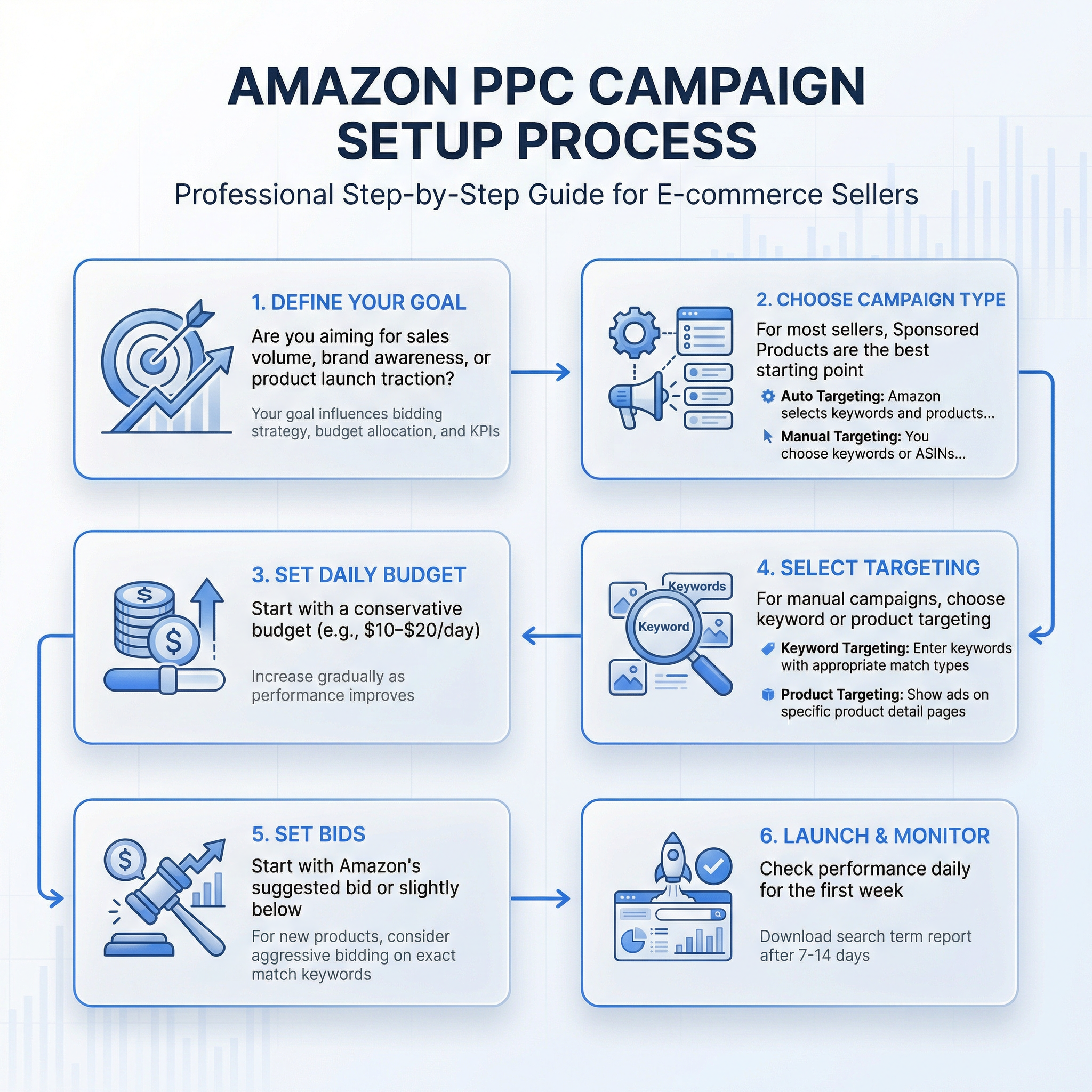
Setting up a successful Amazon PPC campaign requires planning and precision. Follow this step-by-step process whether you're launching a new product or optimizing an existing one.
Step 1: Define Your Goal
Are you aiming for sales volume, brand awareness, or product launch traction? Your goal influences bidding strategy, budget allocation, and KPIs.
Step 2: Choose Campaign Type
For most sellers, Sponsored Products are the best starting point. Select between:
- Auto Targeting: Amazon selects keywords and products based on your listing. Great for gathering initial data.
- Manual Targeting: You choose keywords or ASINs. Offers full control and precision.
Step 3: Set Daily Budget
Start with a conservative budget (e.g., $10–$20/day) for new campaigns. Increase gradually as performance improves. Avoid setting budgets too low—Amazon needs sufficient data to optimize delivery.
Step 4: Select Targeting
For manual campaigns, choose keyword or product targeting:
- Keyword Targeting: Enter keywords with appropriate match types.
- Product Targeting: Show ads on specific product detail pages or categories.
Step 5: Set Bids
Start with Amazon’s suggested bid or slightly below. Monitor performance and adjust. For new products, consider aggressive bidding on exact match keywords to gain early visibility.
Step 6: Launch & Monitor
After launching, check performance daily for the first week. Look for clicks, CTR, and conversions. After 7–14 days, download the search term report to identify opportunities and negatives.
Auto vs. Manual Campaigns: When to Use Each
Understanding when to use auto and manual campaigns is crucial for effective Amazon PPC management.
Auto Campaigns: How to Use Them for Discovery
Auto campaigns let Amazon’s algorithm determine which searches and products trigger your ads. They’re ideal for:
- New Product Launches: Gather real search data to inform manual campaigns.
- Keyword Discovery: Identify high-performing search terms you may not have considered.
- Competitor Targeting: Amazon may show your ad on competitor product pages.
Best practices:
- Run auto campaigns with dynamic bids – down only to control spend.
- Review search term reports weekly to harvest converting keywords.
- Use negative keywords to block irrelevant traffic (e.g., “free,” “used”).
Manual Campaigns: Precision Targeting
Manual campaigns give you full control over targeting. Use them to:
- Bid aggressively on high-converting keywords.
- Run exact match campaigns for branded terms.
- Target specific competitor ASINs.
- Implement category-level targeting for broad reach.
Pro tip: Create “catch-all” campaigns using category targeting to capture shoppers browsing related products. This complements keyword-based campaigns and increases overall visibility.
Advanced Amazon PPC Strategies
Once you’ve mastered the basics, implement these advanced tactics to scale profitably.
1. Bid Adjustments by Placement
Amazon allows bid adjustments based on ad placement (top of search, product pages, rest of search). Typically, top-of-search placements convert best. Increase bids by 20–50% for top of search and reduce for product pages if they underperform.
2. Dayparting & Seasonal Adjustments
While Amazon doesn’t support dayparting directly, third-party tools can help pause or adjust bids based on time of day. Also, anticipate seasonal trends (e.g., holiday spikes) and adjust budgets accordingly.
3. Portfolio Campaigns for Brand Management
Use portfolio campaigns to manage multiple products under a single budget and bidding strategy. Ideal for brands running coordinated launches or promotions.
4. A/B Testing Ad Creatives (Sponsored Brands)
For Sponsored Brands, test different headlines, logos, and custom images to see what resonates. Even small creative changes can significantly impact CTR and conversion.
5. Rule-Based Automation
Set rules to automatically adjust bids based on performance. For example:
- Increase bid by 20% if CTR > 0.5% and ACOS < 25%
- Decrease bid by 30% if ACOS > 40% for 7 days
- Pause keyword if no conversion after 1,000 impressions
Tools like SellerSprite automate these rules, saving time and improving consistency.
Best Amazon PPC Tools for Management & Automation
While Amazon’s native interface provides basic functionality, third-party tools offer deeper insights and automation. Here are the top features to look for:
1. Keyword Research & Reverse Engineering
Tools like SellerSprite analyze competitor listings to reveal which keywords they’re ranking for and bidding on. This helps you identify gaps and opportunities.
2. Automated Bid Management
Automated tools adjust bids in real time based on your rules, ensuring optimal performance without manual intervention. This is especially valuable for sellers managing dozens of campaigns.
3. Search Term Analysis & Negative Keyword Suggestions
Advanced tools categorize search terms by performance, highlight converting queries, and suggest negative keywords—saving hours of manual analysis.
4. Reporting & Dashboards
Customizable dashboards provide at-a-glance views of KPIs across campaigns, helping you spot trends and make faster decisions.
Recommended Tool: SellerSprite
SellerSprite is a powerful Amazon PPC management platform designed for both beginners and advanced sellers. It offers:
- AI-powered keyword suggestions
- Automated bid optimization
- One-click negative keyword application
- Weekly optimization reports
- Competitor ad intelligence
Start optimizing your Amazon PPC campaigns smarter with SellerSprite.
Spoke Content Recommendations
This hub covers the fundamentals of Amazon PPC optimization. For deeper dives into specific topics, explore these spoke articles:
- Weekly PPC Optimization with SellerSprite – Learn how to conduct weekly reviews and automate optimizations.
- Amazon PPC Launch: Keywords Relevance-First Guide – A step-by-step method for launching new products with high-relevance keywords.
- Amazon PPC Category Targeting: Catch-All Campaigns – How to use category targeting to maximize visibility.
Next Steps
- Sign up for SellerSprite to automate your Amazon PPC optimization and gain access to advanced keyword insights. Get started today.
- Download our free checklist: "7-Day Amazon PPC Launch Plan" to guide your first campaign.
- Review your current campaigns using the optimization checklist in this guide and implement one improvement this week.
FAQ
How to Launch a PPC Campaign for a New Product?
Start with an auto campaign to gather search term data. Run it for 7–14 days with a moderate budget ($10–$20/day). Analyze the search term report to identify converting keywords. Then, create a manual campaign targeting those keywords using exact and phrase match. Use aggressive bids initially to gain visibility. Simultaneously, optimize your product listing (title, images, bullet points) to improve conversion rates. Monitor performance weekly and adjust bids or add negative keywords as needed.
Auto Campaigns: How to Use Them for Discovery?
Auto campaigns are ideal for discovery because Amazon automatically shows your ad for relevant searches and product pages. Use them to uncover high-performing keywords you may not have considered. Set bidding to "Dynamic – Down Only" to control costs. After 7–14 days, download the search term report and identify queries that led to sales. Add these as exact or phrase match keywords in manual campaigns. Also, add irrelevant terms as negative keywords to improve relevance and lower ACOS.
What Is a Good ACOS for Amazon PPC?
A "good" ACOS depends on your profit margin and business goals. As a general rule: ACOS below 15% is excellent, 15–25% is strong, and 25–35% may be acceptable for launch or awareness campaigns. If your ACOS exceeds your profit margin, you’re losing money. Always evaluate ACOS in context—sometimes a higher ACOS drives valuable organic sales or brand recognition.
How Often Should I Optimize My Amazon PPC Campaigns?
Weekly optimization is recommended for active campaigns. Check search term reports, adjust bids, add negative keywords, and pause underperforming terms. For new campaigns, monitor daily for the first week. Established campaigns can be reviewed bi-weekly, but major changes (like new product launches or promotions) require immediate attention.
References
- Amazon Advertising Help View
- SellerSprite Blog: Weekly PPC Optimization View
- SellerSprite Guide: Amazon PPC Launch Keywords View
By SellerSprite Success Team
The SellerSprite Success Team combines deep expertise in Amazon marketplace dynamics, data analytics, and e-commerce growth strategies. With years of hands-on experience helping thousands of sellers optimize their PPC campaigns, we deliver actionable insights grounded in real-world performance. Our content is designed to empower sellers with the knowledge and tools needed to scale profitably on Amazon.


