Finding a profitable product to sell on Amazon starts with choosing the right market. A product may generate impressive sales, but that does not necessarily mean its category offers a realistic opportunity for new sellers.
SellerSprite Category Insights helps you evaluate Amazon categories and subcategories using market demand, competitive concentration, new-product performance, pricing, and historical trends.
Instead of analyzing individual products in isolation, you can compare entire niche markets, identify promising opportunities, and then investigate the products competing within them.
Whether you're exploring new product ideas or validating an existing one, we recommend following this 5-step workflow:
Filter Markets → Compare Subcategories → View Market Analysis Report → Review Product Details → Calculate Profitability
Open Category Insights
Compare niches with real Amazon data and pick markets that fit your strategy.
1. Filter Markets That Match Your Selling Strategy
Step 1: Select Your Marketplace, Time Period, and Category
Open Category Insights under the tools menu.
At the top of the page, configure these settings:
🌏 Marketplace
Choose the Amazon marketplace you want to research, such as the United States, United Kingdom, Germany, or Japan.
Market demand, competition, pricing, and consumer behavior can differ significantly between countries. Analyze each marketplace separately before making expansion decisions.
📊 Data Dimension
Choose between two analysis modes:
- Single-Month Static Data: Examine a specific month or the most recent 30-day period. This is useful for screening markets based on their current or historical performance.
- Trends Over the Past 24 Months: Examine how market conditions change over time. Use this mode to investigate growth, seasonality, and fluctuations rather than relying on one month of data.
For your initial search, start with Single-Month Static Data. After narrowing down your options, use historical trends to validate their stability.
✅ Select a Category
Click Select one or more categories & subcategories to open the Amazon category selector.
You can approach category selection in two ways:
- Discover new niches: Select a broad category, such as Home & Kitchen, to explore its subcategories.
- Validate a specific niche: Select the category or subcategory that most closely matches your intended product.
For example, if you're considering selling bath rugs, navigate to: Home & Kitchen > Bath > Bath Rugs
Selecting a broad category is useful for discovering opportunities you might otherwise overlook. Selecting a specific subcategory helps you focus on its direct competitive environment.
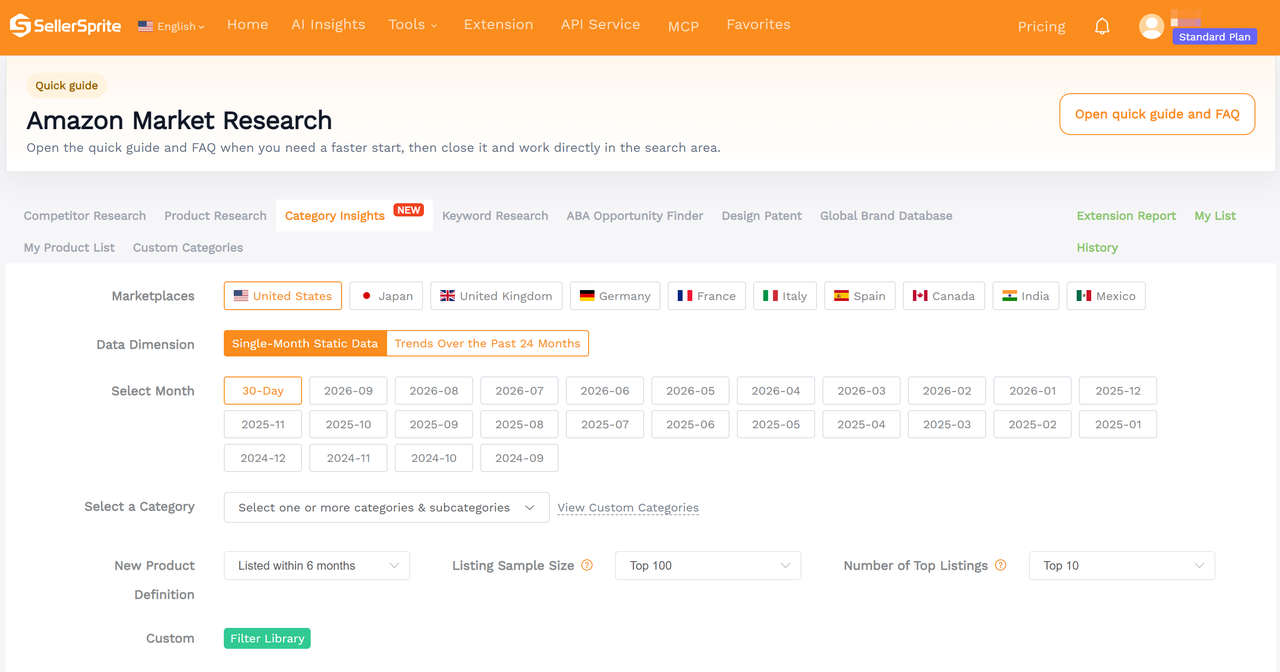
Step 2: Configure Your Analysis Settings
Three settings determine which products are included in your analysis and how their performance is evaluated.
Setting | Available Options | What It Controls |
New Product Definition | Listed within 1, 3, 6, or 12 months | Determines which listings are classified as new products |
Listing Sample Size | Top 100, 200, 300, 400, or 500 | Determines how many listings are included in the market sample |
Number of Top Listings | Top 3, 5, 10, or 20 | Defines the leading group used for comparison with the broader sample |
🌟 Recommended starting point: Select products listed within six months, a sample size of Top 100, and Top 10 listings for comparison.
These are useful initial settings, not universal standards. For categories with frequent product launches, a shorter new-product definition may be more informative. A larger sample may help you examine the wider competitive landscape.
When comparing subcategories, keep these settings consistent so that differences in the results reflect market conditions rather than different analysis criteria.
Step 3: Apply Market Filters
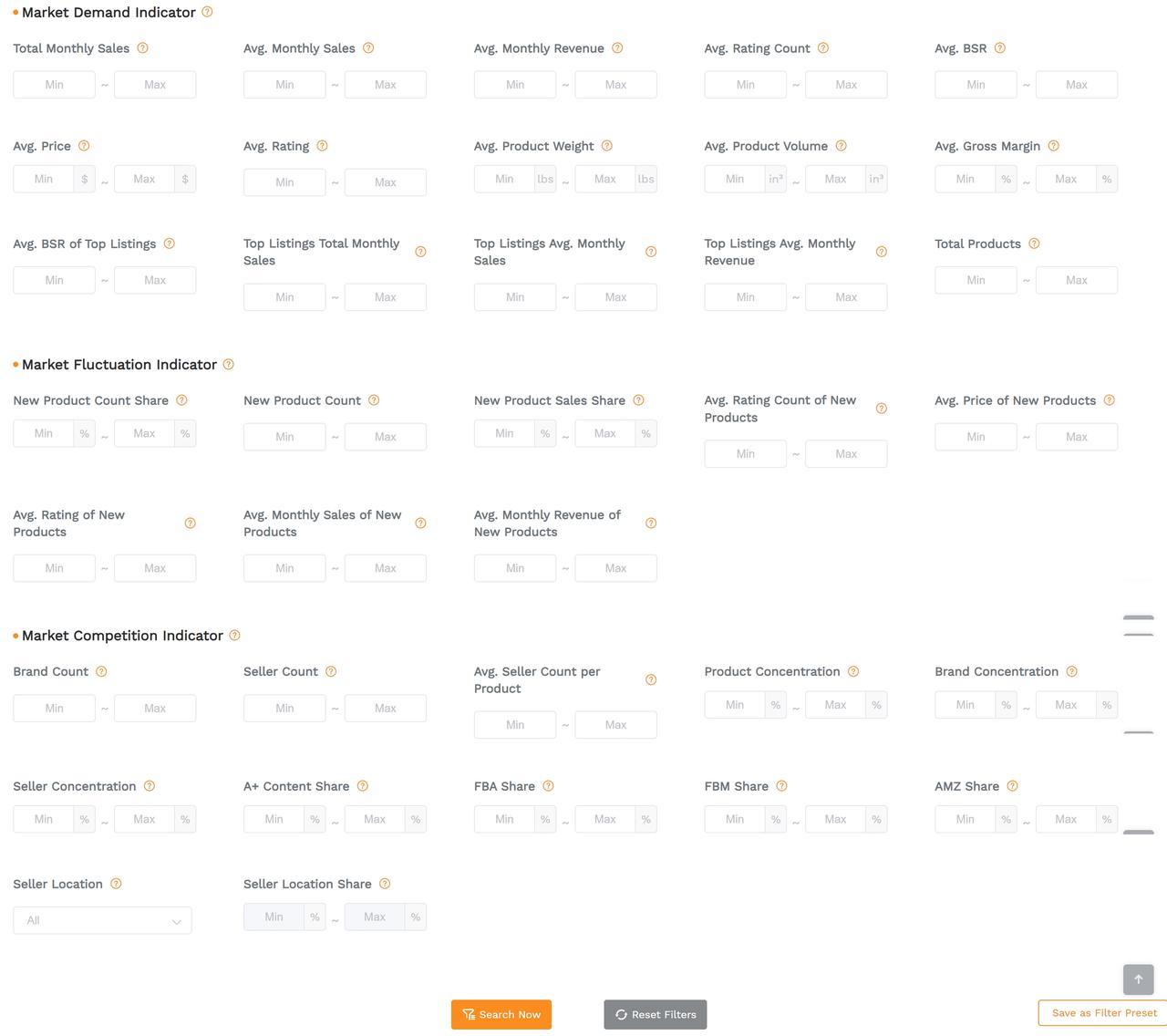
Category Insights organizes its filters into three main groups.
1️⃣ Market Demand Indicator: Is There Enough Demand?
These filters help identify markets with suitable sales potential, prices, and product characteristics.
Useful metrics include:
- Total Monthly Sales: Estimated total monthly units sold by products in the analyzed sample.
- Avg. Monthly Sales / Revenue: Average estimated sales or revenue per sampled listing.
- Avg. Price: Helps determine whether the market fits your target selling price.
- Avg. Rating Count: Provides an initial indication of competitors' accumulated review history.
- Avg. Product Weight / Volume: Useful for screening products against your logistics and fulfillment requirements.
- Avg. Gross Margin: Offers an initial profitability reference, subject to further cost validation.
You can also filter by BSR, average ratings, top-listing performance, and total product count.
2️⃣ Market Fluctuation Indicator: Can New Products Gain Traction?
A market with strong sales is not necessarily accessible to newcomers.
Use new-product metrics to assess whether recently launched listings are gaining meaningful demand.
Pay particular attention to:
- New Product Count Share: The percentage of sampled listings classified as new products.
- New Product Sales Share: The percentage of sample sales generated by new products.
- Avg. Monthly Sales of New Products: Indicates how well recently launched products perform.
- Avg. Rating Count of New Products: Helps you evaluate the review levels associated with newer listings.
For example, a market where new products represent 15% of listings but capture only 2% of sales may be substantially harder to enter than the listing count alone suggests.
3️⃣ Market Competition Indicator: How Concentrated Is the Market?
Competition depends on more than the number of sellers.
Important filters include:
- Product Concentration: Shows how much of the sampled market's sales are controlled by leading products.
- Brand Concentration: Indicates whether sales are dominated by a small number of brands.
- Seller Concentration: Helps identify markets where leading sellers capture a large share of demand.
- Avg. Seller Count per Product: Indicates how many sellers compete on individual listings, on average.
- A+ Content Share: Shows how widely enhanced product content is used.
- FBA / FBM / AMZ Share: Helps you understand the fulfillment and Amazon retail presence within the sample.
You can also examine seller locations and their market shares.
🌟 Practical tip: Start with only a few filters that reflect your priorities. Applying too many restrictive conditions at once may exclude promising categories.
For instance, a seller targeting mid-priced private-label products might begin with an average price of $20–$40, then narrow the results using review counts, concentration, and new-product performance.
Click Search Now to generate your results.
If you regularly use the same screening strategy, save your criteria with Save as Filter Preset for future searches.
2. Compare Subcategories to Identify Better Opportunities
The search results display the subcategories that match your filters, allowing you to compare market conditions side by side.
Rather than choosing the market with the highest sales, evaluate the relationship between demand, competition, new-product performance, and profitability.
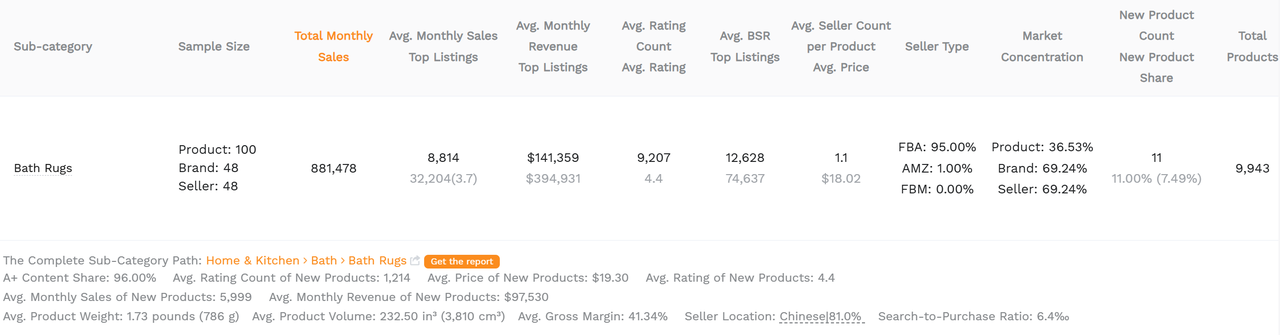
*Example data reflects the supplied Bath Rugs market snapshot and is not a live market forecast.
How to Read the Search Results
Focus on the following questions.
What to Evaluate | Key Metrics | What to Look For |
Market demand | Total Monthly Sales, Avg. Monthly Sales, Total Products | Sufficient demand without relying solely on overall market size |
Leading competitors | Top Listings Avg. Monthly Sales / Revenue, Market Concentration | Whether established leaders capture a disproportionate share of sales |
New-product opportunities | New Product Count Share, New Product Sales Share | Whether recently launched products are actually winning sales |
Competition barriers | Avg. Rating Count, Brand Concentration, Seller Concentration | Whether new sellers must compete against deeply established listings or brands |
Commercial potential | Avg. Price, Avg. Gross Margin, Return Rate | Whether the market's selling economics appear viable |
The results also display sample information, including product, brand, and seller counts.
🌟 Important: Listing Sample Size and Total Products are different metrics. A Top 100 sample represents the listings used for analysis, while Total Products describes the broader category's product population.
Compare Average Listings With Top Performers
One particularly useful comparison is the difference between the average sampled listing and the selected top-listing group.
If the Top 10 listings generate several times the sales of the average product, demand may be concentrated among established leaders.
This does not automatically make the market unattractive, but it suggests that an ordinary new listing may struggle to achieve the sales levels shown by the top performers.
Use Sorting and Additional Filters
Above the results table, you can:
- Sort by metrics such as Total Monthly Sales, Product Concentration, or New Product Sales Share.
- Switch between ascending and descending order.
- Use Sample Size Filter to narrow results based on the number of available product samples.
- Click Export as Excel to save results for further comparison.
Compare closely related subcategories whenever possible. A low concentration level in one product category may not mean the same thing as an identical percentage in a very different category.
Once you have identified a few promising markets, move on to their detailed reports.
3. Open the Market Analysis Report for Deeper Research
The results table provides a quick market overview. The Market Analysis Report allows you to investigate the trends and competitive structures behind those numbers.
To open the report, locate your target subcategory in the search results and move to the Actions column on the far right.
Click the orange bar-chart icon labeled View Market Analysis Report.
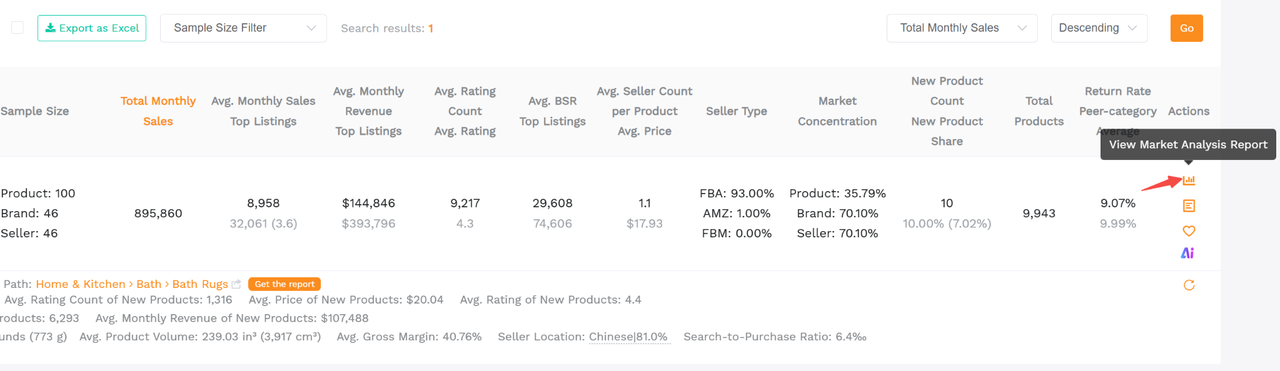
The report contains interactive charts covering market demand, sales distribution, competitive concentration, listing characteristics, and consumer interest.
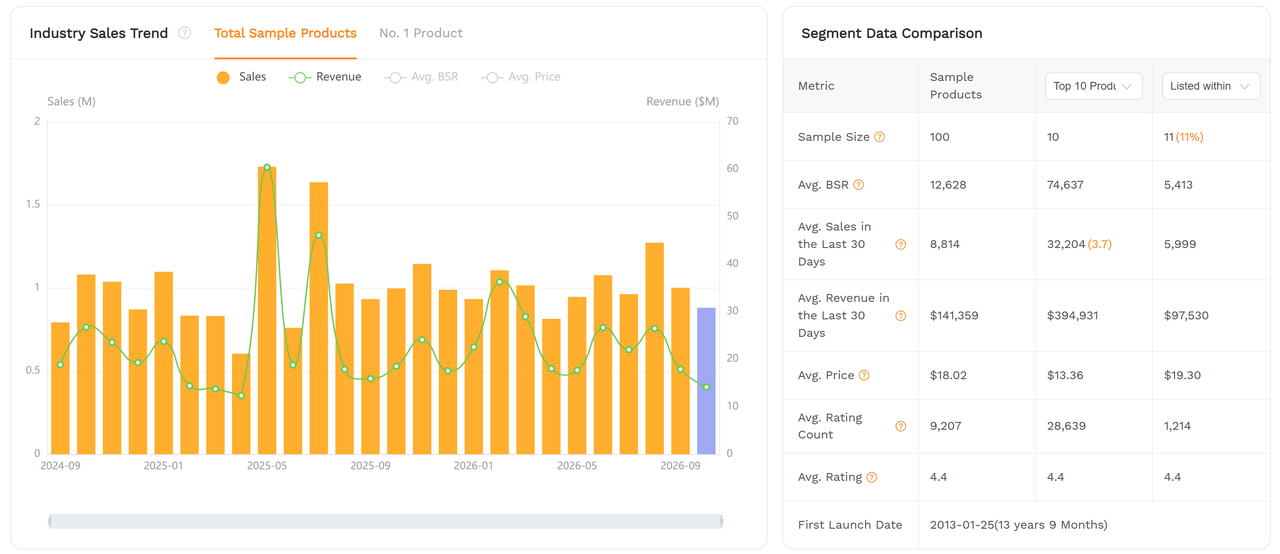
Step 1: Evaluate Market Demand and Trends
Begin by determining whether demand is consistent, growing, or heavily seasonal.
This chart visualizes the past 2 years of changes in total monthly sales, total monthly revenue, average BSR, average price, and other metrics for the sampled Listings.
Look for:
- Consistent demand across multiple months.
- Gradual growth rather than isolated sales spikes.
- Recurring seasonal peaks.
- Sudden declines that may indicate changing demand or market conditions.
For seasonal categories, such as holiday decorations, a strong peak month may overstate the sales opportunity available during the rest of the year.
Use this section to compare the selected market sample with other available listing groups, such as leading or newer products.
It helps reveal whether stronger sales are broadly distributed or concentrated within particular segments.
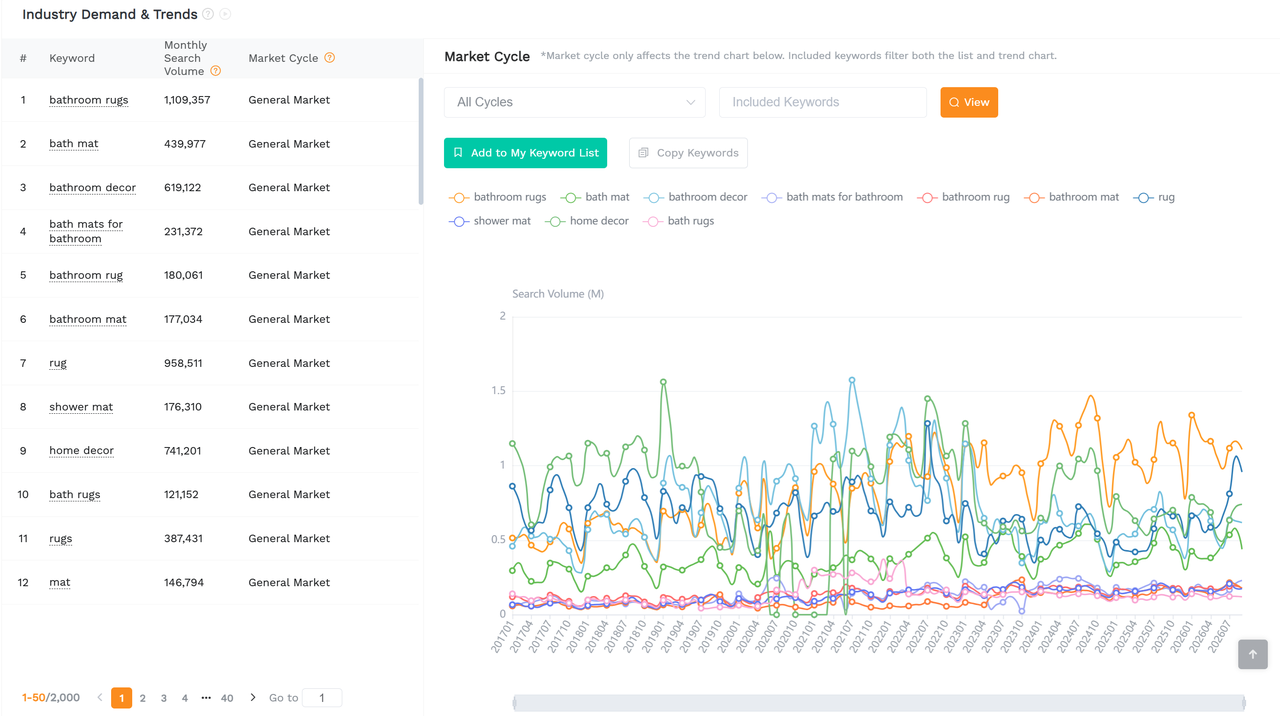
This section provides additional insight into important search terms and their historical demand patterns.
Review the keyword list and market-cycle chart to identify the search themes associated with the niche.
A promising market should have demand connected to a clear customer need, rather than depending entirely on one short-lived trend.
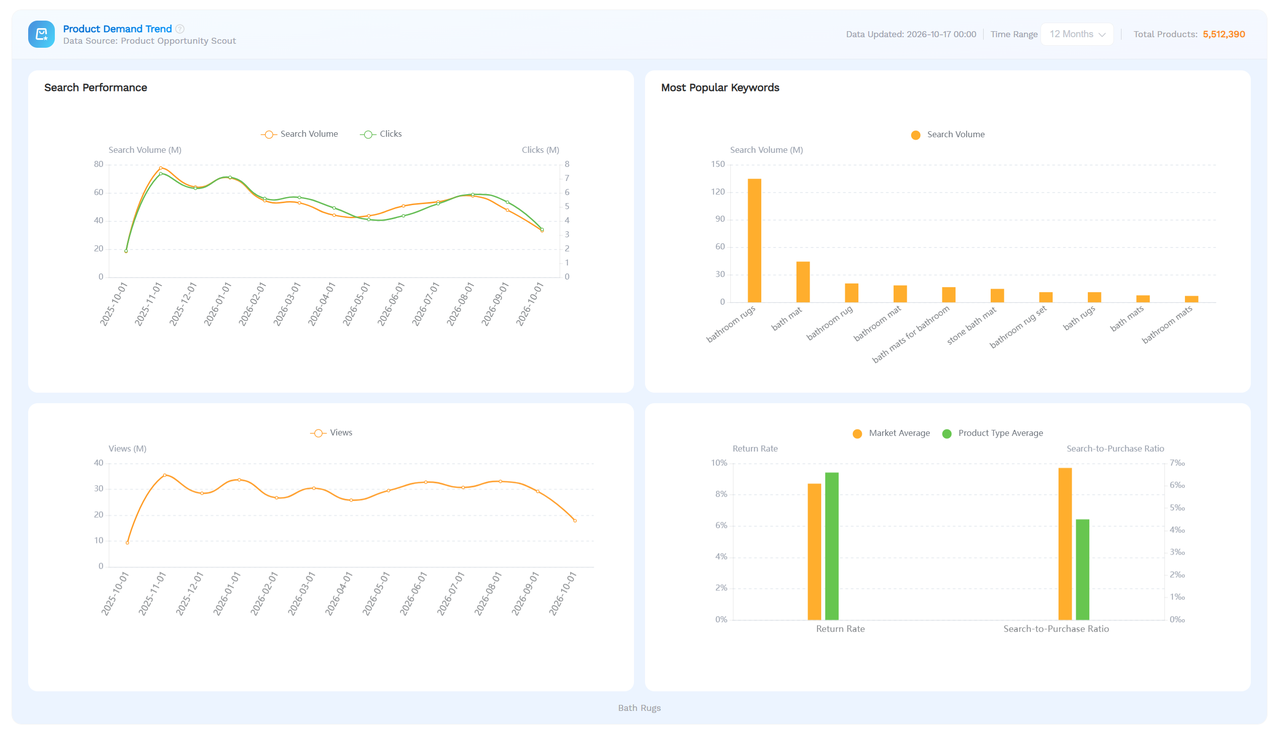
The updated report also provides demand-related charts, including:
- Search Performance, such as search volume and clicks.
- Most Popular Keywords.
- Views over time.
- Return Rate and Search-to-Purchase Ratio comparisons.
These indicators help you investigate consumer interest and how that interest relates to shopping activity.
For example, an increase in search volume without a corresponding increase in purchasing activity deserves closer investigation.
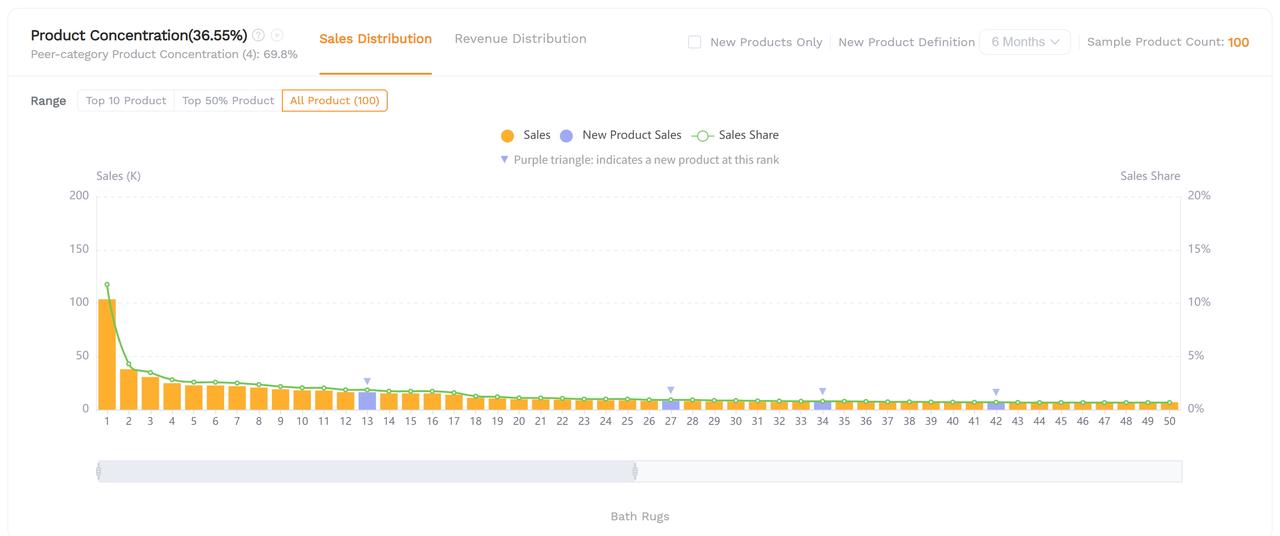
Step 2: Understand Who Controls the Market
Next, examine how sales are distributed among competing products, brands, and sellers.
This chart shows the distribution of sales or revenue across individual products.
A market with very high product concentration may depend heavily on a small group of bestsellers.
When evaluating the chart, compare the leading products' sales shares with those of the remaining listings.
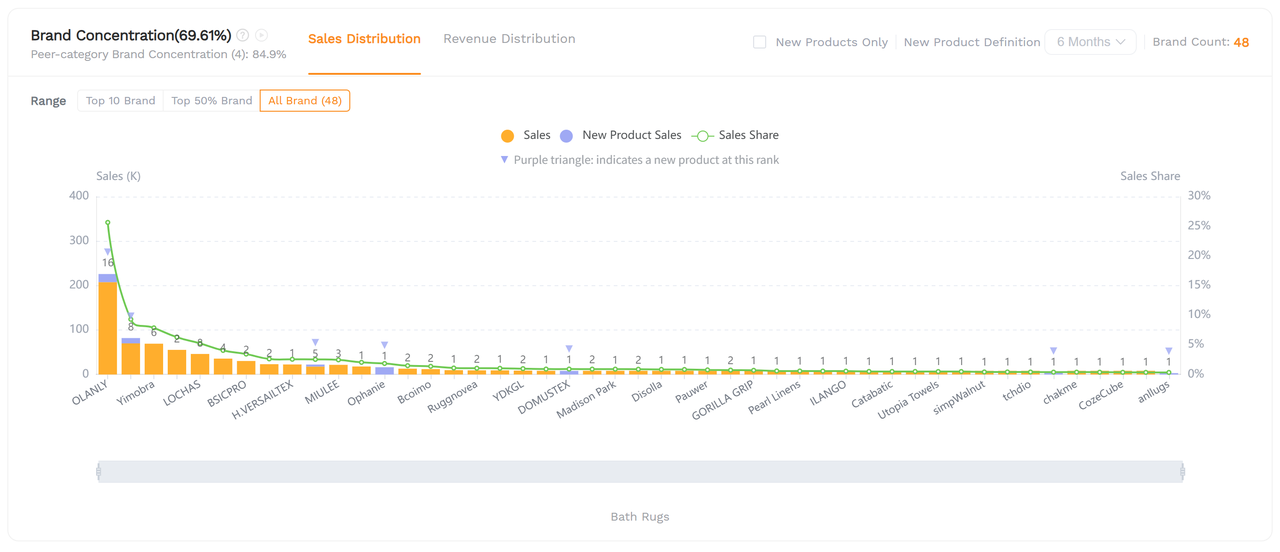
This chart reveals how much demand is captured by major brands.
High brand concentration may indicate strong brand recognition, repeat purchasing, or established distribution advantages.
However, a fragmented brand landscape does not automatically guarantee easy entry. You still need to assess review barriers, pricing, and differentiation.
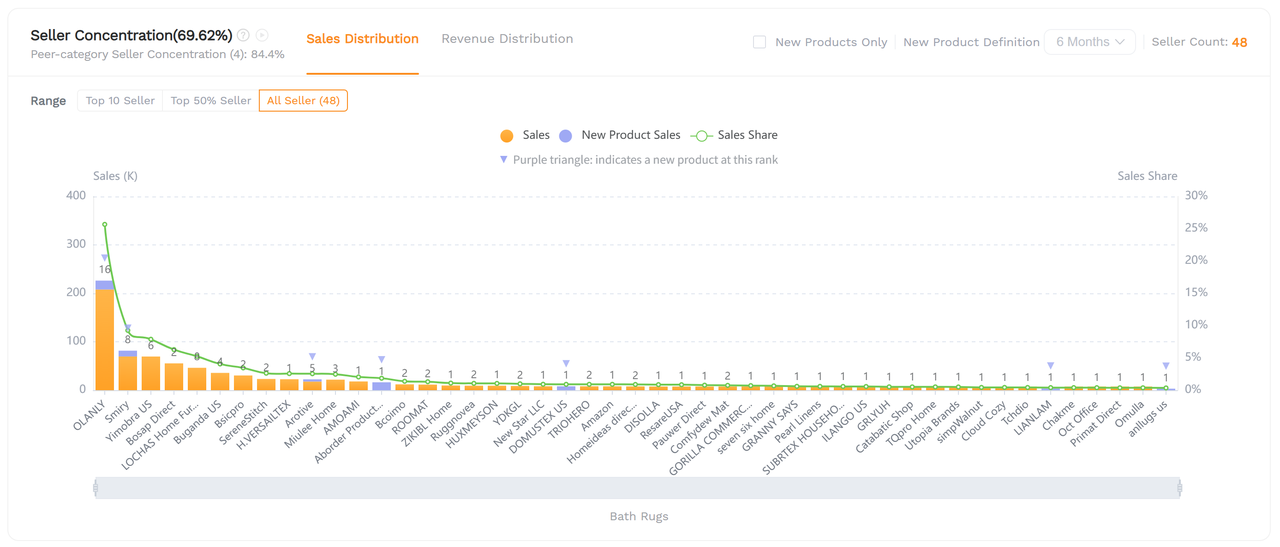
This chart helps determine whether sales are controlled by a small number of sellers.
Review it together with Brand Concentration to understand whether the market is dominated by a few major competitors or contains a wider range of participants.
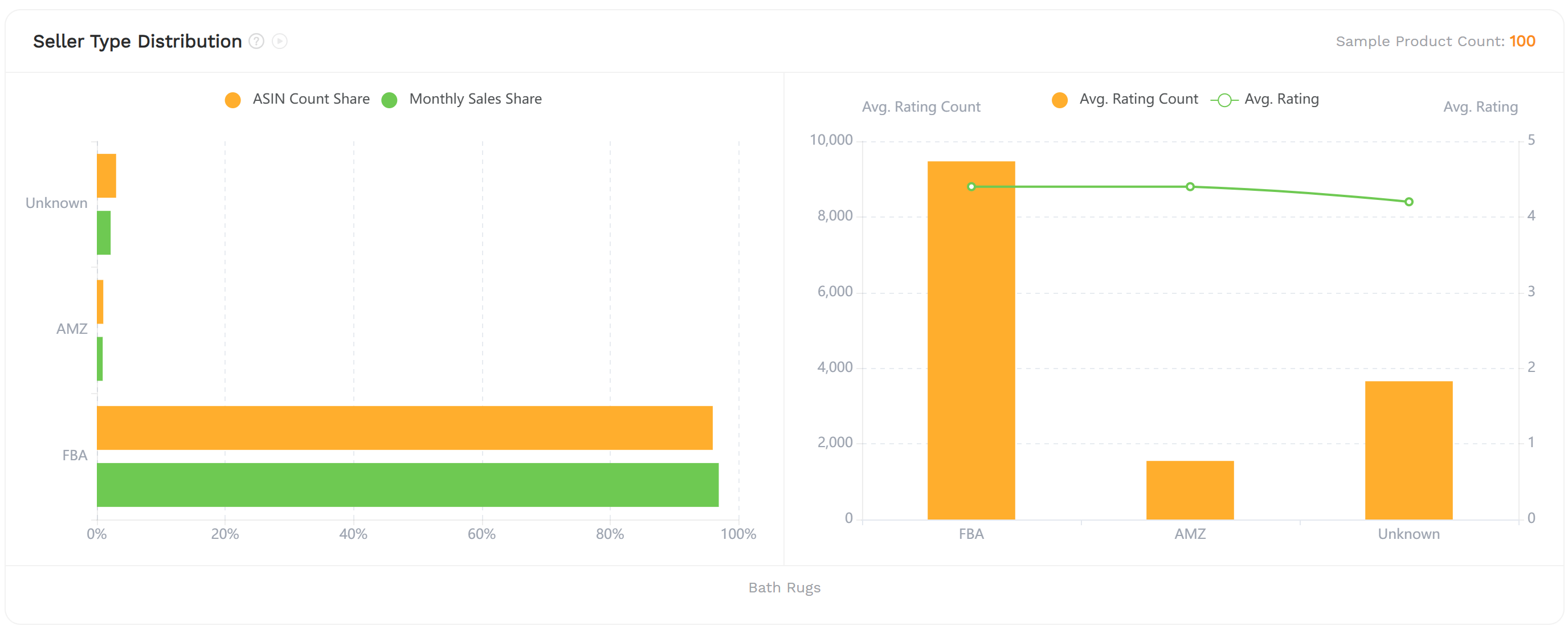
Examine the proportions of FBA, FBM, and Amazon-operated listings.
This helps you understand the fulfillment models commonly used in the category and the competitive environment you may encounter.
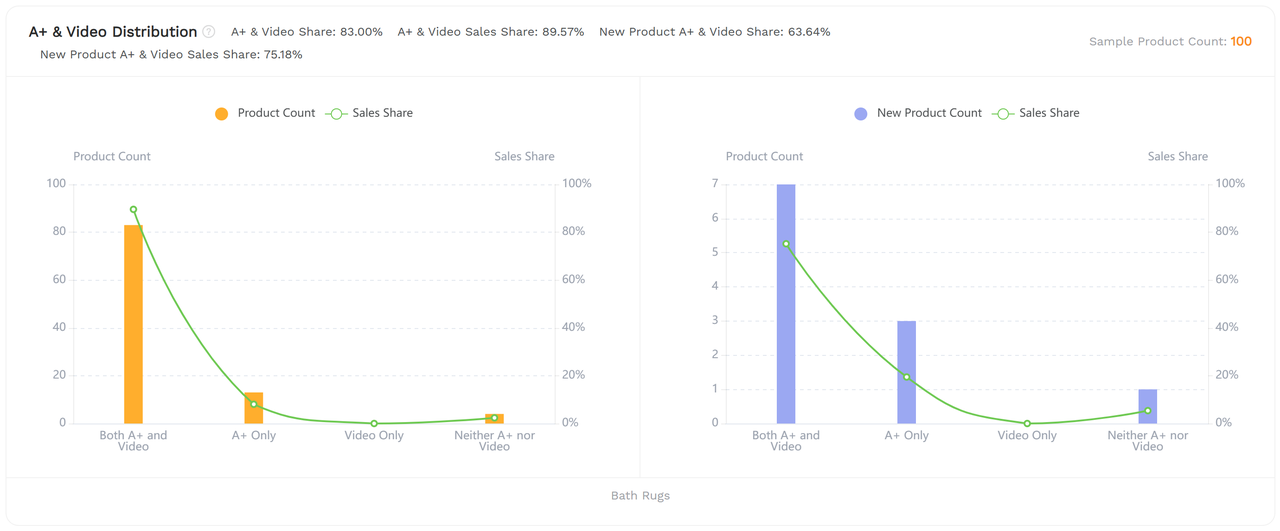
This section shows how widely enhanced content and video assets are used.
If most established competitors already have strong content, professional listing presentation may be a basic requirement rather than a meaningful differentiator.
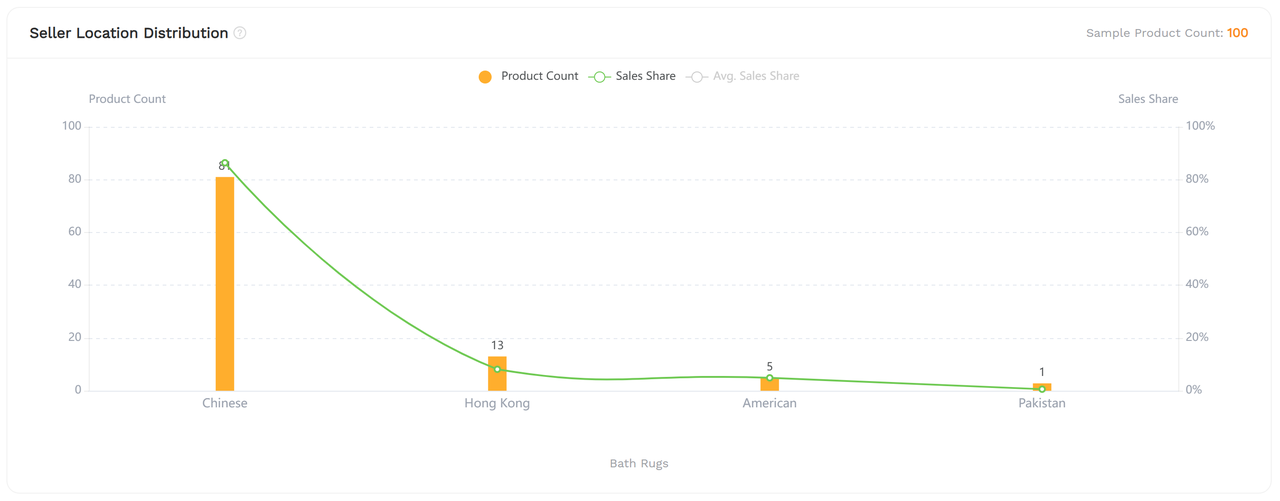
Review where participating sellers are based and their relative sales shares.
This can provide additional context about the market's seller composition, but seller location alone should not determine whether a niche is attractive.
Step 3: Assess Entry Difficulty Through Listing Distributions
The updated report provides several distribution charts that help you assess what successful products tend to look like.
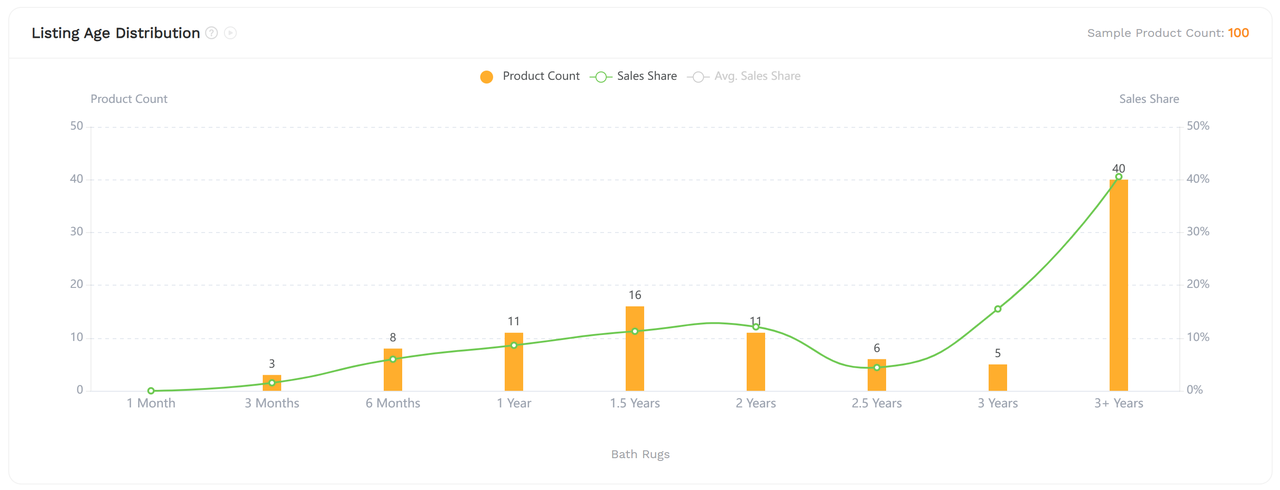
This chart groups products by how long they have been listed on Amazon.
Pay attention to both the number of listings and their sales shares.
For instance, if products listed for more than three years generate most of the sales, the market may favor established competitors.
If newer listings capture meaningful sales, this may indicate opportunities for new entrants.
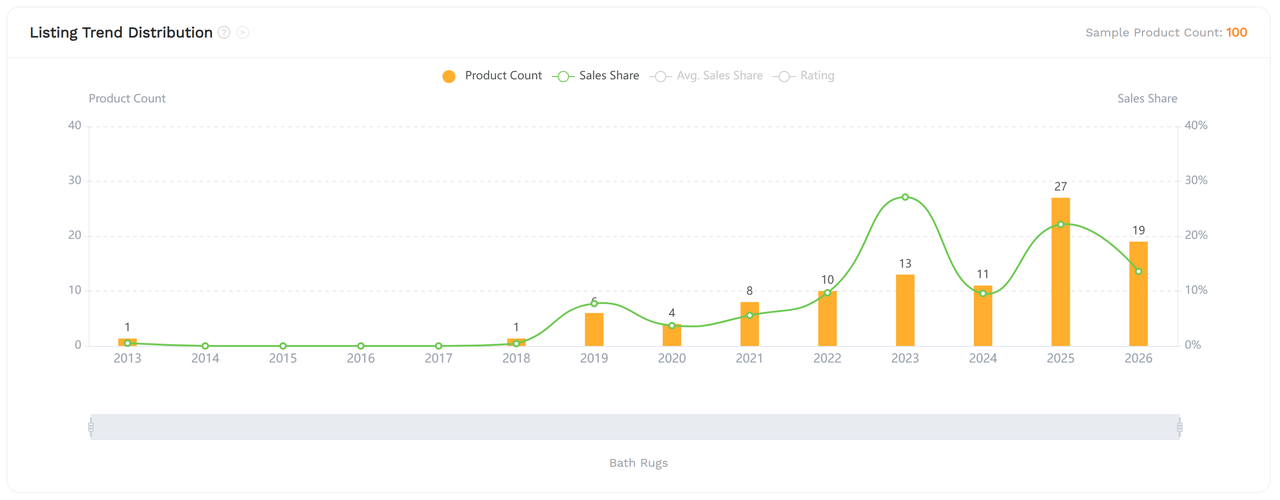
This chart shows how listings are distributed across launch years.
Use it to understand how the market has evolved and whether recently launched products are becoming more prominent.
A large number of new listings is not necessarily a positive sign unless they also generate meaningful sales.
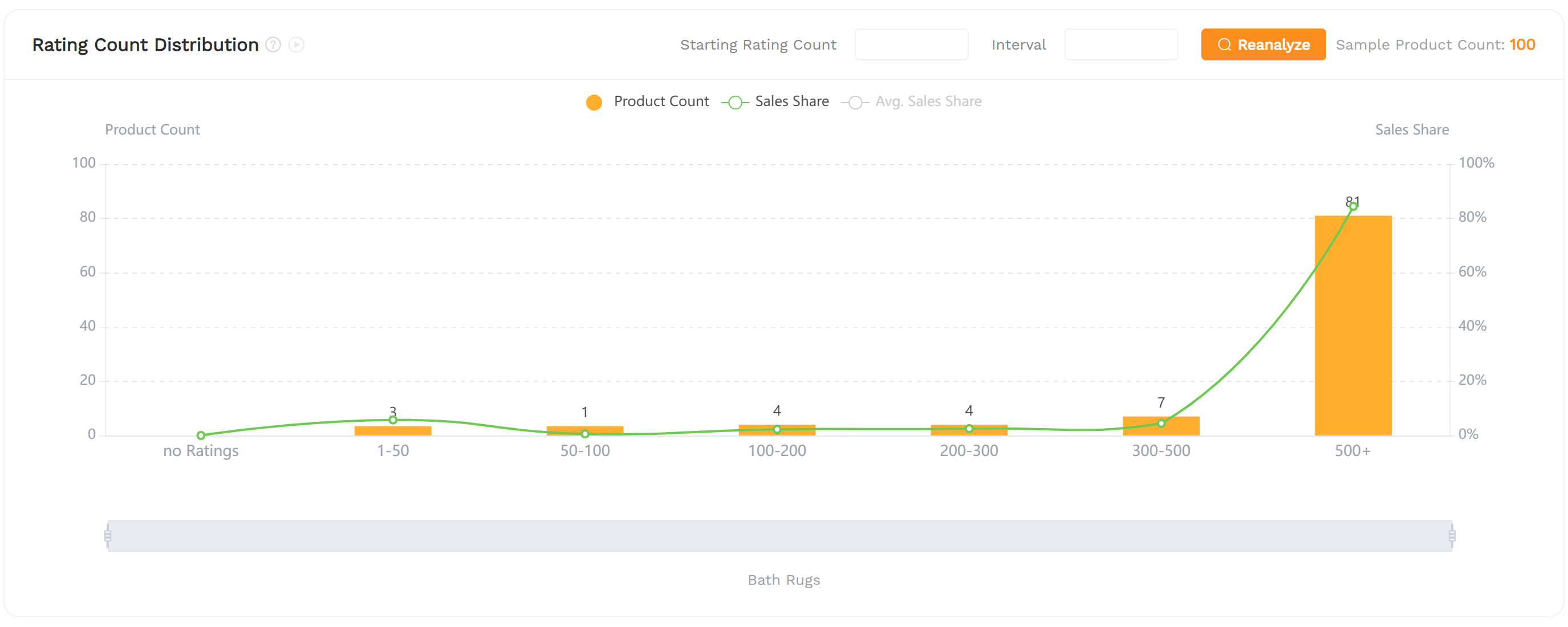
Review the number of products and their sales shares across review-count ranges.
If most sales come from listings with hundreds or thousands of ratings, building sufficient customer trust may be challenging for a new seller.
Conversely, meaningful sales among listings with relatively few ratings may justify further investigation.
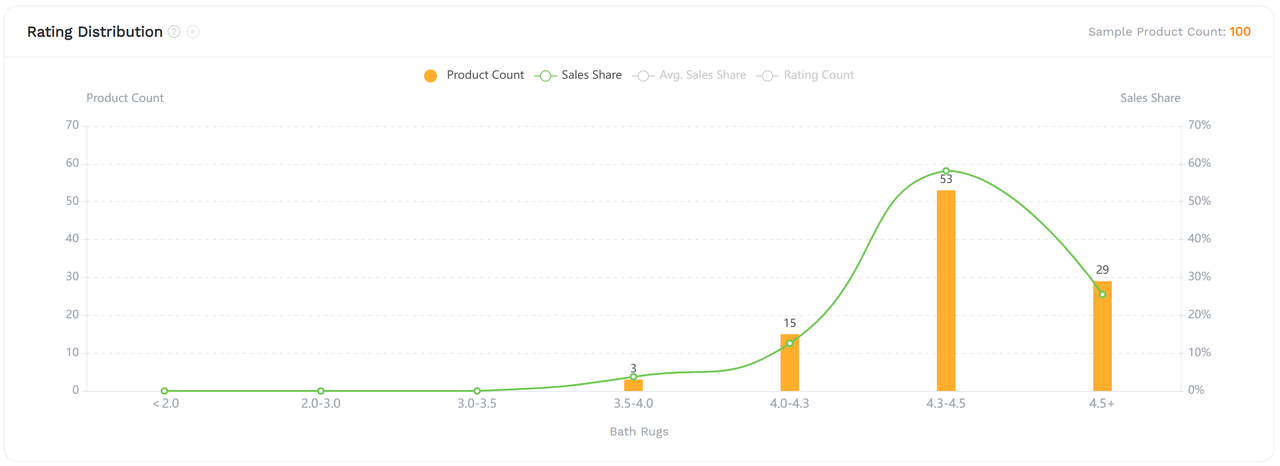
This chart reveals how products are distributed across star-rating ranges.
Look for possible gaps between customer satisfaction and sales performance.
For example, products with relatively modest ratings but strong sales may suggest unmet customer expectations that a differentiated product could address.
However, ratings alone cannot identify specific customer problems. Review analysis is needed to verify them.
This section shows how products and sales are distributed across price ranges.
It helps answer questions such as:
- Which price ranges attract the most sales?
- Are the highest-volume segments heavily crowded?
- Is there a less crowded price segment with meaningful demand?
- Can your expected product costs support a competitive selling price?
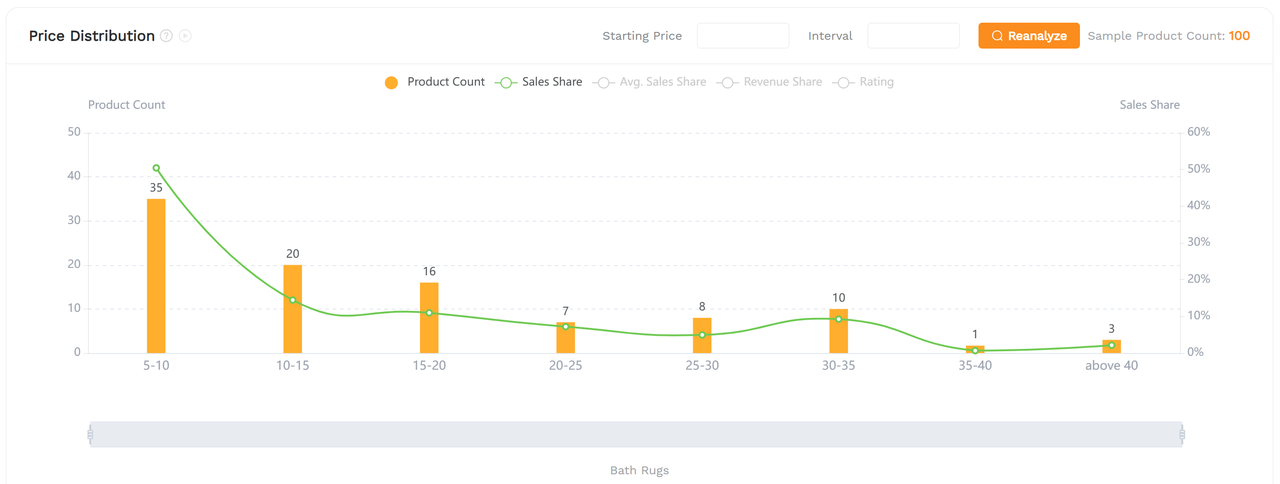
Some distribution charts allow you to adjust their intervals and reanalyze the results.
Use this option when the default price or rating ranges are too broad to reveal meaningful differences.
What Should You Conclude From the Report?
By this stage, you should be able to answer three questions:
1️⃣ Demand: Is customer demand stable and substantial enough to support your business?
2️⃣ Competition: Are sales controlled by a small number of dominant competitors, or is there room for differentiation?
3️⃣ Entry Potential: Are newer products gaining measurable sales, and what characteristics do successful listings share?
If the market looks promising across these dimensions, proceed to the individual products that make up the sample.
4. Review Product Details and Find Benchmark ASINs
After evaluating the overall market, the next step is to identify real products that can guide your product development and competitive research.
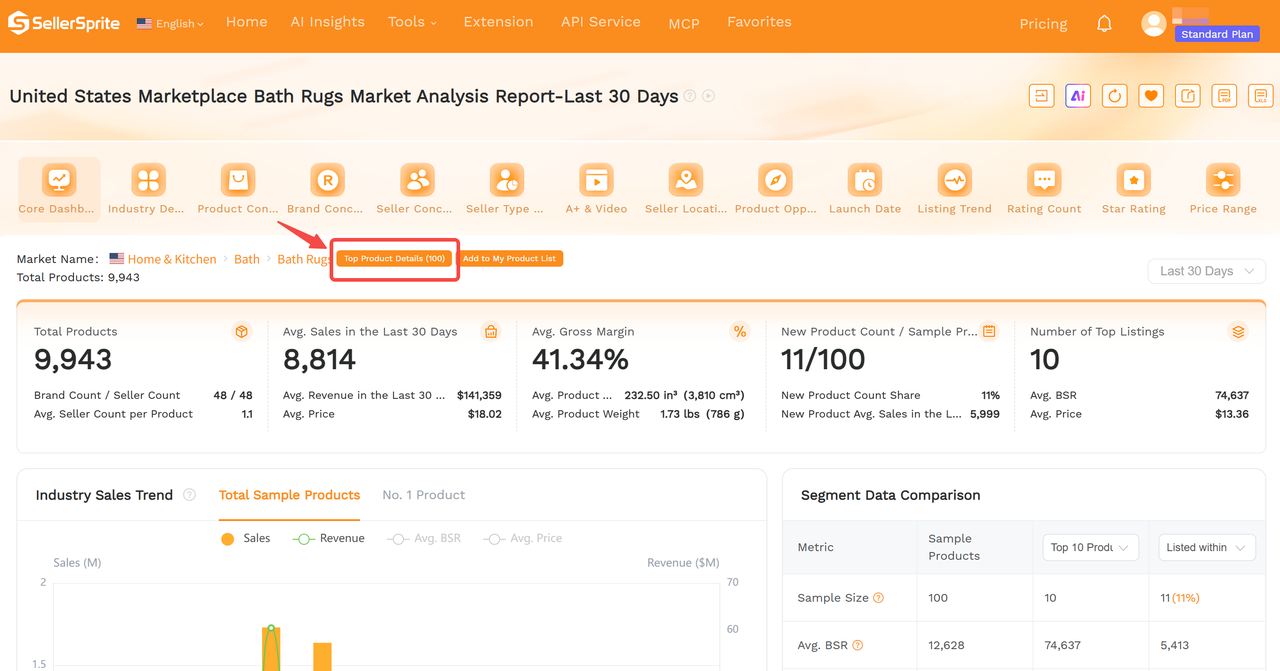
Use the product-details shortcut at the top of the Market Analysis Report to open the corresponding sampled listings.
This takes you from category-level analysis to individual product research.
What to Look for in the Product List
Rather than selecting only the highest-selling product, compare several types of competitors.
These products show what currently performs well in the category.
Examine their prices, review counts, product features, and estimated sales to understand the market's competitive standard.
Look for products that entered the market relatively recently but have already achieved meaningful sales.
These may be especially valuable benchmarks because they provide evidence of what more recent entrants have accomplished.
Products with moderate review counts and consistent sales can help you assess realistic performance targets without relying on exceptional bestsellers.
For each potential benchmark ASIN, investigate:
- Listing age and product positioning.
- Selling price and price history.
- Estimated monthly sales and BSR trends.
- Rating count and average rating.
- Product specifications, variations, and main selling points.
- Possible opportunities for product differentiation.
You can use SellerSprite's Competitor Research and related product analysis tools to examine shortlisted ASINs more closely.
Build a Practical Competitor Shortlist
Select approximately 3 to 5 representative products.
Ideally, include an established bestseller, at least one successful newer listing, and several competitors closer to your intended price or positioning.
Compare them to identify:
- Features customers appear willing to pay for.
- Common specifications that define the category.
- Price points supported by consistent demand.
- Potential gaps in product quality, functionality, or presentation.
Your goal is not to copy a bestseller. It is to understand what already works and determine whether you can offer a credible alternative.
What if the Category Contains Irrelevant Products?
Amazon's category structure does not always match a seller's intended niche.
For example, a product category may contain accessories or related items that serve very different customer needs.
If these irrelevant listings occupy a substantial portion of the sample, the resulting market analysis may not accurately represent your intended competitors.
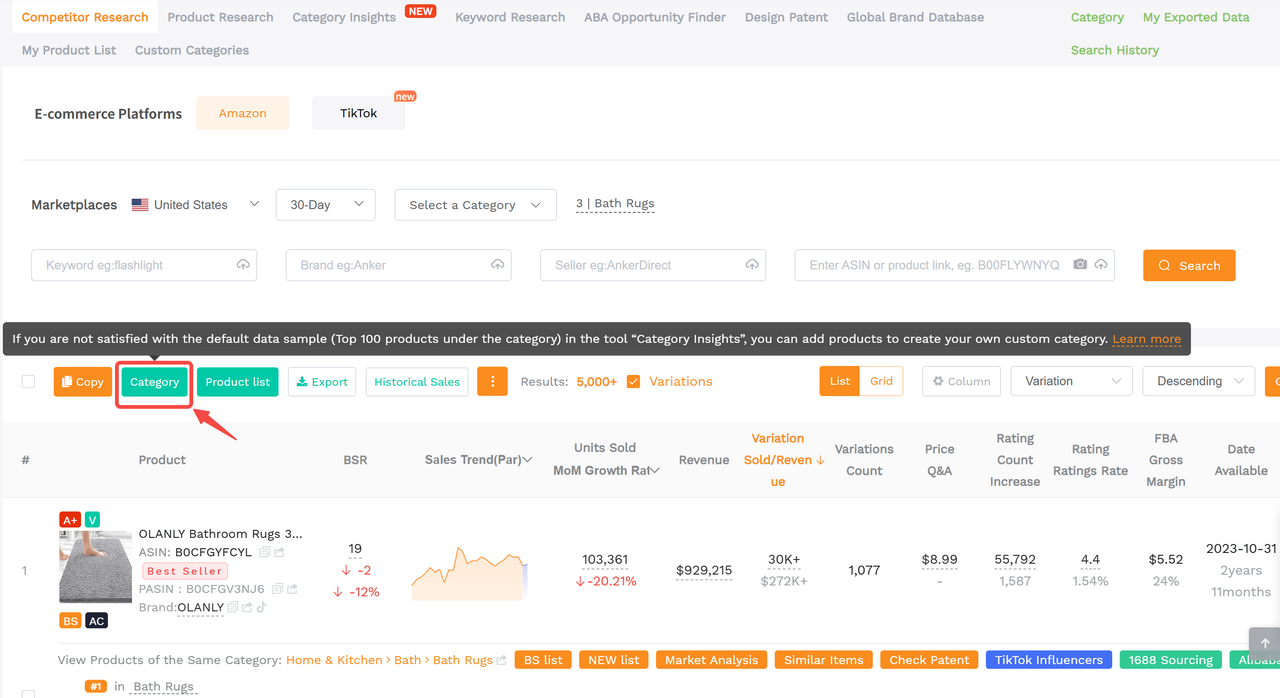
In this situation, use Custom Categories to create a more representative product sample.
You can access this feature through the green button "Category" and build a research group from relevant products.
For detailed instructions, see: How to Do Market Research Using Custom Samples
A carefully selected sample is essential when the standard Amazon category does not accurately describe your target market.
5. Calculate Profitability Before Making a Sourcing Decision
A promising market does not automatically lead to a profitable product.
Before placing an order or committing to a supplier, estimate whether your product can generate sufficient profit after sourcing, fulfillment, advertising, and other operating costs.
Step 1: Research Potential Suppliers
After identifying your benchmark products, use the available 1688 Sourcing or Alibaba shortcuts in the product research view to look for similar products and potential suppliers.
Compare supplier options based on:
- Product specifications and available customization.
- Unit costs at realistic order quantities.
- Minimum order quantities.
- Packaging requirements.
- Production and shipping arrangements.
Supplier listings are a starting point. Confirm pricing and specifications directly before using them in your final financial calculations.
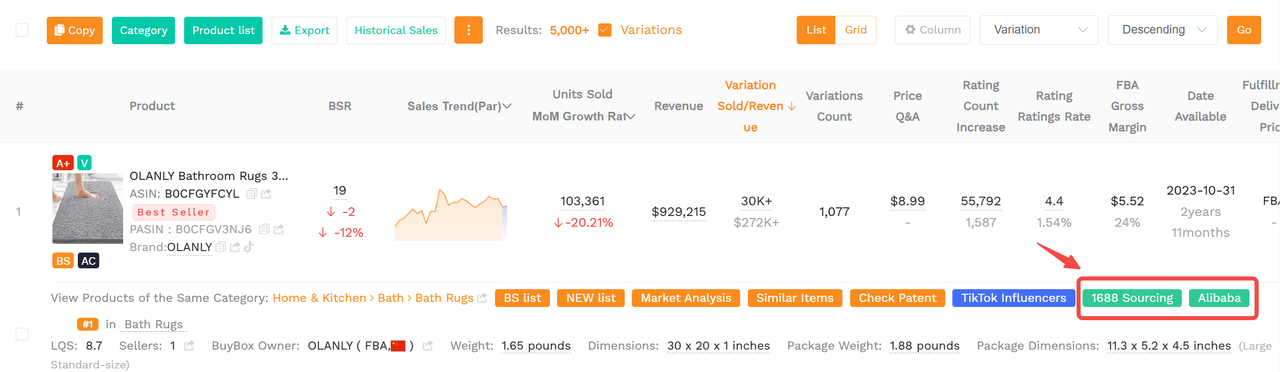
Step 2: Open the Profitability Calculator
Access the Profitability Calculator from the product research interface when available, or open it through SellerSprite's Free Tools menu.
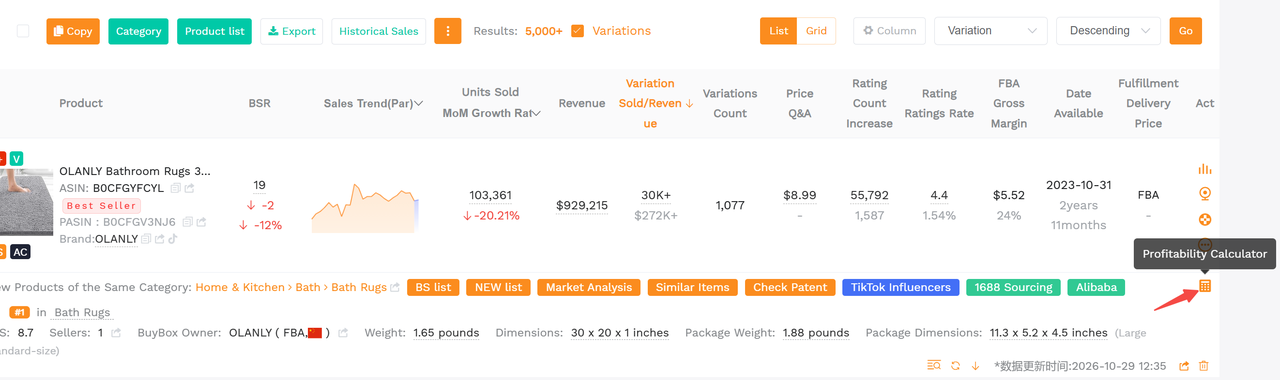
Enter your expected selling conditions and costs, including:
- Target selling price.
- Product purchase and packaging costs.
- Shipping and inbound logistics expenses.
- Applicable Amazon referral and fulfillment fees.
- Advertising and promotional costs.
- Expected returns and other relevant expenses.
Review the resulting profit, margin, and ROI estimates.
If you're using Amazon FBA, check that the product's dimensions, weight, and fee assumptions reflect your intended packaged product.
For a more detailed walkthrough, see the SellerSprite Profitability Calculator Guide.
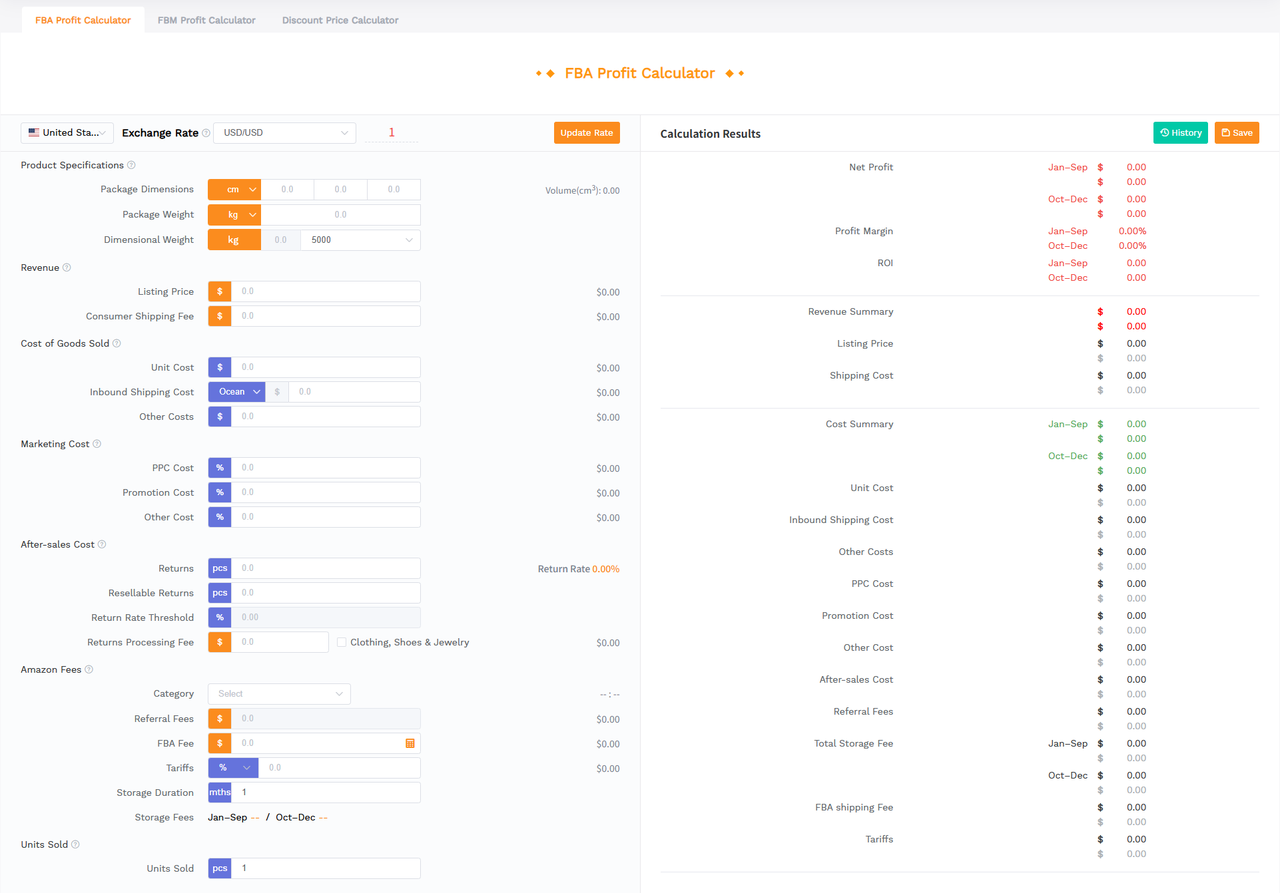
Step 3: Test Different Profit Scenarios
Do not base your decision on a single optimistic estimate.
For each shortlisted product, consider at least three scenarios:
- Best Case: Strong selling price, favorable sourcing costs, and efficient advertising.
- Base Case: Realistic selling price, expected costs, and sustainable advertising performance.
- Conservative Case: Lower selling price, higher acquisition costs, or increased fulfillment and return expenses.
If your estimated profit becomes too small under realistic conditions, reconsider the product, selling price, or sourcing strategy.
🌟 Important: The Avg. Gross Margin shown in Category Insights is an initial market reference (usually higher than the final real margin). It is not your actual net profit margin and cannot replace a product-specific profitability calculation.
Additional Tips for Using Category Insights
Compare Static Data With Historical Trends
A single month can be affected by promotions, seasonal purchasing patterns, or temporary changes in competition.
For a more reliable assessment, compare the selected single month's results with the past 24-month historical trends available in Category Insights.
Pay particular attention to whether strong sales repeat across similar periods and whether demand is growing or declining over time.
Distinguish New-Product Quantity From New-Product Success
A high New Product Count Share means many listings entered the market during the selected period.
It does not mean those listings are selling well.
Always examine New Product Sales Share and the average sales of new products before concluding that a category is accessible to new sellers.
Check the Units Behind Each Metric
Some indicators use different units.
For example, Search-to-Purchase Ratio may be displayed in per mille (‰), while Return Rate is shown as a percentage (%).
A value of 6.4‰ equals 0.64%, not 6.4%.
Pay attention to metric labels, tooltips, sample definitions, and chart axes before comparing data.
Use Market Research to Validate Existing Product Ideas
Category Insights is not limited to discovering new niches.
If you already have a product idea from SellerSprite's Product Research, Competitor Research, or Keyword Research tools, you can investigate its corresponding category to validate market demand and competition.
This helps prevent a common product research mistake: choosing an attractive individual product without understanding the market surrounding it.
Frequently Asked Questions
Is Category Insights the same as Product Research?
No. Category Insights primarily analyzes Amazon categories and subcategories to help you evaluate market opportunities. Product Research focuses on finding and evaluating individual products.
Use Category Insights to decide where to compete and product-level research to decide what you might sell.
Does lower market concentration always mean less competition?
Not necessarily.
Lower concentration means sales are more widely distributed among products, brands, or sellers. However, the market may still have many competitors, high review barriers, aggressive pricing, or costly advertising.
Evaluate concentration alongside market demand, ratings, new-product performance, and profitability.
How do I know whether a niche is suitable for new sellers?
Look for a combination of sustainable demand, manageable competitive barriers, meaningful sales from newer products, and viable profit margins.
No single metric can guarantee success. Use the detailed market report and benchmark ASINs to verify your initial findings.
Can I compare the same niche across Amazon marketplaces?
Yes. Select a different marketplace and repeat your analysis using comparable settings.
Compare demand, pricing, competition, and new-product performance separately for each marketplace. Account for regional differences in fees, logistics, and customer preferences before making your final decision.
Start With the Market, Then Validate the Product
Successful Amazon product research is not simply about finding products with high sales. It is about identifying markets where customer demand, competitive conditions, and your operational advantages can support a sustainable business.
With SellerSprite Category Insights tool, you can move from broad category screening to detailed market evaluation, then narrow your research to representative products and validate their profitability.
Start with the market. Understand the competition. Validate the numbers before you source.
Validate Your Niche In Minutes
Run a full Market Analysis Report and confirm demand, competition, and entry difficulty.



Muy util y Excelente informacion para los que iniciamos
Reply
Like 0