TL;DR: Sponsored Brands and Sponsored Products serve different roles in Amazon PPC. Use Sponsored Brands for brand awareness and top-of-funnel traffic, and Sponsored Products for direct conversions. Knowing when to use each can significantly improve ROI.
Key Takeaways
- Sponsored Brands are ideal for building brand awareness, showcasing multiple products, and capturing top-of-funnel shoppers.
- Sponsored Products drive direct sales by targeting shoppers actively searching for specific items.
- Use Sponsored Brands when launching new products, rebranding, or competing in high-competition categories; use Sponsored Products for conversion-focused campaigns and long-tail keyword targeting.
- Budget allocation should favor Sponsored Products for immediate ROI but include consistent investment in Sponsored Brands for long-term brand equity.
- Combining both ad types in a strategic Amazon PPC plan maximizes visibility across the customer journey.
Table of Contents
- What Are Amazon Sponsored Brands and Sponsored Products?
- Sponsored Brands vs Sponsored Products: A Detailed Comparison
- When to Use Sponsored Brands vs Sponsored Products
- How to Allocate Budget Between Sponsored Brands and Sponsored Products
- Integrating Both Ad Types into Your Amazon PPC Strategy
- FAQ
- References
Note on marketplaces: This guide is specifically optimized for the US market.
What Are Amazon Sponsored Brands and Sponsored Products?
Amazon's advertising ecosystem offers powerful tools for sellers at every stage—from beginners launching their first product to established brands scaling nationwide. Two of the most widely used ad types are Sponsored Brands and Sponsored Products. While both fall under Amazon’s Pay-Per-Click (PPC) model, they serve distinct purposes and perform best in different scenarios.
Understanding the difference between these two ad formats is crucial for optimizing your Amazon PPC strategy. Misusing them can lead to wasted ad spend, poor conversion rates, and missed opportunities for brand growth. On the other hand, using them strategically can dramatically increase visibility, drive qualified traffic, and boost sales.
Sponsored Products are product-specific ads that appear in search results and on product pages. They’re designed to promote individual listings and convert shoppers who are already searching for something similar. Sponsored Brands, formerly known as Headline Search Ads, focus on promoting your entire brand. These ads feature your logo, a custom headline, and up to three products, making them ideal for building brand recognition and capturing broader interest.
For new sellers, choosing the right ad type can feel overwhelming. For growing brands and marketing managers, the challenge shifts to allocating budgets effectively and measuring performance across campaigns. This guide breaks down the key differences, use cases, and strategic considerations so you can make data-driven decisions that align with your business goals.
Sponsored Brands vs Sponsored Products: A Detailed Comparison
To make informed decisions, let’s dive into a side-by-side analysis of Sponsored Brands and Sponsored Products across several key dimensions: ad format, placement, targeting options, cost structure, and performance goals.
1. Ad Format and Visual Presentation
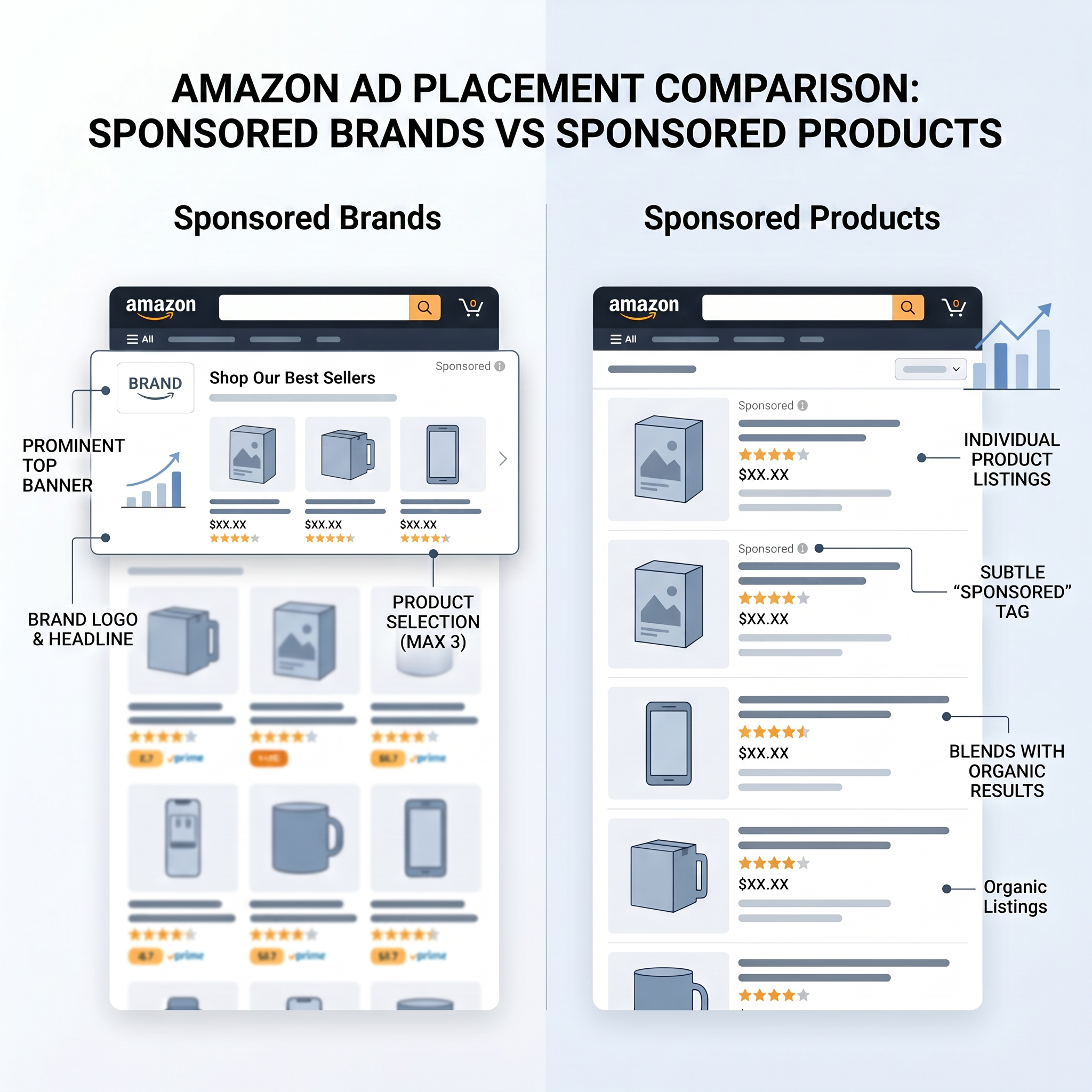
Sponsored Products are simple, clean ads that look almost identical to organic product listings. They include the product image, title, price, Prime badge (if applicable), and a small "Sponsored" label. Their design blends seamlessly into search results, which makes them highly effective for shoppers already in buying mode.
Sponsored Brands, on the other hand, stand out visually. They appear at the top of search results and include a brand logo, a headline (customizable text like "Shop Our Best Sellers" or "New Arrivals"), and a carousel of up to three products. This format gives brands more creative control and space to tell a story.
For example, a skincare brand launching a new anti-aging serum might use a Sponsored Brand ad with the headline "Discover Youthful Skin" and showcase its serum, moisturizer, and eye cream together. This creates a cohesive brand experience, whereas a Sponsored Product ad would only highlight the serum in isolation.
2. Placement and Visibility
Sponsored Products appear in three main locations:
- Top of Amazon search results (above organic listings)
- Middle of search results (interspersed with organic results)
- On product detail pages ("Customers also viewed" or "Sponsored products related to this item")
Sponsored Brands are more limited in placement but more prominent. They appear almost exclusively at the top of search results, giving them prime real estate. This makes them ideal for capturing attention early in the customer journey, especially for broad or category-level searches.
Because of their placement, Sponsored Brands often have higher click-through rates (CTR) for top-of-funnel keywords like "organic coffee beans" or "wireless earbuds," while Sponsored Products dominate for specific queries like "Apple AirPods Pro 2nd generation."
3. Targeting Capabilities
Both ad types support keyword and product targeting, but with important differences.
Sponsored Products allow you to target specific keywords (broad, phrase, exact match) or products (ASINs). You can run automatic campaigns (Amazon suggests keywords) or manual campaigns (you choose keywords). This flexibility makes Sponsored Products excellent for testing new keywords and optimizing for long-tail searches.
Sponsored Brands also support keyword targeting (manual only) and can target competing or complementary brands. However, they do not support product targeting (ASIN targeting) in the same way. Instead, you select which products to feature in your ad, but you don’t bid on specific ASINs as targets.
A practical example: If you sell eco-friendly water bottles, you could use Sponsored Products to target "insulated water bottle 32 oz" and also target the ASIN of a popular competitor. With Sponsored Brands, you could target the keyword "reusable water bottles" and feature your top three bottles in a branded ad, but you couldn’t directly bid on the competitor’s ASIN.
4. Cost and Performance Metrics
Sponsored Products typically have a lower cost-per-click (CPC) than Sponsored Brands because they appear in more locations and compete in a broader auction. However, they also tend to have higher conversion rates since they target shoppers with clear purchase intent.
Sponsored Brands often have higher CPCs due to premium placement and brand-level competition. While their conversion rates may be lower, they excel at increasing brand searches, organic ranking, and overall visibility—key metrics for long-term success.
According to internal data from SellerSprite’s Sponsored Brand campaign analysis, brands that consistently run Sponsored Brands see a 23% increase in organic sales within 90 days, likely due to increased brand recognition and repeat visits.
When to Use Sponsored Brands vs Sponsored Products
Now that we’ve compared the two ad types, let’s explore specific scenarios where one outperforms the other.
Use Sponsored Brands When:
- You’re launching a new brand or product line. Sponsored Brands help introduce your brand to new audiences with a professional, cohesive ad that builds trust.
- You want to dominate top-of-funnel keywords. For broad terms like "yoga mats" or "protein powder," Sponsored Brands capture attention before shoppers narrow down their choices.
- You’re competing in a crowded category. Standing out with a branded message can differentiate you from competitors who only run product-level ads.
- You’re running promotions or seasonal campaigns. Use custom headlines like "Black Friday Deals" or "Summer Sale" to drive urgency and showcase multiple discounted items.
- You want to increase brand searches and organic visibility. Consistent Sponsored Brands exposure trains shoppers to recognize your brand, leading to more direct searches over time.
Use Sponsored Products When:
- You need to drive immediate sales. Sponsored Products target high-intent shoppers and convert better for specific product queries.
- You’re optimizing for long-tail keywords. Manual campaigns let you target precise phrases like "non-slip yoga mat for hardwood floors," which often have lower competition and higher conversion rates.
- You’re running auto-campaigns to discover new keywords. Sponsored Products’ automatic targeting is a powerful tool for gathering search term data.
- You want to retarget shoppers on product pages. Sponsored Products appear in "Customers also viewed" sections, helping you capture consideration-stage buyers.
- You’re managing a large catalog. You can scale Sponsored Products across dozens or hundreds of ASINs with minimal creative effort.
A real-world example: A home goods seller noticed that their Sponsored Products were converting well for "ceramic dinner plates," but their brand wasn’t showing up in top searches for "dinnerware sets." By launching a Sponsored Brand campaign with the headline "Complete Dinnerware Sets – 16-Piece Collection" and featuring their best-selling plates, bowls, and mugs, they increased brand searches by 40% and saw a 15% lift in organic sales over two months.
How to Allocate Budget Between Sponsored Brands and Sponsored Products
One of the most common questions from growth-focused sellers is: How much should I spend on each? There’s no one-size-fits-all answer, but here’s a proven framework based on business stage and goals.
For New Sellers (0–6 months)
Focus 70–80% of your ad budget on Sponsored Products. Your priority is to generate sales, gather reviews, and improve organic ranking. Use automatic campaigns to discover high-performing keywords, then shift to manual campaigns for precision targeting.
Allocate 20–30% to Sponsored Brands to start building brand awareness. Even a small daily budget ($5–$10) on broad keywords can help your brand appear in top searches and create early recognition.
For Growing Brands (6–24 months)
Shift toward a 50/50 split. At this stage, you have enough data to optimize both ad types effectively. Use Sponsored Products to maintain conversion momentum and Sponsored Brands to expand your reach and defend your position against competitors.
Consider running brand defense campaigns—Sponsored Brands targeting your own brand name and common misspellings. This prevents competitors from hijacking your branded traffic.
For Established Brands and Marketing Managers
Invest 60% in Sponsored Brands for strategic brand building, especially during product launches, seasonal peaks, or competitive threats. Use advanced features like Store builder integration and video ads (available in some regions) to enhance engagement.
Keep 40% in Sponsored Products for performance marketing. Focus on high-ACoS (Advertising Cost of Sale) optimization, negative keyword filtering, and long-tail expansion to maximize efficiency.
Pro Tip: Use SellerSprite’s Auto Campaign Analyzer to identify underperforming keywords and reallocate budget dynamically across campaigns.
Integrating Both Ad Types into Your Amazon PPC Strategy
The most successful Amazon sellers don’t choose between Sponsored Brands and Sponsored Products—they use both in a coordinated strategy that covers the entire customer journey.
Here’s a step-by-step approach to integrating them:
Step 1: Map the Customer Journey
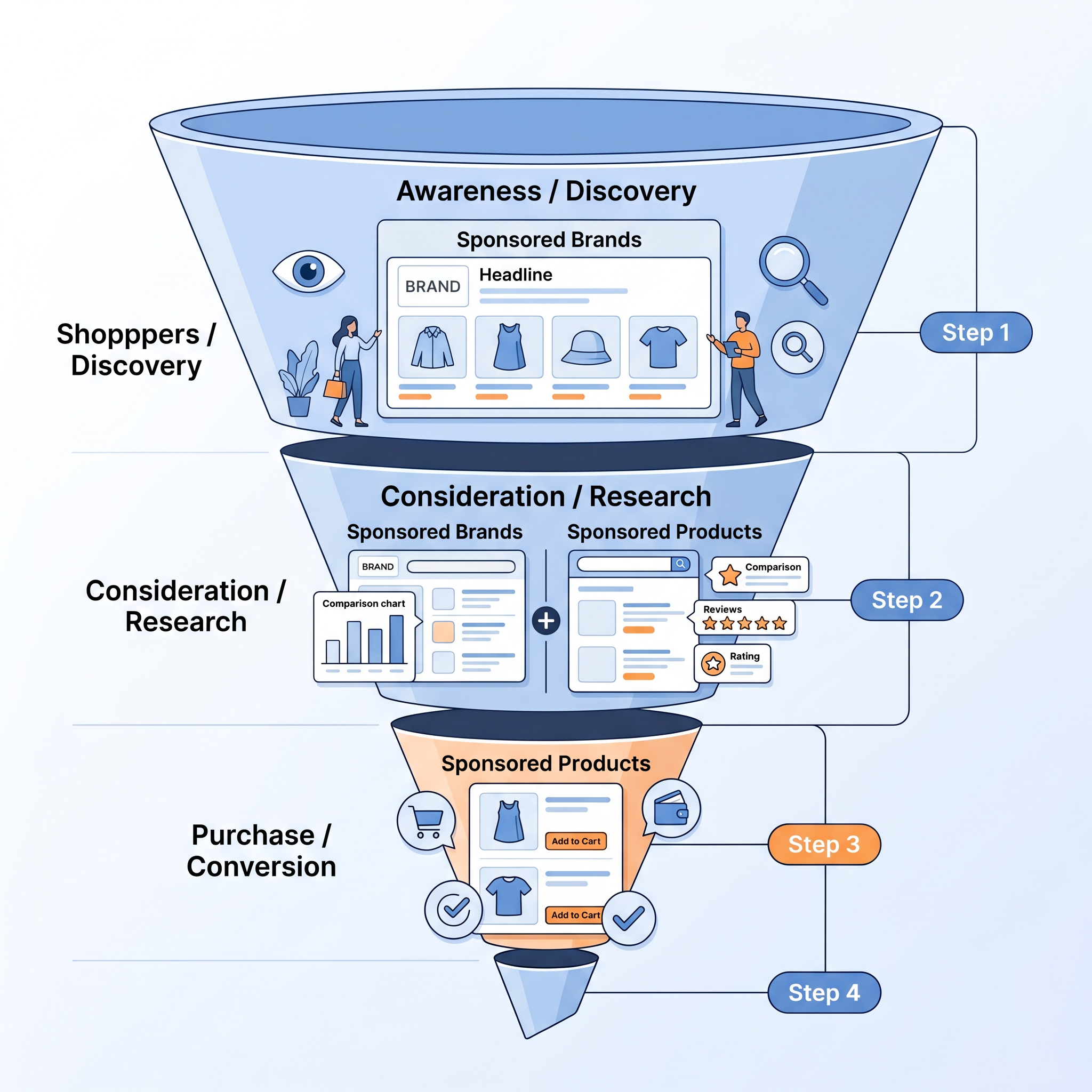
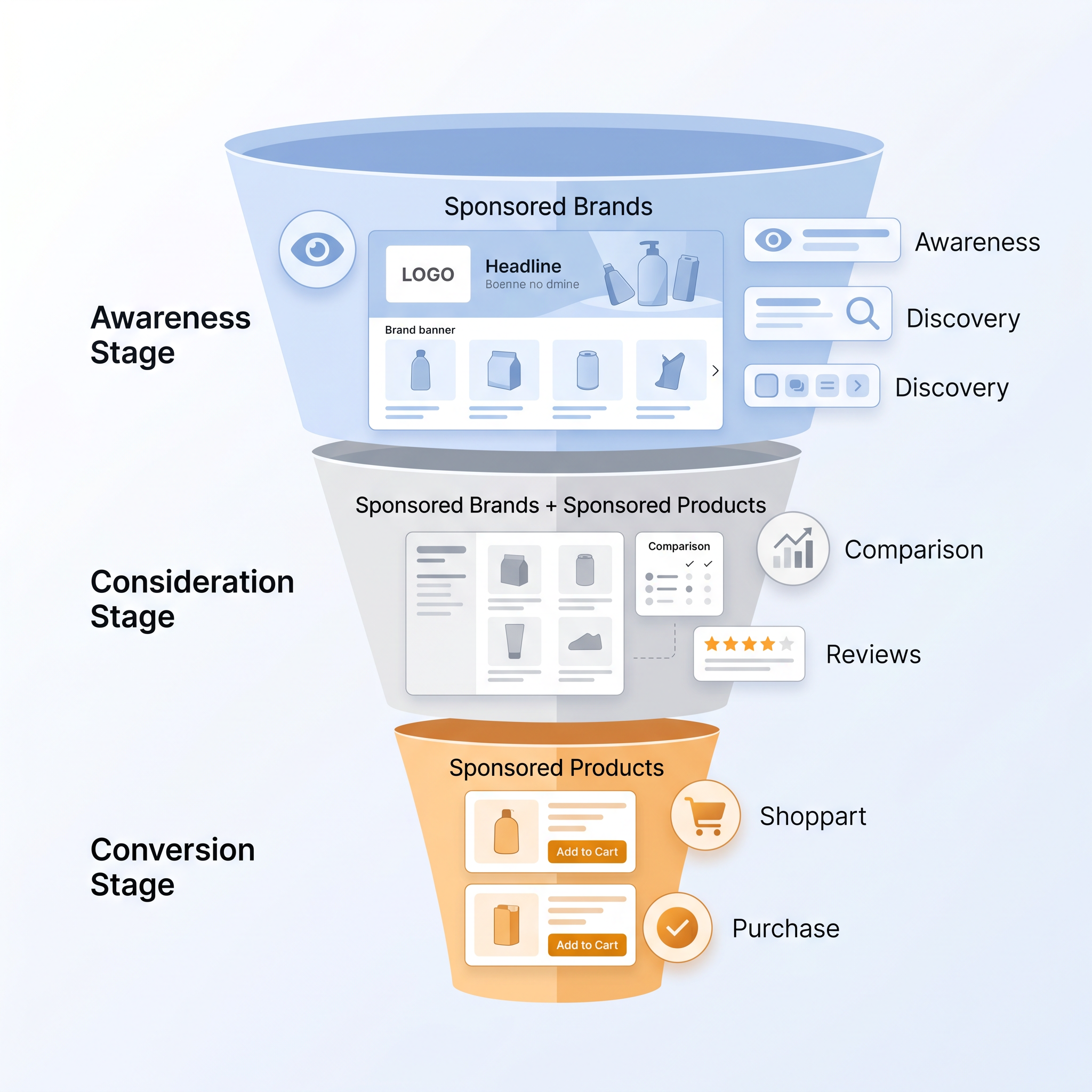
Identify key stages: awareness, consideration, and decision. Use Sponsored Brands for awareness (top of funnel), both for consideration (middle), and Sponsored Products for decision (bottom).
Step 2: Align Keywords with Campaign Types
Broad, category-level keywords (e.g., "coffee maker") → Sponsored Brands. Specific, product-intent keywords (e.g., "Keurig K-Classic coffee maker") → Sponsored Products.
Step 3: Use Data from One to Optimize the Other
Search term reports from Sponsored Products can reveal new keyword opportunities for Sponsored Brands. Conversely, high-impression keywords in Sponsored Brands can be tested in Sponsored Products for conversion potential.
Step 4: Monitor and Adjust Budgets Monthly
Review performance metrics: CTR, CPC, ACOS, and organic sales impact. Shift budget toward the ad type delivering the best ROI for your current goals.
For a comprehensive guide on building a full Amazon PPC strategy, see our Amazon PPC Optimization Guide.
FAQ
What are the key differences between Amazon Sponsored Brands and Sponsored Products?
The key differences lie in format, placement, and purpose. Sponsored Brands feature your logo, a custom headline, and up to three products, appearing at the top of search results to build brand awareness. Sponsored Products promote individual items and appear in search results and on product pages, focusing on driving direct sales. Sponsored Brands are better for top-of-funnel marketing, while Sponsored Products excel at converting high-intent shoppers.
When should I use Sponsored Brands instead of Sponsored Products for my Amazon business?
Use Sponsored Brands when launching a new brand or product line, targeting broad keywords, running promotions, or aiming to increase brand visibility. They’re ideal for top-of-funnel marketing. Use Sponsored Products when your goal is to drive immediate sales, target long-tail keywords, or retarget shoppers on product pages. They’re best for bottom-of-funnel conversion.
How do Sponsored Brands and Sponsored Products impact my Amazon sales and visibility differently?
Sponsored Products directly impact sales by targeting shoppers with high purchase intent, leading to higher conversion rates and immediate ROI. Sponsored Brands improve overall visibility, increase brand searches, and boost organic sales over time by building recognition. While Sponsored Products drive short-term revenue, Sponsored Brands contribute to long-term brand equity and market share.
Can I run both Sponsored Brands and Sponsored Products at the same time?
Yes, and you should. Running both ad types simultaneously allows you to cover multiple stages of the customer journey. Sponsored Brands capture early interest, while Sponsored Products convert ready-to-buy shoppers. Together, they create a powerful, full-funnel advertising strategy that maximizes visibility and sales.
Which ad type has a lower ACOS?
Sponsored Products typically have a lower ACOS because they target shoppers with clear purchase intent and convert more efficiently. Sponsored Brands may have a higher ACOS initially due to broader targeting, but they contribute to long-term organic growth and brand loyalty, which can reduce overall advertising dependency over time.
Next Steps
- Review your current Amazon PPC campaigns and identify whether you’re underutilizing Sponsored Brands or over-relying on Sponsored Products.
- Use SellerSprite’s free tools to analyze your keyword performance and optimize both ad types.
- Start a 30-day test: Allocate 20% of your budget to Sponsored Brands if you haven’t already, and measure changes in brand searches and organic sales.
References
- Amazon Advertising Help – Sponsored Brands Overview View
- SellerSprite: Sponsored Brand Ads with SellerSprite View
- SellerSprite: Sponsored Products Ads Intro – First Auto Campaign View
- SellerSprite: Sponsored Display vs Sponsored Products View
- Amazon PPC Optimization Strategies, Tools, and Setup Guide View
By SellerSprite Success Team
The SellerSprite Success Team consists of Amazon advertising experts, data analysts, and e-commerce strategists with over 50 combined years of experience helping sellers optimize their PPC campaigns. We’ve managed over $50M in ad spend across thousands of ASINs, delivering measurable ROI through data-driven optimization. Our insights are based on real-world performance, platform updates, and proprietary AI-powered tools designed to simplify Amazon selling.


