TL;DR: AI customer service is not about letting a bot answer everything — it is about turning the twenty messages you retype every week into tested templates that draft in seconds, route to the right person, and stay inside Amazon's messaging rules. This guide gives you 12 copy-ready buyer message templates, a 7-step automation checklist, the US compliance guardrails, and the six metrics that prove the system is actually paying for itself.
Key Takeaways
- Build templates by intent, not by channel. A shipping-delay script should look the same whether the buyer wrote through Buyer-Seller Messaging, your helpdesk, or your brand site.
- Auto-send only five low-risk intents (order status, tracking, how-to questions, return instructions, and reassurance after a delay). Refunds, A-to-z claims, safety issues, health claims, and anything emotional go to a human.
- Amazon's buyer-seller messaging guidance asks for a reply within about 24 hours. AI drafts that cover most of the final wording keep you inside that window on weekends and holidays — but a human still approves the risky ones.
- Every solid template has four blocks: acknowledge, explain, act, and exit. Cut anything else; most buyers read on a phone.
- Compliance is not optional. Keep promotional content out of order-related messages, avoid external links and emojis in Amazon messages, and never promise a review change in exchange for a refund or gift.
- Measure six numbers: first-response time, resolution time, containment rate, reopen rate, CSAT, and refund/discount rate. If containment rises but reopens rise with it, the bot is closing tickets, not solving them.
Table of Contents
- Why AI Customer Service Is a Margin Lever, Not a Cost Center
- The 4-Block Anatomy of a Buyer Message Template That Actually Resolves Issues
- 12 Copy-Ready AI Customer Service Templates for US Buyers
- The 7-Step Automation Checklist: From Inbox to Intent Library
- Guardrails: Amazon Policy, FTC Rules, and Buyer Privacy
- The 6-Metric Scorecard That Proves ROI
- 7 Mistakes That Make AI Replies Sound Like a Robot
- Conclusion: Your 14-Day Rollout Plan
- FAQ
- References
Note on marketplaces: This guide is specifically optimized for the US market — Amazon.com buyer expectations, US English phrasing, and FTC/CAN-SPAM-style disclosure habits. If you also sell in the EU or UK, adjust tone, response promises, and data handling to local consumer law before reusing these scripts.
Why AI Customer Service Is a Margin Lever, Not a Cost Center
Most Amazon sellers do not lose money because they answer messages badly. They lose money because the same eight questions arrive every day, get answered from scratch at 11 p.m., and get answered slightly differently each time — which is exactly how a polite reply turns into a refund, a one-star review, or an A-to-z claim. AI customer service fixes that by turning your best-ever answer into the default answer, then letting a human step in only where judgment is genuinely required.
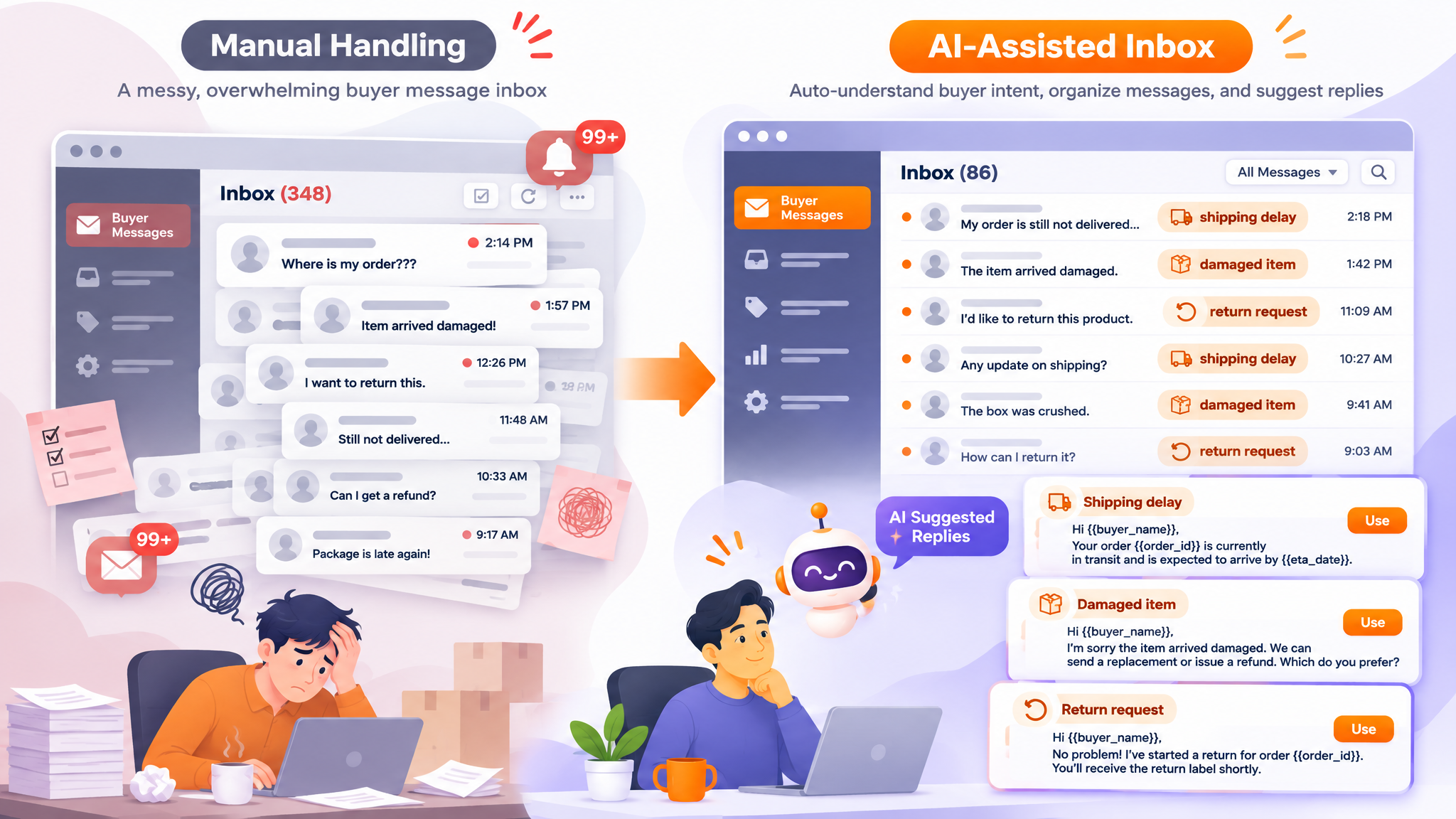
There are three jobs AI does better than a tired human at the end of a long day. First, classification: it reads a message and tags the intent — pre-purchase question, WISMO (where is my order), damage claim, return request — in under a second. Second, drafting: it assembles the right template, fills in the order details, and produces something 85–95% finished. Third, summarization: it rolls a month of messages into a theme list you can hand to product development, which is often worth more than the labor savings.
The margin math is simple even without hard benchmarks. Every message you answer manually costs minutes of a trained person's time; every message you answer badly costs a return, a refund, or a review that suppresses click-through for months. Templates reduce both. If you are still deciding where automation fits across your whole operation, start with our AI for Amazon FBA guide and then come back here for the customer-service layer.
The 4-Block Anatomy of a Buyer Message Template That Actually Resolves Issues
Before you write a single script, lock the skeleton. Every template in this guide follows the same four blocks, in this order, and nothing else:
- Acknowledge. One sentence that names the problem in the buyer's own words. This is the line that lowers the temperature: “I'm sorry your blender arrived with a cracked jar.”
- Explain. One or two sentences of plain-English cause or context. No internal jargon, no blaming the carrier, no policy lecture.
- Act. Exactly one clear next step — yours, theirs, or both. If the buyer must do something, make it a single action with a time window.
- Exit. A closing line that tells them what happens if the action does not work: “If it hasn't scanned by Friday, reply here and I'll reship it.”
Four style rules apply to all of them. Keep the body under roughly 120 words and target an eighth-grade reading level. Use the buyer's first name once, not three times. Ban filler phrases like “as per our policy” and “kindly be advised.” And end with one call to action — templates that offer three options get three times as many follow-up emails.
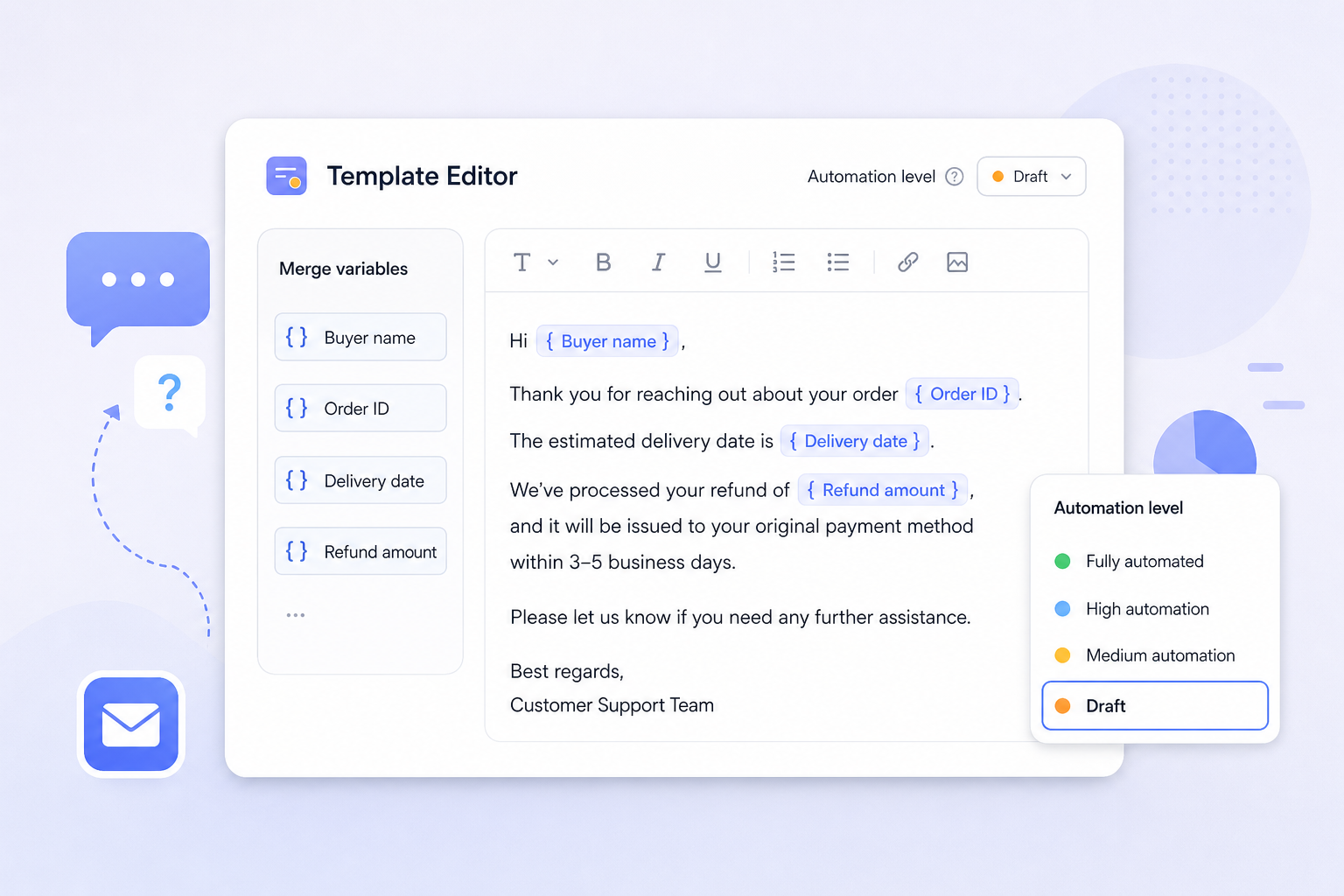
One more structure tip: store every template with an automation level attached. Auto-send means the AI can release it without review. Draft means a human approves the wording before it goes out. Human-only means the AI can summarize and suggest, but a person must write the reply. Deciding this once, in advance, is what keeps you out of trouble when volume spikes.
12 Copy-Ready AI Customer Service Templates for US Buyers
These templates are written for US Amazon buyers: direct, warm, and specific. Replace every {variable} before use, and adapt the voice to your brand. Each card lists the recommended automation level.
Bucket A — Pre-purchase and order confirmation
Template 1 — Pre-purchase product question (Auto-send once your answer bank covers 90% of questions)
“Hi {First Name}, thanks for asking about {Product}. Short answer: yes — {one-sentence answer}. It fits what you described because {reason one} and {reason two}. One thing worth knowing before you buy: {limitation}. If you want me to double-check, reply with {specific detail, e.g., your device model} and I'll confirm today. — {Agent Name}, {Brand} Customer Care”
Variables: {First Name}, {Product}, {answer}, {reason one}, {reason two}, {limitation}, {specific detail}. Never guess on safety, compatibility, or warranty — escalate instead.
Template 2 — Fit and compatibility check (Draft, then auto-send after 30 clean approvals)
“Hi {First Name}, good question. {Product} works with {device/model} from {year} onward. If your model number starts with {X}, you're covered. If it starts with {Y}, you'll also need {accessory}. You can find the model number on {location, e.g., the back panel}. Want me to confirm for you? Send a photo of the label and I'll reply within one business day.”
Compatibility is the top driver of both pre-sale confidence and post-sale returns. Keep a compatibility table in the prompt context so the AI never improvises specs.
Template 3 — Order confirmation plus tracking (Auto-send)
“Hi {First Name}, your order {Order ID} is confirmed and ships {ship date}. Estimated delivery is {date range}. I'll send tracking the moment the carrier scans it. If anything needs to change — address, timing, a gift note — reply here in the next {X} hours and I'll catch it before it leaves the warehouse.”
This one message prevents more WISMO tickets than any other template. Trigger it from the order event, not from a manual queue.
Bucket B — In transit and delivery problems
Template 4 — “Where is my order?” (Auto-send with live tracking inserted)
“Hi {First Name}, thanks for checking in. Your package left our warehouse on {date} and the carrier last scanned it in {city} on {date}. Current estimate: {date}. Tracking: {tracking ID}. If it hasn't moved by {date plus two business days}, reply to this message and I'll open a carrier trace and either reship or refund — your choice.”
Always state the next checkpoint date. Buyers tolerate delay; they do not tolerate silence.
Template 5 — Proactive delay notice (Draft, then auto-send once triggers are reliable)
“Hi {First Name}, I have an update on order {Order ID} and it isn't the news I wanted to send. {Reason, e.g., the carrier missed a sort scan in {city}}. Your new estimated delivery is {date}. Nothing is needed from you right now. If that date doesn't work, reply 'CANCEL' and I'll refund you in full today. If you can wait, I'll add {goodwill, e.g., a 10% credit} to your account.”
Proactive delay messages cut “where is it” volume sharply and are far cheaper than the refund you would otherwise issue. Keep the goodwill offer within your margin policy.
Template 6 — Lost in transit (Draft, human approves the refund or reship)
“Hi {First Name}, I'm sorry — order {Order ID} hasn't scanned in {X} days, so I've opened a trace with {carrier}. Here's what happens next: (1) I'll have an answer within two business days. (2) If the carrier can't locate it, I'll reship {product} at no cost — you don't need to do anything. (3) If you'd rather not wait, say the word and I'll refund you today.”
Giving the buyer a choice between reship and refund reduces chargebacks and A-to-z claims. The system can draft it; a person should confirm the money movement.
Bucket C — Post-delivery, returns, and refunds
Template 7 — Damaged on arrival (Draft; auto-send only if your replacement budget is pre-approved)
“Hi {First Name}, I'm sorry your {product} arrived damaged. No return needed — please send one photo of the item and one of the shipping box, and I'll ship a replacement within one business day. If you'd prefer a refund instead, just say so and I'll process it right away. Either way, please dispose of the damaged unit safely — don't send it back.”
Waiving the return is usually cheaper than the return shipping plus the negative review. Cap it with a dollar threshold in your guardrails.
Template 8 — Missing part or wrong item (Auto-send for missing parts; Draft for wrong item)
“Hi {First Name}, sorry about that — you should have received {part or item} and I want to fix it fast. Could you confirm two things for me: (1) the item number on the packing slip, and (2) a quick photo of what arrived? With those, I'll send the missing piece by {shipping method} at no charge, usually within one business day. No need to return anything.”
Asking for exactly two items keeps the reply rate high. More than two requests and buyers go quiet.
Template 9 — Return and refund instructions (Auto-send for the steps; Draft for the refund amount)
“Hi {First Name}, happy to help with a return for order {Order ID}. Start here: {return steps through the marketplace returns flow}. Once the carrier scans the package, your refund of {amount} goes back to your original payment method, typically within three to five business days. If the item arrived damaged or defective, skip the return — reply 'DEFECTIVE' and I'll refund you without a shipment.”
Short, numbered steps beat paragraphs. Never quote a refund timeline your payment processor cannot meet.
Bucket D — Reputation, reviews, and repeat purchase
Template 10 — Negative review or feedback follow-up (Human-only wording, AI-drafted summary)
“Hi {First Name}, I read your feedback about {issue} and I'd like to make it right. Here's what I can do: {resolution — replacement, refund, or missing part}. If that works for you, reply and I'll start it today. I'm not asking you to change anything you've written — I just want you to get what you paid for.”
Critical compliance note: never offer money, gifts, or discounts in exchange for editing or removing a review. Resolve the order problem on its own merits, in an order-related message.
Template 11 — Policy-safe review request (Human-only send, or use the marketplace's own review-request button)
“Hi {First Name}, your {product} was delivered {X} days ago — I hope it's working the way you expected. If you have a minute, honest feedback helps other shoppers decide and helps us fix what isn't working. If something's off, reply here first and I'll sort it out. — {Brand} Customer Care”
Ask for honest feedback, not for a rating. Skip incentives, skip external links, and skip language that only invites happy customers.
Template 12 — Replenishment and repeat-purchase nudge (Draft; send only through channels where proactive contact is permitted)
“Hi {First Name}, you ordered {product} about {X} weeks ago, so you may be getting close to running out. You can reorder from Your Orders whenever you're ready. If you'd like a different size or a bundle, reply and I'll point you to the right listing. If you're stocking up for a team or household, {multipack or subscription option} usually costs less per unit.”
Keep this order-adjacent, not promotional. Before automating it, confirm which proactive messages your marketplace currently permits — the rules change, and the safest version is a reply-only script triggered by a buyer question.
Twelve templates will not cover everything, but they typically cover the large majority of a US Amazon inbox by volume. If you want to see how message themes connect to lifetime value, the deeper mechanics are in our guide to Amazon seller customer care.
The 7-Step Automation Checklist: From Inbox to Intent Library
Treat this as a build checklist. Do the steps in order; skipping step two is the reason most sellers end up with a chatbot that answers questions nobody asked.
- Audit 30 days of real messages. Export or copy every buyer message and manually tag each one with a single intent label. Aim for 10–15 labels, no more. You are looking for patterns, not perfection.
- Rank intents by volume times risk. A high-volume, low-risk intent (tracking status) is your first automation. A medium-volume, high-risk intent (safety complaint) should never auto-send, no matter how good the draft looks.
- Write a one-page brand voice sheet. Five rules, a reading level, a list of banned phrases, and two example replies you consider perfect. Feed this sheet into every prompt so drafts sound like one company instead of five contractors.
- Build the library with the four-block skeleton. Acknowledge, explain, act, exit. Add merge variables and a fallback line for missing data (“I don't have the tracking scan yet — I'll send it as soon as it appears”).
- Set a confidence gate before you turn anything on. Example policy: auto-send above 90% intent confidence and below a dollar threshold; draft between 60% and 90%; route to a human below 60% or whenever flagged words appear (refund, lawyer, allergic, injury, A-to-z, chargeback).
- Wire the triggers. Order events fire confirmation and delay messages; inbound messages fire classification and drafting; review events fire the reputation workflow. Keep order-related conversations inside the marketplace's own messaging system unless the buyer contacts you elsewhere first.
- Run a weekly QA loop. Sample 20 AI-assisted replies, score each on accuracy, tone, completeness, compliance, and resolution, and update the worst-performing template. Do this every week for a month, then monthly.
Minimum viable intent library: WISMO, delay, damaged, missing part, return, product question, compatibility, review follow-up, invoice or documentation request, and “other.” That is enough to cover most days. Add intents only when a new pattern shows up at least five times in a week.
Guardrails: Amazon Policy, FTC Rules, and Buyer Privacy
Automation amplifies whatever you program into it, including mistakes. These are the guardrails to hard-code before any template goes live in the US market.
- Messaging-channel rules. Marketplace buyer-seller messaging is for order-related communication. Promotional content, external links, attachments, emojis, and review incentives are generally restricted or prohibited, and the exact wording of the policy changes — re-read it in Seller Central before you deploy, and keep a screenshot of the version you built against.
- Never trade value for reviews. Offering a refund, gift card, or discount in exchange for a review edit violates both marketplace policy and US FTC endorsement guidance. Resolve the issue; let the review follow.
- Disclose if asked. If a buyer asks whether they are talking to a bot, say yes. A one-line disclosure (“This first reply was drafted automatically; a team member is reviewing it”) costs nothing and prevents most escalation complaints.
- Keep buyer data inside approved tools. Do not paste order details, addresses, or message threads into consumer AI tools that lack a data-processing agreement. Under US state privacy laws such as the CCPA/CPRA, buyers can request access or deletion — your helpdesk and AI layer need to support that.
- Hard-code escalation triggers. Injury, allergy, electrical hazard, legal threats, chargebacks, A-to-z claims, press inquiries, and anything with two or more exclamation points go to a human immediately.
- Keep an audit trail. Log the prompt version, the template version, the draft, and the final human edit. When a dispute arrives six weeks later, that log is your defense.
- For email, follow CAN-SPAM basics. Accurate headers, a physical address, a working opt-out, and the opt-out honored promptly. Template automation makes it easy to forget the footer — automate the footer instead.
The 6-Metric Scorecard That Proves ROI
Vanity metrics hide broken automation. Track these six and review them weekly for the first two months.
| Metric | What it tells you | Watch for |
|---|---|---|
| First-response time | Whether you meet the expected 24-hour reply window, including weekends | Good averages hiding bad tail days |
| Resolution time | How long the buyer waits for an actual fix | Fast first reply, slow outcome |
| Containment rate | Share of conversations closed without human handling | Containment rising while CSAT falls |
| Reopen rate | Buyers coming back with the same problem | The clearest sign a template is too vague |
| CSAT or short survey score | Tone and helpfulness as the buyer experienced it | Survey fatigue and low response volume |
| Refund and concession rate | The real cost of your messaging, in dollars | Agents buying goodwill too quickly |
How to read the combination: if containment goes up and reopen rate stays flat, the automation is genuinely resolving issues. If containment goes up and reopens go up with it, the AI is closing tickets by sounding confident rather than by solving anything — pull the affected template back to draft-only for two weeks and rewrite it. If first-response time improves but refund rate climbs, you have taught buyers that complaining faster gets money faster.
Build a simple weekly sheet: volume by intent, containment by intent, reopens by intent, dollars refunded by intent. That single sheet tells you which template to fix next and which product to fix in the factory.
7 Mistakes That Make AI Replies Sound Like a Robot
- Over-apologizing. Three “we sincerely apologize” lines read as panic. One specific apology beats three generic ones.
- Repeating the buyer's message back at them. Summarizing is useful for the agent, annoying for the buyer.
- Policy dumps. Nobody needs the full returns policy inside a damaged-item reply. Link or state the one relevant rule.
- Multiple calls to action. “You can reply, call us, or use the portal” guarantees more back-and-forth, not less.
- Fake empathy without action. “I completely understand how frustrating this must be” without a fix is worse than a short, useful sentence.
- Unverified specifics. AI will happily invent a delivery date or a refund amount. Every number in a template must come from a data field, never from the model's imagination.
- No exit line. Templates that end without telling the buyer what happens next generate follow-ups within hours.
Conclusion: Your 14-Day Rollout Plan
You do not need a new platform to start. You need a small, tested library and a decision about what a machine is allowed to send. Use this sequence: on days 1–2, tag 30 days of messages into 10–15 intents. On days 3–5, write the brand voice sheet and the top five templates using the four-block skeleton. On days 6–8, run those five as drafts only and measure how often the human edits them. On days 9–11, promote the two safest intents to auto-send. On days 12–14, build the six-metric sheet and set a weekly 20-reply QA review.
By the end of two weeks you will know three things most sellers never learn: which buyer messages actually cost you money, which answers work, and which intents should never be automated. That knowledge compounds — every template you refine raises the floor on a process you will run every day for as long as you sell.
FAQ
How can AI automate buyer messages in customer service?
It automates four connected steps. First, an AI layer reads the incoming buyer message and assigns an intent — order status, damage, return, product question. Second, it pulls the matching template plus live order data (delivery date, tracking number, refund amount) and drafts a reply with the variables filled in. Third, a rules layer decides whether to auto-send, hold for human approval, or escalate based on intent risk and confidence. Fourth, everything is logged and summarized so you can see which intents are rising. The practical version: start with the one intent you answer most often, build a single template, run it as draft-only for a week, then promote it to auto-send once your team is approving the wording without changes.
What are the best AI customer service message templates for US businesses?
The highest-value set for US buyers is the one that matches the highest-volume intents, and for most Amazon sellers that means: order confirmation with tracking, “where is my order,” proactive shipping delay, lost in transit, damaged on arrival, missing part or wrong item, return and refund instructions, pre-purchase product question, fit and compatibility check, negative review follow-up, a policy-safe review request, and a replenishment nudge. The best templates all share the same four-block structure — acknowledge, explain, act, exit — stay under roughly 120 words, use one call to action, and never promise a number the system cannot verify. Localize spelling and tone for US English, and keep requests direct: American buyers respond better to “reply here and I'll fix it today” than to formal, deferential phrasing.
Can AI customer service templates improve response times for online buyers?
Yes, and the gain usually comes from two places rather than from typing speed. The first is instant drafting: an agent who would spend five minutes composing a delay apology spends thirty seconds reviewing a finished one, which matters most during weekend and holiday spikes. The second is triage: messages that need no human at all — tracking checks, return instructions, compatibility confirmations — leave the queue immediately, so the human queue becomes shorter and more complex rather than longer and mixed. The caveat is that speed without accuracy backfires. If you push response time down while your reopen rate climbs, you are closing conversations that were not actually resolved, and the buyer simply writes again — or leaves a review instead.
Is it safe to let AI auto-send buyer messages on Amazon?
It is safe only for low-risk, fact-based intents where every number comes from a data field — tracking status, delivery dates, return instructions, and how-to answers. It is not safe for refunds, replacements, A-to-z claims, safety or health complaints, or anything containing a legal threat. Before enabling auto-send, confirm three things: the template contains no promotional content or external links, the message stays order-related, and your vendor is not sending messages outside the marketplace's approved messaging channel. Amazon's buyer-seller messaging policy and enforcement details change over time, so verify the current rules in Seller Central and keep a record of the policy version you built against.
How many templates do I need before automating?
Five is enough to launch, and ten to fifteen is enough to cover most of a typical Amazon inbox. The mistake is writing fifty templates before testing five. Tag 30 days of messages into intents, pick the top five by volume weighted against risk, and build those first. Then measure for two weeks. You will usually discover that two of your five templates handle the majority of contacts and the rest are edge cases that a human should keep. Expand the library only when a new pattern appears at least five times in a single week.
Next Steps
- Export 30 days of buyer messages today and tag them into 10–15 intents — this is the only step that cannot be outsourced to AI.
- Write your brand voice sheet and build the top five templates using the acknowledge–explain–act–exit structure.
- Run those five as draft-only for one week and log every human edit; the edits are your real requirements document.
- Promote the two safest intents to auto-send and set your confidence gate, dollar threshold, and escalation keywords.
- Connect message themes to product and keyword decisions inside SellerSprite, so the questions buyers ask this month shape what you launch next quarter.
References
- Amazon Seller Central — Buyer-Seller Messages help hub (messaging policy, permitted content, response expectations). View
- U.S. Federal Trade Commission — CAN-SPAM Act: A Compliance Guide for Business. View
- U.S. Federal Trade Commission — Endorsement Guides: What People Are Asking (reviews, incentives, and disclosures). View
- California Attorney General — California Consumer Privacy Act (CCPA/CPRA) compliance resources. View
- National Institute of Standards and Technology — AI Risk Management Framework. View
Editor's note: marketplace messaging policies, response expectations, and consumer-protection rules are updated periodically. Verify current requirements in Seller Central and with qualified legal counsel before deploying automated replies. The figures used in examples are illustrative, not published benchmarks.
By SellerSprite Content Expert
Amazon seller tools and marketplace SEO specialist.
Editorial process: AI-assisted draft prepared for human fact-checking, source verification, and brand review before publication.